
单域MPLS 虚拟私有网络的整个详解配置过程(可跟做)
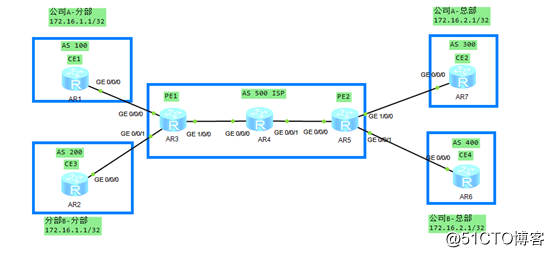
1.PE1和P和PE2之间跑IGP协议
运营商里面首选的还是ISIS协议
我们实验的话,用的是OSPF协议
R3的IP地址和OSPF配置
[R3]display ip int brief

*down: administratively down

^down: standby

(l): loopback

(s): spoofing

The number of interface that is UP in Physical is 5

The number of interface that is DOWN in Physical is 1

The number of interface that is UP in Protocol is 5

The number of interface that is DOWN in Protocol is 1

Interface                         IP Address/Mask      Physical   Protocol

GigabitEthernet0/0/0              13.1.1.3/24          up         up

GigabitEthernet0/0/1              23.1.1.3/24          up         up

GigabitEthernet1/0/0              34.1.1.3/24          up         up

GigabitEthernet2/0/0              unassigned           down       down

LoopBack0                         3.3.3.3/32           up         up(s)

NULL0                             unassigned           up         up(s)

[R3]dis current-configuration configuration ospf

[V200R003C00]

#

ospf 1 router-id 3.3.3.3

 area 0.0.0.0

  network 3.3.3.3 0.0.0.0

  network 34.1.1.0 0.0.0.255

#

return

[R3]
R4的IP地址和OSPF配置
[R4]display ip int brief

*down: administratively down

^down: standby

(l): loopback

(s): spoofing

The number of interface that is UP in Physical is 4

The number of interface that is DOWN in Physical is 0

The number of interface that is UP in Protocol is 4

The number of interface that is DOWN in Protocol is 0

Interface                         IP Address/Mask      Physical   Protocol

GigabitEthernet0/0/0              34.1.1.4/24          up         up

GigabitEthernet0/0/1              45.1.1.4/24          up         up

LoopBack0                         4.4.4.4/32           up         up(s)

NULL0                             unassigned           up         up(s)

[R4]display current-configuration configuration ospf

[V200R003C00]

#

ospf 1 router-id 4.4.4.4

 area 0.0.0.0

  network 4.4.4.4 0.0.0.0

  network 34.1.1.0 0.0.0.255

  network 45.1.1.0 0.0.0.255

#

return
R5的IP地址和OSPF的配置
<R5>display ip int brief

*down: administratively down

^down: standby

(l): loopback

(s): spoofing

The number of interface that is UP in Physical is 5

The number of interface that is DOWN in Physical is 0

The number of interface that is UP in Protocol is 5

The number of interface that is DOWN in Protocol is 0

Interface                         IP Address/Mask      Physical   Protocol

GigabitEthernet0/0/0              45.1.1.5/24          up         up

GigabitEthernet0/0/1              56.1.1.5/24          up         up

GigabitEthernet1/0/0              57.1.1.5/24          up         up

LoopBack0                         5.5.5.5/32           up         up(s)

NULL0                             unassigned           up         up(s)

<R5>display current-configuration configuration ospf

[V200R003C00]

#

ospf 1 router-id 5.5.5.5

 area 0.0.0.0

  network 5.5.5.5 0.0.0.0

  network 45.1.1.0 0.0.0.255

#

return
2.检查结果
在R4上面检查我们的结果
[R4]display ospf peer brief

         OSPF Process 1 with Router ID 4.4.4.4

                  Peer Statistic Information

 ----------------------------------------------------------------------------

 Area Id          Interface                        Neighbor id      State

 0.0.0.0          GigabitEthernet0/0/0             3.3.3.3          Full

 0.0.0.0          GigabitEthernet0/0/1             5.5.5.5          Full

 ----------------------------------------------------------------------------
在R4上面检查是否通过OSPF学习到R3和R5network发布的路由
[R4]display ip routing-table protocol ospf

Route Flags: R - relay, D - download to fib

------------------------------------------------------------------------------

Public routing table : OSPF

         Destinations : 2        Routes : 2

OSPF routing table status : <Active>

         Destinations : 2        Routes : 2

Destination/Mask    Proto   Pre  Cost      Flags NextHop         Interface

        3.3.3.3/32  OSPF    10   1           D   34.1.1.3        GigabitEthernet0/0/0

        5.5.5.5/32  OSPF    10   1           D   45.1.1.5        GigabitEthernet0/0/1

OSPF routing table status : <Inactive>

         Destinations : 0        Routes : 0
3.PE1和P和PE2之间跑MPLS协议和MPLS LDP协议
原因就是解决BGP跨设备路由黑洞问题
R3的MPLS和MPLS LDP的配置
全局下的配置
#

mpls lsr-id 3.3.3.3

mpls

mpls ldp

#

接口下的配置

#

interface GigabitEthernet1/0/0

 mpls

 mpls ldp

#
R4的MPLS和MPLS LDP的配置
全局下的配置
#

mpls lsr-id 4.4.4.4

mpls

mpls ldp

#

接口下的配置

#

interface GigabitEthernet0/0/0

 mpls

 mpls ldp

#

interface GigabitEthernet0/0/1

 mpls

 mpls ldp

#
R5的MPLS和MPLS LDP的配置
全局下的配置
#

mpls lsr-id 5.5.5.5

mpls

mpls ldp

#

接口下的配置

#

interface GigabitEthernet0/0/0

 mpls

 mpls ldp

#
4.检查MPLS LDP关系
在R4上面查看于R3和R5之间的LDP关系
[R4]display mpls ldp session all

 LDP Session(s) in Public Network

 Codes: LAM(Label Advertisement Mode), SsnAge Unit(DDDD:HH:MM)

 A '*' before a session means the session is being deleted.

 ------------------------------------------------------------------------------

 PeerID             Status      LAM  SsnRole  SsnAge      KASent/Rcv

 ------------------------------------------------------------------------------

 3.3.3.3:0          Operational DU   Active   0000:00:36  148/148

 5.5.5.5:0          Operational DU   Passive  0000:00:36  147/147

 ------------------------------------------------------------------------------

 TOTAL: 2 session(s) Found.
在R5上面分别查看是否对3.3.3.3/32分发标签
<R5>display mpls lsp include 3.3.3.3 32

-------------------------------------------------------------------------------

                 LSP Information: LDP LSP

-------------------------------------------------------------------------------

FEC                In/Out Label  In/Out IF                      Vrf Name

3.3.3.3/32         NULL/1024     -/GE0/0/0

3.3.3.3/32         1024/1024     -/GE0/0/0

<R4>display mpls lsp include 3.3.3.3 32

-------------------------------------------------------------------------------

                 LSP Information: LDP LSP

-------------------------------------------------------------------------------

FEC                In/Out Label  In/Out IF                      Vrf Name

3.3.3.3/32         NULL/3        -/GE0/0/0

3.3.3.3/32         1024/3        -/GE0/0/0

<R3>display mpls lsp include 3.3.3.3 32

-------------------------------------------------------------------------------

                 LSP Information: LDP LSP

-------------------------------------------------------------------------------

FEC                In/Out Label  In/Out IF                      Vrf Name

3.3.3.3/32         3/NULL        -/-
在R3上面分别查看是否对5.5.5.5/32分发标签
<R3>display mpls lsp include 5.5.5.5 32

-------------------------------------------------------------------------------

                 LSP Information: LDP LSP

-------------------------------------------------------------------------------

FEC                In/Out Label  In/Out IF                      Vrf Name

5.5.5.5/32         NULL/1025     -/GE1/0/0

5.5.5.5/32         1025/1025     -/GE1/0/0

<R4>display mpls lsp include 5.5.5.5 32

-------------------------------------------------------------------------------

                 LSP Information: LDP LSP

-------------------------------------------------------------------------------

FEC                In/Out Label  In/Out IF                      Vrf Name

5.5.5.5/32         NULL/3        -/GE0/0/1

5.5.5.5/32         1025/3        -/GE0/0/1

<R5>display mpls lsp include 5.5.5.5 32

-------------------------------------------------------------------------------

                 LSP Information: LDP LSP

-------------------------------------------------------------------------------

FEC                In/Out Label  In/Out IF                      Vrf Name

5.5.5.5/32         3/NULL        -/-
5.在PE1和PE2上面分别配置VRF和RD和RT
在PE1和PE2上面分别对A公司的分部和总部进行定义VRF
PE1上面定义A公司分部
#

ip ***-instance ***13

 ipv4-family

  route-distinguisher 1:3

  ***-target 100:300 export-extcommunity

  ***-target 100:300 import-extcommunity

#
PE2上面定义A公司总部
#

ip ***-instance ***75

 ipv4-family

  route-distinguisher 7:5

  ***-target 100:300 export-extcommunity

  ***-target 100:300 import-extcommunity

#
在PE1和PE2上面分别对A公司的分部和总部进行定义VRF调用
PE1上面定义A公司分部VRF的调用
#

interface GigabitEthernet0/0/0

 ip binding ***-instance ***13

 ip address 13.1.1.3 255.255.255.0

#

注意:调用VRF的时候,该接口下的配置就会消失

 #

interface GigabitEthernet0/0/0

 ip address 13.1.1.3 255.255.255.0

#

[R3-GigabitEthernet0/0/0]ip binding ***-instance ***13

Nov  2 2019 14:59:50-08:00 R3 %%01IFNET/4/LINK_STATE(l)[3]:The line protocol IP on the interface GigabitEthernet0/0/0 has entered the DOWN state.

Info: All IPv4 related configurations on this interface are removed!

Info: All IPv6 related configurations on this interface are removed!

[R3-GigabitEthernet0/0/0]dis this

[V200R003C00]

#

interface GigabitEthernet0/0/0

 ip binding ***-instance ***13

#

[R3-GigabitEthernet0/0/0]ip address  13.1.1.3 24

Nov  2 2019 15:00:02-08:00 R3 %%01IFNET/4/LINK_STATE(l)[4]:The line protocol IP on the interface GigabitEthernet0/0/0 has entered the UP state.

[R3-GigabitEthernet0/0/0]
怎么样查看VRF的路由呢?
[R3]display ip routing-table ***-instance ***13

Route Flags: R - relay, D - download to fib

------------------------------------------------------------------------------

Routing Tables: ***13

         Destinations : 6        Routes : 6

Destination/Mask    Proto   Pre  Cost      Flags NextHop         Interface

       13.1.1.0/24  Direct  0    0           D   13.1.1.3        GigabitEthernet0/0/0

       13.1.1.3/32  Direct  0    0           D   127.0.0.1       GigabitEthernet0/0/0

     13.1.1.255/32  Direct  0    0           D   127.0.0.1       GigabitEthernet0/0/0

255.255.255.255/32  Direct  0    0           D   127.0.0.1       InLoopBack0

[R3]
在PE1上面的全局路由表里面根本就看不到13网段的任何路由
[R3]display ip routing-table

Route Flags: R - relay, D - download to fib

------------------------------------------------------------------------------

Routing Tables: Public

         Destinations : 11       Routes : 11

Destination/Mask    Proto   Pre  Cost      Flags NextHop         Interface

        3.3.3.3/32  Direct  0    0           D   127.0.0.1       LoopBack0

        4.4.4.4/32  OSPF    10   1           D   34.1.1.4        GigabitEthernet1/0/0

        5.5.5.5/32  OSPF    10   2           D   34.1.1.4        GigabitEthernet1/0/0

       34.1.1.0/24  Direct  0    0           D   34.1.1.3        GigabitEthernet1/0/0

       34.1.1.3/32  Direct  0    0           D   127.0.0.1       GigabitEthernet1/0/0

     34.1.1.255/32  Direct  0    0           D   127.0.0.1       GigabitEthernet1/0/0

       45.1.1.0/24  OSPF    10   2           D   34.1.1.4        GigabitEthernet1/0/0

      127.0.0.0/8   Direct  0    0           D   127.0.0.1       InLoopBack0

      127.0.0.1/32  Direct  0    0           D   127.0.0.1       InLoopBack0

127.255.255.255/32  Direct  0    0           D   127.0.0.1       InLoopBack0

255.255.255.255/32  Direct  0    0           D   127.0.0.1       InLoopBack0

[R3]
PE2上面定义A公司总部VRF的调用
#

interface GigabitEthernet1/0/0

 ip binding ***-instance ***75

 ip address 57.1.1.5 255.255.255.0

#

[R5]display ip routing-table ***-instance ***75

Route Flags: R - relay, D - download to fib

------------------------------------------------------------------------------

Routing Tables: ***75

         Destinations : 6        Routes : 6

Destination/Mask    Proto   Pre  Cost      Flags NextHop         Interface

       57.1.1.0/24  Direct  0    0           D   57.1.1.5        GigabitEthernet1/0/0

       57.1.1.5/32  Direct  0    0           D   127.0.0.1       GigabitEthernet1/0/0

     57.1.1.255/32  Direct  0    0           D   127.0.0.1       GigabitEthernet1/0/0

255.255.255.255/32  Direct  0    0           D   127.0.0.1       InLoopBack0

[R5]display ip routing-table

Route Flags: R - relay, D - download to fib

------------------------------------------------------------------------------

Routing Tables: Public

         Destinations : 11       Routes : 11

Destination/Mask    Proto   Pre  Cost      Flags NextHop         Interface

        3.3.3.3/32  OSPF    10   2           D   45.1.1.4        GigabitEthernet0/0/0

        4.4.4.4/32  OSPF    10   1           D   45.1.1.4        GigabitEthernet0/0/0

        5.5.5.5/32  Direct  0    0           D   127.0.0.1       LoopBack0

       34.1.1.0/24  OSPF    10   2           D   45.1.1.4        GigabitEthernet0/0/0

       45.1.1.0/24  Direct  0    0           D   45.1.1.5        GigabitEthernet0/0/0

       45.1.1.5/32  Direct  0    0           D   127.0.0.1       GigabitEthernet0/0/0

     45.1.1.255/32  Direct  0    0           D   127.0.0.1       GigabitEthernet0/0/0

      127.0.0.0/8   Direct  0    0           D   127.0.0.1       InLoopBack0

      127.0.0.1/32  Direct  0    0           D   127.0.0.1       InLoopBack0

127.255.255.255/32  Direct  0    0           D   127.0.0.1       InLoopBack0

255.255.255.255/32  Direct  0    0           D   127.0.0.1       InLoopBack0
在PE1和PE2上面分别对B公司的分部和总部进行定义VRF
PE1上面定义B公司分部
#

ip ***-instance ***23

 ipv4-family

  route-distinguisher 2:3

  ***-target 200:400 export-extcommunity

  ***-target 200:400 import-extcommunity

#
PE2上面定义B公司总部
#

ip ***-instance ***65

 ipv4-family

  route-distinguisher 6:5

  ***-target 200:400 export-extcommunity

  ***-target 200:400 import-extcommunity

#
在PE1和PE2上面分别对B公司的分部和总部进行定义VRF调用
PE1上面定义B公司分部VRF的调用
#

interface GigabitEthernet0/0/1

 ip binding ***-instance ***23

 ip address 23.1.1.3 255.255.255.0

#
PE2上面定义B公司总部VRF的调用
#

interface GigabitEthernet0/0/1

 ip binding ***-instance ***65

 ip address 56.1.1.5 255.255.255.0

#
总结:此时PE1和PE2上面有三张表
一个是FIB表(全局路由表)
一个是***13表
一个是***23表
三张表之间的关系相互独立,互不影响
6.CE1和PE1之间的路由协议
注意:CE和PE之间可以启用静态、RIP、OSPF、ISIS、BGP协议
但是推荐启用BGP协议
CE1的BGP的配置
#

bgp 100

 peer 13.1.1.3 as-number 500

 #

 ipv4-family unicast

  undo synchronization

  network 1.1.1.1 255.255.255.255

  peer 13.1.1.3 enable

#
PE1的BGP的配置
[R3-bgp]ipv4-family ?

  multicast     Specify multicast address family

  unicast       Specify unicast address family    默认情况你的BGP都在单播里面

  ***-instance  Specify *** instance    但是你要进入这个***-INSTANCE视图里面去

  ***v4         Specify ***v4 address family

[R3-bgp]ipv4-family ***-instance ***13

[R3-bgp-***13]dis this

[V200R003C00]

#

 #

 ipv4-family ***-instance ***13

  peer 13.1.1.1 as-number 100

#
在PE1查看BGP ***-instance的关系
[R3]display bgp ***v4 ***-instance ***13 peer

 BGP local router ID : 3.3.3.3

 Local AS number : 500

 ***-Instance ***13, Router ID 3.3.3.3:

 Total number of peers : 1                Peers in established state : 1

  Peer            V          AS  MsgRcvd  MsgSent  OutQ  Up/Down       State PrefRcv

  13.1.1.1        4         100       20       20     0 00:17:56 Established       1

[R1]display bgp peer

 BGP local router ID : 13.1.1.1

 Local AS number : 100

 Total number of peers : 1                Peers in established state : 1

  Peer            V          AS  MsgRcvd  MsgSent  OutQ  Up/Down       State PrefRcv

  13.1.1.3        4         500       20       21     0 00:17:08 Established       1
检查在PE1上面是否学习到关于CE1设备的1.1.1.1/32的路由
[R3]display bgp ***v4 ***-instance ***13 routing-table

 BGP Local router ID is 3.3.3.3

 Status codes: * - valid, > - best, d - damped,

               h - history,  i - internal, s - suppressed, S - Stale

               Origin : i - IGP, e - EGP, ? - incomplete

 ***-Instance ***13, Router ID 3.3.3.3:

 Total Number of Routes: 2

      Network            NextHop        MED        LocPrf    PrefVal Path/Ogn

 *>   1.1.1.1/32         13.1.1.1        0                     0      100i
剩下的CE2和PE2之间的BGP
R7的BGP配置
#

bgp 300

 peer 57.1.1.5 as-number 500

 #

 ipv4-family unicast

  undo synchronization

  network 7.7.7.7 255.255.255.255

  peer 57.1.1.5 enable

#
PE2BGP的配置
[R5]bgp 500

[R5-bgp]ipv4-family ***-instance ***75

[R5-bgp-***75]DIS THIS

[V200R003C00]

#

 ipv4-family ***-instance ***75

  peer 57.1.1.7 as-number 300

#
在R7上面进行检查
[R7]display bgp peer

 BGP local router ID : 57.1.1.7

 Local AS number : 300

 Total number of peers : 1                Peers in established state : 1

  Peer            V          AS  MsgRcvd  MsgSent  OutQ  Up/Down       State PrefRcv

  57.1.1.5        4         500       90       88     0 01:25:01 Established       1

[R7]
在PE2上面进行检查
[R5-bgp]display bgp ***v4 ***-instance ***75 peer

 BGP local router ID : 45.1.1.5

 Local AS number : 500

 ***-Instance ***75, Router ID 45.1.1.5:

 Total number of peers : 1                Peers in established state : 1

  Peer            V          AS  MsgRcvd  MsgSent  OutQ  Up/Down       State PrefRcv

  57.1.1.7        4         300       88       91     0 01:25:13 Established       1

[R5-bgp]display bgp ***v4 ***-instance ***75 routing-table

 BGP Local router ID is 45.1.1.5

 Status codes: * - valid, > - best, d - damped,

               h - history,  i - internal, s - suppressed, S - Stale

               Origin : i - IGP, e - EGP, ? - incomplete

 ***-Instance ***75, Router ID 45.1.1.5:

 Total Number of Routes: 2

      Network            NextHop        MED        LocPrf    PrefVal Path/Ogn

*>   7.7.7.7/32         57.1.1.7        0                     0      300i

[R5-bgp]
剩下的CE3和PE1之间的BGP
#

bgp 200

 peer 23.1.1.3 as-number 500

 #

 ipv4-family unicast

  undo synchronization

  network 2.2.2.2 255.255.255.255

  peer 23.1.1.3 enable

#

return

[R2-bgp]

[R3]bgp 500

[R3-bgp]ip

[R3-bgp]ipv4-family ***

[R3-bgp]ipv4-family ***v4

[R3-bgp]ipv4-family ***-instance ***23

[R3-bgp-***23]

[R3-bgp-***23]

[R3-bgp-***23]dis this

[V200R003C00]

#

 #

 ipv4-family ***-instance ***23

  peer 23.1.1.2 as-number 200

#

return

[R3-bgp-***23]

[R2]display bgp peer

 BGP local router ID : 23.1.1.2

 Local AS number : 200

 Total number of peers : 1                Peers in established state : 1

  Peer            V          AS  MsgRcvd  MsgSent  OutQ  Up/Down       State PrefRcv

  23.1.1.3        4         500       91       91     0 01:28:11 Established       1

[R3-bgp]display bgp ***v4 ***-instance ***23 peer

 BGP local router ID : 3.3.3.3

 Local AS number : 500

 ***-Instance ***23, Router ID 3.3.3.3:

 Total number of peers : 1                Peers in established state : 1

  Peer            V          AS  MsgRcvd  MsgSent  OutQ  Up/Down       State PrefRcv

  23.1.1.2        4         200       91       92     0 01:28:28 Established       1

[R3-bgp]display bgp ***v4 ***-instance ***23 rou

[R3-bgp]display bgp ***v4 ***-instance ***23 routing-table

 BGP Local router ID is 3.3.3.3

 Status codes: * - valid, > - best, d - damped,

               h - history,  i - internal, s - suppressed, S - Stale

               Origin : i - IGP, e - EGP, ? - incomplete

 ***-Instance ***23, Router ID 3.3.3.3:

 Total Number of Routes: 2

      Network            NextHop        MED        LocPrf    PrefVal Path/Ogn

 *>   2.2.2.2/32         23.1.1.2        0                     0      200i

 *>i  6.6.6.6/32         5.5.5.5         0          100        0      400i
剩下的CE4和PE2之间的BGP
bgp 400

 peer 56.1.1.5 as-number 500

 #

 ipv4-family unicast

  undo synchronization

  network 6.6.6.6 255.255.255.255

  peer 56.1.1.5 enable

#

[R5-bgp]

[R5-bgp]bgp 500

[R5-bgp]ip

[R5-bgp]ipv6-family

[R5-bgp]ipv4-family ***

[R5-bgp]ipv4-family ***v4

[R5-bgp]ipv4-family ***-instance ***

[R5-bgp]ipv4-family ***-instance ***65

[R5-bgp-***65]dis this

[V200R003C00]

#

 #

 ipv4-family ***-instance ***65

  peer 56.1.1.6 as-number 400

#

return

[R5-bgp-***65]

[R6]display bgp peer

 BGP local router ID : 56.1.1.6

 Local AS number : 400

 Total number of peers : 1                Peers in established state : 1

  Peer            V          AS  MsgRcvd  MsgSent  OutQ  Up/Down       State PrefRcv

  56.1.1.5        4         500       93       94     0 01:30:21 Established       1

[R5-bgp]display bgp ***v4 ***-instance ***65 peer

 BGP local router ID : 45.1.1.5

 Local AS number : 500

 ***-Instance ***65, Router ID 45.1.1.5:

 Total number of peers : 1                Peers in established state : 1

  Peer            V          AS  MsgRcvd  MsgSent  OutQ  Up/Down       State PrefRcv

  56.1.1.6        4         400       93       93     0 01:30:35 Established       1

[R5-bgp]display bgp ***v4 ***-instance ***65 rou

[R5-bgp]display bgp ***v4 ***-instance ***65 routing-table

 BGP Local router ID is 45.1.1.5

 Status codes: * - valid, > - best, d - damped,

               h - history,  i - internal, s - suppressed, S - Stale

               Origin : i - IGP, e - EGP, ? - incomplete

 ***-Instance ***65, Router ID 45.1.1.5:

 Total Number of Routes: 2

      Network            NextHop        MED        LocPrf    PrefVal Path/Ogn

 *>i  2.2.2.2/32         3.3.3.3         0          100        0      200i

 *>   6.6.6.6/32         56.1.1.6        0                     0      400i
7.PE1和PE2之间建立MP-BGP的关系
在PE1上面的配置
7.PE1和PE2之间建立MP-BGP的关系

在PE1上面的配置

bgp 500

 undo default ipv4-unicast

 peer 5.5.5.5 as-number 500

 peer 5.5.5.5 connect-interface LoopBack0

 #

 ipv4-family unicast

  undo synchronization

  peer 5.5.5.5 enable

  peer 5.5.5.5 next-hop-local

 #

 ipv4-family ***v4

  policy ***-target

  peer 5.5.5.5 enable       因为PE设备之间的路由是***V4的路由

#

在PE2上面的配置

bgp 500

 peer 3.3.3.3 as-number 500

 peer 3.3.3.3 connect-interface LoopBack0

 #

 ipv4-family unicast

  undo synchronization

  peer 3.3.3.3 enable

  peer 3.3.3.3 next-hop-local

 #

 ipv4-family ***v4

  policy ***-target

  peer 3.3.3.3 enable

 #

检查MP-BGP的关系

[R3]display bgp ***v4 all peer

 BGP local router ID : 3.3.3.3

 Local AS number : 500

 Total number of peers : 3                Peers in established state : 3

  Peer            V          AS  MsgRcvd  MsgSent  OutQ  Up/Down       State PrefRcv

  5.5.5.5         4         500       98      101     0 01:34:50 Established       2

  Peer of IPv4-family for *** instance :

 ***-Instance ***13, Router ID 3.3.3.3:

  13.1.1.1        4         100       36       36     0 00:33:30 Established       1

 ***-Instance ***23, Router ID 3.3.3.3:

  23.1.1.2        4         200       98       99     0 01:35:22 Established       1

[R5]display bgp ***v4 all peer

 BGP local router ID : 45.1.1.5

 Local AS number : 500

 Total number of peers : 3                Peers in established state : 3

  Peer            V          AS  MsgRcvd  MsgSent  OutQ  Up/Down       State PrefRcv

  3.3.3.3         4         500      104      102     0 01:38:29 Established       2

  Peer of IPv4-family for *** instance :

 ***-Instance ***65, Router ID 45.1.1.5:

  56.1.1.6        4         400      102      102     0 01:39:01 Established       1

 ***-Instance ***75, Router ID 45.1.1.5:

  57.1.1.7        4         300      101      104     0 01:38:40 Established       1

在R3上面查看我们***V4的路由表   R3上面都会学习到各个站点的VRF的***V4路由,但是R3这边他会根据各个VRF路由里面所携带的RD和RT参数,R3就是把各自的路由放入到各自的***-Instance当中

[R3]display bgp ***v4 all  routing-table

 BGP Local router ID is 3.3.3.3

 Status codes: * - valid, > - best, d - damped,

               h - history,  i - internal, s - suppressed, S - Stale

               Origin : i - IGP, e - EGP, ? - incomplete

 Total number of routes from all PE: 4

 Route Distinguisher: 1:3

      Network            NextHop        MED        LocPrf    PrefVal Path/Ogn

 *>   1.1.1.1/32         13.1.1.1        0                     0      100i

 Route Distinguisher: 2:3

      Network            NextHop        MED        LocPrf    PrefVal Path/Ogn

 *>   2.2.2.2/32         23.1.1.2        0                     0      200i

 Route Distinguisher: 6:5

      Network            NextHop        MED        LocPrf    PrefVal Path/Ogn

 *>i  6.6.6.6/32         5.5.5.5         0          100        0      400i

 Route Distinguisher: 7:5

      Network            NextHop        MED        LocPrf    PrefVal Path/Ogn

 *>i  7.7.7.7/32         5.5.5.5         0          100        0      300i

 ***-Instance ***13, Router ID 3.3.3.3:

 Total Number of Routes: 2

      Network            NextHop        MED        LocPrf    PrefVal Path/Ogn

 *>   1.1.1.1/32         13.1.1.1        0                     0      100i

 *>i  7.7.7.7/32         5.5.5.5         0          100        0      300i

 ***-Instance ***23, Router ID 3.3.3.3:

 Total Number of Routes: 2

      Network            NextHop        MED        LocPrf    PrefVal Path/Ogn

 *>   2.2.2.2/32         23.1.1.2        0                     0      200i

 *>i  6.6.6.6/32         5.5.5.5         0          100        0      400i

8.在各个站点进行测试

<R1>display ip routing-table

Route Flags: R - relay, D - download to fib

------------------------------------------------------------------------------

Routing Tables: Public

         Destinations : 9        Routes : 9

Destination/Mask    Proto   Pre  Cost      Flags NextHop         Interface

        1.1.1.1/32  Direct  0    0           D   127.0.0.1       LoopBack0

        7.7.7.7/32  EBGP    255  0           D   13.1.1.3        GigabitEthernet0/0/0

       13.1.1.0/24  Direct  0    0           D   13.1.1.1        GigabitEthernet0/0/0

       13.1.1.1/32  Direct  0    0           D   127.0.0.1       GigabitEthernet0/0/0

     13.1.1.255/32  Direct  0    0           D   127.0.0.1       GigabitEthernet0/0/0

      127.0.0.0/8   Direct  0    0           D   127.0.0.1       InLoopBack0

      127.0.0.1/32  Direct  0    0           D   127.0.0.1       InLoopBack0

127.255.255.255/32  Direct  0    0           D   127.0.0.1       InLoopBack0

255.255.255.255/32  Direct  0    0           D   127.0.0.1       InLoopBack0

<R1>ping -a 1.1.1.1 7.7.7.7

  PING 7.7.7.7: 56  data bytes, press CTRL_C to break

    Reply from 7.7.7.7: bytes=56 Sequence=1 ttl=252 time=40 ms

    Reply from 7.7.7.7: bytes=56 Sequence=2 ttl=252 time=40 ms

    Reply from 7.7.7.7: bytes=56 Sequence=3 ttl=252 time=70 ms

    Reply from 7.7.7.7: bytes=56 Sequence=4 ttl=252 time=40 ms

    Reply from 7.7.7.7: bytes=56 Sequence=5 ttl=252 time=30 ms

  --- 7.7.7.7 ping statistics ---

    5 packet(s) transmitted

    5 packet(s) received

    0.00% packet loss

    round-trip min/avg/max = 30/44/70 ms

其他连通性略
在PE2上面的配置
bgp 500

 peer 3.3.3.3 as-number 500

 peer 3.3.3.3 connect-interface LoopBack0

 #

 ipv4-family unicast

  undo synchronization

  peer 3.3.3.3 enable

  peer 3.3.3.3 next-hop-local

 #

 ipv4-family ***v4

  policy ***-target

  peer 3.3.3.3 enable

 #
检查MP-BGP的关系
<R1>display ip routing-table

Route Flags: R - relay, D - download to fib

------------------------------------------------------------------------------

Routing Tables: Public

         Destinations : 9        Routes : 9

Destination/Mask    Proto   Pre  Cost      Flags NextHop         Interface

        1.1.1.1/32  Direct  0    0           D   127.0.0.1       LoopBack0

        7.7.7.7/32  EBGP    255  0           D   13.1.1.3        GigabitEthernet0/0/0

       13.1.1.0/24  Direct  0    0           D   13.1.1.1        GigabitEthernet0/0/0

       13.1.1.1/32  Direct  0    0           D   127.0.0.1       GigabitEthernet0/0/0

     13.1.1.255/32  Direct  0    0           D   127.0.0.1       GigabitEthernet0/0/0

      127.0.0.0/8   Direct  0    0           D   127.0.0.1       InLoopBack0

      127.0.0.1/32  Direct  0    0           D   127.0.0.1       InLoopBack0

127.255.255.255/32  Direct  0    0           D   127.0.0.1       InLoopBack0

255.255.255.255/32  Direct  0    0           D   127.0.0.1       InLoopBack0

<R1>ping -a 1.1.1.1 7.7.7.7

  PING 7.7.7.7: 56  data bytes, press CTRL_C to break

    Reply from 7.7.7.7: bytes=56 Sequence=1 ttl=252 time=40 ms

    Reply from 7.7.7.7: bytes=56 Sequence=2 ttl=252 time=40 ms

    Reply from 7.7.7.7: bytes=56 Sequence=3 ttl=252 time=70 ms

    Reply from 7.7.7.7: bytes=56 Sequence=4 ttl=252 time=40 ms

    Reply from 7.7.7.7: bytes=56 Sequence=5 ttl=252 time=30 ms

  --- 7.7.7.7 ping statistics ---

    5 packet(s) transmitted

    5 packet(s) received

    0.00% packet loss

    round-trip min/avg/max = 30/44/70 ms
在R3上面查看我们***V4的路由表 R3上面都会学习到各个站点的VRF的***V4路由,但是R3这边他会根据各个VRF路由里面所携带的RD和RT参数,R3就是把各自的路由放入到各自的***-Instance当中
[R3]display bgp ***v4 all  routing-table

 BGP Local router ID is 3.3.3.3

 Status codes: * - valid, > - best, d - damped,

               h - history,  i - internal, s - suppressed, S - Stale

               Origin : i - IGP, e - EGP, ? - incomplete

 Total number of routes from all PE: 4

 Route Distinguisher: 1:3

      Network            NextHop        MED        LocPrf    PrefVal Path/Ogn

 *>   1.1.1.1/32         13.1.1.1        0                     0      100i

 Route Distinguisher: 2:3

      Network            NextHop        MED        LocPrf    PrefVal Path/Ogn

 *>   2.2.2.2/32         23.1.1.2        0                     0      200i

 Route Distinguisher: 6:5

      Network            NextHop        MED        LocPrf    PrefVal Path/Ogn

 *>i  6.6.6.6/32         5.5.5.5         0          100        0      400i

 Route Distinguisher: 7:5

      Network            NextHop        MED        LocPrf    PrefVal Path/Ogn

 *>i  7.7.7.7/32         5.5.5.5         0          100        0      300i

 ***-Instance ***13, Router ID 3.3.3.3:

 Total Number of Routes: 2

      Network            NextHop        MED        LocPrf    PrefVal Path/Ogn

 *>   1.1.1.1/32         13.1.1.1        0                     0      100i

 *>i  7.7.7.7/32         5.5.5.5         0          100        0      300i

 ***-Instance ***23, Router ID 3.3.3.3:

 Total Number of Routes: 2

      Network            NextHop        MED        LocPrf    PrefVal Path/Ogn

 *>   2.2.2.2/32         23.1.1.2        0                     0      200i

 *>i  6.6.6.6/32         5.5.5.5         0          100        0      400i
8.在各个站点进行测试
<R1>display ip routing-table

Route Flags: R - relay, D - download to fib

------------------------------------------------------------------------------

Routing Tables: Public

         Destinations : 9        Routes : 9

Destination/Mask    Proto   Pre  Cost      Flags NextHop         Interface

        1.1.1.1/32  Direct  0    0           D   127.0.0.1       LoopBack0

        7.7.7.7/32  EBGP    255  0           D   13.1.1.3        GigabitEthernet0/0/0

       13.1.1.0/24  Direct  0    0           D   13.1.1.1        GigabitEthernet0/0/0

       13.1.1.1/32  Direct  0    0           D   127.0.0.1       GigabitEthernet0/0/0

     13.1.1.255/32  Direct  0    0           D   127.0.0.1       GigabitEthernet0/0/0

      127.0.0.0/8   Direct  0    0           D   127.0.0.1       InLoopBack0

      127.0.0.1/32  Direct  0    0           D   127.0.0.1       InLoopBack0

127.255.255.255/32  Direct  0    0           D   127.0.0.1       InLoopBack0

255.255.255.255/32  Direct  0    0           D   127.0.0.1       InLoopBack0

<R1>ping -a 1.1.1.1 7.7.7.7

  PING 7.7.7.7: 56  data bytes, press CTRL_C to break

    Reply from 7.7.7.7: bytes=56 Sequence=1 ttl=252 time=40 ms

    Reply from 7.7.7.7: bytes=56 Sequence=2 ttl=252 time=40 ms

    Reply from 7.7.7.7: bytes=56 Sequence=3 ttl=252 time=70 ms

    Reply from 7.7.7.7: bytes=56 Sequence=4 ttl=252 time=40 ms

    Reply from 7.7.7.7: bytes=56 Sequence=5 ttl=252 time=30 ms

  --- 7.7.7.7 ping statistics ---

    5 packet(s) transmitted

    5 packet(s) received

    0.00% packet loss

    round-trip min/avg/max = 30/44/70 ms
其他连通性略
单域MPLS 虚拟私有网络的整个详解配置过程(可跟做)的更多相关文章
- 使用 /proc 文件系统来访问 linux操作系统 内核的内容 && 虚拟文件系统vfs及proc详解
http://blog.163.com/he_junwei/blog/static/19793764620152743325659/ http://www.01yun.com/other/201304 ...
- 网络装机pxe服务器的配置过程
网络装机pxe服务器的配置过程 背景: 针对于Linux运维工作中遇到的需要大批量安装Linux系统的情况,通过网络装机的方式实现无人值守安装Linux操作系统,现需要配置一台pxe服务器用于pxe批 ...
- Centos7 配置网络步奏详解
Centos7 配置网络步奏详解 编辑网卡配置文件 vi /etc/sysconfig/network-script/ifcfg-ens01 备注:这里的ens01不是所有系统都叫这个,有的可能叫其他 ...
- Android热门网络框架Volley详解[申明:来源于网络]
Android热门网络框架Volley详解[申明:来源于网络] 地址:http://www.cnblogs.com/caobotao/p/5071658.html
- CAS (6) —— Nginx代理模式下浏览器访问CAS服务器网络顺序图详解
CAS (6) -- Nginx代理模式下浏览器访问CAS服务器网络顺序图详解 tomcat版本: tomcat-8.0.29 jdk版本: jdk1.8.0_65 nginx版本: nginx-1. ...
- css3浏览器私有属性前缀使用详解
什么是浏览器私有属性前缀 CSS3的浏览器私有属性前缀是一个浏览器生产商经常使用的一种方式.它暗示该CSS属性或规则尚未成为W3C标准的一部分. 以下是几种常用前缀 -webkit- -moz- -m ...
- Iperf3网络性能测试工具详解教程
Iperf3网络性能测试工具详解教程 小M 2020年4月17日 运维 本文下载链接 [学习笔记]Iperf3网络性能测试工具.pdf 网络性能评估主要是监测网络带宽的使用率,将网络带宽利用最大化是保 ...
- 【山外笔记-工具框架】iperf3网络性能测试工具详解教程
[山外笔记-工具框架]iperf3网络性能测试工具详解教程 本文下载链接 [学习笔记]iperf3网络性能测试工具.pdf 网络性能评估主要是监测网络带宽的使用率,将网络带宽利用最大化是保证网络性 ...
- VMware虚拟网络连接模式详解(NAT,Bridged,Host-only)
序言 如果你使用VMware安装虚拟机,那么你必定会选择网络连接,那么vmware提供主要的3种网络连接方式,我们该如何抉择呢?他们有什么不同呢?这篇我们就做一个深入. 首先打开虚拟机设置里面的网络适 ...
随机推荐
- HTML5学习第二天!
学习了一天,然后整理内容到现在,感觉昨天的学习效率有点差,哎! 感受尽在代码中,布局真的脑壳疼,仅仅只整理了CSS中的list: <!DOCTYPE html> <html> ...
- [TimLinux] Python学习内容框架
以下内容主体来自<Python学习手册第四版>,大致整理出的方向 1. 第一部分:使用入门 介绍Python语法之前,先对Python的的各个方面进行一个比较宽广的介绍,包含对Python ...
- JSP+Servlet 实现:理财产品信息管理系统
一.接业务,作分析 1.大致业务要求 1.1 使用 JSP+Servlet 实现理财产品信息管理系统,MySQL5.5 作为后台数据库,实现查看理财 和增加理财功能 1.2 查询页面效果图 1.3 添 ...
- WSL(Windows Subsystem for Linux) Ubuntu 下byobu状态栏错误的问题
关于WSL的,Win10 的Linux子系统如何安装,就不赘述了,Win10商店里就有,至于win7和win8.1想装这个估计也不行,所以跳过. 最近处于好奇,也懒得弄VMware的虚拟机(那玩意儿占 ...
- 在5分钟内将Spring Boot作为Windows服务启动
分享优锐课学习笔记~来看一下如何使用Spring Boot创建Windows服务以及通过配置详细信息来快速启动并运行. 最近不得不将Spring Boot应用程序部署为Windows服务,感到惊讶的是 ...
- 每周一练 之 数据结构与算法(Dictionary 和 HashTable)
这是第五周的练习题,上周忘记发啦,这周是复习 Dictionary 和 HashTable. 下面是之前分享的链接: 1.每周一练 之 数据结构与算法(Stack) 2.每周一练 之 数据结构与算法( ...
- Startup/OWIN框架
为什么写OWIN框架呢? 因为没接触刀OWIN框架直接去学.NET Core比较生硬,个人见解.首先我们要知道OWIN的由来:ASP.NET和IIS和Windows操作系统的关系在之前是紧密联系的,缺 ...
- 牛客国庆集训派对Day1 L New Game!(堆优化dijkstra+建图)
链接:https://ac.nowcoder.com/acm/contest/201/L来源:牛客网 时间限制:C/C++ 1秒,其他语言2秒 空间限制:C/C++ 1048576K,其他语言2097 ...
- pytho GUI编程之Tkinter
摘录 python核心编程s GUI(Graphical User Interface)图形用户界面. Tcl.Tk和Tkinter Tkinter是python的默认GUI库.它基于Tk工具包,该工 ...
- C# format格式对齐
1.24小时时间格式制定 按照2019-12-10-13-00-00格式输出:string dtnow = string.Format("{0:yyyy-MM-dd-HH-mm-ss}&qu ...