
ASP.NET MVC 实现简单的登录
1、创建一个控制器 如下:
using System;

using System.Collections.Generic;

using System.Linq;

using System.Web;

using System.Web.Mvc;

using Demo.Models;    //命名空间

namespace Demo.Controllers

{

    public class HomeController : Controller

    {

        //

        // GET: /Home/

        DL_DemoEntities db = new DL_DemoEntities();   //模型

        public ActionResult Index()  //首页

        {

            return View();

        }

        public ActionResult Demo404()  //登陆失败跳转

        {

            return View();

        }

        public ActionResult Start_Here()  //登陆成功跳转

        {

            return View();

        }

        [HttpPost]

        public ActionResult Login(string name, string password)

        {

             name = Request["name"];

             password = Request["password"];

            if (string .IsNullOrEmpty(name)||string .IsNullOrEmpty(password))

            {

                return Content("<script>alert('账号密码不能为空');location.href='Demo404'</script>");

            }

            else

            {

                var user = db.User.Where(u => u.admin == name && u.passid == password).SingleOrDefault();

                if (user == null)

                {

                    return Content("<script>alert('输入有误');location.href='Demo404'</script>");

                }

                else

                {

                    return Content("<script>location.href='Start_Here'</script>");
                    //登录成功跳转

                }

            }

        }

    }

}
2、视图界面
<body style="background:url(Html/images/bg.jpg) no-repeat;">

    <form action="/Home/Login" method="post">

 <div class="container wrap1" style="height:450px;">

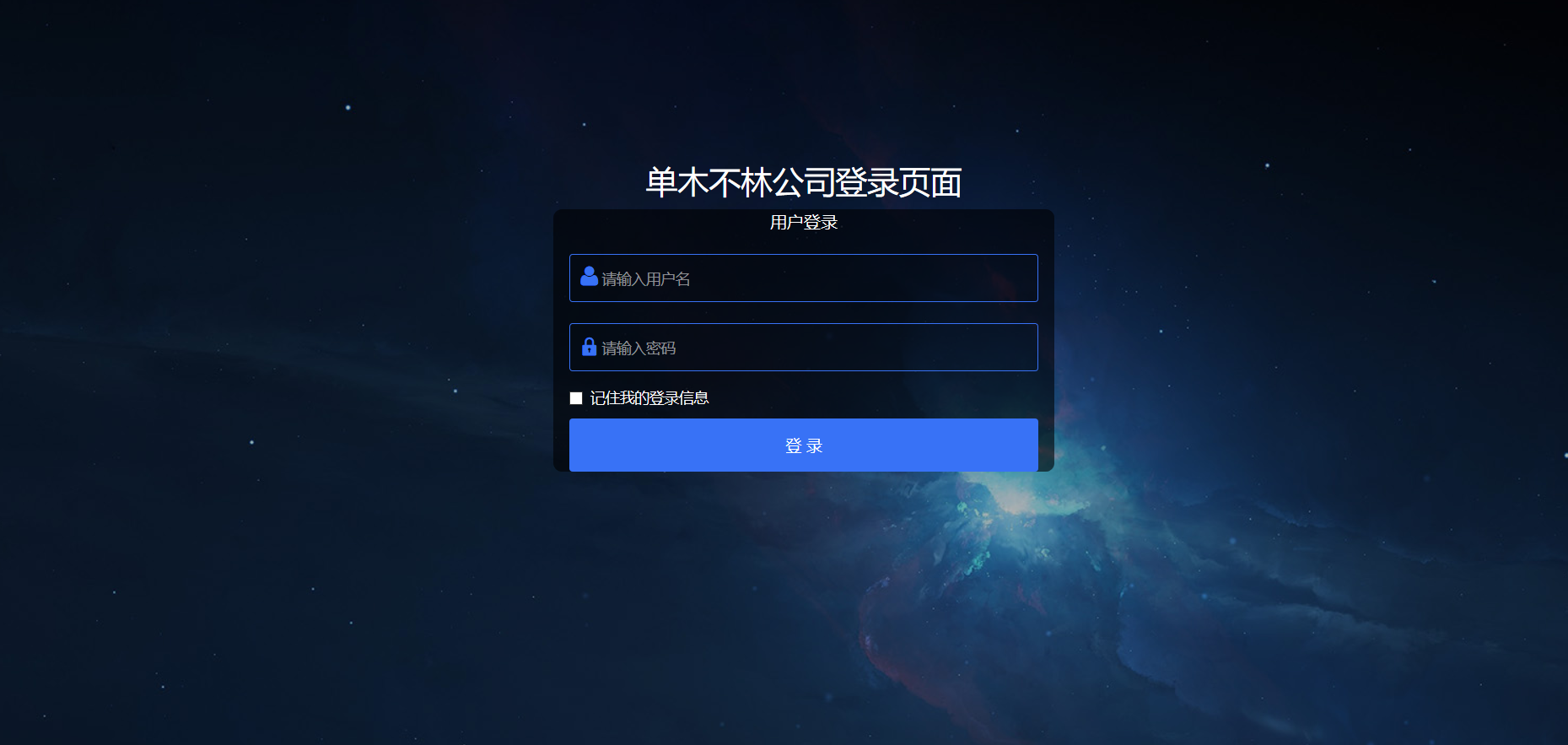
            <h2 class="mg-b20 text-center">单木不林后台登录页面</h2>

            <div class="col-sm-8 col-md-5 center-auto pd-sm-50 pd-xs-20 main_content">

                <p class="text-center font16">用户登录</p>

                <form>

                    <div class="form-group mg-t20">

                        <i class="icon-user icon_font"></i>

                        <input type="text" class="login_input" id="Email1" name="name" placeholder="请输入用户名" />

                    </div>

                    <div class="form-group mg-t20">

                        <i class="icon-lock icon_font"></i>

                        <input type="password" class="login_input" id="Password1" name="password" placeholder="请输入密码" />

                    </div>

                    <div class="checkbox mg-b25">

                        <label>

                            <input type="checkbox" />记住我的登录信息

                        </label>

                    </div>

                    <button type="submit" class="login_btn">登 录</button>

               </form>

        </div><!--row end-->

    </div><!--container end-->

    </form>

</body>
界面
百度云:https://pan.baidu.com/s/1zY8Hhwrnc5adkVg_TLirzw 提取码:ytnw
ASP.NET MVC 实现简单的登录的更多相关文章
- Easyui + asp.net MVC 系列教程 完成登录
Easyui + asp.net MVC 系列教程 第09-17 节 完成登录 高清录制 前面八节 在这里 Easyui + asp.net mvc + sqlite 开发教程(录屏)适合入门 在接下 ...
- ASP.NET MVC项目演练:用户登录
ASP.NET MVC 基础入门 http://www.cnblogs.com/liunlls/p/aspnetmvc_gettingstarted.html 设置默认启动页面 public clas ...
- ASP.NET MVC下判断用户登录和授权的方法
日常开发的绝大多数系统中,都涉及到管理用户的登录和授权问题.登录功能(Authentication),针对于所有用户都开放:而授权(Authorization),则对于某种用户角色才开放. 在asp. ...
- asp.net mvc 实现简单的实时消息推送
因为项目需要,需要在网页上实现消息的推送.在百度上搜索了一下,发现实现网页上的消息推送,可以使用asp.net 中的SignalR类库,当然也可以使用H5的WebSocket Ajax的轮回.当然此 ...
- ASP.NET MVC下判断用户登录和授权状态方法
在我们日常开发的绝大多数系统中,都涉及到管理用户的登录和授权问题.登录功能(Authentication),针对于所有用户都开放:而授权(Authorization),则对于某种用户角色才开放. 在a ...
- asp.net mvc(一) ----------简单封装成通用的List<T>集合
asp.net mvc(一) 这些天开始学习asp.net mvc,用传统的asp.net已经快四的年了,刚开始接触asp.net mvc确认感觉有点不适应,主要体现在asp.net mvc的实现上. ...
- ASP.Net MVC Filter验证用户登录
一.Filter是什么 ASP.NetMVC模式自带的过滤器Filter,是一种声明式编程方式,支持四种过滤器类型,各自是:Authorization(授权),Action(行为),Result(结果 ...
- ASP.NET MVC使用AuthenticationAttribute验证登录
首先,添加一个类AuthenticationAttribute,该类继承AuthorizeAttribute,如下: using System.Web; using System.Web.Mvc; n ...
- asp.net mvc 三层加EF 登录注册 增删改查
首先打开vs软件新建项目创建web中的mvc项目再右击解决方案创建类库项目分别创建DAL层和BLL层再把DAL层和BLL层的类重命名在mvc项目中的Models文件夹创建model类在DAL创建ADO ...
随机推荐
- python数据挖掘之数据探索第一篇
目录 数据质量分析 当我们得到数据后,接下来就是要考虑样本数据集的数据和质量是否满足建模的要求?是否出现不想要的数据?能不能直接看出一些规律或趋势?每个因素之间的关系是什么? 通过检验数据集的 ...
- Java生鲜电商平台-订单架构实战
Java生鲜电商平台-订单架构实战 生鲜电商中订单中心是一个电商后台系统的枢纽,在这订单这一环节上需要读取多个模块的数据和信息进行加工处理,并流向下一环节:因此订单模块对一电商系统来说,重要性不言而喻 ...
- CSS @charset规则
定义和用法 @charset规则指定样式表中使用的字符编码.@charset规则必须在样式表中的第一元素,而不是由任何字符之后进行.在外部样式文件中使用.如果@charset定义了多个规则,则仅使用第 ...
- vue学习笔记(二): 添加 element ui 插件
一.加载 ui element vue add element 加载过程及成功结果如下 > vue add element>
- NSURLSession中的downloadTask的使用
1.用downloadTask下载图片 优点:简单 缺点:不能监听下载的进度 代码示例: NSURL *url = [NSURL URLWithString:@"http://pic1.wi ...
- 高并发高可、O2O、微服务架构用学习网站
高并发高可.O2O.微服务架构用学习网站 https://www.itkc8.com 非常感谢http://www.cnblogs.com/skyblog/p/5044486.html 关于架构,笔者 ...
- 成功安装mysql后,为何服务管理器里找不到MYSQL服务名【转】
解决方案:(参考以下命令) 1.打开cmd,切换到mysql的bin目录下 2. D:\Program Files\MySQL5.1\bin>mysqld.exe -install Servic ...
- BayaiM__经典SQL语句大全
BayaiM__经典SQL语句大全 原创 作者:bayaim 时间:2016-06-16 09:22:24 32 0删除编辑 以下这篇文章,是一个垃圾,垃圾中的垃圾 ----------------- ...
- cobalt strike入门和防护
1.入门: https://blog.csdn.net/localhost01/article/details/86741124 2.cs的防护: 由于关乎渗透人员自身的安全,建议大家好好看看,这里贴 ...
- postman---postman增加断言
我们在做测试的时候都会有一个验证点,我们通常把这个验证点叫做断言,断言通过了就会说明我们的这个用例是通过的,当然这么强大的postman也是有断言的,我们一起学习下如何通过postman增加断言. 断 ...