
FCC---CSS Flexbox: Align Elements Using the justify-content Property
Sometimes the flex items within a flex container do not fill all the space in the container. It is common to want to tell CSS how to align and space out the flex items a certain way. Fortunately, the justify-content property has several options to do this. But first, there is some important terminology to understand before reviewing those options.
Here is a useful image showing a row to illustrate the concepts below.
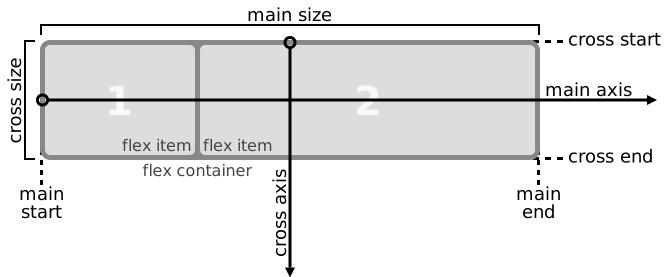
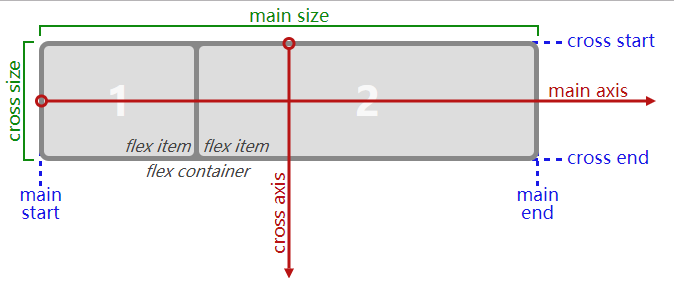
Recall that setting a flex container as a row places the flex items side-by-side from left-to-right. A flex container set as a column places the flex items in a vertical stack from top-to-bottom. For each, the direction the flex items are arranged is called the main axis. For a row, this is a horizontal line that cuts through each item. And for a column, the main axis is a vertical line through the items.
There are several options for how to space the flex items along the line that is the main axis. One of the most commonly used is justify-content: center;, which aligns all the flex items to the center inside the flex container. Others options include:
flex-start: aligns items to the start of the flex container. For a row, this pushes the items to the left of the container. For a column, this pushes the items to the top of the container. This is the default alignment if nojustify-contentis specified.flex-end: aligns items to the end of the flex container. For a row, this pushes the items to the right of the container. For a column, this pushes the items to the bottom of the container.space-between: aligns items to the center of the main axis, with extra space placed between the items. The first and last items are pushed to the very edge of the flex container. For example, in a row the first item is against the left side of the container, the last item is against the right side of the container, then the remaining space is distributed evenly among the other items.space-around: similar tospace-betweenbut the first and last items are not locked to the edges of the container, the space is distributed around all the items with a half space on either end of the flex container.space-evenly: Distributes space evenly between the flex items with a full space at either end of the flex container
An example helps show this property in action. Add the CSS property justify-content to the #box-container element, and give it a value of center.
Bonus
Try the other options for the justify-content property in the code editor to see their differences. But note that a value of center is the only one that will pass this challenge.
换上上面提到的几个属性,都可以操作,体会实际效果~
from:
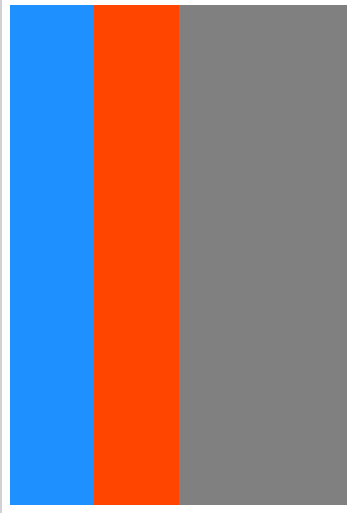
to:
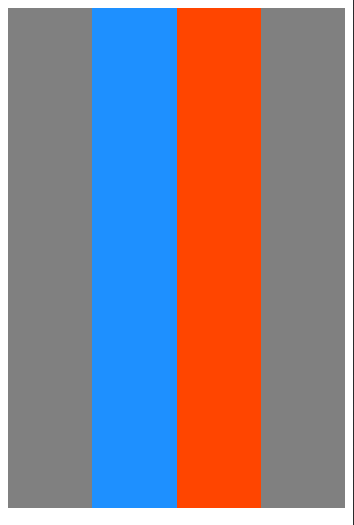

FCC---CSS Flexbox: Align Elements Using the justify-content Property的更多相关文章
- CSS Flexbox 学习指南、工具与框架
Flexbox 是一种更有效的布局方式,它能更好的分配容器空间,并控制项目的对齐.虽然,掌握它的理论有些复杂,但幸运的是,我们可以借助开放的网络来学习并逐步掌握它. 在本文中,我们整合了一些最佳的 F ...
- CSS Flexbox 弹性盒子模型
CSS Flexbox 弹性盒子模型 设置元素样式为 display: flex 或 display: inline-flex, 让元素变成flex容器, 从而可以通过flex模式布局它的子元素. f ...
- CSS#Flex-box, border-size, onresize() event, Media Queries
Flexbox Pseudo-classes box-sizing: border-box HTML DOM event resize() @media Queries: 根据一些css条件,触发一 ...
- css flexbox 弹性布局
flexbox 即css flexible box layout. ie9及以下不支持flexbox. flex详细规范(https://www.w3.org/TR/css-flexbox/) 为什么 ...
- CSS: Flexbox
Use flexbox to create a responsive website, containing a flexible navigation bar and flexible conten ...
- 使用css Flexbox实现垂直居中
CSS布局对我们来说一直是个噩梦,我们都认为flexbox是我们的救世主.是否真的如我们说说,还有待观察,但是flexbox确非常轻松的解决css长久一来比较难解决的居中问题.让我们来看看到底有多容易 ...
- [CSS] Target empty elements using the :empty pseudo-class
You can target an element that has no child elements by using the :empty pseudo-class. With browser ...
- [CSS] Dynamically Size Elements with Pure CSS
Learn how to size elements based on the dimensions of the viewport, even when the browser is resized ...
- [CSS] Target Positional Elements Using *-Of-Type CSS pseudo-classes
Learn how to target elements based on their position inside of a parent element in relation to its s ...
随机推荐
- github下载历史版本--xdd
第一步 打开一个仓库,可以看到此时在主分支下,点击1位置查看历史版本 第二步 现在可以查看到所有的版本(提交)信息,单击2位置进入该版本 第三步 单击3位置浏览并打开该版本 第四步 进入该版本之后,可 ...
- es3设置属性不能修改
/*es3*/ { var Person =function () { var data ={ name:'zs', sex:'男', age:18 } this.get=function (key) ...
- C#学习笔记04--排序/查找/二维数组/交叉数组
一. 冒泡排序(重点) 思路: 每次比较把较小的放在前面, 大的放到后面; 图解:下图是最坏情况下的排序 ` 冒泡排序m个元素, 就有(m-1)趟排序, 第一趟m-1次, 第二趟 m-2次.... ...
- 解决“无法完成域加入,原因是试图加入的域的SID与本计算机的SID相同
原文链接:http://www.cnblogs.com/xiaoyou2018/p/10677437.html Windows server 2012 R2 解决"无法完成域加入,原因是试图 ...
- Spring源码分析之AOP
1.AOP简介 AOP即面向切面编程(Aspect Oriented Programming),通过预编译方式及运行期动态代理实现程序功能的统一维护的一种技术.使用aop对业务逻辑的各个部分进行隔离, ...
- Sting类字符串
一.声明字符串 在java语言中字符串必须包含在一对双引号(" ")之内,但不能作为其他数据类型来使用,如"1+2"的输出结果不可能是3: 可以通过以下语法格式 ...
- 接口访问报错:The valid characters are defined in RFC 7230 and RFC 3986
写了个接口,在测试访问的时候,需要传json串,但是后台报错了 The valid characters are defined in RFC 7230 and RFC 3986 当前使用的tomca ...
- [TimLinux] JavaScript 如何在AJAX中替换元素的图片
1. 示例代码 /* * <img id="idTestImg" src="/static/test.png" /> */ var idTestIm ...
- 最小生成树唯一性判断-UESTC1959天才钱vs学霸周
天才钱vs学霸周 Time Limit: 1000 MS Memory Limit: 256 MB Submit Status 有一天,天才钱和学霸周闲的无聊玩起了游戏,游戏内容是这样的,现在 ...
- 学习Java必看的Java书籍(高清中文最新版附下载链接)
今年下半年,我正式系统地学习Java(之前学习C++).最近把学习Java所用到的书籍整理了一下,分享出来,希望对正在学习或准备学习Java的人有一定的帮助. 关于Java的学习路线,和IDE工具In ...