
c#基础三
using System;

using System.Collections.Generic;

using System.Linq;

using System.Text;

using System.IO;

namespace _02Directory

{

    class Program

    {

        static void Main(string[] args)

        {

            //CreateDirectory:创建一个新的文件夹

            //Delete:删除

            //Move:剪切

            //Exist()判断指定的文件夹是否存在

            //if (!Directory.Exists(@"C:\Users\SpringRain\Desktop\new"))

            //{

            //    Directory.CreateDirectory(@"C:\Users\SpringRain\Desktop\new");

            //}

            //Console.WriteLine("操作成功");

            //for (int i = 0; i < 100; i++)

            //{

            //    Directory.CreateDirectory(@"C:\Users\SpringRain\Desktop\new\" + i);

            //}

            //Console.WriteLine("创建成功");

            //移动

            //Directory.Move(@"C:\Users\SpringRain\Desktop\new", @"C:\Users\SpringRain\Desktop\new2");

            //Console.WriteLine("移动成功");

            //Directory.Delete(@"C:\Users\SpringRain\Desktop\new2",true);

            //Console.WriteLine("删除成功");

            //Console.ReadKey();

            //获得指定目录下所有文件的全路径

            //string[] fileNames = Directory.GetFiles(@"F:\老赵生活\Music","*.mp3");

            //获得指定目录下所有的文件夹

            //只能获得当前第一目录下所有的文件夹

            string[] dics = Directory.GetDirectories(@"c:\");

            foreach (string item in dics)

            {

                Console.WriteLine(item);

            }

            Console.ReadKey();

        }

    }

}
1、StringBuilder
它就是拼接字符串的一个工具,拼成完成后,还是需要将它转回字符串。
详解 见 https://www.cnblogs.com/cang12138/p/7323709.html
2、ref参数
ref参数侧重于将一个值带到函数中进行改变,再讲改变后的值带出去。ref参数在函数内不用赋值
函数外必须为ref参数赋值。
using System;

using System.Collections.Generic;

using System.Linq;

using System.Text;

namespace _04ref参数的使用

{

    class Program

    {

        static void Main(string[] args)

        {

            double salary = ;

            JiangJin(ref salary);

            Console.WriteLine(salary);

            Console.ReadKey();

        }

        static void JiangJin(ref double s)

        {

            s += ;

        }

    }

}
3、out参数
4、params可变参数
5、集合的学习
非泛型集合
ArrayList
Hashtable
泛型集合List<T>
using System;

using System.Collections.Generic;

using System.Linq;

using System.Text;

namespace _07List泛型集合

{

    class Program

    {

        static void Main(string[] args)

        {

            List<int> list = new List<int>();

            //集合--->数组

            //Count:获取集合中实际包含的元素的个数

            //Capcity:集合中可以包含的元素的个数

            //list.Add(1);

            //Console.WriteLine(list.Count);

            //Console.WriteLine(list.Capacity);

            //Add的是添加单个元素

            //AddRange是添加集合

            list.Add();

            list.AddRange(new int[] { , , , , ,  });

            //list.Remove(100);

            //list.RemoveAll(n => n > 3);

            //list.RemoveAt(3);

            //list.RemoveRange(1, 6);

            // list.Insert(1, 200);

            // list.InsertRange(0, new int[] { 5, 4, 3, 2, 1 });

            //集合跟数组之间的转换

            //集合----->数组

            int[] nums = list.ToArray();

            List<string> list2 = new List<string>();

            //list2.ToArray()

            //数组转集合

            int[] nums3 = { , , , , ,  };

            List<int> list3 = nums3.ToList();

            for (int i = ; i < list3.Count; i++)

            {

                Console.WriteLine(list3[i]);

            }

            Console.ReadKey();

        }

    }

}
Dictionary<Tkey,Tvalue>
using System;

using System.Collections.Generic;

using System.Linq;

using System.Text;

namespace _09Dictionary键值对集合

{

    class Program

    {

        static void Main(string[] args)

        {

            //Dictionary<string, string> dic = new Dictionary<string, string>();

            //dic.Add("1", "张三");

            //dic.Add("2", "李四");

            //dic.Add("3", "王五");

            //dic.Add("4", "赵六");

            ////键值对集合中的键必须是唯一的

            ////dic.Add(4, "田七");

            ////键值对集合中的值是可以重复的

            //dic.Add("5", "王五");

            ////可以给键值对集合中的某一个值进行重新赋值

            //dic["4"] = "田七";

            //键值对集合常用函数

            //判断集合中是否已经包含某一个键

            //if (!dic.ContainsKey(13))

            //{

            //    dic.Add(13, "玩狗蛋儿");

            //}

            //else

            //{

            //    dic[3] = "王狗蛋儿";

            //}

            //Console.WriteLine(dic[13]);

            //使用foreach循环,通过遍历键值对的形式对键值对集合进行遍历

            //第一种遍历方式:遍历集合中的键

            //foreach (string item in dic.Keys)

            //{

            //    Console.WriteLine("键---{0}            值---{1}",item,dic[item]);

            //}

            //第二种遍历方式:遍历集合中的键值对

            //foreach (KeyValuePair<string, string> kv in dic)

            //{

            //    Console.WriteLine("键---{0}            值---{1}", kv.Key, kv.Value);

            //}

            //Console.WriteLine(dic[3]);//整体代表的就是值

           // Console.ReadKey();

        }

    }

}
6、装箱和拆箱
装箱:值类型---->引用类型
拆箱:引用类型--->值类型
我们判断是否发生了拆箱或者装箱,首先要判断这两种数据类型是否存在继承关系。
你装箱的时候拿什么类型装的箱,你拆的时候,就得拿什么类型去拆。
7、List<T>常用的函数
Add():添加单个元素
AddRange():添加一个集合
Insert():插入一个元素
InsertRange():插入一个集合
Remove():移除指定的元素
RemoveAt():根据下标移除元素
RemoveRange():移除一定范围内的元素
ToArray():集合转换成数组
ToList():数组转换成集合
8、编码格式
将字符串是怎样的形式保存为二进制。
ascii 256
6000 GB2312
GBK GB18030
ISO
Unicode
utf-16
utf-8
出现乱码的原因:我们保存这个文件的时候采取的编码跟打开这个文件的时候采取的编码格式不一致。
文本文件:拖到txt中还能看得懂得就是文本文件
using System;

using System.Collections.Generic;

using System.Linq;

using System.Text;

using System.IO;

namespace _14File类的操作

{

    class Program

    {

        static void Main(string[] args)

        {

            //File

            //Exist():判断指定的文件是否存在

            //Create():创建

            //Move():剪切

            //Copy():复制

            //Delete():删除

            //if (!File.Exists("1.txt"))

            //{

            //    File.Create("1.txt");

            //}

            //if (File.Exists("1.txt"))

            //{

            //    File.Delete("1.txt");

            //}

            //

            //File.Copy(@"C:\Users\SpringRain\Desktop\english.txt", @"D:\aaaaaa.txt");

            //Console.WriteLine("操作成功");

            //File.Move(@"D:\aaaaaa.txt", @"C:\Users\SpringRain\Desktop\bbbbbb.txt");

            //ReadAllLines()默认采用的编码格式是utf-8

            //string[] str = File.ReadAllLines(@"C:\Users\SpringRain\Desktop\english.txt");

            //ReadAllText()默认采用的编码格式也是utf-8

            //string str = File.ReadAllText(@"C:\Users\SpringRain\Desktop\english.txt");

            //Console.WriteLine(str);

            //byte[] buffer = File.ReadAllBytes(@"C:\Users\SpringRain\Desktop\english.txt");

            ////字节数组---->字符串

            //string str = Encoding.UTF8.GetString(buffer);

            //Console.WriteLine(str);

            //string str="张三李四王五百家姓";

            ////字符串--->字节数组

            //byte[] buffer= Encoding.Default.GetBytes(str);

            //File.WriteAllBytes(@"C:\Users\SpringRain\Desktop\121212.txt", buffer);

            //Console.WriteLine("写入成功");

            //Console.ReadKey();

            //File.WriteAllLines(@"C:\Users\SpringRain\Desktop\121212.txt", new string[] { "a", "b" });

          //  File.WriteAllText(@"C:\Users\SpringRain\Desktop\121212.txt", "c");

            //byte[] buffer = new byte[3];

            //Console.WriteLine(buffer.ToString());

            //18 99 221 我爱你

           // Encoding.Default.GetString()

        }

    }

}
File的使用
using System;

using System.Collections.Generic;

using System.IO;

using System.Linq;

using System.Text;

namespace _01File类练习

{

    class Program

    {

        static void Main(string[] args)

        {

            //string path = @"C:\Users\SpringRain\Desktop\工资.txt";

            //string[] contents = File.ReadAllLines(path, Encoding.Default);

            //for (int i = 0; i < contents.Length; i++)

            //{

            //    //temp[0]张三  temp[1]5000

            //    string[] temp = contents[i].Split(new char[] { ' ' }, StringSplitOptions.RemoveEmptyEntries);

            //    contents[i] = temp[0] + int.Parse(temp[1]) * 2;

            //}

            //File.WriteAllLines(path, contents);

            //Console.WriteLine("操作成功");

            //Console.ReadKey();

        }

    }

}
Directory的使用
using System;

using System.Collections.Generic;

using System.Linq;

using System.Text;

using System.IO;

namespace _02Directory

{

    class Program

    {

        static void Main(string[] args)

        {

            //CreateDirectory:创建一个新的文件夹

            //Delete:删除

            //Move:剪切

            //Exist()判断指定的文件夹是否存在

            //if (!Directory.Exists(@"C:\Users\SpringRain\Desktop\new"))

            //{

            //    Directory.CreateDirectory(@"C:\Users\SpringRain\Desktop\new");

            //}

            //Console.WriteLine("操作成功");

            //for (int i = 0; i < 100; i++)

            //{

            //    Directory.CreateDirectory(@"C:\Users\SpringRain\Desktop\new\" + i);

            //}

            //Console.WriteLine("创建成功");

            //移动

            //Directory.Move(@"C:\Users\SpringRain\Desktop\new", @"C:\Users\SpringRain\Desktop\new2");

            //Console.WriteLine("移动成功");

            //Directory.Delete(@"C:\Users\SpringRain\Desktop\new2",true);

            //Console.WriteLine("删除成功");

            //Console.ReadKey();

            //获得指定目录下所有文件的全路径

            //string[] fileNames = Directory.GetFiles(@"F:\老赵生活\Music","*.mp3");

            //获得指定目录下所有的文件夹

            //只能获得当前第一目录下所有的文件夹

            string[] dics = Directory.GetDirectories(@"c:\");

            foreach (string item in dics)

            {

                Console.WriteLine(item);

            }

            Console.ReadKey();

        }

    }

}
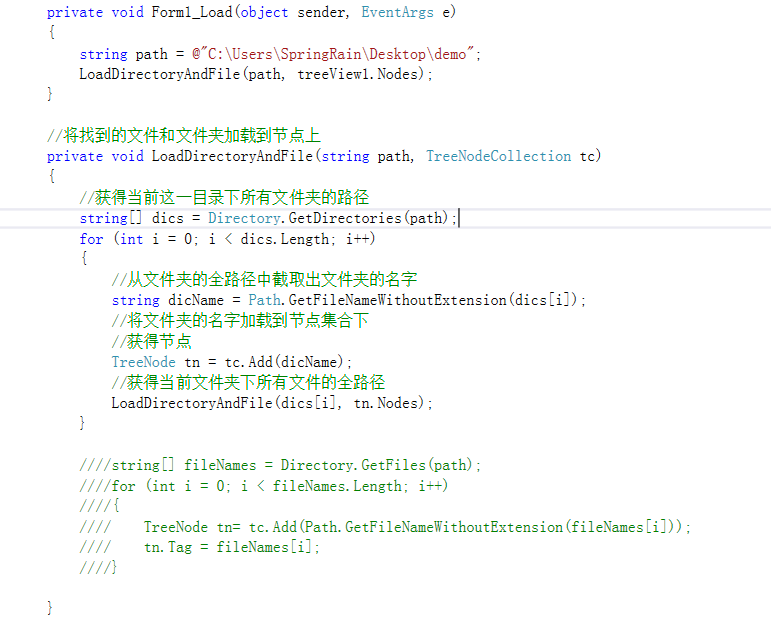
TreeView的使用
见 https://www.cnblogs.com/net064/p/5534697.html
c#基础三的更多相关文章
- Python全栈开发【基础三】
Python全栈开发[基础三] 本节内容: 函数(全局与局部变量) 递归 内置函数 函数 一.定义和使用 函数最重要的是减少代码的重用性和增强代码可读性 def 函数名(参数): ... 函数体 . ...
- Bootstrap <基础三十二>模态框(Modal)插件
模态框(Modal)是覆盖在父窗体上的子窗体.通常,目的是显示来自一个单独的源的内容,可以在不离开父窗体的情况下有一些互动.子窗体可提供信息.交互等. 如果您想要单独引用该插件的功能,那么您需要引用 ...
- Bootstrap <基础三十一>插件概览
在前面布局组件中所讨论到的组件仅仅是个开始.Bootstrap 自带 12 种 jQuery 插件,扩展了功能,可以给站点添加更多的互动.即使不是一名高级的 JavaScript 开发人员,也可以着手 ...
- Bootstrap <基础三十>Well
Well 是一种会引起内容凹陷显示或插图效果的容器 <div>.为了创建 Well,只需要简单地把内容放在带有 class .well 的 <div> 中即可.下面的实例演示了 ...
- Bootstrap<基础三> 排版
Bootstrap 使用 Helvetica Neue. Helvetica. Arial 和 sans-serif 作为其默认的字体栈. 使用 Bootstrap 的排版特性,您可以创建标题.段落. ...
- jdbc基础 (三) 大文本、二进制数据处理
LOB (Large Objects) 分为:CLOB和BLOB,即大文本和大二进制数据 CLOB:用于存储大文本 BLOB:用于存储二进制数据,例如图像.声音.二进制文件 在mysql中,只有B ...
- Ruby语法基础(三)
Ruby语法基础(三) 在前面快速入之后,这次加深对基本概念的理解. 字符串 Ruby字符串可以分为单引号字符串和双引号字符串,单引号字符串效率更高,但双引号的支持转义和运行 puts '单引 ...
- C#_02.13_基础三_.NET类基础
C#_02.13_基础三_.NET类基础 一.类概述: 类是一个能存储数据和功能并执行代码的数据结构,包含数据成员和函数成员.(有什么和能够干什么) 运行中的程序是一组相互作用的对象的集合. 二.为类 ...
- 04 mysql 基础三 (进阶)
mysql 基础三 阶段一 mysql 单表查询 1.查询所有记录 select * from department; select * from student; select * from ...
- Python 基础 三 反射
Python 基础 三 反射 今天我们先介绍一下反射这个概念,啥是反射?反射就是自己检测自己.在我们Python的面向对象中的反射是啥意思呢?就是通过字符串的形式操作对象相关的属性.python中的一 ...
随机推荐
- Java利用Zxing生成二维码
Zxing是Google提供的关于条码(一维码.二维码)的解析工具,提供了二维码的生成与解析的方法,现在我简单介绍一下使用Java利用Zxing生成与解析二维码 1.二维码的生成 1.1 将Zxing ...
- html5 页面元素插件
1. 滚动条 jquery.nicescroll 正常引用方式: 设置区域高度 var bodyHeight = $(document.body).height(); $("#XXXXXXX ...
- 怎么样 javascript / js 在 建立map
设定map道路(它是非常有用的json履行) var a = {}; a["key1"] = "value1"; a["key2"] = & ...
- angular form set dynamic control(form动态设置control)
实现效果 form表单控件的实时更新 效果如图 关键代码 validateForm: FormGroup; // 表单校验 constructor( private fb: FormBuilder ) ...
- XF警告试图
using System; using System.Collections.Generic; using System.Linq; using System.Text; using System.T ...
- 用户控件(UserControl)
简介 "用户控件"继承自UserControl,而UserControl继承自ContentControl,也就是内容控件UserControl和Window是一个层次上的,都有x ...
- iOS开发HTTP协议相关知识总结
HTTP原理 什么是URL URL中常见的几种协议 什么是HTTP协议 HTTP是做什么的 为什么要使用HTTP协议 HTPP协议的通信过程介绍 HTTP请求 HTTP响应 HTTP请求的选择 两种发 ...
- linux的自动化操作相关使用方法汇总 专题
Crontab中的除号(slash)到底怎么用? crontab 是Linux中配置定时任务的工具,在各种配置中,我们经常会看到除号(Slash)的使用,那么这个除号到底标示什么意思,使用中有哪些需要 ...
- WPF 在一个dll创建一个Window(包含xaml),在另一个dll中再次继承 会出错
https://social.msdn.microsoft.com/Forums/vstudio/en-US/e92390eb-bbfa-42fb-baa9-2286444c0dca/the-comp ...
- 读unp并动手实践
经过三个月的学习,我发现进度比较慢.照这个进度下去,平均一周花费5-6小时,还不知道读完全书需要多久. 现在做个计划,全书除开简介部分分为 基础 和 高级 套接字编程两部分,其中 基础可以分为 TCP ...