
记住用户名和登录密码+虚拟机没有root权限解决办法
今日所学:
记住用户名和登录密码
用adb查看保存文件内容
遇到的问题:
用adb查看文件时,没有权限访问data文件
出现原因:google play虚拟机没有root权限
解决办法:
用google API的虚拟机
相关博客:adb shell中提示Permission denied - 简书
关于/system/bin/sh: su: not found的解决办法(安卓模拟器运行) - 程序员大本营
成果截图:
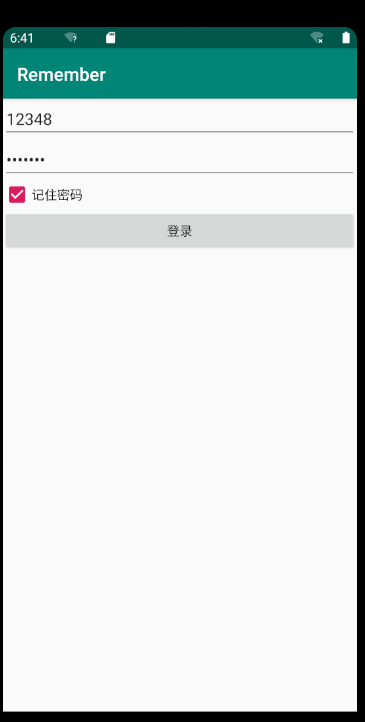
代码:
MainActivity.java
import androidx.appcompat.app.AppCompatActivity;

import android.content.Context;

import android.content.SharedPreferences;

import android.os.Bundle;

import android.text.Editable;

import android.text.TextWatcher;

import android.util.Log;

import android.widget.CheckBox;

import android.widget.CompoundButton;

import android.widget.EditText;

public class MainActivity extends AppCompatActivity {

    private EditText mEtPhone;

    private EditText mEtPasswd;

    private CheckBox mPsd;

    private String SP_PHONE="sp_phone";

    private String SP_PASSWD="sp_passwd";

    private SharedPreferences sharedPreferences;

    private String SP_IS_REMEMBER="sp_is_remember";

    private boolean isCheck=false;

    private String TAG="MainActivity";

    @Override

    protected void onCreate(Bundle savedInstanceState) {

        super.onCreate(savedInstanceState);

        setContentView(R.layout.activity_main);

        initUI();

        initData();

    }

    private void initData() {

        if(sharedPreferences==null){

            sharedPreferences=getApplicationContext().getSharedPreferences("config", Context.MODE_PRIVATE);

        }

        mEtPhone.setText(sharedPreferences.getString(SP_PHONE,""));

        mEtPasswd.setText(sharedPreferences.getString(SP_PASSWD,""));

        isCheck=sharedPreferences.getBoolean(SP_IS_REMEMBER,false);

        Log.i(TAG,"测试:"+isCheck);

        mPsd.setChecked(isCheck);

    }

    private void initUI() {

        mEtPhone=findViewById(R.id.et_phone);

        mEtPhone.addTextChangedListener(new TextWatcher() {

            @Override

            public void beforeTextChanged(CharSequence s, int start, int count, int after) {

            }

            @Override

            public void onTextChanged(CharSequence s, int start, int before, int count) {

            }

            @Override

            public void afterTextChanged(Editable s) {

                if(isCheck){

                    if(sharedPreferences==null){

                        sharedPreferences=getApplicationContext().getSharedPreferences("config", Context.MODE_PRIVATE);

                    }

                    SharedPreferences.Editor edit=sharedPreferences.edit();

                    edit. putString(SP_PHONE,mEtPhone.getText().toString());

                    edit.commit();

                }

            }

        });

        mEtPasswd=findViewById(R.id.et_passwd);

        mEtPasswd.addTextChangedListener(new TextWatcher() {

            @Override

            public void beforeTextChanged(CharSequence s, int start, int count, int after) {

            }

            @Override

            public void onTextChanged(CharSequence s, int start, int before, int count) {

            }

            @Override

            public void afterTextChanged(Editable s) {

                if(isCheck){

                    if(sharedPreferences==null){

                        sharedPreferences=getApplicationContext().getSharedPreferences("config", Context.MODE_PRIVATE);

                    }

                    SharedPreferences.Editor edit=sharedPreferences.edit();

                    edit.putString(SP_PASSWD,mEtPasswd.getText().toString());

                    edit.commit();

                }

            }

        });

        mPsd=findViewById(R.id.cb_remember_psd);

        mPsd.setOnCheckedChangeListener(new CompoundButton.OnCheckedChangeListener() {

            @Override

            public void onCheckedChanged(CompoundButton buttonView, boolean isChecked) {

                Log.d(TAG,"状态为:"+isChecked);

                isCheck=isChecked;

                if(sharedPreferences==null){

                    sharedPreferences=getApplicationContext().getSharedPreferences("config", Context.MODE_PRIVATE);

                }

                SharedPreferences.Editor edit=sharedPreferences.edit();

                if(isChecked){

                    edit. putString(SP_PHONE,mEtPhone.getText().toString());

                    edit.putString(SP_PASSWD,mEtPasswd.getText().toString());

                }

                edit.putBoolean(SP_IS_REMEMBER,isChecked);

                edit.commit();

            }

        });

    }

}
activity_main.xml
<?xml version="1.0" encoding="utf-8"?>

<LinearLayout xmlns:android="http://schemas.android.com/apk/res/android"

    xmlns:app="http://schemas.android.com/apk/res-auto"

    xmlns:tools="http://schemas.android.com/tools"

    android:layout_width="match_parent"

    android:layout_height="match_parent"

    android:orientation="vertical"

    tools:context=".MainActivity">

    <EditText

        android:id="@+id/et_phone"

        android:inputType="phone"

        android:hint="电话"

        android:layout_width="match_parent"

        android:layout_height="wrap_content"/>

    <EditText

        android:id="@+id/et_passwd"

        android:inputType="textPassword"

        android:hint="密码"

        android:layout_width="match_parent"

        android:layout_height="wrap_content"/>

    <CheckBox

        android:id="@+id/cb_remember_psd"

        android:text="记住密码"

        android:layout_width="wrap_content"

        android:layout_height="wrap_content"/>

    <Button

        android:text="登录"

        android:layout_width="match_parent"

        android:layout_height="wrap_content"/>

</LinearLayout>
明日计划:
保存用户数据到数据库
记住用户名和登录密码+虚拟机没有root权限解决办法的更多相关文章
- javascript记住用户名和登录密码
javascript记住用户名和登录密码 下面主要通过代码给大家展示下javascript记住用户名和登录密码,具体代码内容请看下文. <script type="text/javas ...
- mysql Access denied for user \'root\'@\'localhost\'”解决办法总结,下面我们对常见的出现的一些错误代码进行分析并给出解决办法,有需要的朋友可参考一下。
mysql Access denied for user \'root\'@\'localhost\'”解决办法总结,下面我们对常见的出现的一些错误代码进行分析并给出解决办法,有需要的朋友可参考一下. ...
- "SQLServer无法打开用户默认数据库,登录失败,错误4064"的解决办法
"SQLServer无法打开用户默认数据库,登录失败,错误4064"的解决办法 1.检查登录密码 如果密码错误,修改数据库密码,用windows身份验证登录进去, (1)安全--登 ...
- Linux提示no crontab for root的解决办法
Linux提示no crontab for root的解决办法 安装crontab:yum install crontabs 说明:/sbin/service crond start //启动服务/s ...
- MySQL运行出错:无法连接驱动、无root访问权限解决办法
按照疯狂java讲义的13.3的程序,发现程序运行出错. 1.点开runConnMySql.cmd运行文件,出现如下结果: 2.用Editplus进行编译运行,如下结果: 报错定位到程序第18行,而第 ...
- VM出现该虚拟机正在使用中的提示,让获取所有权限解决办法
今天打开虚拟机正要学习,结果说是虚拟机似乎正在使用中,让我重新获取权限.解决办法:打开提示的配置文件的位置,将一个以.lck结尾的文件夹删除或者保存为另外的文件名称,再打开虚拟机就OK了.
- Ubuntu14.04 切换root账户su root失败解决办法
原因是需要备份一个vimrc,可是cp就提示Permission denied. su root就提示su: Authentication failure 解决办法: sudo passwd root ...
- Ubunt 使用Virtualbox虚拟机NAT无法上网解决办法
我的Ubuntu安装了一个Centos虚拟机,为了SSH和上外网的方便,使用了NAT+host Only方式,实现内网+外网,但是安装好的Centos不能连接外网,很是无语,只能Google了-- 解 ...
- ssh远程登录出现Host key verification failed.解决办法
今天通过ssh和域名连接主机: IcarusdeMacBook-Pro:~ icarus$ ssh root@icarusyu.me 出现了如下错误: @@@@@@@@@@@@@@@@@@@@@@@@ ...
随机推荐
- 快速整透Redis中的压缩列表到底是个啥
压缩列表简介 压缩列表(ziplist)是由一个连续内存组成的顺序型数据结构.一个压缩列表可以包含任意多个节点,每个节点上可以保存一个字节数组或整数值.它是Redis为了节省内存空间而开发的. 压缩列 ...
- webgl未使用独立显卡报告
0x00 楔子 最近客户在使用我们的的三维可视化平台的时候,总是会出现浏览器崩溃,webgl context lost的情况. 这种请一般出现在电脑配置很低的电脑上,比如没有独显,只有很小现存的集成显 ...
- Java入土---Java基础(一)
注释,标识符,关键字 注释类似于我们的随手记,并且不会被执行,是写给我们自己看的,书写注释是一个非常好的习惯 重点来了,Java中注释有三种:单行注释,多行注释,文档注释 单行注释 "//& ...
- java基础复习记录
java基础复习记录(数组.对象.异常) 数组 数组的定义 数组是相同类型数据的有序集合.如:篮球队就是一个数组,队员球服上有号码,相当于索引.通过某一个的某一个号码来确认是某一个队员.数组中索引从0 ...
- Golang 基础之基础语法梳理 (三)
大家好,今天将梳理出的 Go语言基础语法内容,分享给大家. 请多多指教,谢谢. 本次<Go语言基础语法内容>共分为三个章节,本文为第三章节 Golang 基础之基础语法梳理 (一) Gol ...
- 【dubbo3.x trace组件分享】
目录 背景 一.trace-dubbo组件介绍 二.设计原理 2.1 原理图 2.2 实现方案 2.2.1 consumer端实现 2.2.2 provider端实现 2.2.3 traceId和sp ...
- [源码解析] TensorFlow 分布式环境(3)--- Worker 静态逻辑
[源码解析] TensorFlow 分布式环境(3)--- Worker 静态逻辑 目录 [源码解析] TensorFlow 分布式环境(3)--- Worker 静态逻辑 1. 继承关系 1.1 角 ...
- SpringSecurity-5.11-课堂笔记-01
- linux如何通过文件2,3找回文件1?
查看系统是否有diff,patch命令 diff一般系统自带 patch下载 (yum install patch -y) 现在开始演示 我的系统里有1和2两个文件 使用 diff 1 2 > ...
- 什么是LSA,在OSPF中LSA是什么
什么是LSA:链路状态通告,它存在于LSU(链路状态更新包) Type 1 LSA:路由器LSA 每个OSPF路由器都会产生路由器LSA,描述了对应设备的物理接口所连接的链路和接口,并指明 ...