
ShardingSphere-proxy-5.0.0建立mysql读写分离的连接(六)
一、修改配置文件config-sharding.yaml,并重启服务
#

# Licensed to the Apache Software Foundation (ASF) under one or more

# contributor license agreements.  See the NOTICE file distributed with

# this work for additional information regarding copyright ownership.

# The ASF licenses this file to You under the Apache License, Version 2.0

# (the "License"); you may not use this file except in compliance with

# the License.  You may obtain a copy of the License at

#

#     http://www.apache.org/licenses/LICENSE-2.0

#

# Unless required by applicable law or agreed to in writing, software

# distributed under the License is distributed on an "AS IS" BASIS,

# WITHOUT WARRANTIES OR CONDITIONS OF ANY KIND, either express or implied.

# See the License for the specific language governing permissions and

# limitations under the License.

#

######################################################################################################

#

# Here you can configure the rules for the proxy.

# This example is configuration of sharding rule.

#

######################################################################################################

#

#schemaName: sharding_db

#

#dataSources:

#  ds_0:

#    url: jdbc:postgresql://127.0.0.1:5432/demo_ds_0

#    username: postgres

#    password: postgres

#    connectionTimeoutMilliseconds: 30000

#    idleTimeoutMilliseconds: 60000

#    maxLifetimeMilliseconds: 1800000

#    maxPoolSize: 50

#    minPoolSize: 1

#  ds_1:

#    url: jdbc:postgresql://127.0.0.1:5432/demo_ds_1

#    username: postgres

#    password: postgres

#    connectionTimeoutMilliseconds: 30000

#    idleTimeoutMilliseconds: 60000

#    maxLifetimeMilliseconds: 1800000

#    maxPoolSize: 50

#    minPoolSize: 1

#

#rules:

#- !SHARDING

#  tables:

#    t_order:

#      actualDataNodes: ds_${0..1}.t_order_${0..1}

#      tableStrategy:

#        standard:

#          shardingColumn: order_id

#          shardingAlgorithmName: t_order_inline

#      keyGenerateStrategy:

#          column: order_id

#          keyGeneratorName: snowflake

#    t_order_item:

#      actualDataNodes: ds_${0..1}.t_order_item_${0..1}

#      tableStrategy:

#        standard:

#          shardingColumn: order_id

#          shardingAlgorithmName: t_order_item_inline

#      keyGenerateStrategy:

#        column: order_item_id

#        keyGeneratorName: snowflake

#  bindingTables:

#    - t_order,t_order_item

#  defaultDatabaseStrategy:

#    standard:

#      shardingColumn: user_id

#      shardingAlgorithmName: database_inline

#  defaultTableStrategy:

#    none:

#

#  shardingAlgorithms:

#    database_inline:

#      type: INLINE

#      props:

#        algorithm-expression: ds_${user_id % 2}

#    t_order_inline:

#      type: INLINE

#      props:

#        algorithm-expression: t_order_${order_id % 2}

#    t_order_item_inline:

#      type: INLINE

#      props:

#        algorithm-expression: t_order_item_${order_id % 2}

#

#  keyGenerators:

#    snowflake:

#      type: SNOWFLAKE

#      props:

#        worker-id: 123

######################################################################################################

#

# If you want to connect to MySQL, you should manually copy MySQL driver to lib directory.

#

######################################################################################################

# 连接mysql所使用的数据库名

 schemaName: MyDb

 dataSources:

  ds_0: # 主库

    url: jdbc:mysql://127.0.0.1:3306/MyDb?serverTimezone=UTC&useSSL=false

    username: root # 数据库用户名

    password: mysql123  # 登录密码

    connectionTimeoutMilliseconds: 30000

    idleTimeoutMilliseconds: 60000

    maxLifetimeMilliseconds: 1800000

    maxPoolSize: 50

    minPoolSize: 1

  ds_0_read0: # 从库

    url: jdbc:mysql://192.168.140.132:3306/MyDb?serverTimezone=UTC&useSSL=false

    username: root # 数据库用户名

    password: Xiaohemiao_123  # 登录密码

    connectionTimeoutMilliseconds: 30000

    idleTimeoutMilliseconds: 60000

    maxLifetimeMilliseconds: 1800000

    maxPoolSize: 50

    minPoolSize: 1

#  ds_1:

#    url: jdbc:mysql://127.0.0.1:3306/demo_ds_1?serverTimezone=UTC&useSSL=false

#    username: root

#    password:

#    connectionTimeoutMilliseconds: 30000

#    idleTimeoutMilliseconds: 60000

#    maxLifetimeMilliseconds: 1800000

#    maxPoolSize: 50

#    minPoolSize: 1

#

# 规则

 rules:

 - !READWRITE_SPLITTING  #读写分离规则

   dataSources:

     pr_ds:

       writeDataSourceName: ds_0

       readDataSourceNames:

         - ds_0_read0

 - !SHARDING

   tables:

     t_product: #需要进行分表的表名

       actualDataNodes: ds_0.t_product_${0..1} # 表达式,将表分为t_product_0 , t_product_1

       tableStrategy:

        standard:

           shardingColumn: product_id # 字段名

           shardingAlgorithmName: t_product_VOLUME_RANGE

       keyGenerateStrategy:

         column: id

         keyGeneratorName: snowflake #雪花算法

#    t_order_item:

#      actualDataNodes: ds_${0..1}.t_order_item_${0..1}

#      tableStrategy:

#        standard:

#          shardingColumn: order_id

#          shardingAlgorithmName: t_order_item_inline

#      keyGenerateStrategy:

#        column: order_item_id

#        keyGeneratorName: snowflake

#  bindingTables:

#    - t_order,t_order_item

#  defaultDatabaseStrategy:

#    standard:

#      shardingColumn: user_id

#      shardingAlgorithmName: database_inline

#  defaultTableStrategy:

#    none:

#

   shardingAlgorithms:

     t_product_VOLUME_RANGE: # 取模名称,可自定义

       type: VOLUME_RANGE # 取模算法

       props:

         range-lower: '5' # 最小容量为5条数据,仅方便测试

         range-upper: '10' #最大容量为10条数据,仅方便测试

         sharding-volume: '5' #分片的区间的数据的间隔

#    t_order_inline:

#      type: INLINE

#      props:

#        algorithm-expression: t_order_${order_id % 2}

#    t_order_item_inline:

#      type: INLINE

#      props:

#        algorithm-expression: t_order_item_${order_id % 2}

#

   keyGenerators:

     snowflake: # 雪花算法名称,自定义名称

       type: SNOWFLAKE

       props:

         worker-id: 123
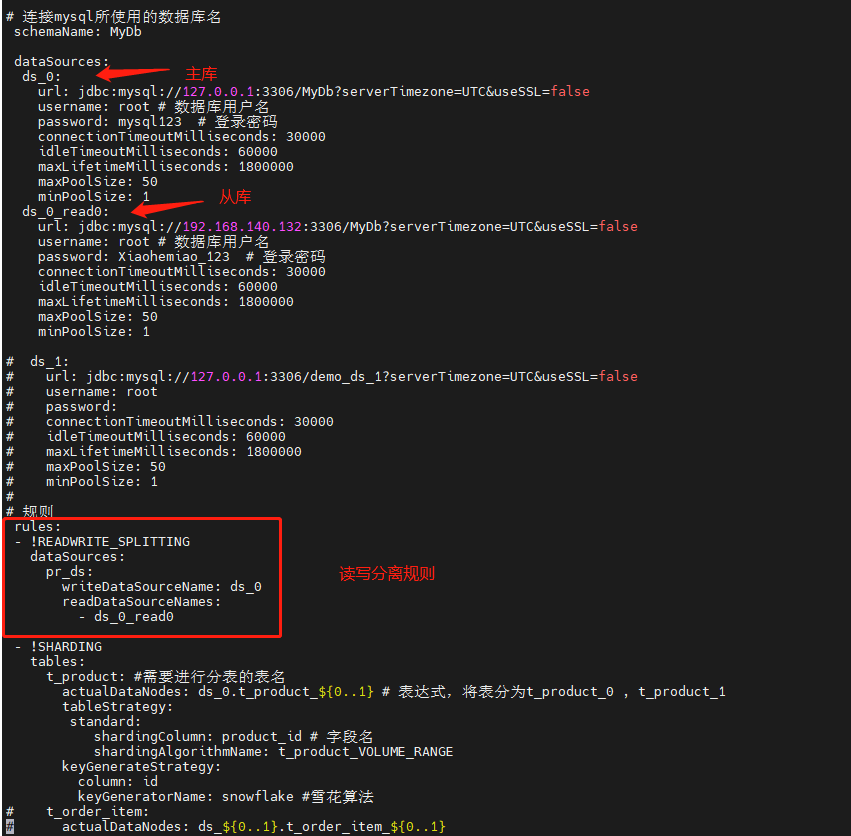
上述配置是同时有做容量范围分片
二、数据准备
在中间件中ShardingSphere中创建MyDb数据库,并创建相关表和插入数据
-- 创建表

SET NAMES utf8mb4;

SET FOREIGN_KEY_CHECKS = 0;

-- ----------------------------

-- Table structure for t_product

-- ----------------------------

DROP TABLE IF EXISTS `t_product`;

CREATE TABLE `t_product`  (

  `id` varchar(225) CHARACTER SET utf8mb4 COLLATE utf8mb4_general_ci NOT NULL,

  `product_id` int(11) NOT NULL,

  `product_name` varchar(255) CHARACTER SET utf8mb4 COLLATE utf8mb4_general_ci NOT NULL,

  PRIMARY KEY (`id`, `product_id`) USING BTREE

) ENGINE = InnoDB CHARACTER SET = utf8mb4 COLLATE = utf8mb4_general_ci ROW_FORMAT = Dynamic;

SET FOREIGN_KEY_CHECKS = 1;

-- 插入表数据

INSERT INTO t_product(product_id,product_name) VALUES(1,'one');

INSERT INTO t_product(product_id,product_name) VALUES(2,'two');

INSERT INTO t_product(product_id,product_name) VALUES(3,'three');

INSERT INTO t_product(product_id,product_name) VALUES(4,'four');

INSERT INTO t_product(product_id,product_name) VALUES(5,'five');

INSERT INTO t_product(product_id,product_name) VALUES(6,'six');

INSERT INTO t_product(product_id,product_name) VALUES(7,'seven');
三、查看数据

1、查看shardingsphere中间件t_product表数据

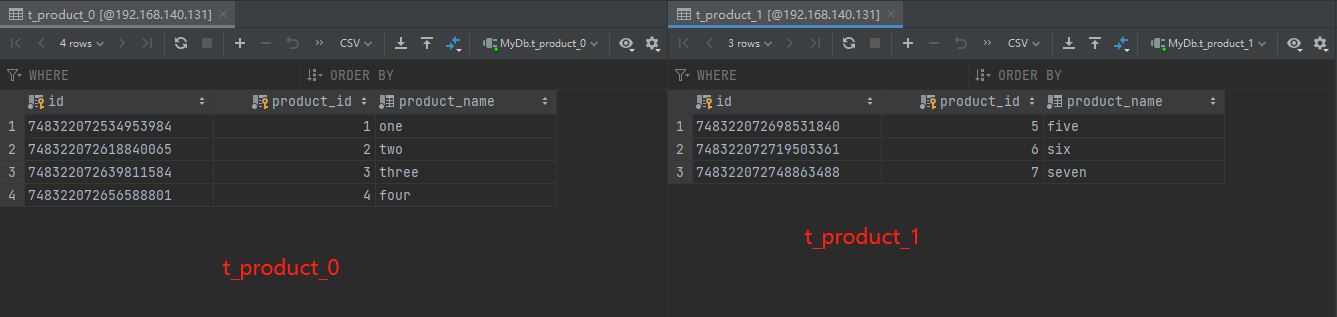
2、主库192.168.140.131数据
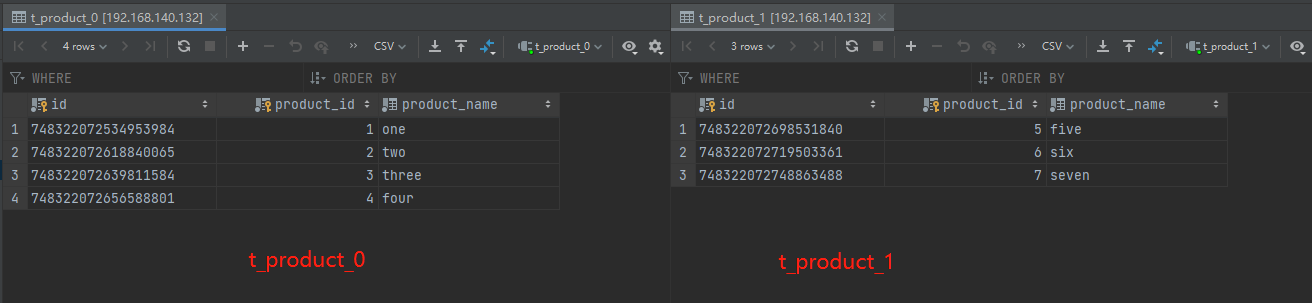
3、主库192.168.140.132数据
ShardingSphere-proxy-5.0.0建立mysql读写分离的连接(六)的更多相关文章
- Mysql读写分离-Amoeba Proxy
参考:http://www.linuxidc.com/Linux/2015-10/124115.htm 一个完整的MySQL读写分离环境包括以下几个部分: 应用程序client database pr ...
- MySQL读写分离技术
1.简介 当今MySQL使用相当广泛,随着用户的增多以及数据量的增大,高并发随之而来.然而我们有很多办法可以缓解数据库的压力.分布式数据库.负载均衡.读写分离.增加缓存服务器等等.这里我们将采用读写分 ...
- Mysql-Proxy实现mysql读写分离、负载均衡 (转)
在mysql中实现读写分离.负载均衡,用Mysql-Proxy是很容易的事,不过大型处理对于性能方面还有待提高,主要配置步骤如下: 1.1. mysql-proxy安装 MySQL Proxy就是这么 ...
- Database基础(六):实现MySQL读写分离、MySQL性能调优
一.实现MySQL读写分离 目标: 本案例要求配置2台MySQL服务器+1台代理服务器,实现MySQL代理的读写分离: 用户只需要访问MySQL代理服务器,而实际的SQL查询.写入操作交给后台的2台M ...
- [mysql]linux mysql 读写分离
[mysql]linux mysql 读写分离 作者:flymaster qq:908601287 blog:http://www.cnblogs.com/flymaster500/ 1.简介 当今M ...
- amoeba实现MySQL读写分离
amoeba实现MySQL读写分离 准备环境:主机A和主机B作主从配置,IP地址为192.168.131.129和192.168.131.130,主机C作为中间件,也就是作为代理服务器,IP地址为19 ...
- php实现MySQL读写分离
MySQL读写分离有好几种方式 MySQL中间件 MySQL驱动层 代码控制 关于 中间件 和 驱动层的方式这里不做深究 暂且简单介绍下 如何通过PHP代码来控制MySQL读写分离 我们都知道 &q ...
- mysql读写分离——中间件ProxySQL的简介与配置
mysql实现读写分离的方式 mysql 实现读写分离的方式有以下几种: 程序修改mysql操作,直接和数据库通信,简单快捷的读写分离和随机的方式实现的负载均衡,权限独立分配,需要开发人员协助. am ...
- ProxySQL实现Mysql读写分离 - 部署手册
ProxySQL是一个高性能的MySQL中间件,拥有强大的规则引擎.ProxySQL是用C++语言开发的,也是percona推的一款中间件,虽然也是一个轻量级产品,但性能很好(据测试,能处理千亿级的数 ...
随机推荐
- Pytest系列(一)初次了解
在之前,我分享过unittest系列,后来有很多人问我,能不能出pytest的教程,正好最近在整理pytest相关的资料,那么,就趁着这个机会,去和大家分享一下pytest系列. pytest是一个非 ...
- SIP信令跟踪工具HOMER
概述 HOMER是一款100%开源的针对SIP/VOIP/RTC的抓包工具和监控工具. HOMER是一款强大的.运营商级.可扩展的数据包和事件捕获系统,是基于HEP/EEP协议的VoIP/RTC监控应 ...
- 机器学习基础:奇异值分解(SVD)
SVD 原理 奇异值分解(Singular Value Decomposition)是线性代数中一种重要的矩阵分解,也是在机器学习领域广泛应用的算法,它不光可以用于降维算法中的特征分解,还可以用于推荐 ...
- js字符串操作方法集合
1.字符方法: str.charAt(): 可以访问字符串中特定的字符,可以接受0至字符串长度-1的数字作为参数,返回该位置下的字符,如果参数超出该范围,返回空字符串,如果没有参数,返回位置为0的字符 ...
- JVM垃圾回收篇
点赞再看,养成习惯,微信搜索「小大白日志」关注这个搬砖人. 文章不定期同步公众号,还有各种一线大厂面试原题.我的学习系列笔记. 基础概念 GC=jvm垃圾回收,垃圾回收机制是由垃圾回收器Garbage ...
- python学习番外篇——字符串的数据类型转换及内置方法
目录 字符串的数据类型转换及内置方法 类型转换 内置方法 优先掌握的方法 需要掌握的方法 strip, lstrip, rstrip lower, upper, islower, isupper 插入 ...
- XCTF练习题---MISC---What-is-this
XCTF练习题---MISC---What-is-this flag:AZADI TOWER 解题步骤: 1.观察题目,下载附件 2.下载后发现是个压缩包,文件内容不清楚,试试改为压缩包看看效果,发现 ...
- 3DUNet的Pytorch实现
编辑日期: 2021-04-24 16:57:48 本文主要介绍3DUNet网络,及其在LiTS2017肝脏肿瘤数据集上训练的Pytorch实现代码. GitHub地址: https://github ...
- Linux操作系统,为什么需要内核空间和用户空间?
点击上方"开源Linux",选择"设为星标" 回复"学习"获取独家整理的学习资料! 本文以 32 位系统为例介绍内核空间(kernel sp ...
- 第一个MVC程序
配置版 添加web的支持! 确定导入了SpringMVC 的依赖! 配置web.xml , 注册DispatcherServlet <?xml version="1.0" e ...