
国产时序数据库IotDB安装、与SpringBoot集成
一.简介:
本文将完成一个真实业务中的设备上报数据的一个例子,完整的展示后台服务接收到设备上报的数据后,将数据添加到时序数据库,并且将数据查询出来的一个例子。本文所有代码已经上传GitHub:https://github.com/Tom-shushu/work-study 下的 iotdb-demo 下。
IoTDB 是针对时间序列数据收集、存储与分析一体化的数据管理引擎。它具有体量轻、性能高、易使用的特点,完美对接 Hadoop 与 Spark 生态,适用于工业物联网应用中海量时间序列数据高速写入和复杂分析查询的需求。
我的理解:它就是一个树形结构的数据库可以很灵活的查询各个级下面的数据,因为它特殊的数据结构也使得它的查询效率会更高一些。
二.Docker安装IotDB:
1.拉取镜像(使用0.13,在使用的过程中0.14在查询时出现了问题)
docker pull apache/iotdb:0.13.1-node
2.创建数据文件和日志的 docker 挂载目录 (docker volume)
docker volume create mydata

docker volume create mylogs
3.直接运行镜像
docker run --name iotdb -p 6667:6667 -v mydata:/iotdb/data -v mylogs:/iotdb/logs -d apache/iotdb:0.13.1-node /iotdb/bin/start-server.sh
4.进入镜像并且登录IotDB
docker exec  -it iotdb  /bin/bash

/iotdb/sbin/start-cli.sh -h localhost -p 6667 -u root -pw root
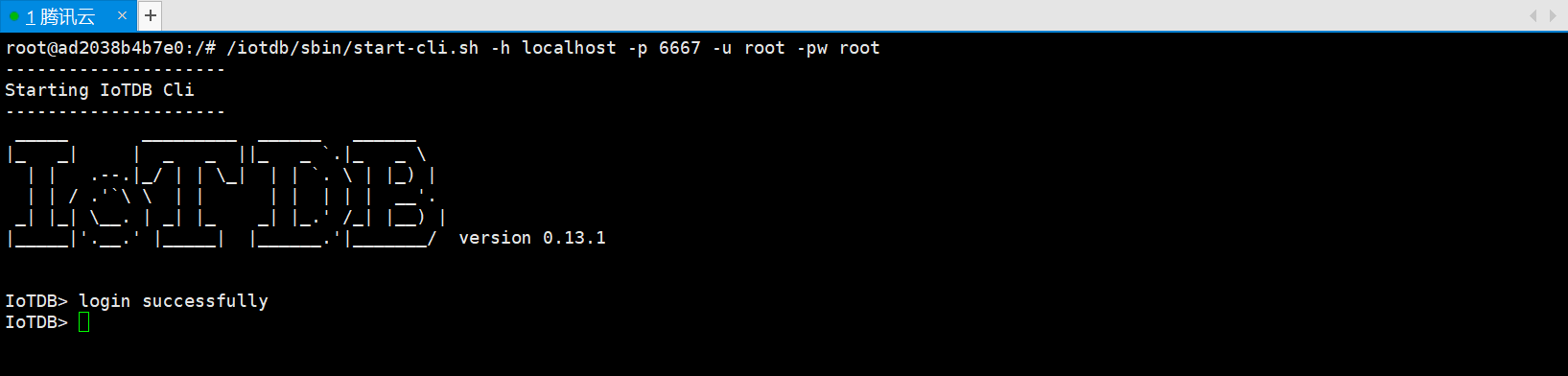
这样就算安装完成,然后打开服务器6667安全组
三.IotDB与SpringBoot集成
1.引入必要的依赖
    <dependency>

            <groupId>org.apache.iotdb</groupId>

            <artifactId>iotdb-session</artifactId>

            <version>0.14.0-preview1</version>

        </dependency>

        <dependency>

            <groupId>cn.hutool</groupId>

            <artifactId>hutool-all</artifactId>

            <version>5.6.3</version>

        </dependency>

        <dependency>

            <groupId>com.alibaba</groupId>

            <artifactId>fastjson</artifactId>

            <version>1.2.83</version>

        </dependency>

        <dependency>

            <groupId>org.springframework.boot</groupId>

            <artifactId>spring-boot-starter-web</artifactId>

        </dependency>

        <dependency>

            <groupId>org.projectlombok</groupId>

            <artifactId>lombok</artifactId>

            <optional>true</optional>

        </dependency>

        <dependency>

            <groupId>org.springframework.boot</groupId>

            <artifactId>spring-boot-starter-test</artifactId>

            <scope>test</scope>

            <exclusions>

                <exclusion>

                    <groupId>org.junit.vintage</groupId>

                    <artifactId>junit-vintage-engine</artifactId>

                </exclusion>

            </exclusions>

        </dependency>
2.编写配置类并且封装对应的方法 IotDBSessionConfig
package com.zhouhong.iotdbdemo.config;

import lombok.extern.log4j.Log4j2;

import org.apache.iotdb.rpc.IoTDBConnectionException;

import org.apache.iotdb.rpc.StatementExecutionException;

import org.apache.iotdb.session.Session;

import org.apache.iotdb.session.SessionDataSet;

import org.apache.iotdb.session.util.Version;

import org.apache.iotdb.tsfile.file.metadata.enums.TSDataType;

import org.apache.iotdb.tsfile.write.record.Tablet;

import org.apache.iotdb.tsfile.write.schema.MeasurementSchema;

import org.springframework.context.annotation.Bean;

import org.springframework.context.annotation.Configuration;

import org.springframework.stereotype.Component;

import java.rmi.ServerException;

import java.util.ArrayList;

import java.util.List;

/**

 * description: iotdb 配置工具类(常用部分,如需要可以自行扩展)

 * 注意:可以不需要创建分组,插入时默认前两个节点名称为分组名称 比如: root.a1eaKSRpRty.CA3013A303A25467 或者

 * root.a1eaKSRpRty.CA3013A303A25467.heart  他们的分组都为 root.a1eaKSRpRty

 * author: zhouhong

 */

@Log4j2

@Component

@Configuration

public class IotDBSessionConfig {

    private static Session session;

    private static final String LOCAL_HOST = "XXX.XX.XXX.XX";

    @Bean

    public Session getSession() throws IoTDBConnectionException, StatementExecutionException {

        if (session == null) {

            log.info("正在连接iotdb.......");

            session = new Session.Builder().host(LOCAL_HOST).port(6667).username("root").password("root").version(Version.V_0_13).build();

            session.open(false);

            session.setFetchSize(100);

            log.info("iotdb连接成功~");

            // 设置时区

            session.setTimeZone("+08:00");

        }

        return session;

    }

    /**

     * description: 带有数据类型的添加操作 - insertRecord没有指定类型

     * author: zhouhong

     * @param  * @param deviceId:节点路径如:root.a1eaKSRpRty.CA3013A303A25467

     *                  time:时间戳

     *                  measurementsList:物理量 即:属性

     *                  type:数据类型: BOOLEAN((byte)0), INT32((byte)1),INT64((byte)2),FLOAT((byte)3),DOUBLE((byte)4),TEXT((byte)5),VECTOR((byte)6);

     *                  valuesList:属性值 --- 属性必须与属性值一一对应

     * @return

     */

    public void insertRecordType(String deviceId, Long time,List<String>  measurementsList, TSDataType type,List<Object> valuesList) throws StatementExecutionException, IoTDBConnectionException, ServerException {

        if (measurementsList.size() != valuesList.size()) {

            throw new ServerException("measurementsList 与 valuesList 值不对应");

        }

        List<TSDataType> types = new ArrayList<>();

        measurementsList.forEach(item -> {

            types.add(type);

        });

        session.insertRecord(deviceId, time, measurementsList, types, valuesList);

    }

    /**

     * description: 带有数据类型的添加操作 - insertRecord没有指定类型

     * author: zhouhong

     * @param  deviceId:节点路径如:root.a1eaKSRpRty.CA3013A303A25467

     * @param  time:时间戳

     * @param  measurementsList:物理量 即:属性

     * @param  valuesList:属性值 --- 属性必须与属性值一一对应

     * @return

     */

    public void insertRecord(String deviceId, Long time,List<String>  measurementsList, List<String> valuesList) throws StatementExecutionException, IoTDBConnectionException, ServerException {

        if (measurementsList.size() == valuesList.size()) {

            session.insertRecord(deviceId, time, measurementsList, valuesList);

        } else {

            log.error("measurementsList 与 valuesList 值不对应");

        }

    }

    /**

     * description: 批量插入

     * author: zhouhong

     */

    public void insertRecords(List<String> deviceIdList, List<Long> timeList, List<List<String>> measurementsList, List<List<String>> valuesList) throws StatementExecutionException, IoTDBConnectionException, ServerException {

        if (measurementsList.size() == valuesList.size()) {

            session.insertRecords(deviceIdList, timeList, measurementsList, valuesList);

        } else {

            log.error("measurementsList 与 valuesList 值不对应");

        }

    }

    /**

     * description: 插入操作

     * author: zhouhong

     * @param  deviceId:节点路径如:root.a1eaKSRpRty.CA3013A303A25467

     *  @param  time:时间戳

     *  @param  schemaList: 属性值 + 数据类型 例子: List<MeasurementSchema> schemaList = new ArrayList<>();  schemaList.add(new MeasurementSchema("breath", TSDataType.INT64));

     *  @param  maxRowNumber:

     * @return

     */

    public void insertTablet(String deviceId,  Long time,List<MeasurementSchema> schemaList, List<Object> valueList,int maxRowNumber) throws StatementExecutionException, IoTDBConnectionException {

        Tablet tablet = new Tablet(deviceId, schemaList, maxRowNumber);

        // 向iotdb里面添加数据

        int rowIndex = tablet.rowSize++;

        tablet.addTimestamp(rowIndex, time);

        for (int i = 0; i < valueList.size(); i++) {

            tablet.addValue(schemaList.get(i).getMeasurementId(), rowIndex, valueList.get(i));

        }

        if (tablet.rowSize == tablet.getMaxRowNumber()) {

            session.insertTablet(tablet, true);

            tablet.reset();

        }

        if (tablet.rowSize != 0) {

            session.insertTablet(tablet);

            tablet.reset();

        }

    }

    /**

     * description: 根据SQL查询

     * author: zhouhong

     */

    public SessionDataSet query(String sql) throws StatementExecutionException, IoTDBConnectionException {

        return session.executeQueryStatement(sql);

    }

    /**

     * description: 删除分组 如 root.a1eaKSRpRty

     * author: zhouhong

     * @param  groupName:分组名称

     * @return

     */

    public void deleteStorageGroup(String groupName) throws StatementExecutionException, IoTDBConnectionException {

        session.deleteStorageGroup(groupName);

    }

    /**

     * description: 根据Timeseries删除  如:root.a1eaKSRpRty.CA3013A303A25467.breath  (个人理解:为具体的物理量)

     * author: zhouhong

     */

    public void deleteTimeseries(String timeseries) throws StatementExecutionException, IoTDBConnectionException {

        session.deleteTimeseries(timeseries);

    }

    /**

     * description: 根据Timeseries批量删除

     * author: zhouhong

     */

    public void deleteTimeserieList(List<String> timeseriesList) throws StatementExecutionException, IoTDBConnectionException {

        session.deleteTimeseries(timeseriesList);

    }

    /**

     * description: 根据分组批量删除

     * author: zhouhong

     */

    public void deleteStorageGroupList(List<String> storageGroupList) throws StatementExecutionException, IoTDBConnectionException {

        session.deleteStorageGroups(storageGroupList);

    }

    /**

     * description: 根据路径和结束时间删除 结束时间之前的所有数据

     * author: zhouhong

     */

    public void deleteDataByPathAndEndTime(String path, Long endTime) throws StatementExecutionException, IoTDBConnectionException {

        session.deleteData(path, endTime);

    }

    /**

     * description: 根据路径集合和结束时间批量删除 结束时间之前的所有数据

     * author: zhouhong

     */

    public void deleteDataByPathListAndEndTime(List<String> pathList, Long endTime) throws StatementExecutionException, IoTDBConnectionException {

        session.deleteData(pathList, endTime);

    }

    /**

     * description: 根据路径集合和时间段批量删除

     * author: zhouhong

     */

    public void deleteDataByPathListAndTime(List<String> pathList, Long startTime,Long endTime) throws StatementExecutionException, IoTDBConnectionException {

        session.deleteData(pathList, startTime, endTime);

    }

}
3.入参
package com.zhouhong.iotdbdemo.model.param;

import lombok.Data;

/**

 * description: 入参

 * date: 2022/8/15 21:53

 * author: zhouhong

 */

@Data

public class IotDbParam {

    /***

     * 产品PK

     */

    private  String  pk;

    /***

     * 设备号

     */

    private  String  sn;

    /***

     * 时间

     */

    private Long time;

    /***

     * 实时呼吸

     */

    private String breath;

    /***

     * 实时心率

     */

    private String heart;

    /***

     * 查询开始时间

     */

    private String startTime;

    /***

     * 查询结束时间

     */

    private String endTime;

}
4.返回参数
package com.zhouhong.iotdbdemo.model.result;

import lombok.Data;

/**

 * description: 返回结果

 * date: 2022/8/15 21:56

 * author: zhouhong

 */

@Data

public class IotDbResult {

    /***

     * 时间

     */

    private String time;

    /***

     * 产品PK

     */

    private  String  pk;

    /***

     * 设备号

     */

    private  String  sn;

    /***

     * 实时呼吸

     */

    private String breath;

    /***

     * 实时心率

     */

    private String heart;

}
5.使用
package com.zhouhong.iotdbdemo.server.impl;

import com.zhouhong.iotdbdemo.config.IotDBSessionConfig;

import com.zhouhong.iotdbdemo.model.param.IotDbParam;

import com.zhouhong.iotdbdemo.model.result.IotDbResult;

import com.zhouhong.iotdbdemo.server.IotDbServer;

import lombok.extern.log4j.Log4j2;

import org.apache.iotdb.rpc.IoTDBConnectionException;

import org.apache.iotdb.rpc.StatementExecutionException;

import org.apache.iotdb.session.SessionDataSet;

import org.apache.iotdb.tsfile.read.common.Field;

import org.apache.iotdb.tsfile.read.common.RowRecord;

import org.springframework.stereotype.Service;

import javax.annotation.Resource;

import java.rmi.ServerException;

import java.util.ArrayList;

import java.util.HashMap;

import java.util.List;

import java.util.Map;

/**

 * description: iot服务实现类

 * date: 2022/8/15 9:43

 * author: zhouhong

 */

@Log4j2

@Service

public class IotDbServerImpl implements IotDbServer {

    @Resource

    private IotDBSessionConfig iotDBSessionConfig;

    @Override

    public void insertData(IotDbParam iotDbParam) throws StatementExecutionException, ServerException, IoTDBConnectionException {

        // iotDbParam: 模拟设备上报消息

        // bizkey: 业务唯一key  PK :产品唯一编码   SN:设备唯一编码

        String deviceId = "root.bizkey."+ iotDbParam.getPk() + "." + iotDbParam.getSn();

        // 将设备上报的数据存入数据库(时序数据库)

        List<String> measurementsList = new ArrayList<>();

        measurementsList.add("heart");

        measurementsList.add("breath");

        List<String> valuesList = new ArrayList<>();

        valuesList.add(String.valueOf(iotDbParam.getHeart()));

        valuesList.add(String.valueOf(iotDbParam.getBreath()));

        iotDBSessionConfig.insertRecord(deviceId, iotDbParam.getTime(), measurementsList, valuesList);

    }

    @Override

    public List<IotDbResult> queryDataFromIotDb(IotDbParam iotDbParam) throws Exception {

        List<IotDbResult> iotDbResultList = new ArrayList<>();

        if (null != iotDbParam.getPk() && null != iotDbParam.getSn()) {

            String sql = "select * from root.bizkey."+ iotDbParam.getPk() +"." + iotDbParam.getSn() + " where time >= "

                    + iotDbParam.getStartTime() + " and time < " + iotDbParam.getEndTime();

            SessionDataSet sessionDataSet = iotDBSessionConfig.query(sql);

            List<String> columnNames = sessionDataSet.getColumnNames();

            List<String> titleList = new ArrayList<>();

            // 排除Time字段 -- 方便后面后面拼装数据

            for (int i = 1; i < columnNames.size(); i++) {

                String[] temp = columnNames.get(i).split("\\.");

                titleList.add(temp[temp.length - 1]);

            }

            // 封装处理数据

            packagingData(iotDbParam, iotDbResultList, sessionDataSet, titleList);

        } else {

            log.info("PK或者SN不能为空!!");

        }

        return iotDbResultList;

    }

    /**

     * 封装处理数据

     * @param iotDbParam

     * @param iotDbResultList

     * @param sessionDataSet

     * @param titleList

     * @throws StatementExecutionException

     * @throws IoTDBConnectionException

     */

    private void packagingData(IotDbParam iotDbParam, List<IotDbResult> iotDbResultList, SessionDataSet sessionDataSet, List<String> titleList)

            throws StatementExecutionException, IoTDBConnectionException {

        int fetchSize = sessionDataSet.getFetchSize();

        if (fetchSize > 0) {

            while (sessionDataSet.hasNext()) {

                IotDbResult iotDbResult = new IotDbResult();

                RowRecord next = sessionDataSet.next();

                List<Field> fields = next.getFields();

                String timeString = new java.text.SimpleDateFormat("yyyy-MM-dd HH:mm:ss").format(next.getTimestamp());

                iotDbResult.setTime(timeString);

                Map<String, String> map = new HashMap<>();

                for (int i = 0; i < fields.size(); i++) {

                    Field field = fields.get(i);

                    // 这里的需要按照类型获取

                    map.put(titleList.get(i), field.getObjectValue(field.getDataType()).toString());

                }

                iotDbResult.setTime(timeString);

                iotDbResult.setPk(iotDbParam.getPk());

                iotDbResult.setSn(iotDbParam.getSn());

                iotDbResult.setHeart(map.get("heart"));

                iotDbResult.setBreath(map.get("breath"));

                iotDbResultList.add(iotDbResult);

            }

        }

    }

}
6.控制层
package com.zhouhong.iotdbdemo.controller;

import com.zhouhong.iotdbdemo.config.IotDBSessionConfig;

import com.zhouhong.iotdbdemo.model.param.IotDbParam;

import com.zhouhong.iotdbdemo.response.ResponseData;

import com.zhouhong.iotdbdemo.server.IotDbServer;

import lombok.extern.log4j.Log4j2;

import org.apache.iotdb.rpc.IoTDBConnectionException;

import org.apache.iotdb.rpc.StatementExecutionException;

import org.springframework.web.bind.annotation.*;

import javax.annotation.Resource;

import java.rmi.ServerException;

/**

 * description: iotdb 控制层

 * date: 2022/8/15 21:50

 * author: zhouhong

 */

@Log4j2

@RestController

public class IotDbController {

    @Resource

    private IotDbServer iotDbServer;

    @Resource

    private IotDBSessionConfig iotDBSessionConfig;

    /**

     * 插入数据

     * @param iotDbParam

     */

    @PostMapping("/api/device/insert")

    public ResponseData insert(@RequestBody IotDbParam iotDbParam) throws StatementExecutionException, ServerException, IoTDBConnectionException {

        iotDbServer.insertData(iotDbParam);

        return ResponseData.success();

    }

    /**

     * 插入数据

     * @param iotDbParam

     */

    @PostMapping("/api/device/queryData")

    public ResponseData queryDataFromIotDb(@RequestBody IotDbParam iotDbParam) throws Exception {

        return ResponseData.success(iotDbServer.queryDataFromIotDb(iotDbParam));

    }

    /**

     * 删除分组

     * @return

     */

    @PostMapping("/api/device/deleteGroup")

    public ResponseData deleteGroup() throws StatementExecutionException, IoTDBConnectionException {

        iotDBSessionConfig.deleteStorageGroup("root.a1eaKSRpRty");

        iotDBSessionConfig.deleteStorageGroup("root.smartretirement");

        return ResponseData.success();

    }

}
四.PostMan测试
1.添加一条记录
接口:localhost:8080/api/device/insert
入参:
{

    "time":1660573444672,

    "pk":"a1TTQK9TbKT",

    "sn":"SN202208120945QGJLD",

    "breath":"17",

    "heart":"68"

}
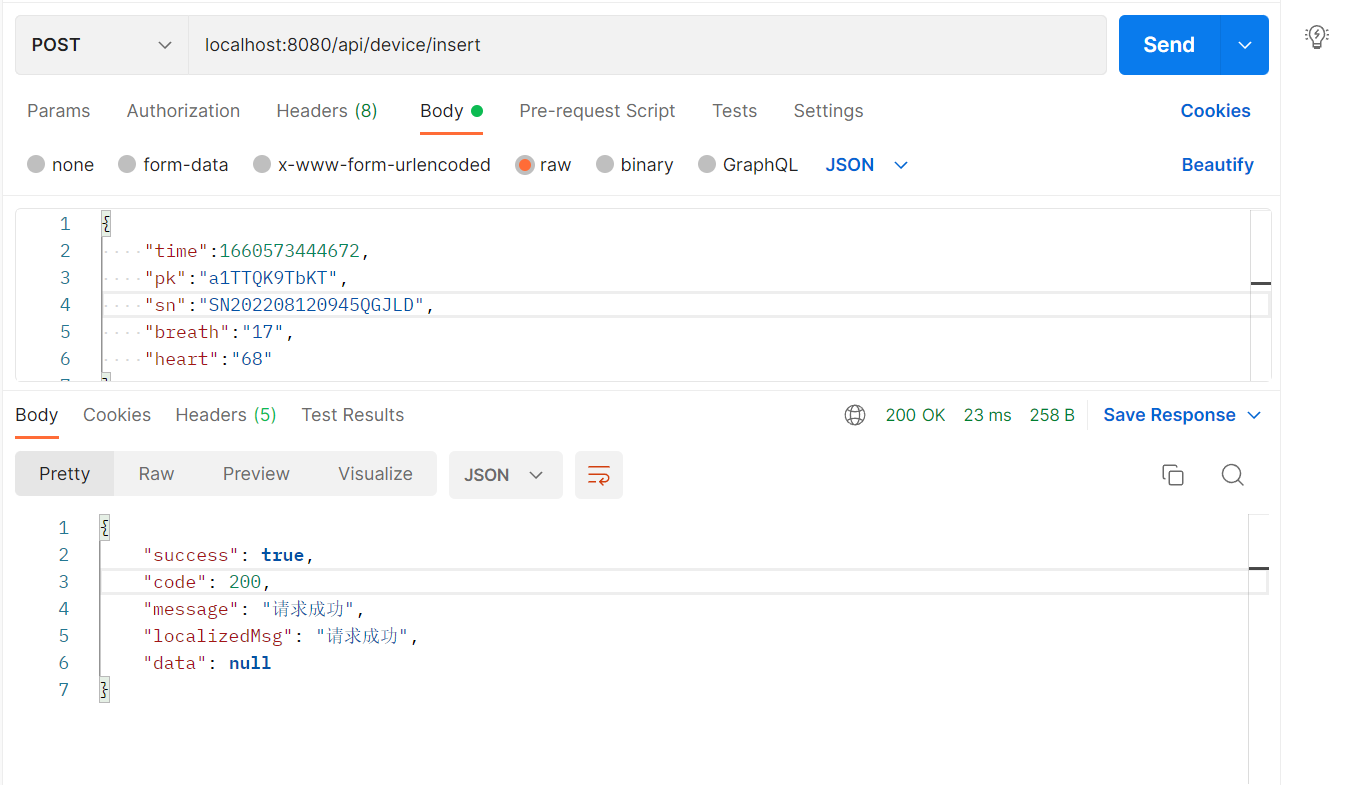
查看IotDB数据

2.根据SQL查询时间区间记录(其他查询以此类推)
接口:localhost:8080/api/device/queryData
入参:
{

    "pk":"a1TTQK9TbKT",

    "sn":"SN202208120945QGJLD",

    "startTime":"2022-08-14 00:00:00",

    "endTime":"2022-08-16 00:00:00"

}
结果:
{

    "success": true,

    "code": 200,

    "message": "请求成功",

    "localizedMsg": "请求成功",

    "data": [

        {

            "time": "2022-08-15 22:24:04",

            "pk": "a1TTQK9TbKT",

            "sn": "SN202208120945QGJLD",

            "breath": "19.0",

            "heart": "75.0"

        },

        {

            "time": "2022-08-15 22:24:04",

            "pk": "a1TTQK9TbKT",

            "sn": "SN202208120945QGJLD",

            "breath": "20.0",

            "heart": "78.0"

        },

        {

            "time": "2022-08-15 22:24:04",

            "pk": "a1TTQK9TbKT",

            "sn": "SN202208120945QGJLD",

            "breath": "17.0",

            "heart": "68.0"

        }

    ]

}
IotDB还支持分页、聚合等等其他操作,详细信息可以参考 https://iotdb.apache.org/zh/UserGuide/Master/Query-Data/Overview.html
国产时序数据库IotDB安装、与SpringBoot集成的更多相关文章
- 时序数据库InfluxDB安装及使用
时序数据库InfluxDB安装及使用 1 安装配置 安装 wget https://dl.influxdata.com/influxdb/releases/influxdb-1.3.1.x86_64. ...
- RabbitMQ学习笔记(一):安装及Springboot集成
前言 MQ,即消息队列Message Queue的缩写. RabbitMQ 是MQ的一种,就像招商银行是银行的一种一样.主要是用来实现应用程序的异步和解耦,同时也能起到消息缓冲,消息分发的作用. 消息 ...
- Influxdb 时序数据库 windows 安装
Influxdb 是一款比较火爆的时序数据库,本文介绍如何在 windows 平台下安装. 1.场景: windows 平台的 influxdb 似乎只支持单机非windows 服务的安装方式 适用于 ...
- Influxdb 时序数据库 centos 安装
Influxdb 环境搭建 操作系统:CentOS 7 X64 SSH工具:PuTTY 操作系统安装,请参照官网文档进行:https://www.centos.org/ 使用PuTTY 通过ssh连接 ...
- SpringBoot | 集成Redis
Windows下安装: https://github.com/MicrosoftArchive/redis/releases zip下就解包到自定义目录下,msi就跟着步骤安装 进入安装目录下运行命令 ...
- 时序数据库TDengine 详细安装+集成流程+问题解决
官方文档:https://docs.taosdata.com/get-started/package/ 点击进入 产品简介 TDengine 是一款高性能.分布式.支持 SQL 的时序数据库 (Dat ...
- 深度解读MRS IoTDB时序数据库的整体架构设计与实现
[本期推荐]华为云社区6月刊来了,新鲜出炉的Top10技术干货.重磅技术专题分享:还有毕业季闯关大挑战,华为云专家带你做好职业规划. 摘要:本文将会系统地为大家介绍MRS IoTDB的来龙去脉和功能特 ...
- MRS IoTDB时序数据库的总体架构设计与实现
MRS IoTDB时序数据库的总体架构设计与实现 MRS IoTDB是华为FusionInsight MRS大数据套件最新推出的时序数据库产品,其领先的设计理念在时序数据库领域展现出越来越强大的竞争力 ...
- Windows环境下springboot集成redis的安装与使用
一,redis安装 首先我们需要下载Windows版本的redis压缩包地址如下: https://github.com/MicrosoftArchive/redis/releases 连接打开后如下 ...
随机推荐
- 很好用的vscode 插件 Open PHP/HTML/JS In Browser 让php文件直接在浏览器打开
p { font-size: 25px } <body> <h1>安装插件</h1> <img src="https://img2020.cnblo ...
- P4169 [Violet]天使玩偶
两种操作:1.加入点(x,y); 2.查询距(x,y)最近的点的曼哈顿距离距离 思路:绝对值拆开通常可以取max,不过这里直接分类讨论4种情况,我们发现如果找\(i\)点左下点\(j\)\((x_j& ...
- 线性求 $i^i$ 的做法
线性求 \(i^i\) 的做法 方便起见,我们记 \(f_i=i^i\),\(i\) 的最小质因子为 \(p=\mathrm{minp}(i)\),第 \(i\) 个质数为 \(\mathrm{pr} ...
- boost::bind 不能处理函数重载 (error: no matching function for call to 'bind')
前言 最近任务多.工期紧,没有时间更新博客,就水一期吧.虽然是水,也不能太失水准,刚好最近工作中遇到一个 boost::bind 的问题,花费了半天时间来定位解决,就说说它吧. 问题背景 项目中使用了 ...
- 可靠的分布式KV存储产品-ETCD-初见
目录 Paxos Raft(Understandable Distributed Consensus) 名词介绍 Leader Election Log Replication 请求完整流程 etcd ...
- LVS+keepalived高可用
1.keeplived相关 1.1工作原理 Keepalived 是一个基于VRRP协议来实现的LVS服务高可用方案,可以解决静态路由出现的单点故障问题. 在一个LVS服务集群中通常有主服务器(MAS ...
- 2021.05.04【NOIP提高B组】模拟 总结
T1 题目大意, \(S_{i,j}=\sum_{k=i}^j a_k\) ,求 \(ans=\min\{ S_{i,j}\mod P|S_{i,j}\mod P\ge K \}\) 其中 \(i\l ...
- mysql复制表的两种方式
mysql复制表的两种方式. 第一.只复制表结构到新表 create table 新表 select * from 旧表 where 1=2 或者 create table 新表 like 旧表 第二 ...
- hive完整搭建
安装 MySQL 服务的详细步骤如下: 1. 解压安装包 现在已经为大家下载好了 MySQL 5.7.25 的安装包,存放在 /root/software 目录下.首先进入此目录下,然后使用tar - ...
- bat-命令行配置静态IP地址
查看连接名称ipconfig 打开命令提示符,输入netsh后回车 输入interface后回车 输入ip,回车 输入set address "连接名称" static 新IP地址 ...