
使用easypoi 最原始的代码进行导出Excel
首先,产品有需求,我们苦逼的程序员就得把需求实现。那么今天咱就把产品提的导出Excel的需求给他搞定。他的需求是这样的,很简单的Excel导出。样式如图所示: 。
。
其实我们项目中的ExcelUtils工具类不适应这种动态的问题和题干的导出。稍后我会吧此工具类的发放粘贴到文档中供大家参考和学习。那么项目中的不适应,我就自己手写最原始的进行导出,废话不多说开搞~
首先我们是从别的服务获取到数据,那么这个数据是个List集合。
代码如下
`@ApiOperation(value = "查看答卷数据--->导出功能")
@GetMapping("/{questionId}/export")
public void export(@PathVariable("questionId") String questionId, AnswerExportQueryModel queryModel, HttpServletResponse response) throws IOException {
//aggregateResultDto 自定义的返回值 里面包含header头 和List<?> 泛型,在这里不做解释。
AggregateResultDto aggregateResultDto = questionnaireManager.exportAnswerById(questionId, queryModel);
List<AnswerListResource> list = (List<AnswerListResource>) aggregateResultDto.getList();
//获取到List集合中的数据,接下来咱们进行手写导出Excel。
//说明一下: 导出的Excel的格式有两种 一个是xlsx 一个是 xls。需要自己创建不同的WorkBook实现类,在这里我踩坑了望大家不要再次踩坑。
//1 正常导出xlsx格式
//创建工作薄的时候,用Workbook workbook = new XSSFWorkbook(); 这样可以正常导出xlsx格式
` response.setContentType("application/vnd.openxmlformats-officedocument.spreadsheetml.sheet");
response.addHeader("Content-Disposition", "attachment;filename=fileName" + ".xlsx");`
//2 正常导出xls格式 Workbook workbook = new HSSFWorkbook();
` response.setContentType("application/vnd.ms-excel");
response.addHeader("Content-Disposition", "attachment;filename=fileName"+".xls");`
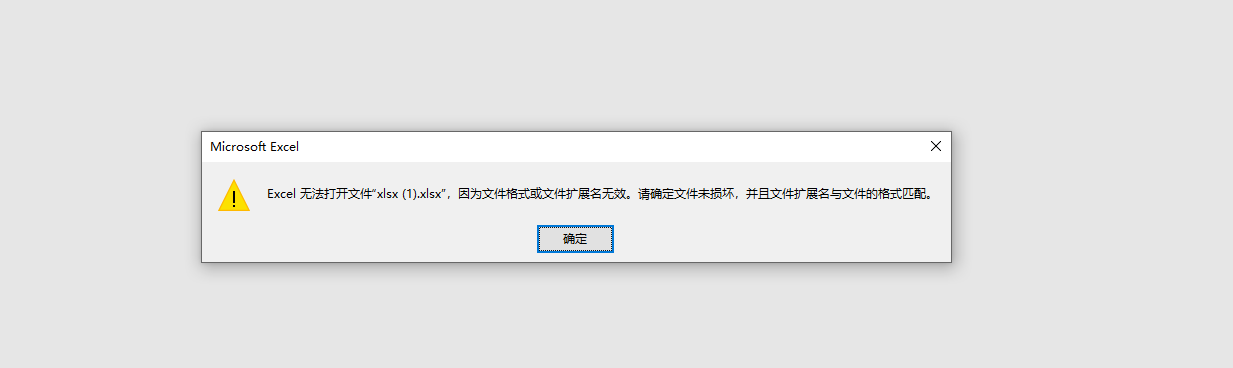
//3 如果创建xlsx工作薄的时候,用 Workbook workbook = new HSSFWorkbook(); 生成的excel将无法打开,并有如下提示:
//创建HSSFWorkbook对象(excel的文档对象)
Workbook wb = new XSSFWorkbook();
//建立新的sheet对象(excel的表单)
Sheet sheet = wb.createSheet("问卷答案数据");
//在sheet里创建第1行 (标题)
Row rowTitle = sheet.createRow(0);
//创建单元格并设置单元格内容
rowTitle.createCell(0).setCellValue("大鹏号");
rowTitle.createCell(1).setCellValue("学管师");
rowTitle.createCell(2).setCellValue("联系方式");
rowTitle.createCell(3).setCellValue("用户昵称");
rowTitle.createCell(4).setCellValue("提交时间");
rowTitle.createCell(5).setCellValue("你的性别");
rowTitle.createCell(6).setCellValue("您的出生日期");
for (int i = 0; i < list.size(); i++) {
AnswerListResource answerListExportResource = list.get(i);
int rownum = i + 1;
//在sheet里创建数据行
Row rowData = sheet.createRow(rownum);
// 固定列
rowData.createCell(0).setCellValue(answerListExportResource.getDpAccount());
rowData.createCell(1).setCellValue(answerListExportResource.getTeacherName());
rowData.createCell(2).setCellValue(answerListExportResource.getLearnManagerStudentPhone());
rowData.createCell(3).setCellValue(answerListExportResource.getNickName());
rowData.createCell(4).setCellValue(answerListExportResource.getSubTime());
rowData.createCell(5).setCellValue(getSexType(answerListExportResource.getGender()));
rowData.createCell(6).setCellValue(answerListExportResource.getBirthday());
// 设置动态列
List<AnswerListResource.Question> questions = answerListExportResource.getQuestions();
Map<String, AnswerListResource.Question> questionMap = questions.stream().collect(Collectors.toMap(AnswerListResource.Question::getQuestion, Function.identity(), (key1, key2) -> key2));
questions.stream().forEach(question -> {
AnswerListResource.Question questionTemp = questionMap.get(question.getQuestion());
if (questionTemp.getQuestion().equals(question.getQuestion())) {
// 第一次循环时 创建出 列的标题(问卷的问题列)
if (rownum == 1) {
rowTitle.createCell(rowTitle.getLastCellNum()).setCellValue(question.getQuestion());
}
// 设置答案
rowData.createCell(rowData.getLastCellNum()).setCellValue(question.getAnswer());
}
});
}
// 下载
ExcelUtils.downLoadExcel("问卷答案导出",response,wb);
}`
附:ExcelUtils 代码
`public class ExcelUtils {
/**

 * excel 导出

 *

 * @param list           数据

 * @param title          标题

 * @param sheetName      sheet名称

 * @param pojoClass      pojo类型

 * @param fileName       文件名称

 * @param isCreateHeader 是否创建表头

 * @param response

 */

public static void exportExcel(List<?> list, String title, String sheetName, Class<?> pojoClass, String fileName,

                               boolean isCreateHeader, HttpServletResponse response) throws IOException {

    ExportParams exportParams = new ExportParams(title, sheetName, ExcelType.XSSF);

    exportParams.setCreateHeadRows(isCreateHeader);

    defaultExport(list, pojoClass, fileName, response, exportParams);

}

/**

 * excel 导出

 *

 * @param list      数据

 * @param title     标题

 * @param sheetName sheet名称

 * @param pojoClass pojo类型

 * @param fileName  文件名称

 * @param response

 */

public static void exportExcel(List<?> list, String title, String sheetName, Class<?> pojoClass, String fileName,

                               HttpServletResponse response) throws IOException {

    defaultExport(list, pojoClass, fileName, response, new ExportParams(title, sheetName, ExcelType.XSSF));

}

/**

 * excel 导出

 *

 * @param list         数据

 * @param pojoClass    pojo类型

 * @param fileName     文件名称

 * @param response

 * @param exportParams 导出参数

 */

public static void exportExcel(List<?> list, Class<?> pojoClass, String fileName, ExportParams exportParams,

                               HttpServletResponse response) throws IOException {

    defaultExport(list, pojoClass, fileName, response, exportParams);

}

/**

 * excel 导出

 *

 * @param list         数据

 * @param pojoClass    pojo类型

 * @param fileName     文件名称

 * @param response

 */

public static void exportExcel(List<?> list, Class<?> pojoClass, String fileName, HttpServletResponse response) throws IOException {

    defaultExport(list, pojoClass, fileName, response, new ExportParams());

}

/**

 * excel 导出

 *

 * @param list     数据

 * @param fileName 文件名称

 * @param response

 */

public static void exportExcel(List<Map<String, Object>> list, String fileName, HttpServletResponse response)

        throws IOException {

    defaultExport(list, fileName, response);

}

/**

 * 默认的 excel 导出

 *

 * @param list         数据

 * @param pojoClass    pojo类型

 * @param fileName     文件名称

 * @param response

 * @param exportParams 导出参数

 */

private static void defaultExport(List<?> list, Class<?> pojoClass, String fileName, HttpServletResponse response,

                                  ExportParams exportParams) throws IOException {

    exportParams.setType(ExcelType.XSSF);

    Workbook workbook = ExcelExportUtil.exportExcel(exportParams, pojoClass, list);

    downLoadExcel(fileName, response, workbook);

}

/**

 * 默认的 excel 导出

 *

 * @param list     数据

 * @param fileName 文件名称

 * @param response

 */

private static void defaultExport(List<Map<String, Object>> list, String fileName, HttpServletResponse response)

        throws IOException {

    Workbook workbook = ExcelExportUtil.exportExcel(list, ExcelType.HSSF);

    downLoadExcel(fileName, response, workbook);

}

/**

 * 下载

 *

 * @param fileName 文件名称

 * @param response

 * @param workbook excel数据

 */

public static void downLoadExcel(String fileName, HttpServletResponse response, Workbook workbook)

        throws IOException {

    try {

        response.setCharacterEncoding("UTF-8");

        response.setHeader("content-Type", "application/vnd.ms-excel");

        response.setHeader("Content-Disposition", "attachment;filename="

                + URLEncoder.encode(fileName + "." + ExcelTypeEnum.XLSX.getValue(), "UTF-8"));

        workbook.write(response.getOutputStream());

    } catch (Exception e) {

        throw new IOException(e.getMessage());

    }

}

/**

 * excel 导入

 *

 * @param filePath   excel文件路径

 * @param titleRows  标题行

 * @param headerRows 表头行

 * @param pojoClass  pojo类型

 * @param <T>

 * @return

 */

public static <T> List<T> importExcel(String filePath, Integer titleRows, Integer headerRows, Class<T> pojoClass)

        throws IOException {

    if (StringUtils.isBlank(filePath)) {

        return null;

    }

    ImportParams params = new ImportParams();

    params.setTitleRows(titleRows);

    params.setHeadRows(headerRows);

    params.setNeedSave(true);

    params.setSaveUrl("/excel/");

    try {

        return ExcelImportUtil.importExcel(new File(filePath), pojoClass, params);

    } catch (NoSuchElementException e) {

        throw new IOException("模板不能为空");

    } catch (Exception e) {

        throw new IOException(e.getMessage());

    }

}

/**

 * excel 导入

 *

 * @param file      excel文件

 * @param pojoClass pojo类型

 * @param <T>

 * @return

 */

public static <T> List<T> importExcel(MultipartFile file, Class<T> pojoClass) throws IOException {

    return importExcel(file, 1, 1, pojoClass);

}

public static <T> List<T> importExcelNoTitle(MultipartFile file, Class<T> pojoClass) throws IOException {

return importExcel(file,0,1,pojoClass);

}

/**

 * excel 导入

 *

 * @param file       excel文件

 * @param titleRows  标题行

 * @param headerRows 表头行

 * @param pojoClass  pojo类型

 * @param <T>

 * @return

 */

public static <T> List<T> importExcel(MultipartFile file, Integer titleRows, Integer headerRows, Class<T> pojoClass)

        throws IOException {

    return importExcel(file, titleRows, headerRows, false, pojoClass);

}

/**

 * excel 导入

 *

 * @param file       上传的文件

 * @param titleRows  标题行

 * @param headerRows 表头行

 * @param needVerfiy 是否检验excel内容

 * @param pojoClass  pojo类型

 * @param <T>

 * @return

 */

public static <T> List<T> importExcel(MultipartFile file, Integer titleRows, Integer headerRows, boolean needVerfiy,

                                      Class<T> pojoClass) throws IOException {

    if (file == null) {

        return null;

    }

    try {

        return importExcel(file.getInputStream(), titleRows, headerRows, needVerfiy, pojoClass);

    } catch (Exception e) {

        throw new BusinessException(e.getMessage());

    }

}

/**

 * excel 导入

 *

 * @param inputStream 文件输入流

 * @param titleRows   标题行

 * @param headerRows  表头行

 * @param needVerify  是否检验excel内容

 * @param pojoClass   pojo类型

 * @param <T>

 * @return

 */

public static <T> List<T> importExcel(InputStream inputStream, Integer titleRows, Integer headerRows,

                                      boolean needVerify, Class<T> pojoClass) throws IOException {

    if (inputStream == null) {

        return null;

    }

    ImportParams params = new ImportParams();

    params.setTitleRows(titleRows);

    params.setHeadRows(headerRows);

    params.setSaveUrl("/excel/");

    params.setNeedSave(true);

    params.setNeedVerfiy(needVerify);

    try {

        return ExcelImportUtil.importExcel(inputStream, pojoClass, params);

    } catch (NoSuchElementException e) {

        throw new IOException("excel文件不能为空");

    } catch (Exception e) {

        throw new IOException(e.getMessage());

    }

}

/**

 * Excel 类型枚举

 */

enum ExcelTypeEnum {

    XLS("xls"), XLSX("xlsx");

    private String value;

    ExcelTypeEnum(String value) {

        this.value = value;

    }

    public String getValue() {

        return value;

    }

    public void setValue(String value) {

        this.value = value;

    }

}
}`
使用easypoi 最原始的代码进行导出Excel的更多相关文章
- RDLC - 后台代码直接导出Excel/PDF/Word格式
最近做报表功能,用到了.net的报表组件rdlc. 其中有个功能就是后台代码直接输出Excel/PDF/Word格式的文件,网上看了些资源,做个总结: 参考地址 我直接贴出代码: //自动导出exce ...
- EasyOffice-.NetCore一行代码导入导出Excel,生成Word
简介 Excel和Word操作在开发过程中经常需要使用,这类工作不涉及到核心业务,但又往往不可缺少.以往的开发方式在业务代码中直接引入NPOI.Aspose或者其他第三方库,工作繁琐,耗时多,扩展性差 ...
- Java代码导入导出 Excel 表格最简单的方法
import java.io.FileInputStream; import java.io.FileNotFoundException; import java.io.FileOutputStrea ...
- asp.net 同时执行js事件和代码事件 导出 excel
onclick="return bnQuery_onclick()" onserverclick="bnQuery_ServerClick" public ...
- asp.net导出excel示例代码
asp.net导出excel的简单方法. excel的操作,最常用的就是导出和导入. 本例使用NPOI实现. 代码:/// <summary> ); ; ...
- ASP.NET MVC导出excel(数据量大,非常耗时的,异步导出)
要在ASP.NET MVC站点上做excel导出功能,但是要导出的excel文件比较大,有几十M,所以导出比较费时,为了不影响对界面的其它操作,我就采用异步的方式,后台开辟一个线程将excel导出到指 ...
- 导出Excel和Excel生成dt
引用ExcelLibrary.dll(qq网盘上有源代码) //导出excel,“”文件名为空时,弹出提示框 ExcelLibrary.DataSetHelper.CreateWorkbook(&qu ...
- PHP从数据库导出EXCEL文件
参考博客链接:http://www.cnblogs.com/huangcong/p/3687665.html 我的程序代码 原生导出Excel文件 <?phpheader('Content-ty ...
- MVC学习笔记---MVC导出excel(数据量大,非常耗时的,异步导出)
要在ASP.NET MVC站点上做excel导出功能,但是要导出的excel文件比较大,有几十M,所以导出比较费时,为了不影响对界面的其它操作,我就采用异步的方式,后台开辟一个线程将excel导出到指 ...
- ASP.NET MVC导出excel
ASP.NET MVC导出excel 要在ASP.NET MVC站点上做excel导出功能,但是要导出的excel文件比较大,有几十M,所以导出比较费时,为了不影响对界面的其它操作,我就采用异步的方式 ...
随机推荐
- [2002年NOIP普及组] 选数
已知 n 个整数 x1,x2,-,xn,以及一个整数 k(k<n).从 n 个整数中任选 k 个整数相加,可分别得到一系列的和.例如当 n=4,k=3,4 个整数分别为 3,7,12,19 时, ...
- Vim与系统剪贴板的复制粘贴
上次在VirtualBox 安装Ubuntu 的时候有用到 vi/vim 与系统剪贴板的复制粘贴 通用问题,因此记录一下. 开始前需要先查看vim 是否已经支持clipboard功能,使用vim -- ...
- MYSQL-数据操作DDL,DML,DCL,DQL
前言:MYSQL数据操作语言分为四种 1.DDL(数据定义语言):用来创建数据库中的表.索引.视图.存储过程.触发器等. 2.DML(数据操作语言):用来对表内数据的添加.更新.删除等. 3.DCL( ...
- String类对象的常用操作及方法
在Java中,String类包含有50多个方法来实现字符串的各种操作,以下介绍一些我们需要经常使用的方法.1.字符串的连接public String concat(String str) 该方法的参数 ...
- Java 并发线程池线程数配置
1. 如果任务是计算密集型的,线程池大小建议设置为Ncpu + 1 其中N是CPU数量, +1 是为了在某一个线程处于暂停阶段时,有新的线程可以用来执行,减少CPU中断时间. 2. 如果是IO密集型, ...
- maven的setting.xml配置文件详解
<?xml version="1.0" encoding="UTF-8"?> <settings xmlns="http://mav ...
- webpackHotMiddleware改造成koa支持的中间件
const stream = require('stream'); const webpackHot = require('webpack-hot-middleware'); const PassTh ...
- 结构体struct
在 C# 中,结构体是值类型数据结构.它使得一个单一变量可以存储各种数据类型的相关数据.struct 关键字用于创建结构体. 结构体是用来代表一个记录.假设您想跟踪图书馆中书的动态.您可能想跟踪每本书 ...
- 【剑指Offer】【链表】合并两个排序的链表
题目:输入两个单调递增的链表,输出两个链表合成后的链表,当然我们需要合成后的链表满足单调不减规则. A:若链表1为空,则合并后的链表头结点为pHead2:若链表2为空,则合并后的链表头结点为pHead ...
- C++实现有序表--链表的合并操作代码
#include<iostream>#include<cstdlib>using namespace std;#define MAXSIZE 100#define OK 1#d ...