
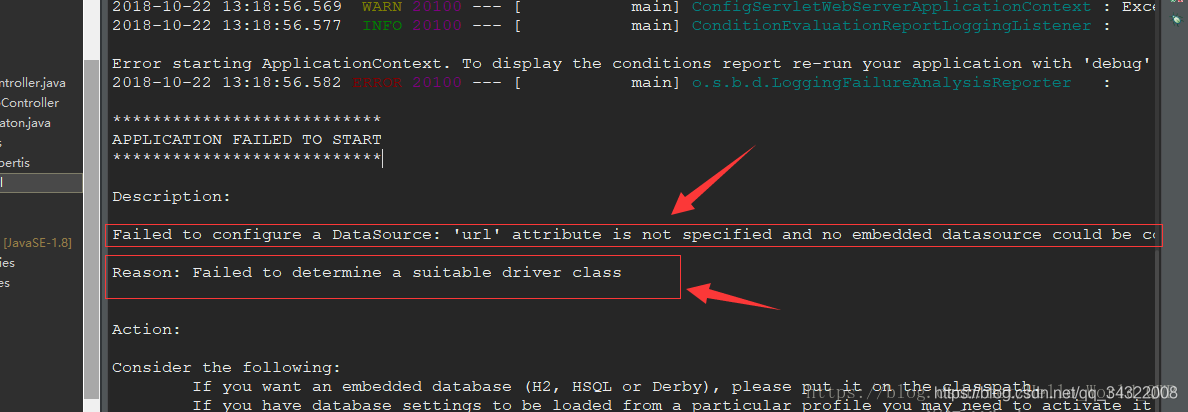
Mybatis配置报错:Failed to configure a DataSource: 'url' attribute is not specified and no embe...
问题分析及解决方案
问题原因: Mybatis没有找到合适的加载类,其实是大部分spring - datasource - url没有加载成功,分析原因如下所示.
DataSourceAutoConfiguration会自动加载.
没有配置spring - datasource - url 属性.
spring - datasource - url 配置的地址格式有问题.
配置 spring - datasource - url的文件没有加载.
方案一 (解决原因1)
排除此类的autoconfig。启动以后就可以正常运行。
@SpringBootApplication(exclude= {DataSourceAutoConfiguration.class})
方案二 (解决原因2)
在application.properties/或者application.yml文件中没有添加数据库配置信息.
spring:

  datasource:

    url: jdbc:mysql://localhost:3306/read_data?useUnicode=true&characterEncoding=UTF-8&useSSL=false

    username: root

    password: 123456

    driver-class-name: com.mysql.jdbc.Driver
方案三 (解决原因3)
在spring xml配置文件中引用了数据库地址 所以需要对:等进行转义处理.但是在application.properties/或者application.yml文件并不需要转义,错误和正确方法写在下面了.
//错误示例

spring.datasource.url = jdbc:mysql\://192.168.0.20\:1504/f_me?setUnicode=true&characterEncoding=utf8
//正确示例

spring.datasource.url = jdbc:mysql://192.168.0.20:1504/f_me?setUnicode=true&characterEncoding=utf8
方案四 (解决原因4)
yml或者properties文件没有被扫描到,需要在pom文件中<build></build>添加如下.来保证文件都能正常被扫描到并且加载成功.
<!-- 如果不添加此节点mybatis的mapper.xml文件都会被漏掉。 -->

<resources>

    <resource>

        <directory>src/main/java</directory>

        <includes>

            <include>**/*.yml</include>

            <include>**/*.properties</include>

            <include>**/*.xml</include>

        </includes>

        <filtering>false</filtering>

    </resource>

    <resource>

        <directory>src/main/resources</directory>

        <includes>

            <include>**/*.yml</include>

            <include>**/*.properties</include>

            <include>**/*.xml</include>

        </includes>

        <filtering>false</filtering>

    </resource>

</resources>
Mybatis配置报错:Failed to configure a DataSource: 'url' attribute is not specified and no embe...的更多相关文章
- SpringBoot 2.0 报错: Failed to configure a DataSource: 'url' attribute is not specified and no embe
问题描述 *************************** APPLICATION FAILED TO START *************************** Description ...
- springboot项目启动报错Failed to configure a DataSource: 'url' attribute is not specified and no embedde
springboot项目启动报错Failed to configure a DataSource: 'url' attribute is not specified and no embedde 创建 ...
- springboot启动报错 Failed to configure a DataSource: 'url' attribute is not specified and no embedded datasource could be configured.
新建了一个springboot项目报一下错误: Failed to configure a DataSource: 'url' attribute is not specified and no em ...
- Spring Boot错误——SpringBoot 2.0 报错: Failed to configure a DataSource: 'url' attribute is not specified and no embedded datasource could be configured.
背景 使用Spring Cloud搭建微服务,服务的注册与发现(Eureka)项目启动时报错,错误如下 *************************** APPLICATION FAILED T ...
- Spring Boot 2.1.7 启动项目失败,报错: "Failed to configure a DataSource: 'url' attribute is not specified and no embedded datasource could be configured."
一开始按照网上的很多解决办法是: 启动类头部声明@SpringBootApplication(exclude= {DataSourceAutoConfiguration.class}),但是这样会排除 ...
- springboot项目启动报错 Failed to configure a DataSource: 'url' attribute is not specified and no embedde
参考:https://blog.csdn.net/Coyotess/article/details/80637837
- SpringBoot使用mybatis,发生:Failed to configure a DataSource: 'url' attribute is not specified and no embedded datasource could be configured
最近,配置项目,使用SpringBoot2.2.1,配置mybatis访问db,配好后,使用自定义的数据源.启动发生: APPLICATION FAILED TO START ************ ...
- Failed to configure a DataSource: 'url' attribute is not specified and no embe...
问题分析及解决方案 问题原因: Mybatis没有找到合适的加载类,其实是大部分spring - datasource - url没有加载成功,分析原因如下所示. DataSourceAutoConf ...
- springboot启动报错Failed to configure a DataSource
2018-11-21 19:43:12.076 WARN 5392 --- [ main] ConfigServletWebServerApplicationContext : Exception e ...
- Spring boot&Mybatis 启动报错 Failed to auto-configure a DataSource
*************************** APPLICATION FAILED TO START *************************** Description: Fai ...
随机推荐
- reduce对数组及数组对象的常见操作
语法: array.reduce(function(prev, currentValue, currentIndex, arr), initialValue)prev: 初始值,或者是计算结束后的返回 ...
- temp_laijx_2023
############################ [{\"itemKey\": \"jenkinsConfig\",\"itemValue\& ...
- (0619) wavedrom 画时序图---链接
https://www.cnblogs.com/jackzhang001/p/15879207.html
- 活动 | Cloud Ace 受邀参加中国智造出海数字科技峰会
[Cloud Ace 是谷歌云全球战略合作伙伴,拥有 200 多名工程师,也是谷歌最高级别合作伙伴,多次获得 Google Cloud 合作伙伴奖. 作为谷歌托管服务商,我们提供谷歌云.谷歌地图.谷歌 ...
- MySql密码忘记怎么办?
第一步服务 net stop mysql 第二步,执行指令 mysqld --console --skip-grant-tables --user=mysql --shared-memory 第三步, ...
- Java基础__04.GUI编程
GUI编程常见的组件: 窗口 弹窗 面板 文本框 列表框 按钮 图片 监听事件 鼠标操作 键盘事件 GUI简介 GUI的核心技术:Swing AWT,是需要jre环境的. AWT介绍 包含了很多类和接 ...
- pip python的包成功,但是import的时候报错
今天,一位同学线上反馈import python包失败了,同时附带两张图: 图1.报错代码 图2.报错提示 结合上面两个图片,我们发现这个同学import全部失败,初步怀疑该同学的本地环境上没有num ...
- SQL执行定时任务JOB,包教包会
什么是JOB? 数据库中可以定时执行任务的功能组件,那就是JOB. JOB的作用 它可以按我们设置好的参数定时执行查询语句或存储过程,特别适合一些每天,每周,每月,每年这种需要循环执行任务的场景,当然 ...
- GreenDao操作本地db文件(使用greendao 新版3.2.2 )
项目需求:省市区使用本地db文件,数据库使用greendao框架.现在不想使用SQL语句,用greendao直接查询本地数据库表(至于为啥使用GreenDao,可以百度一下它的优势). https:/ ...
- YOLO v6:一个硬件友好的目标检测算法
本文来自公众号"AI大道理" YOLOv6 是美团视觉智能部研发的一款目标检测框架,致力于工业应用. YOLOv6支持模型训练.推理及多平台部署等全链条的工业应用需求,并在 ...