
GIT安装步骤记录以及Git 常用命令,忽略文件,推送本地代码到仓库示例以及报错解决
下载
下载地址
git-scm.com
或
gitforwindows.org
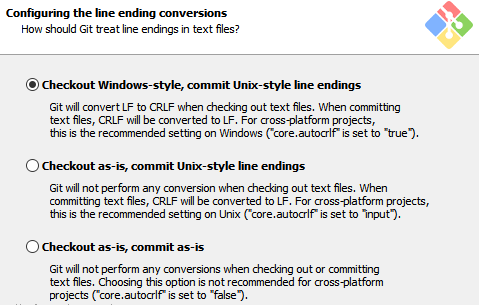
安装(凡是下面没有给出图片的,都按默认选项就行)
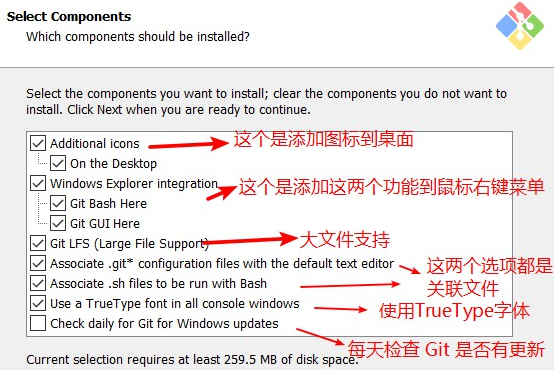
选择安装组件
调整你的 path 环境变量
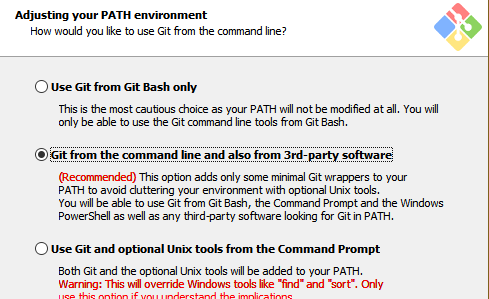
第一种是仅从 Git Bash 使用 Git。
第二种是从命令行以及第三方软件进行 Git。
第三种是从命令提示符使用 Git 和可选的 Unix 工具。
选择HTTPS后端传输
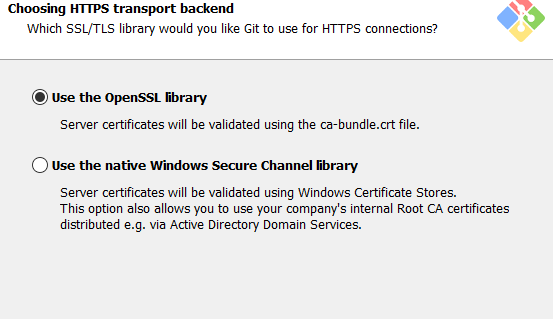
在具有企业管理证书的组织中要使用安全通道。一般都用第一个就OK了~
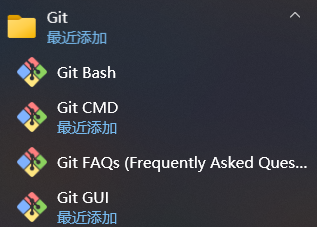
添加成功以后
推送本地代码到仓库示例以及报错解决
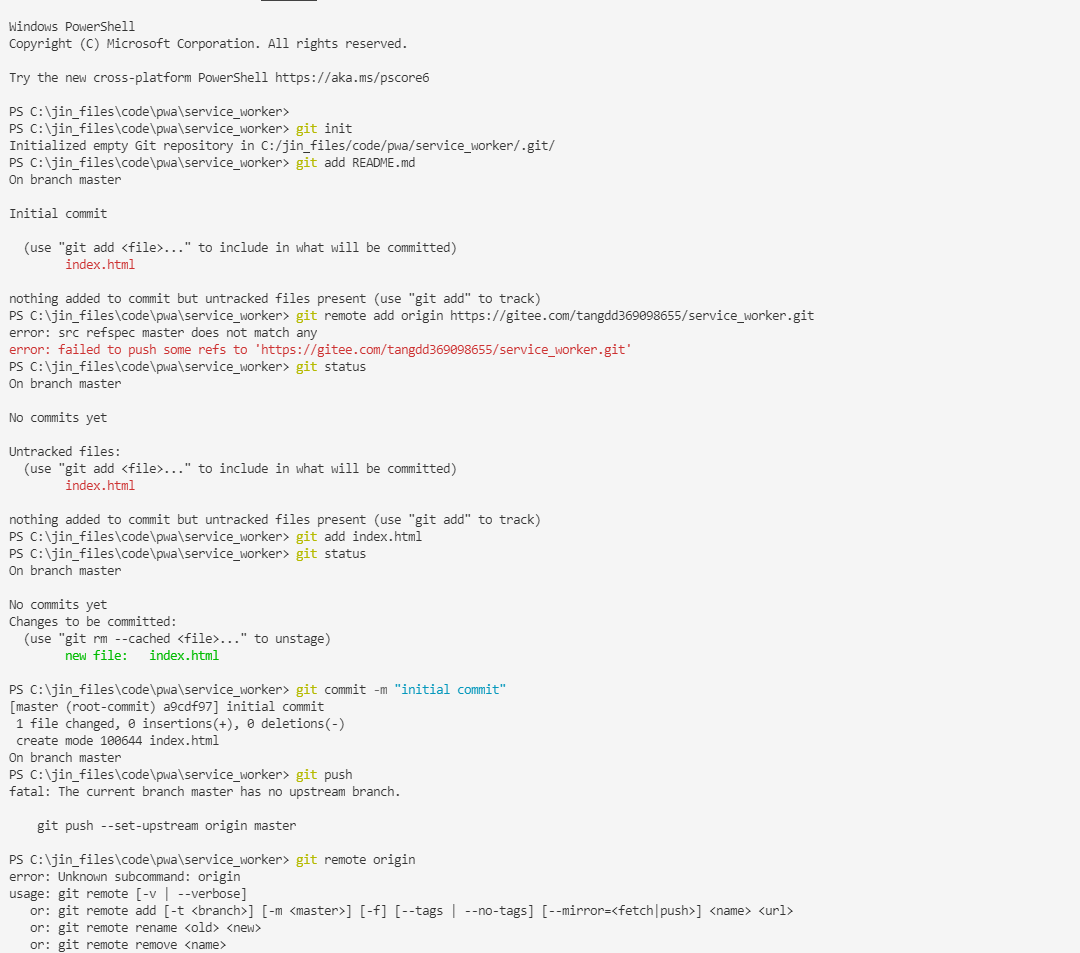
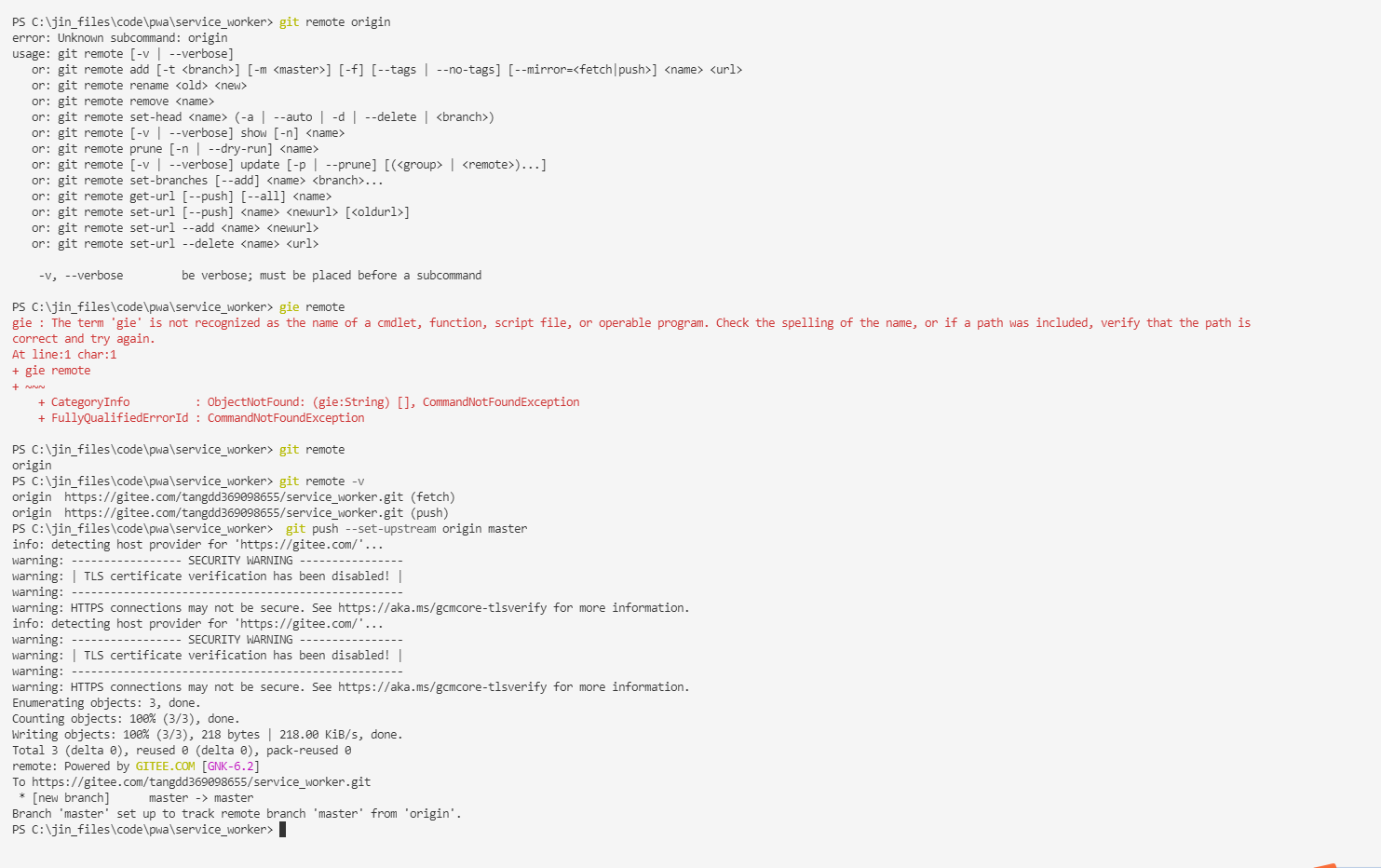
Windows PowerShell

Copyright (C) Microsoft Corporation. All rights reserved.

Try the new cross-platform PowerShell https://aka.ms/pscore6

PS C:\jin_files\code\pwa\service_worker>

PS C:\jin_files\code\pwa\service_worker> git init

Initialized empty Git repository in C:/jin_files/code/pwa/service_worker/.git/

PS C:\jin_files\code\pwa\service_worker> git add README.md

On branch master

Initial commit

  (use "git add <file>..." to include in what will be committed)

        index.html

nothing added to commit but untracked files present (use "git add" to track)

PS C:\jin_files\code\pwa\service_worker> git remote add origin https://gitee.com/tangdd369098655/service_worker.git

error: src refspec master does not match any

error: failed to push some refs to 'https://gitee.com/tangdd369098655/service_worker.git'

PS C:\jin_files\code\pwa\service_worker> git status

On branch master

No commits yet

Untracked files:

  (use "git add <file>..." to include in what will be committed)

        index.html

nothing added to commit but untracked files present (use "git add" to track)

PS C:\jin_files\code\pwa\service_worker> git add index.html

PS C:\jin_files\code\pwa\service_worker> git status

On branch master

No commits yet

Changes to be committed:

  (use "git rm --cached <file>..." to unstage)

        new file:   index.html

PS C:\jin_files\code\pwa\service_worker> git commit -m "initial commit"

[master (root-commit) a9cdf97] initial commit

 1 file changed, 0 insertions(+), 0 deletions(-)

 create mode 100644 index.html

On branch master

PS C:\jin_files\code\pwa\service_worker> git push

fatal: The current branch master has no upstream branch.

    git push --set-upstream origin master

PS C:\jin_files\code\pwa\service_worker> git remote origin

error: Unknown subcommand: origin

usage: git remote [-v | --verbose]

   or: git remote add [-t <branch>] [-m <master>] [-f] [--tags | --no-tags] [--mirror=<fetch|push>] <name> <url>

   or: git remote rename <old> <new>

   or: git remote remove <name>

   or: git remote set-head <name> (-a | --auto | -d | --delete | <branch>)

   or: git remote [-v | --verbose] show [-n] <name>

   or: git remote prune [-n | --dry-run] <name>

   or: git remote [-v | --verbose] update [-p | --prune] [(<group> | <remote>)...]

   or: git remote set-branches [--add] <name> <branch>...

   or: git remote get-url [--push] [--all] <name>

   or: git remote set-url [--push] <name> <newurl> [<oldurl>]

   or: git remote set-url --add <name> <newurl>

   or: git remote set-url --delete <name> <url>

    -v, --verbose         be verbose; must be placed before a subcommand

PS C:\jin_files\code\pwa\service_worker> gie remote

gie : The term 'gie' is not recognized as the name of a cmdlet, function, script file, or operable program. Check the spelling of the name, or if a path was included, verify that the path is

correct and try again.

At line:1 char:1

+ gie remote

+ ~~~

    + CategoryInfo          : ObjectNotFound: (gie:String) [], CommandNotFoundException

    + FullyQualifiedErrorId : CommandNotFoundException

PS C:\jin_files\code\pwa\service_worker> git remote

origin

PS C:\jin_files\code\pwa\service_worker> git remote -v

origin  https://gitee.com/tangdd369098655/service_worker.git (fetch)

origin  https://gitee.com/tangdd369098655/service_worker.git (push)

PS C:\jin_files\code\pwa\service_worker>  git push --set-upstream origin master

info: detecting host provider for 'https://gitee.com/'...

warning: ----------------- SECURITY WARNING ----------------

warning: | TLS certificate verification has been disabled! |

warning: ---------------------------------------------------

warning: HTTPS connections may not be secure. See https://aka.ms/gcmcore-tlsverify for more information.

info: detecting host provider for 'https://gitee.com/'...

warning: ----------------- SECURITY WARNING ----------------

warning: | TLS certificate verification has been disabled! |

warning: ---------------------------------------------------

warning: HTTPS connections may not be secure. See https://aka.ms/gcmcore-tlsverify for more information.

Enumerating objects: 3, done.

Counting objects: 100% (3/3), done.

Writing objects: 100% (3/3), 218 bytes | 218.00 KiB/s, done.

Total 3 (delta 0), reused 0 (delta 0), pack-reused 0

remote: Powered by GITEE.COM [GNK-6.2]

To https://gitee.com/tangdd369098655/service_worker.git

 * [new branch]      master -> master

Branch 'master' set up to track remote branch 'master' from 'origin'.

PS C:\jin_files\code\pwa\service_worker>
附录:Git 常用命令
初始化版本库,并提交到远程服务器端---名称为origin的远程服务器库
mkdir WebApp

cd WebApp

git init 本地初始化

touch README

git add README 添加文件

git commit -m 'first commit'

git remote add origin git@github.com:AAA/myCode.git
git branch 查看本地所有分支

git status 查看当前状态

git commit 提交

git branch -a 查看所有的分支

git branch -r 查看远程所有分支

git commit -am "init" 提交并且加注释

git push origin master 将文件给推到服务器上

git remote show origin 显示远程库origin里的资源

git push origin master:develop

git push origin master:hb-dev 将本地库与服务器上的库进行关联

git checkout --track origin/dev 切换到远程dev分支

git branch -D master develop 删除本地库develop

git checkout -b dev 建立一个新的本地分支dev

git merge origin/dev 将分支dev与当前分支进行合并

git checkout dev 切换到本地dev分支

git remote show 查看远程库

git rm 文件名(包括路径) 从git中删除指定文件

git clone git://github.com/aaa/aaaa.git 从服务器上将代码给拉下来

git config --list 看所有用户

git ls-files 看已经被提交的

git rm [file name] 删除一个文件

git commit -a 提交当前repos的所有的改变

git add [file name] 添加一个文件到git index

git commit -v 当你用-v参数的时候可以看commit的差异

git commit -m "This is the message describing the commit" 添加commit信息

git commit -a -a是代表add,把所有的change加到git index里然后再commit

git commit -a -v 一般提交命令

git log 看你commit的日志

git diff 查看尚未暂存的更新

git rm a.a 移除文件(从暂存区和工作区中删除)

git rm --cached a.a 移除文件(只从暂存区中删除)

git commit -m "remove" 移除文件(从Git中删除)

git rm -f a.a 强行移除修改后文件(从暂存区和工作区中删除)

git diff --cached 或 $ git diff --staged 查看尚未提交的更新
git remote add origin git@github.com:username/Hello-World.git

git push origin master 将本地项目给提交到服务器中
git pull 本地与服务器端同步
git push (远程仓库名) (分支名) 将本地分支推送到服务器上去。

git push origin serverfix:awesomebranch
git fetch 相当于是从远程获取最新版本到本地,不会自动merge

git commit -a -m "log_message" (-a是提交所有改动,-m是加入log信息) 本地修改同步至服务器端 :

git branch branch_0.1 master 从主分支master创建branch_0.1分支

git branch -m branch_0.1 branch_1.0 将branch_0.1重命名为branch_1.0

git checkout branch_1.0/master 切换到branch_1.0/master分支

du -hs
git branch 删除远程branch

git push origin :branch_remote_name

git branch -r -d branch_remote_name
忽略某个文件夹
如果已经提交过的文件或者文件夹怎么办?此时更改.gitignore文件对已经提交的文件是无效的
编辑.gitignore文件。

然后如果是单个文件,可以使用如下命令从仓库中删除:

git rm --cached logs/xx.log

如果是整个目录:

git rm --cached -r logs

如果文件很多,那么直接

git rm --cached -r .

如果提示某个文件无法忽略,可以添加-f参数强制忽略。

git rm -f --cached logs/xx.log

然后

git add .

git commit -m "Update .gitignore"
使用.gitignore忽略文件或者文件夹参考来源 https://blog.csdn.net/toopoo/article/details/88660806
常用命令部分参考来源 https://www.cnblogs.com/kenshinobiy/p/4543976.html

GIT安装步骤记录以及Git 常用命令,忽略文件,推送本地代码到仓库示例以及报错解决的更多相关文章
- NO.A.0006——Git在IntelliJ IDEA中的使用/创建项目并推送到GitHub仓库/分支管理及分支合并
一.在IntelliJ IDEA中使用Git: 1.在IDEA下创建项目并编写一个main方法的工程: 在IDEA下新建一个Project IDEA-->新建一个Project-->Fil ...
- Git学习——把文件推送到远程仓库
本地仓库与GitHub仓库关联 git remote add origin git@github.com:<github账户名>/<github的仓库名>.git 把本地库的所 ...
- Git - Git推送本地分支到远程分支报错(! [rejected] non-fast-forward)的解决办法
一般都是冲突造成的,解决方案执行如下命令(dev为分支名称): git fetch origin dev #获取远程 dev 分支的修改 git merge origin dev #合并 ...
- 使用tortoise git将一个现有项目推送到远程仓库
一.安装文件: 1.git https://git-scm.com/downloads 2.tortoise git https://tortoisegit.org/download/ 二.将一个现有 ...
- git常用命令以及如何与fork别人的仓库保持同步
简单常用命令1.git status查看当前仓库是否有文件改动a:提示Your branch is up-to-date with 'origin/master'.nothing to commit, ...
- 使用git命令将本地项目推送到远程仓库
将本地项目推送到远程仓库 这里先放一张图, 有助于理解git命令 1. 在GitHub上新建一个仓库 注意不要勾选自动生成README.md文件, 否则会产生某些问题, README.md文件到时可以 ...
- git将本地仓库推送到远程仓库
如何将本地仓库推送到公司远程仓库? 1:前提是你本地安装好git.先把远程git仓库克隆到本地 git clone 远程仓库的地址(SSH) 2: git branch //查看本地分支 3: g ...
- 如何将git本地创建的项目推送到github仓库
除了集中式的版本控制系统CVS和SVN外,还有目前世界上最先进的分布式版本控制系统Git,它的创始人是创建了linux的大神 - linus.GitHub网站与2008年开始服役,为开源项目免费提供G ...
- Win10 pip安装pycocotools报错解决方法(cl: 命令行 error D8021 :无效的数值参数“/Wno-cpp”)
参考: https://blog.csdn.net/chixia1785/article/details/80040172 https://blog.csdn.net/gxiaoyaya/articl ...
- Git本地初始化并推送到远程仓库
git常用命令 1.全局配置git用户名邮箱 git config --global user.name '你的名字' git config --global user.email '你的邮箱地址' ...
随机推荐
- 对于python中“FileNotFoundError: [Errno 2] No such file or directory”的解决办法
在我们使用vscode运行Python代码时遇到的情况 一.出现原因:这里是由于Vscode中,python里的路径是相对与工作目录来进行定位的.所以在多级目录情况下,若不设置绝对路径,往往找不到相应 ...
- Node.js的学习(三)node.js 开发web后台服务
一.Express -- Web开发框架 1.Express是什么? Express 是一个简洁而灵活.目前最流行的基于Node.js的Web开发框架, 提供了一系列强大特性帮助你创建各种 Web 应 ...
- nacos集群搭建和反向代理
搭建环境 安装ngin https://www.linuxprobe.com/linux-install-nginx.html 配置jdk1.8 https://blog.csdn.net/qq_42 ...
- 【云原生 · Kubernetes】搭建Harbor仓库
[云原生 · Kubernetes]Kubernetes基础环境搭建 接着上次的内容,后续来了! 4.部署Harbor仓库 在master节点执行脚本k8s_harbor_install.sh即可完成 ...
- .net随笔——Web开发config替换到正式config appSettings
前言(废话) 查了一些资料,总体来说呢,就是坑,而且顺带吐槽下百度,一个内容被copy那么多遍还排在最前面.同一个内容我点了那么多次,淦. 正题: 实现目的:开发的时候使用system.debug.c ...
- 错误“AxImp.exe”已退出,代码为 -1163019603
最近调试项目时突然出现错误"AxImp.exe"已退出,代码为 -1163019603 发现引用中的组件出现了一个感叹号 经过核对是锐浪报表的组件出现了问题,尝试打开报表设计器也无 ...
- 关于解决windows安装gcc g++环境 mingw失败
前言 这几天学习c++,为了详细了解编译过程我没有安装vs全家桶,当然使用命令行是最好的方法. 但是为了解决这个网络问题折腾了我很久,经过我研究发现,其实就是到固定网站下载几个压缩格式的文件,然后解压 ...
- C++编程笔记(智能指针学习)
目录 scoped_ptr unique_ptr shared_ptr 智能指针简单应用 智能指针简单应用 scoped_ptr 拷贝构造和 =赋值操作均为私有,不允许 内部重载了解引用(*)操作符和 ...
- 【云原生 • DevOps】一文掌握容器管理工具 Rancher
一.容器管理工具 Rancher 介绍Rancher 是一个开源的企业级全栈化容器部署及管理平台,其实就是一个 Docker 的图形化管理界面.它为容器提供基础架构服务,可以让 CNI 兼容的网络服务 ...
- 互斥锁 线程理论 GIL全局解释器锁 死锁现象 信号量 event事件 进程池与线程池 协程实现并发
目录 互斥锁 multiprocessing Lock类 锁的种类 线程理论 进程和线程对比 开线程的两种方式(类似进程) 方式1 使用Thread()创建线程对象 方式2 重写Thread类run方 ...