
tp5实现邮件发送(无注释)
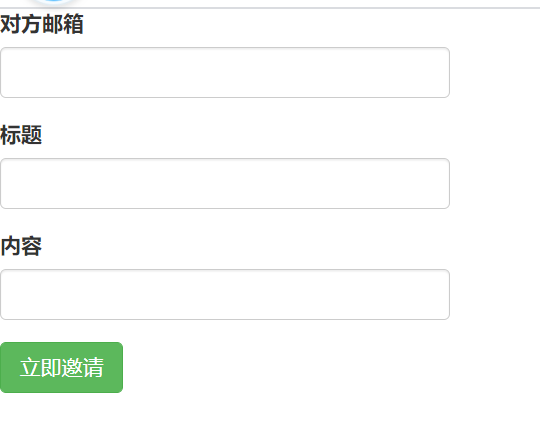
HTML代码:
<!DOCTYPE html>

<html lang="en">

<head>

    <meta charset="UTF-8">

    <title>邮箱注册</title>

    <link rel="stylesheet" href="http://apps.bdimg.com/libs/bootstrap/3.3.0/css/bootstrap.min.css">

</head>

<body>

<form action="/home/login/peroper" method="post" style="width: 300px">

    <div class="form-group">

        <label for="name">对方邮箱</label>

        <input type="text" class="form-control" name="email" id="name">

    </div>

    <div class="form-group">

        <label for="name">标题</label>

        <input type="text" class="form-control" name="title" id="name">

    </div>

    <div class="form-group">

        <label for="name">内容</label>

        <input type="textarea" class="form-control" name="content" id="name">

    </div>

  <button type="submit" class="btn btn-success">立即邀请</button>

</form>

</body>

</html>
控制器代码:
    public function peroper()

    {

        //    接受邮箱参数

        $params = input();

        $email = $params['email'];//接受对方邮箱号码

        $title = $params['title'];//邮箱主题

        $content = $params['content'];//邮箱内容

        $mail = new PHPMailer(true);                              // Passing `true` enables exceptions

        try {

            //服务器配置

            $mail->CharSet = "UTF-8";                     //设定邮件编码

            $mail->SMTPDebug = 0;                        // 调试模式输出

            $mail->isSMTP();                             // 使用SMTP

            $mail->Host = 'smtp.qq.com';                // SMTP服务器

            $mail->SMTPAuth = true;                      // 允许 SMTP 认证

            $mail->Username = '910624858@qq.com';                // SMTP 用户名  即邮箱的用户名

            $mail->Password = 'syqyafshccsabbhh';             // SMTP 密码  部分邮箱是授权码(例如163邮箱)

            $mail->SMTPSecure = 'ssl';                    // 允许 TLS 或者ssl协议

            $mail->Port = 465;                            // 服务器端口 25 或者465 具体要看邮箱服务器支持

            $mail->setFrom('910624858@qq.com', 'yanbing');  //发件人

            $mail->addAddress($email);  // 收件人

            //$mail->addAddress('ellen@example.com');  // 可添加多个收件人

            $mail->addReplyTo('910624858@qq.com', 'yanbing'); //回复的时候回复给哪个邮箱 建议和发件人一致

            //$mail->addCC('cc@example.com');                    //抄送

            //$mail->addBCC('bcc@example.com');                    //密送

            //发送附件

            // $mail->addAttachment('../xy.zip');         // 添加附件

            // $mail->addAttachment('../thumb-1.jpg', 'new.jpg');    // 发送附件并且重命名

            //Content

            $mail->isHTML(true);                                  // 是否以HTML文档格式发送  发送后客户端可直接显示对应HTML内容

            $mail->Subject = $title . time();

            $mail->Body = $content . date('Y-m-d H:i:s');

            $mail->AltBody = '如果邮件客户端不支持HTML则显示此内容';

            $mail->send();

            echo '邮件发送成功';

        } catch (Exception $e) {

            echo '邀请失败: ', $mail->ErrorInfo;

        }

    }
tp5实现邮件发送(无注释)的更多相关文章
- TP5实现邮件发送(PHP 利用QQ邮箱发送邮件「PHPMailer」)
在 PHP 应用开发中,往往需要验证用户邮箱.发送消息通知,而使用 PHP 内置的 mail() 函数,则需要邮件系统的支持. 如果熟悉 IMAP/SMTP 协议,结合 Socket 功能就可以编写邮 ...
- tp5实现邮件发送
项目中,用户修改密码,需要发送验证码到用户邮箱,于是就看了看,在此记录一下. 1.开启SMTP服务 测试用的是自己的qq邮箱,首先需要开启邮箱的SMTP服务,开启之后,要记得给你的授权码,授权码一定要 ...
- Tp5.0 PHPMailer邮件发送
今天突然想起来邮件发送,就看了一下PHPmailer,其实这个用起来很简单,都是封装好的 https://github.com/PHPMailer/PHPMailer,直接下载下来之后,把他放入TP5 ...
- TP5使用phpmailer实现邮件发送
1.从github下载PHPMailer,在vendor目录中新建文件夹phpmailer,将压缩包中的class.phpmailer.php和class.smtp.php复制到phpmailer中, ...
- python 发送无附件邮件
import smtplibimport tracebackfrom email.mime.text import MIMETextfrom config.config import * ...
- 【Thinkphp 5】 整合邮箱类 phpmailer实现邮件发送
第一步:下载phpmailer文件,主要用到的文件只有箭头指向的两个,thinkphp5中,把class.phpmailer.php改成了phpmailer.php 第二步: 将phpmailer文件 ...
- 测试开发【提测平台】分享11-Python实现邮件发送的两种方法实践
微信搜索[大奇测试开],关注这个坚持分享测试开发干货的家伙. 按照开发安排,本篇本应该是关于提测页面的搜索和显示实现,怕相似内容疲劳,这期改下内容顺序,将邮件服务的相关的提前,在之前的产品需求和原型中 ...
- .NET开发邮件发送功能的全面教程(含邮件组件源码)
今天,给大家分享的是如何在.NET平台中开发“邮件发送”功能.在网上搜的到的各种资料一般都介绍的比较简单,那今天我想比较细的整理介绍下: 1) 邮件基础理论知识 2) ...
- 利用PHPMailer 来完成PHP的邮件发送 #转载自:大菜鸟在云端#
利用PHPMailer 来完成PHP的邮件发送 1.首先是下载PHPMailer http://code.google.com/a/apache-extras.org/p/phpmailer/ 2.解 ...
随机推荐
- Git分支基本操作
感谢廖雪峰老师,以下教程均来自廖雪峰老师的博客,地址:https://www.liaoxuefeng.com/wiki/896043488029600/900003767775424 基本原理 在版本 ...
- C语言中的单引号和双引号的区别
首先肯定地说,二者是有区别的,不是说用谁都一样. 1.实质区别,代表的含义不同 'A'代表的是一个整数,而且这个整数对应的是编译器所采用的字符集中的字符序列对应的数值.所以'A'跟ASCII中的65意 ...
- 获取联系人列表的时候contact_id出现null的值
因为删除联系人只是把它的contact_id设置为null,所以只要手机上删除过联系人id就会有null,用之前先判断是不是null就好了
- Solution -「CF 1349D」Slime and Biscuits
\(\mathcal{Description}\) Link. 有 \(n\) 堆饼干,一开始第 \(i\) 堆有 \(a_i\) 块.每次操作从所有饼干中随机一块,将其随机丢到另外一堆.求所 ...
- 我们一起来学grep
文章目录 grep 介绍 grep 命令格式 grep 命令选项 grep 实例 查找指定进程 查找指定进程个数 从文件中读取关键词进行搜索 从多个文件中查找关键字 输出以u开头的行 输出非u开头的行 ...
- Spring Boot部署之 web项目war包运行
传统的部署方式:将项目打成war包,放入tomcat 的webapps目录下面,启动tomcat,即可访问. 具体打war包流程: 1.pom.xml配置文件修改: 2.改造启动类,如果是war包发布 ...
- CesiumJS-01 环境搭建
CesiumJS 环境搭建 操作环境: OS:Windows 10 专业版 19042.685 64 位操作系统 1.安装Node.js (1)打开Node.js官网 https://nodejs. ...
- [Golang]一些书城项目中出现错误的原因和解决办法(一)
跟着B站尚硅谷的GoWeb教程写书城项目,整理一下自己写的时候出现的错误和解决办法. 错误一:cartItem中只能加入一种书,SQL语句没有问题,但是购物车中的总金额和总数量正确: 原因:cartI ...
- Hbuilderx换行问题(属性合并一行展示)
1. 标签折行,非吾所愿(格式化代码快捷键:Ctrl + K) 2. 打开工具-设置 3. 点击左侧插件配置,点击右边下侧jsbeautify 4. 将原本的折行长度由120改为1200(长度可根据 ...
- 【转】浅谈 Integer 类
突然发现自己对Integer i = 10;这种语法不太明白,于是乎有了这篇文章,那么在讲解 Integer 之前,我们先看下面这段代码: 1 2 3 4 5 6 7 8 9 10 11 12 13 ...