
python运维开发之第十一天(RabbitMQ,redis)
一、RabbitMQ
python的Queue与RabbitMQ之间的理解:
python的进程或线程Queue只能python自己用。RabbitMQ队列多个应用之间共享队列,互相通信。
1、简单的实现生产者与消费者
生产者
(1)建立socket连接;(2)声明一个管道;(3)声明队列(queue);(4)通过管道发消息;(5)routing_key(queue名字);(6)body(内容)
消费者
(1)建立连接;(2)声明管道;(3)声明队列;(4)消费者声明队列(防止生产者后启动,消费者报错);(5)消费消息;(6)callback如果收到消息就调用函数处理消息 queue队列名字;
#!/usr/bin/env python

# -*- coding: utf-8 -*-

# @Author  : Willpower-chen

# @blog: http://www.cnblogs.com/willpower-chen/

import pika

#建立socket连接

connection = pika.BlockingConnection(pika.ConnectionParameters('localhost'))

#声明一个管道

channel = connection.channel()

#声明一个队列

channel.queue_declare(queue='hello')

#通过管道发消息,routing_key 队列queue名字 ,body发送内容

channel.basic_publish(exchange='',

                      routing_key='hello',

                      body='Hello World! 1 2')

print("[x] send 'Hello World! 1 2 '")

connection.close()
producer
#!/usr/bin/env python

# -*- coding: utf-8 -*-

# @Author  : Willpower-chen

# @blog: http://www.cnblogs.com/willpower-chen/

import pika,time

#建立连接

connection = pika.BlockingConnection(pika.ConnectionParameters('localhost'))

#声明一个管道

channel = connection.channel()

#声明队列,防止生产者(发送端)没开启,消费者端报错

channel.queue_declare(queue='hello')

#ch管道的内存对象地址,如果收到消息就调用函数callback,处理消息

def callbak(ch,method,properties,body):

    print("[x] Received %r " % body)

    # time.sleep(30)

#消费消息

channel.basic_consume(callbak,

                      queue='hello',

                      no_ack=True #消息有没处理,都不给生产者发确认消息

                      )

print('[*] Waitting for messages TO exit press ctrl+c')

channel.start_consuming() #开始
consumer
2、消费者对生产者,可以1对多,而且默认是轮询机制
no_ack=True如果注释掉的话,消费者端不给服务器端确认收到消息,服务器端就不会把要发的消息从队列里清除
如下图注释了no_ack,加了一个时间,

开启三个消费者,一个生产者,生产者只send一次数据,挨个停止consumer,会发现同一条消息会被重新发给下一个consumer,直到producer收到consumer的确认收到的消息

3、队列查询

清除队列消息

4、消息持久化
(1)durable只是队列持久化
channel.queue_declare(queue='hello',durable=True)
生产者和消费者都需要添加durable=True
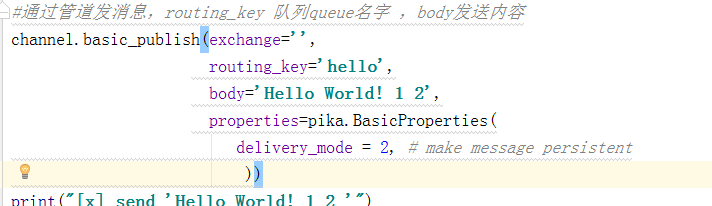
(2)要实现消息持久化,还需要
5、消息(1对多)实现权重功能
消费者端添加在消费消息之前
channel.basic_qos(prefetch_count=1)
6、广播消息fanout(纯广播)订阅发布
#!/usr/bin/env python

# -*- coding: utf-8 -*-

# @Author  : Willpower-chen

# @blog: http://www.cnblogs.com/willpower-chen/

import pika

import sys

connection = pika.BlockingConnection(pika.ConnectionParameters(

    host='localhost'))

channel = connection.channel()

channel.exchange_declare(exchange='logs',

                         type='fanout')

#message = ' '.join(sys.argv[1:]) or "info: Hello World!"

message = "info: Hello World!2"

channel.basic_publish(exchange='logs',

                      routing_key='',

                      body=message)

print(" [x] Sent %r" % message)

connection.close()
fanout_producer
#!/usr/bin/env python

# -*- coding: utf-8 -*-

# @Author  : Willpower-chen

# @blog: http://www.cnblogs.com/willpower-chen/

import pika

connection = pika.BlockingConnection(pika.ConnectionParameters(

    host='localhost'))

channel = connection.channel()

channel.exchange_declare(exchange='logs',

                         type='fanout')

result = channel.queue_declare(exclusive=True)

queue_name = result.method.queue

print("random queuename",queue_name)

channel.queue_bind(exchange='logs',

                   queue=queue_name)

print(' [*] Waiting for logs. To exit press CTRL+C')

def callback(ch, method, properties, body):

    print(" [x] %r" % body)

channel.basic_consume(callback,

                      queue=queue_name,

                      no_ack=True)

channel.start_consuming()
fanout_consumer
7、direct广播模式(有选择性的发送接收消息)
import pika

import sys

connection = pika.BlockingConnection(pika.ConnectionParameters(

    host='localhost'))

channel = connection.channel()

channel.exchange_declare(exchange='direct_logs',

                         type='direct')

severity = sys.argv[1] if len(sys.argv) > 1 else 'info'

message = ' '.join(sys.argv[2:]) or 'Hello World!'

channel.basic_publish(exchange='direct_logs',

                      routing_key=severity,

                      body=message)

print(" [x] Sent %r:%r" % (severity, message))

connection.close()
direct_producer
#!/usr/bin/env python

# -*- coding: utf-8 -*-

# @Author  : Willpower-chen

# @blog: http://www.cnblogs.com/willpower-chen/

import pika

import sys

connection = pika.BlockingConnection(pika.ConnectionParameters(

    host='localhost'))

channel = connection.channel()

channel.exchange_declare(exchange='direct_logs',

                         type='direct')

result = channel.queue_declare(exclusive=True)

queue_name = result.method.queue

severities = sys.argv[1:]

if not severities:

    sys.stderr.write("Usage: %s [info] [warning] [error]\n" % sys.argv[0])

    sys.exit(1)

for severity in severities:

    channel.queue_bind(exchange='direct_logs',

                       queue=queue_name,

                       routing_key=severity)

print(severities)

print(' [*] Waiting for logs. To exit press CTRL+C')

def callback(ch, method, properties, body):

    print(" [x] %r:%r" % (method.routing_key, body))

channel.basic_consume(callback,

                      queue=queue_name,

                      no_ack=True)

channel.start_consuming()
direct_consumer

8、更细致的消息判断 type = topic
#!/usr/bin/env python

# -*- coding: utf-8 -*-

# @Author  : Willpower-chen

# @blog: http://www.cnblogs.com/willpower-chen/

import pika

import sys

connection = pika.BlockingConnection(pika.ConnectionParameters(

    host='localhost'))

channel = connection.channel()

channel.exchange_declare(exchange='topic_logs',

                         type='topic')

routing_key = sys.argv[1] if len(sys.argv) > 1 else 'anonymous.info'

message = ' '.join(sys.argv[2:]) or 'Hello World!'

channel.basic_publish(exchange='topic_logs',

                      routing_key=routing_key,

                      body=message)

print(" [x] Sent %r:%r" % (routing_key, message))

connection.close()
topic_producer
#!/usr/bin/env python

# -*- coding: utf-8 -*-

# @Author  : Willpower-chen

# @blog: http://www.cnblogs.com/willpower-chen/

import pika

import sys

connection = pika.BlockingConnection(pika.ConnectionParameters(

    host='localhost'))

channel = connection.channel()

channel.exchange_declare(exchange='topic_logs',

                         type='topic')

result = channel.queue_declare(exclusive=True)

queue_name = result.method.queue

binding_keys = sys.argv[1:]

if not binding_keys:

    sys.stderr.write("Usage: %s [binding_key]...\n" % sys.argv[0])

    sys.exit(1)

for binding_key in binding_keys:

    channel.queue_bind(exchange='topic_logs',

                       queue=queue_name,

                       routing_key=binding_key)

print(' [*] Waiting for logs. To exit press CTRL+C')

def callback(ch, method, properties, body):

    print(" [x] %r:%r" % (method.routing_key, body))

channel.basic_consume(callback,

                      queue=queue_name,

                      no_ack=True)

channel.start_consuming()
topic_consumer

python运维开发之第十一天(RabbitMQ,redis)的更多相关文章
- Python运维开发基础10-函数基础【转】
一,函数的非固定参数 1.1 默认参数 在定义形参的时候,提前给形参赋一个固定的值. #代码演示: def test(x,y=2): #形参里有一个默认参数 print (x) print (y) t ...
- Python运维开发基础09-函数基础【转】
上节作业回顾 #!/usr/bin/env python3 # -*- coding:utf-8 -*- # author:Mr.chen # 实现简单的shell命令sed的替换功能 import ...
- Python运维开发基础08-文件基础【转】
一,文件的其他打开模式 "+"表示可以同时读写某个文件: r+,可读写文件(可读:可写:可追加) w+,写读(不常用) a+,同a(不常用 "U"表示在读取时, ...
- Python运维开发基础07-文件基础【转】
一,文件的基础操作 对文件操作的流程 [x] :打开文件,得到文件句柄并赋值给一个变量 [x] :通过句柄对文件进行操作 [x] :关闭文件 创建初始操作模板文件 [root@localhost sc ...
- Python运维开发基础06-语法基础【转】
上节作业回顾 (讲解+温习120分钟) #!/usr/bin/env python3 # -*- coding:utf-8 -*- # author:Mr.chen # 添加商家入口和用户入口并实现物 ...
- Python运维开发基础05-语法基础【转】
上节作业回顾(讲解+温习90分钟) #!/usr/bin/env python # -*- coding:utf-8 -*- # author:Mr.chen import os,time Tag = ...
- Python运维开发基础04-语法基础【转】
上节作业回顾(讲解+温习90分钟) #!/usr/bin/env python3 # -*- coding:utf-8 -*- # author:Mr.chen # 仅用列表+循环实现“简单的购物车程 ...
- Python运维开发基础03-语法基础 【转】
上节作业回顾(讲解+温习60分钟) #!/usr/bin/env python3 # -*- coding:utf-8 -*- # author:Mr.chen #只用变量和字符串+循环实现“用户登陆 ...
- Python运维开发基础02-语法基础【转】
上节作业回顾(讲解+温习60分钟) #!/bin/bash #user login User="yunjisuan" Passwd="666666" User2 ...
随机推荐
- expresscalculate
//本程序接受任意含有+.-.*./和()的数值表达式,数值允许带小数,输入以#结束.如:((2.4+3.5)*2-(2+3.5)/2)*(2+3)# #include <stdio.h> ...
- 从SG函数浅谈解决博弈问题的通法
基于笔者之前对于几种二元零和博弈游戏的介绍,这里将其思想进行简单的提炼,并引出解决这类二元零和博弈游戏的强大工具——SG函数. 其实对于博弈游戏如Bash.Nim等基本类型,异或一些比较高级的棋类游戏 ...
- 60秒找到最对的size?为服饰电商提供尺寸匹配解决方案的True Fit获1500万美元融资 | 36氪
60秒找到最对的size?为服饰电商提供尺寸匹配解决方案的True Fit获1500万美元融资 | 36氪 60秒找到最对的size?为服饰电商提供尺寸匹配解决方案的True Fit获1500万美元融 ...
- python-selenium实现的简易下载器,并常见错误解决
简易下载器的实现 支持代理.失败重试.确保包含指定ID元素(可根据需求自定义修改) # coding: utf-8 from Utils import logging from bs4 import ...
- iOS10相机等崩溃
当使用iOS10使用相机时会出现崩溃 This app has crashed because it attempted to access privacy-sensitive data withou ...
- WCF:如何将net.tcp协议寄宿到IIS
1 部署IIS 1.1 安装WAS IIS原本是不支持非HTTP协议的服务,为了让IIS支持net.tcp,必须先安装WAS(Windows Process Activation Service),即 ...
- 如何看懂Code128条形码
条形码就是我们看到的商品上有的那些竖条条. 要不是项目上用到这个或许我一辈子也不会对那个感兴趣. 条形码其实是分成很多类的,虽然他们看起来都差不多…… 常见的条形码的码制被称为39码.128码.417 ...
- CDH5 安装过程
一.环境 1.1 操作系统 $ cat /etc/redhat-release CentOS release 6.5 (Final) 1.2 Java环境 $ java -version java v ...
- PHP安全编程:不要让不相关的人看到报错信息(转)
没有不会犯错的开发者,PHP的错误报告功能可以协助你确认和定位这些错误,可以提供的这些错误的详细描述,但如果被恶意攻击者看到,这就不妙了.不能让大众看到报错信息,这一点很重要.做到这一点很容易,只要关 ...
- qt优点
(1)优良的跨平台特性. Qt支持下列操作系统:Microsoft Windows 95/98.Microsoft Windows NT.Linux.Solaris.SunOS.HP-UX.Digi ...