
C# 内存法图像处理
内存法通过把图像储存在内存中进行处理,效率大大高于GetPixel方法,安全性高于指针法。
笔者当初写图像处理的时候发现网上多是用GetPixel方法实现,提到内存法的时候也没有具体实现,所以笔者在这里具体实现一下- -,望指正。
首先讲一下用到的一些方法。
1.LockBits和UnlockBits:使用 LockBits 方法,可在系统内存中锁定现有的位图,以便通过编程方式进行更改,每调用LockBits之后都应该调用一次UnlockBits。
2.Scan0:图像的第一个字节地址。
3.Stride:步幅,扫描宽度,形象的说就是一行的长度。
4.PixelFormat:数据的实际像素格式。
给出原图:

一、灰度
对每个像素点进行加权平均,(方法不唯一)。

        /// <summary>

        /// 灰化实现方法

        /// </summary>

        void Image_Ashing()

        {

            if (pbshowbox.Image != null)

            {

                int Height = this.pbshowbox.Image.Height;

                int Width = this.pbshowbox.Image.Width;

                Bitmap bitmap = new Bitmap(Width, Height, PixelFormat.Format24bppRgb);

                Bitmap MyBitmap = (Bitmap)this.pbshowbox.Image;

                BitmapData oldData = MyBitmap.LockBits(new Rectangle(, , Width, Height), ImageLockMode.ReadOnly, PixelFormat.Format24bppRgb);

                BitmapData newData = bitmap.LockBits(new Rectangle(, , Width, Height), ImageLockMode.ReadWrite, PixelFormat.Format24bppRgb);

                unsafe

                {

                    byte* pin = (byte*)(oldData.Scan0.ToPointer());

                    byte* pout = (byte*)(newData.Scan0.ToPointer());

                    for (int y = ; y < oldData.Height; y++)

                    {

                        for (int x = ; x < oldData.Width; x++)

                        {

                            byte Result = (byte)(pin[] * 0.1 + pin[] * 0.2 + pin[] * 0.7);//加权平均实现灰化

                            pout[] = (byte)(Result);

                            pout[] = (byte)(Result);

                            pout[] = (byte)(Result);

                            pin = pin + ;

                            pout = pout + ;

                        }

                        pin += oldData.Stride - oldData.Width * ;

                        pout += newData.Stride - newData.Width * ;

                    }

                    bitmap.UnlockBits(newData);

                    MyBitmap.UnlockBits(oldData);

                    this.pbshowbox.Image = bitmap;

                }

            }

            else

            {

                MessageBox.Show("请先打开一张图片!");

            }

        }
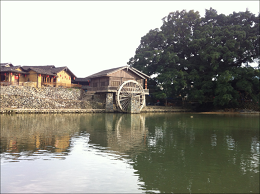
二、柔化
像素点与周围像素点差别较大时取平均值。
        /// <summary>

        /// 柔化实现方法

        /// </summary>

        void Image_Soften()

        {

            if (pbshowbox.Image != null)

            {

                int Height = this.pbshowbox.Image.Height;

                int Width = this.pbshowbox.Image.Width;

                Bitmap bitmap = new Bitmap(Width, Height, PixelFormat.Format32bppRgb);

                Bitmap MyBitmap = (Bitmap)this.pbshowbox.Image;

                BitmapData oldData = MyBitmap.LockBits(new Rectangle(, , Width, Height), ImageLockMode.ReadOnly, PixelFormat.Format32bppRgb);

                BitmapData newData = bitmap.LockBits(new Rectangle(, , Width, Height), ImageLockMode.ReadWrite, PixelFormat.Format32bppRgb);

                unsafe

                {

                    byte* pin = (byte*)(oldData.Scan0.ToPointer());

                    byte* pout = (byte*)(newData.Scan0.ToPointer());

                    //高斯模板

                    int[] Gauss = { , , , , , , , ,  };

                    for (int i = ; i < Width - ; i++)

                    {

                        for (int j = ; j < Height - ; j++)

                        {

                            int r = , g = , b = ;

                            int Index = ;

                            for (int col = -; col <= ; col++)

                            {

                                for (int row = -; row <= ; row++)

                                {

                                    int off = ((j + row) * (Width) + (i + col)) * ;

                                    r += pin[off + ] * Gauss[Index];

                                    g += pin[off + ] * Gauss[Index];

                                    b += pin[off + ] * Gauss[Index];

                                    Index++;

                                }

                            }

                            r /= ;

                            g /= ;

                            b /= ;

                            //处理颜色值溢出

                            if (r < ) r = ;

                            if (r > ) r = ;

                            if (g < ) g = ;

                            if (g > ) g = ;

                            if (b < ) b = ;

                            if (b > ) b = ;

                            int off2 = (j * Width + i) * ;

                            pout[off2 + ] = (byte)r;

                            pout[off2 + ] = (byte)g;

                            pout[off2 + ] = (byte)b;

                        }

                    }

                    bitmap.UnlockBits(newData);

                    MyBitmap.UnlockBits(oldData);

                    this.pbshowbox.Image = bitmap;

                }

            }

            else

            {

                MessageBox.Show("请先打开一张图片!");

            }

        }
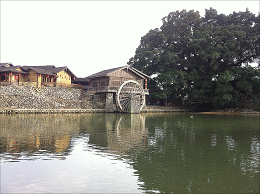
三、锐化
突出显示颜色值大的像素点。
        /// <summary>

        /// 锐化实现方法,显示数值最大像素点

        /// </summary>

        void Image_Sharpen()

        {

            if (this.pbshowbox.Image != null)

            {

                int Height = this.pbshowbox.Image.Height;

                int Width = this.pbshowbox.Image.Width;

                Bitmap bitmap = new Bitmap(Width, Height, PixelFormat.Format32bppRgb);

                Bitmap MyBitmap = (Bitmap)this.pbshowbox.Image;

                BitmapData oldData = MyBitmap.LockBits(new Rectangle(, , Width, Height), ImageLockMode.ReadOnly, PixelFormat.Format32bppRgb);

                BitmapData newData = bitmap.LockBits(new Rectangle(, , Width, Height), ImageLockMode.ReadWrite, PixelFormat.Format32bppRgb);

                unsafe

                {

                    byte* pin = (byte*)(oldData.Scan0.ToPointer());

                    byte* pout = (byte*)(newData.Scan0.ToPointer());

                    //拉普拉斯模板

                    int[] Laplacian = { -, -, -, -, , -, -, -, - };

                    for (int i = ; i < Width - ; i++)

                    {

                        for (int j = ; j < Height - ; j++)

                        {

                            int r = , g = , b = ;

                            int Index = ;

                            for (int col = -; col <= ; col++)

                            {

                                for (int row = -; row <= ; row++)

                                {

                                    int off = ((j + row) * (Width) + (i + col)) * ;

                                    r += pin[off + ] * Laplacian[Index];

                                    g += pin[off + ] * Laplacian[Index];

                                    b += pin[off + ] * Laplacian[Index];

                                    Index++;

                                }

                            }

                            if (r < ) r = ;

                            if (r > ) r = ;

                            if (g < ) g = ;

                            if (g > ) g = ;

                            if (b < ) b = ;

                            if (b > ) b = ;

                            int off2 = (j * Width + i) * ;

                            pout[off2 + ] = (byte)r;

                            pout[off2 + ] = (byte)g;

                            pout[off2 + ] = (byte)b;

                        }

                    }

                    bitmap.UnlockBits(newData);

                    MyBitmap.UnlockBits(oldData);

                    this.pbshowbox.Image = bitmap;

                }

            }

            else

            {

                MessageBox.Show("请先打开一张图片!");

            }

        }
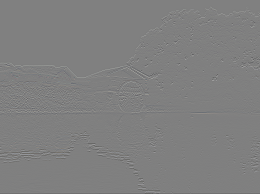
四、浮雕
对图像像素点的像素值分别与相邻像素点的像素值相减后加上128, 然后将其作为新的像素点的值。
        /// <summary>

        /// 浮雕实现方法

        /// </summary>

        void Image_Relief()

        {

            if (this.pbshowbox.Image != null)

            {

                int Height = this.pbshowbox.Image.Height;

                int Width = this.pbshowbox.Image.Width;

                Bitmap bitmap = new Bitmap(Width, Height, PixelFormat.Format24bppRgb);

                Bitmap MyBitmap = (Bitmap)this.pbshowbox.Image;

                BitmapData oldData = MyBitmap.LockBits(new Rectangle(, , Width, Height), ImageLockMode.ReadOnly, PixelFormat.Format24bppRgb);

                BitmapData newData = bitmap.LockBits(new Rectangle(, , Width, Height), ImageLockMode.ReadWrite, PixelFormat.Format24bppRgb);

                unsafe

                {

                    byte* pin_1 = (byte*)(oldData.Scan0.ToPointer());

                    byte* pin_2 = pin_1 + (oldData.Stride);

                    byte* pout = (byte*)(newData.Scan0.ToPointer());

                    for (int y = ; y < oldData.Height - ; y++)

                    {

                        for (int x = ; x < oldData.Width; x++)

                        {

                            int b = (int)pin_1[] - (int)pin_2[] + ;

                            int g = (int)pin_1[] - (int)pin_2[] + ;

                            int r = (int)pin_1[] - (int)pin_2[] + ;

                            if (r < ) r = ;

                            if (r > ) r = ;

                            if (g < ) g = ;

                            if (g > ) g = ;

                            if (b < ) b = ;

                            if (b > ) b = ;

                            pout[] = (byte)(b);

                            pout[] = (byte)(g);

                            pout[] = (byte)(r);

                            pin_1 = pin_1 + ;

                            pin_2 = pin_2 + ;

                            pout = pout + ;

                        }

                        pin_1 += oldData.Stride - oldData.Width * ;

                        pin_2 += oldData.Stride - oldData.Width * ;

                        pout += newData.Stride - newData.Width * ;

                    }

                    bitmap.UnlockBits(newData);

                    MyBitmap.UnlockBits(oldData);

                    this.pbshowbox.Image = bitmap;

                }

            }

            else

            {

                MessageBox.Show("请先打开一张图片!");

            }

        }
五、底片
颜色值取反。

        /// <summary>

        /// 底片实现方法

        /// </summary>

        void Image_Negative()

        {

            if (pbshowbox.Image != null)

            {

                int Height = this.pbshowbox.Image.Height;

                int Width = this.pbshowbox.Image.Width;

                Bitmap bitmap = new Bitmap(Width, Height, PixelFormat.Format24bppRgb);

                Bitmap MyBitmap = (Bitmap)this.pbshowbox.Image;

                BitmapData oldData = MyBitmap.LockBits(new Rectangle(, , Width, Height), ImageLockMode.ReadOnly, PixelFormat.Format24bppRgb);

                BitmapData newData = bitmap.LockBits(new Rectangle(, , Width, Height), ImageLockMode.ReadWrite, PixelFormat.Format24bppRgb);

                unsafe

                {

                    byte* pin = (byte*)(oldData.Scan0.ToPointer());

                    byte* pout = (byte*)(newData.Scan0.ToPointer());

                    for (int y = ; y < oldData.Height; y++)

                    {

                        for (int x = ; x < oldData.Width; x++)

                        {

                            pout[] = (byte)( - pin[]);

                            pout[] = (byte)( - pin[]);

                            pout[] = (byte)( - pin[]);

                            pin = pin + ;

                            pout = pout + ;

                        }

                        pin += oldData.Stride - oldData.Width * ;

                        pout += newData.Stride - newData.Width * ;

                    }

                    bitmap.UnlockBits(newData);

                    MyBitmap.UnlockBits(oldData);

                    this.pbshowbox.Image = bitmap;

                }

            }

            else

            {

                MessageBox.Show("请先打开一张图片!");

            }

        }
六、积木
低像素置0,高像素置255。

        /// <summary>

        /// 积木实现方法

        /// </summary>

        private void Image_Block()

        {

            if (this.pbshowbox.Image != null)

            {

                int Height = this.pbshowbox.Image.Height;

                int Width = this.pbshowbox.Image.Width;

                Bitmap bitmap = new Bitmap(Width, Height);

                Bitmap Mybitmap = (Bitmap)this.pbshowbox.Image;

                BitmapData oldData = Mybitmap.LockBits(new Rectangle(, , Width, Height), ImageLockMode.ReadOnly, PixelFormat.Format24bppRgb);

                BitmapData newData = bitmap.LockBits(new Rectangle(, , Width, Height), ImageLockMode.ReadWrite, PixelFormat.Format24bppRgb);

                unsafe

                {

                    byte* pin = (byte*)(oldData.Scan0.ToPointer());

                    byte* pout = (byte*)(newData.Scan0.ToPointer());

                    for (int y = ; y < oldData.Height; y++)

                    {

                        for (int x = ; x < oldData.Width; x++)

                        {

                            int avg = (pin[] + pin[] + pin[]) / ;

                            if (avg > )

                            {

                                pout[] = ;

                                pout[] = ;

                                pout[] = ;

                            }

                            else

                            {

                                pout[] = ;

                                pout[] = ;

                                pout[] = ;

                            }

                            pin = pin + ;

                            pout = pout + ;

                        }

                        pin = pin + oldData.Stride - oldData.Width * ;

                        pout = pout + newData.Stride - newData.Width * ;

                    }

                    bitmap.UnlockBits(newData);

                    Mybitmap.UnlockBits(oldData);

                    this.pbshowbox.Image = bitmap;

                }

            }

            else

            {

                MessageBox.Show("请先打开一张图片!");

            }

        }
有些图片效果看起来不明显是因为笔者把图缩小了,其实效果挺明显的- -。
C# 内存法图像处理的更多相关文章
- C# 图像处理:将图像(24位真彩)转为 8位灰度图像 采用了内存法,大大提高了效率
/// <summary> /// 将源图像灰度化,并转化为8位灰度图像. /// </summary> /// <param name="original&q ...
- c#图像处理入门(-bitmap类和图像像素值获取方法) 转
一.Bitmap类 Bitmap对象封装了GDI+中的一个位图,此位图由图形图像及其属性的像素数据组成.因此Bitmap是用于处理由像素数据定义的图像的对象.该类的主要方法和属性如下: 1. GetP ...
- C#数字图像处理的3种方法
本文主要通过彩色图象灰度化来介绍C#处理数字图像的3种方法,Bitmap类.BitmapData类和Graphics类是C#处理图像的的3个重要的类. Bitmap只要用于处理由像素数据定义的图像的对 ...
- c#图像处理入门
一.Bitmap类 Bitmap对象封装了GDI+中的一个位图,此位图由图形图像及其属性的像素数据组成.因此Bitmap是用于处理由像素数据定义的图像的对象.该类的主要方法和属性如下: 1. GetP ...
- c#图像处理入门(-bitmap类和图像像素值获取方法)
c#图像处理入门 -bitmap类和图像像素值获取方法 一.Bitmap类 Bitmap对象封装了GDI+中的一个位图,此位图由图形图像及其属性的像素数据组成.因此Bitmap是用于处理由像素数据定义 ...
- C#数字图像处理算法学习笔记(一)--C#图像处理的3中方法
C#数字图像处理算法学习笔记(一)--C#图像处理的3中方法 Bitmap类:此类封装了GDI+中的一个位图,次位图有图形图像及其属性的像素数据组成.因此此类是用于处理像素数据定义的图形的对象.该类的 ...
- c#数字图像处理(二)彩色图像灰度化,灰度图像二值化
为加快处理速度,在图像处理算法中,往往需要把彩色图像转换为灰度图像,在灰度图像上得到验证的算法,很容易移植到彩色图像上.24位彩色图像每个像素用3个字节表示,每个字节对应着R.G.B分量的亮度(红.绿 ...
- C#中的bitmap类和图像像素值获取方法
一.Bitmap类 Bitmap对象封装了GDI+中的一个位图,此位图由图形图像及其属性的像素数据组成.因此Bitmap是用于处理由像素数据定义的图像的对象.该类的主要方法和属性如下: 1. GetP ...
- C# 处理图像三种方法对比
C#本身自带有一定的图像处理能力,即使在不依赖Emgu CV的情况下,也是有很大的潜质的. 不过,最近在处理大量图片时,发现图片数量较少时,处理本身所带来的延时不会让人敏感,但是数量较大时,程序花费大 ...
随机推荐
- Jlink烧写图文教程
,点击安装 , 插上jlink,安装驱动后,红灯一直亮 ...
- centos "cannot open display"的问题
实用技巧:在Linux下设置xhost方法步骤 第一步:用root登陆linux,启动vnc服务: 第二步:根据vnc起来的端口,设置export DISPLAY=localhost:1(1表示vnc ...
- HW3.20
import java.util.Scanner; public class Solution { public static void main(String[] args) { Scanner i ...
- visual studio 2010 "创建控件时出错"解决办法[转]
之前我有在博问里面提问(http://space.cnblogs.com/q/16208/),但一直都没答案.我系统都重装了两次了,可还是出现这样的错误,我很郁闷啊.今天我终于找到原因了. 我写了一个 ...
- 新发现:原来java正则表达式不写^和$也可以运行
最近用了好多正则表达式,都是循规蹈矩的在前面加上^在后面加上$ 像这个样子"^[.]\\S+$",但实际上我在eclipse和editplus下都试了一下,不加前缀和后缀也是可以的 ...
- 将list转换为json失败
估计你是用的hibernate的自动注解,并且里面有一对多,多对一的关系,这是需要在不需要的字段上加上注解@JsonIgnore, 这样的话在list转json的时候就会忽略加上@JsonIgnore ...
- NASA关于如何写出安全代码的10条军规
博客搬到了fresky.github.io - Dawei XU,请各位看官挪步.最新的一篇是:NASA关于如何写出安全代码的10条军规.
- windows 文件名太长无法删除的解决方法
国内私募机构九鼎控股打造APP,来就送 20元现金领取地址:http://jdb.jiudingcapital.com/phone.html内部邀请码:C8E245J (不写邀请码,没有现金送)国内私 ...
- [Android]Fragment源代码分析(二) 状态
我们上一讲,抛出来一个问题,就是当Activity的onCreateView的时候,是怎样构造Fragment中的View參数.要回答这个问题我们先要了解Fragment的状态,这是Fragment管 ...
- 【转】C++中多重继承的二义性及解决办法
转自:http://www.cnblogs.com/lintong/archive/2012/07/28/2613002.html 1. 什么是多重继承的二义性 class A{ public: vo ...