
Bootstrap_表单_表单控件状态
一、焦点状态
焦点状态是通过伪类“:focus”来实现。Bootstrap框架中表单控件的焦点状态删除了outline的默认样式,重新添加阴影效果。
<form role="form" class="form-horizontal">

  <div class="form-group">

    <div class="col-xs-6">

      <input class="form-control input-lg" type="text" placeholder="不是焦点状态下效果">

    </div>

    <div class="col-xs-6">

      <input class="form-control input-lg" type="text" placeholder="焦点点状态下效果">

    </div>

  </div>

</form>

二、禁用状态
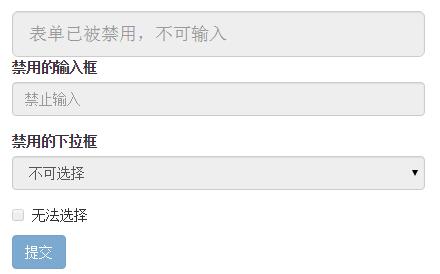
Bootstrap框架的表单控件的禁用状态和普通的表单禁用状态实现方法是一样的,在相应的表单控件上添加属性“disabled”。
<form role="form">

  <input class="form-control input-lg" id="disabledInput" type="text" placeholder="表单已被禁用,不可输入" disabled>

  <fieldset disabled>

    <div class="form-group">

      <label for="disabledTextInput">禁用的输入框</label>

      <input type="text" id="disabledTextInput" class="form-control" placeholder="禁止输入">

    </div>

    <div class="form-group">

      <label for="disabledSelect">禁用的下拉框</label>

      <select id="disabledSelect" class="form-control">

        <option>不可选择</option>

      </select>

    </div>

    <div class="checkbox">

      <label>

        <input type="checkbox"> 无法选择

      </label>

    </div>

    <button type="submit" class="btn btn-primary">提交</button>

  </fieldset>

</form>
三、验证状态
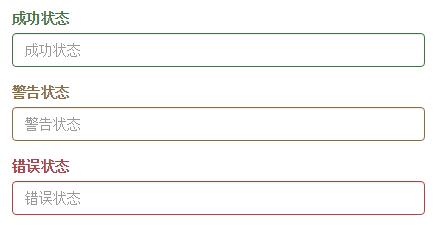
在制作表单时,不免要做表单验证。同样也需要提供验证状态样式,在Bootstrap框架中同样提供这几种效果。
1、.has-warning:警告状态(黄色)
2、.has-error:错误状态(红色)
3、.has-success:成功状态(绿色)
使用的时候只需要在form-group容器上对应添加状态类名
<form role="form">

  <div class="form-group has-success">

    <label class="control-label" for="inputSuccess1">成功状态</label>

    <input type="text" class="form-control" id="inputSuccess1" placeholder="成功状态" >

  </div>

  <div class="form-group has-warning">

    <label class="control-label" for="inputWarning1">警告状态</label>

    <input type="text" class="form-control" id="inputWarning1" placeholder="警告状态">

  </div>

  <div class="form-group has-error">

    <label class="control-label" for="inputError1">错误状态</label>

    <input type="text" class="form-control" id="inputError1" placeholder="错误状态">

  </div>

</form>
Bootstrap_表单_表单控件状态的更多相关文章
- Bootstrap_表单_表单提示信息
平常在制作表单验证时,要提供不同的提示信息.在Bootstrap框架中也提供了这样的效果.使用了一个"help-block"样式,将提示信息以块状显示,并且显示在控件底部. < ...
- Bootstrap_表单_表单控件
一.输入框input 单行输入框,常见的文本输入框,也就是input的type属性值为text. 在Bootstrap中使用input时也必须添加type类型,如果没有指定type类型,将无法得到正确 ...
- Bootstrap_表单_表单样式
一.基础表单 <form > <div class="form-group"> <label>邮箱:</label> <inp ...
- SpringBoot(五)_表单验证
SpringBoot(五)_表单验证 参数校验在我们日常开发中非常常见,最基本的校验有判断属性是否为空.长度是否符合要求等,在传统的开发模式中需要写一堆的 if else 来处理这些逻辑,很繁琐,效率 ...
- Day055--MySQL--外键的变种,表与表的关系,单表查询,多表查询, 内连接,左右连接,全外连接
表和表的关系 ---- 外键的变种 * 一对多或多对一 多对多 一对一 参考 https://www.cnblogs.com/majj/p/9169416.html 如何找出两张表之间的关系 分析步骤 ...
- python mysql 单表查询 多表查询
一.外键 变种: 三种关系: 多对一 站在左表的角度: (1)一个员工 能不能在 多个部门? 不成立 (2)多个员工 能不能在 一个部门? 成立 只要有一个条件成立:多 对 一或者是1对多 如果两个条 ...
- python 全栈开发,Day62(外键的变种(三种关系),数据的增删改,单表查询,多表查询)
一.外键的变种(三种关系) 本节重点: 如何找出两张表之间的关系 表的三种关系 一.介绍 因为有foreign key的约束,使得两张表形成了三种了关系: 多对一 多对多 一对一 二.重点理解如果找出 ...
- mysq更新(六) 单表查询 多表查询
本节重点: 单表查询 语法: 一.单表查询的语法 SELECT 字段1,字段2... FROM 表名 WHERE 条件 GROUP BY field HAVING 筛选 ORDER BY fiel ...
- MYSQL数据类型 表基本操作 表记录增删改 单表查询
一.数据类型 常用的数据类型如下: 整数:int,bit 小数:decimal 字符串:varchar,char 日期时间: date, time, datetime 枚举类型(enum) 特别说明的 ...
随机推荐
- VS2010 MFC GDI+ 实现PNG透明图片显示
网上找了一些资料学习了一下PNG图的显示,这里总结一下. 参考:http://blog.csdn.net/czyt1988/article/details/7965066 一.VS2010配置GDI+ ...
- 折腾iPhone的生活——我的越狱插件精品筛选
威锋上有人说的好,iOS系统越狱是为了装更多东西,安卓Root是为了删更多东西. 插件 众所周知,iOS系统是非常封闭的,基本上涉及到底层的功能在iOS上都不能实现,除非越狱装插件,所以插件就成为 ...
- 你不一定能做对的JavaScript闭包面试题
由工作中演变而来的面试题 这是一个我工作当中的遇到的一个问题,似乎很有趣,就当做了一道题去面试,发现几乎没人能全部答对并说出原因,遂拿出来聊一聊吧. 先看题目代码: function fun(n,o) ...
- win8.1 无法安装 net framework3.5的解决办法
近期给重装系统时,发现Windows8.1无法安装.net framework 3.5,即使我离线下载了安装文件,还要求安装2.0和3.0....而且无法从Windows更新中获取,因此百度到以下方案 ...
- 417. Pacific Atlantic Water Flow
正常做的,用了645MS..感觉DFS的时候剪枝有问题.. 为了剪枝可能需要标记一个点的4种情况: 1:滨临大西洋,所有太平洋来的点可以通过: 2:濒临太平洋,所有大西洋来的点可以通过: 3:都不濒临 ...
- 深入浅出node(4) 异步编程
一)函数式编程基础 二)异步编程的优势和难点 2.1 优势 2.2 难点 2.2.1 异常处理 2.2.2 函数嵌套过深 2.2.3 阻塞 2.2.4 多线程编程 2.2.5 异步转同步 三)异步编程 ...
- 实现网页页面跳转的几种方法大全(meta标签、js实现、php实现)
1.meta标签实现 只需在head里加上下面这一句就行了,在当前页面停留0.1秒后跳转到目标页面 代码如下 复制代码 1 <meta http-equiv="refresh&quo ...
- Python自带的日志模块logging的使用
import logging # 创建一个logger logger = logging.getLogger('cmccLogger') logger.setLevel(logging.DEB ...
- C# 模拟用户登录
, data.Length); newStream.Close(); request.CookieContainer ...
- app启动其他应用
因开发需要内包一个app,所以要启动一个app,这种操作 如果知道包名和类名 其实很简单 只需要将包名内嵌即可(一般情况 我们都可以解压或者反接拿到) 代码如下: Intent intent = ne ...