
编译安装nginx并修改版本头信息—参考实例
今天做实验的时候,想起我那台yum安装的nginx+php-fpm+mysql服务器上的nginx版本有点低了,并且还要加两个第3方模块,就去nginx官网下载了最新稳定版nginx-1.0.6,好了,废话不多说看教程吧.
系统版本: centos 5.6
ip: 192.168.1.200
需要的软件包:nginx-1.0.6.tar.gz Nginx-accesskey-2.0.3.tar.gz ngx_cache_purge-1.3.tar.gz(这3个包可以自己去下载,我就不提供了)
1.解压并修改nginx内核
tar zxf nginx-1.0.6.tar.gz && tar zxf Nginx-accesskey-2.0.3.tar.gz && tar zxf Nginx-accesskey-2.0.3.tar.gz
cd nginx-1.0.6
vi src/http/ngx_http_header_filter_module.c
修改ngx_http_header_filter_module.c里的
static char ngx_http_server_string[] = "Server: nginx" CRLF;
static char ngx_http_server_full_string[] = "Server: " NGINX_VER CRLF;
改成:
static char ngx_http_server_string[] = "Server: tws" CRLF;
static char ngx_http_server_full_string[] = "Server: " NGINX_VER CRLF; (这行不要去改,不然后面编译会报错,我不知道网上其他人是怎么处理的,也不知道他们到底有没有亲手试过)
再来
vi src/core/nginx.h
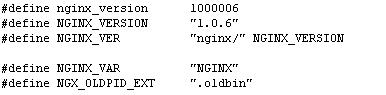
改为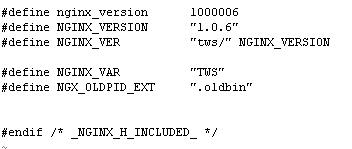
2.开始编译安装nginx和第3方模块
./configure --user=nginx --group=nginx --add-module=../ngx_cache_purge-1.3 --add-module=../nginx-accesskey-2.0.3 --prefix=/usr/share/nginx --sbin-path=/usr/sbin/nginx --conf-path=/etc/nginx/nginx.conf --error-log-path=/var/log/nginx/error.log --http-log-path=/var/log/nginx/access.log --http-client-body-temp-path=/var/lib/nginx/tmp/client_body --http-proxy-temp-path=/var/lib/nginx/tmp/proxy --http-fastcgi-temp-path=/var/lib/nginx/tmp/fastcgi --pid-path=/var/run/nginx.pid --lock-path=/var/lock/subsys/nginx --with-http_secure_link_module --with-http_random_index_module --with-http_ssl_module --with-http_realip_module --with-http_addition_module --with-http_sub_module --with-http_dav_module --with-http_flv_module --with-http_gzip_static_module --with-http_stub_status_module --with-http_perl_module --with-http_geoip_module --with-mail --with-mail_ssl_module
这是我的编译参数,当然你可以根据自己的需要来修改.
如果编译安装出现错误提示,那就你要执行下面的语句
yum -y install pcre-devel GeoIP* openssl-devel
configure完后如果没有报错,就执行
make && meke install
安装完后查看nginx的版本号和编译参数
我这里没有把下面编译参数截图,这个你懂的
3.让nginx随系统启动
cd /etc/rc.d/init.d
vi nginx
nginx的内容:
#!/bin/sh
#
# nginx - this script starts and stops the nginx daemon
#
# chkconfig: - 85 15
# description: Nginx is an HTTP(S) server, HTTP(S) reverse \
# proxy and IMAP/POP3 proxy server
# processname: nginx
# config: /etc/nginx/nginx.conf
# config: /etc/sysconfig/nginx
# pidfile: /var/run/nginx.pid
# Source function library.
. /etc/rc.d/init.d/functions
# Source networking configuration.
. /etc/sysconfig/network
# Check that networking is up.
[ "$NETWORKING" = "no" ] && exit 0
nginx="/usr/sbin/nginx"
prog=$(basename $nginx)
NGINX_CONF_FILE="/etc/nginx/nginx.conf"
[ -f /etc/sysconfig/nginx ] && . /etc/sysconfig/nginx
lockfile=/var/lock/subsys/nginx
start() {
[ -x $nginx ] || exit 5
[ -f $NGINX_CONF_FILE ] || exit 6
echo -n $"Starting $prog: "
daemon $nginx -c $NGINX_CONF_FILE
retval=$?
echo
[ $retval -eq 0 ] && touch $lockfile
return $retval
}
stop() {
echo -n $"Stopping $prog: "
killproc $prog -TERM
retval=$?
if [ $retval -eq 0 ]; then
if [ "$CONSOLETYPE" != "serial" ]; then
echo -en "\\033[16G"
fi
while rh_status_q
do
sleep 1
echo -n $"."
done
rm -f $lockfile
fi
echo
return $retval
}
restart() {
configtest || return $?
stop
start
}
reload() {
configtest || return $?
echo -n $"Reloading $prog: "
killproc $nginx -HUP
sleep 1
RETVAL=$?
echo
}
configtest() {
$nginx -t -c $NGINX_CONF_FILE
}
rh_status() {
status $prog
}
rh_status_q() {
rh_status >/dev/null 2>&1
}
# Upgrade the binary with no downtime.
upgrade() {
local pidfile="/var/run/${prog}.pid"
local oldbin_pidfile="${pidfile}.oldbin"
configtest || return $?
echo -n $"Staring new master $prog: "
killproc $nginx -USR2
sleep 1
retval=$?
echo
if [[ -f ${oldbin_pidfile} && -f ${pidfile} ]]; then
echo -n $"Graceful shutdown of old $prog: "
killproc -p ${oldbin_pidfile} -TERM
sleep 1
retval=$?
echo
return 0
else
echo $"Something bad happened, manual intervention required, maybe restart?"
return 1
fi
}
case "$1" in
start)
rh_status_q && exit 0
$1
;;
stop)
rh_status_q || exit 0
$1
;;
restart|configtest)
$1
;;
force-reload|upgrade)
rh_status_q || exit 7
upgrade
;;
reload)
rh_status_q || exit 7
$1
;;
status|status_q)
rh_$1
;;
condrestart|try-restart)
rh_status_q || exit 7
restart
;;
*)
echo $"Usage: $0 {start|stop|reload|configtest|status|force-reload|upgrade|restart}"
exit 2
esac
然后执行
chmod a+x nginx
chkconfig --add nginx
chkconfig nginx on
service nginx start
最后执行
curl -I http://localhost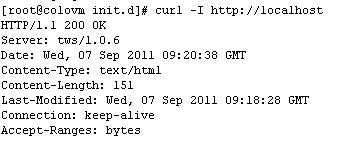
可以看到nginx正常运行中,好了,后面就是修改nginx.conf的事了,我就不说了.
编译安装nginx并修改版本头信息—参考实例的更多相关文章
- CentOS6.6 32位 Minimal版本纯编译安装Nginx Mysql PHP Memcached
声明:部分编译指令在博客编辑器里好像被处理了,如双横线变成单横线了等等,于是在本地生成了一个pdf版本,在下面地址可以下载. LNMP+Memcached CentOS是红帽发行的免费的稳定Linux ...
- 源码编译安装nginx
安装依赖软件 1.安装编译工具gcc gcc是一个开源编译器集合,用于处理各种各样的语言:C.C++.Java.Ada等,在linux世界中是最通用的编译器,支持大量处理器:x86.AMD64.Pow ...
- Centos7 编译安装 Nginx PHP Mariadb Memcached 扩展 ZendOpcache扩展 (实测 笔记 Centos 7.3 + Mariadb 10.1.20 + Nginx 1.10.2 + PHP 7.1.0 + Laravel 5.3 )
环境: 系统硬件:vmware vsphere (CPU:2*4核,内存2G,双网卡) 系统版本:CentOS-7-x86_64-Minimal-1611.iso 安装步骤: 1.准备 1.0 查看硬 ...
- CentOS7 编译安装 Nginx (实测 笔记 Centos 7.0 + nginx 1.6.2)
环境: 系统硬件:vmware vsphere (CPU:2*4核,内存2G,双网卡) 系统版本:CentOS-7.0-1406-x86_64-DVD.iso 安装步骤: 1.准备 1.1 显示系统版 ...
- Centos7 编译安装 Nginx Mariadb Asp.net Core2 (实测 笔记 Centos 7.3 + Openssl 1.1.0h + Mariadb 10.3.7 + Nginx 1.14.0 + Asp.net. Core 2 )
环境: 系统硬件:vmware vsphere (CPU:2*4核,内存2G,双网卡) 系统版本:CentOS-7-x86_64-Minimal-1611.iso 安装步骤: 1.准备 1.0 查看硬 ...
- Centos7 编译安装 Nginx PHP Mariadb Memcached 扩展 ZendOpcache扩展 (实测 笔记 Centos 7.3 + Openssl 1.1.0e + Mariadb 10.1.22 + Nginx 1.12.0 + PHP 7.1.4 + Laravel 5.4 )
环境: 系统硬件:vmware vsphere (CPU:2*4核,内存2G,双网卡) 系统版本:CentOS-7-x86_64-Minimal-1611.iso 安装步骤: 1.准备 1.0 查看硬 ...
- Centos7 编译安装 Nginx PHP Mariadb Memcache扩展 ZendOpcache扩展 (实测 笔记 Centos 7.0 + Mariadb 10.1.9 + Nginx 1.9.9 + PHP 5.5.30)
环境: 系统硬件:vmware vsphere (CPU:2*4核,内存2G,双网卡) 系统版本:CentOS-7-x86_64-Minimal-1503-01.iso 安装步骤: 1.准备 1.1 ...
- Centos7 编译安装 Nginx、MariaDB、PHP
前言 本文主要大致介绍CentOS 7下编译安装Nginx.MariaDB.PHP.面向有Linux基础且爱好钻研的朋友.技艺不精,疏漏再所难免,还望指正. 环境简介: 系统: CentOS 7,最小 ...
- Centos7编译安装Nginx+keepalived
一.安装环境.主机信息及软件版本 Nginx:1.12.2keepalived:2.0.12时间同步(同步后确认各服务器时间是否一致,不一致需要修改一下时区) 关闭防火墙 二.编译安装Nginx 1. ...
随机推荐
- springmvc(六)——视图和视图解析器
aaarticlea/png;base64,iVBORw0KGgoAAAANSUhEUgAAAoIAAAGrCAIAAADb2WEhAAAgAElEQVR4nOzdaVhTd78vfF8/z772c9 ...
- 安装Cygwin
如果你现在正在学习C语言,而你又不希望使用微软提供的任何C语言的任何编译器,那么你应该考虑一下GCC.GCC是运行于类UNIX系统下的编译器工具集,这又引出了另一个让人头疼的问题,你没有一台现成的装有 ...
- Linux---vi编辑器必会操作
移动光标: (1)基本的上下左右:通过箭头按键控制 (2)跳到一行的末尾:键盘"end" (3)跳到一行的开头:键盘"home" (4)跳到最后一行:shift ...
- jQuery Mobile里xxx怎么用呀?(缓存篇)
jQuery Mobile初始页面DOM Cache所引发的问题 HTML元素事件多次触发: jsFiddle: http://jsfiddle.net/gn9JA/2/ cause: 在jsFidd ...
- [HttpClient]SSL双向实例
package com.jerry.httpclient; import java.io.File; import java.io.FileInputStream; import java.secur ...
- PHP提取身份证号码中的生日并验证是否成年的函数
php 提取身份证号码中的生日日期以及确定是否成年的一个函数.可以同时确定15位和18位的身份证,经本人亲测,非常好用,分享函数代码如下: <?php //用php从身份证中提取生日,包括15位 ...
- 利用数据库链做DML操作时报ORA-02069: global_names parameter must be set to TRUE for this operation
按照 http://space.itpub.net/195110/viewspace-711110 的说法顺利解决问题. 通过DBLink更新远程数据的时候,如果使用到本地的sequence.函数.过 ...
- UILabel 属性祥记
创建label UILabel *label1 = [[UILabel alloc] initWithFrame:CGRectMake(20, 40, 280, 80)]; 设置背景色 label1. ...
- 按行N等分某个文件
# --*-- coding:utf-8 --*--import randomimport math def fanhui(): into = random.randint(1, 10) ...
- ECshop Strict Standards: Only variables should be passed by reference in解决办法
本文章来给各位同学介绍关于ECshop Strict Standards: Only variables should be passed by reference in解决办法,希望此教程 对各位同 ...