
PYTHON的CGIServer的进化
按例程,一步一步理解如何从SOCKET,TCP,HTTP,CGIHTTP进化的。
最终,静态文件和脚本分享,且能处理FORM提交和展示。
下一步,到数据库??:)
A,SOCKET
#HTTPserver
import socket

HOST = ''
PORT = 8088

text_content = '''
HTTP/1.x 200 OK
Content-Type: text/html

<html>
<head>
<title>WOW</title>
</head>
<body>
<p>WOW, Python Server</p>
<form name='input', action='/' method='post'>
First name :<input type='text' name='firstname'><br>
<input type='submit' value='submit'>
</form>
</body>
</html>
'''

f = open('hello.jpg', 'rb')
pic_content = '''
HTTP/1.1 200 OK
Content-Type: image/jpeg
'''
pic_content = pic_content + f.read()
f.close()

s = socket.socket(socket.AF_INET, socket.SOCK_STREAM)
s.bind((HOST, PORT))
print 'HTTPserver is start listen...'

while True:
    s.listen(3)
    conn, addr = s.accept()
    request = conn.recv(1024)
    print request.split(' ')
    method = request.split(' ')[0]
    src = request.split(' ')[1]

    if method == 'GET':
        if src == '/hello.jpg':
            content = pic_content
        else:
            content = text_content

        print 'Connetcted by', addr
        print 'Request is:', request
        conn.sendall(content)
    if method == 'POST':
        form = request.split('\r\n')
        idx = form.index('')
        entry = form[idx:]
        value = entry[-1].split('=')[-1]
        conn.sendall(text_content + '\n <p>' + value + '</p>')

    conn.close()
B,TCP
#HTTPserver
#import socket
import SocketServer

HOST = ''
PORT = 8080

text_content = '''
HTTP/1.x 200 OK
Content-Type: text/html

<html>
<head>
<title>WOW</title>
</head>
<body>
<p>WOW, Python Server</p>
<form name='input', action='/' method='post'>
First name :<input type='text' name='firstname'><br>
<input type='submit' value='submit'>
</form>
</body>
</html>
'''

f = open('hello.jpg', 'rb')
pic_content = '''
HTTP/1.1 200 OK
Content-Type: image/jpeg

'''
pic_content = pic_content + f.read()
f.close()

class MyTCPHandler(SocketServer.BaseRequestHandler):

    def handle(self):
        print 'HTTPserver is start listen...'
        request = self.request.recv(1024)
        print 'Connetcted by', self.client_address[0]
        print 'Request is:', request

        method = request.split(' ')[0]
        src = request.split(' ')[0]

        if method == 'GET':
            if src == '/hello.jpg':
                content = pic_content
            else:
                content = text_content
            self.request.sendall(content)
        if method == 'POST':
            form = request.split('\r\n')
            idx = form.index('')
            entry = form[idx:]
            value = entry[-1].split('=')[-1]
            self.request.sendall(text_content + '\n <p>' + value + '</p>')

server = SocketServer.TCPServer((HOST, PORT), MyTCPHandler)

server.serve_forever()
C,HTTP
#HTTPserver
#import socket
import SocketServer
import SimpleHTTPServer

HOST = ''
PORT = 8088

server = SocketServer.TCPServer((HOST, PORT), SimpleHTTPServer.SimpleHTTPRequestHandler)
server.serve_forever()
D,CGI
#HTTPserver
#import socket
import BaseHTTPServer
import CGIHTTPServer

HOST = ''
PORT = 8088

server = BaseHTTPServer.HTTPServer((HOST, PORT), CGIHTTPServer.CGIHTTPRequestHandler)
server.serve_forever()
(HTML及PY)
<head>
<title>WOW</title>
</head>
<html>
<p>Wow, Python Server</p>
<IMG src="hello.jpg"/>
<form name="input" action="cgi-bin/post.py" method="post">
First name:<input type="text" name="firstname"><br>
<input type="submit" value="Submit">
</form>
</html>
~~~~~~~~~~~~~~~~~~~~~~~~
~~~~~~~~~~~~~~~~~~~~~~~~
import cgi

form = cgi.FieldStorage()

print 'Content-Type: text/html'
print
print '<p>Hello world!</p>'
print '<p>' + repr(form['firstname']) + '</p>'
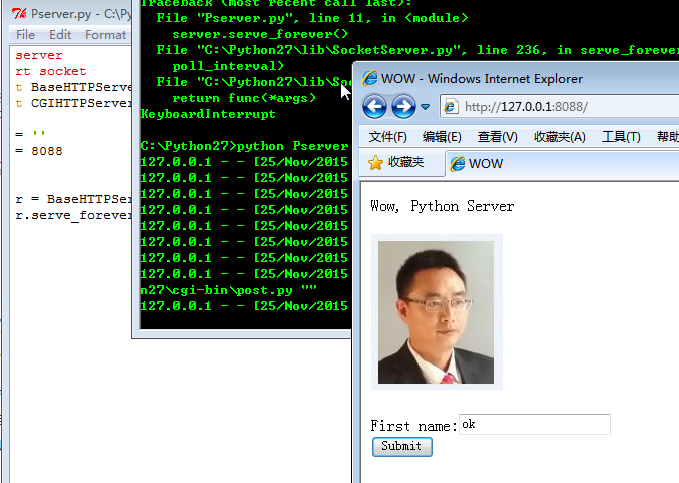
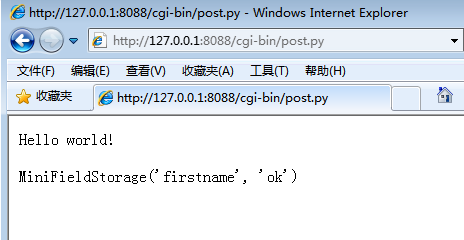
截图:
PYTHON的CGIServer的进化的更多相关文章
- Python 参数校验的进化
Python 函数参数魔法 事情的起因是感觉目前项目中的参数校验方法写的太简单了,很多时候需要在server层再if else处理,于是就动手准备写一个好用一点的,可以自定义校验参数规则的参数校验器, ...
- 【大爽python算法】递归算法进化之回溯算法(backtracking)
作者自我介绍:大爽歌, b站小UP主 , python1对1辅导老师, 时常直播编程,直播时免费回答简单问题. 前置知识: 递归算法(recursion algorithm). 我的递归教程: [教程 ...
- 【Python Deap库】遗传算法/遗传编程 进化算法基于python DEAP库深度解析讲解
目录 前言 概述 启发式的理解(重点) 优化问题的定义 个体编码 初始族群的创建 评价 配种选择 锦标赛 轮盘赌选择 随机普遍抽样选择 变异 单点交叉 两点交叉 均匀交叉 部分匹配交叉 突变 高斯突变 ...
- python之阶乘的小例子
现在自己写阶乘是这个样子的 def f(x): return x * f(x-1) if x >1 else 1 后来无意中看到耗子的一篇<Python程序员的进化>的文章, 感脚这 ...
- Python协程与JavaScript协程的对比
前言 以前没怎么接触前端对JavaScript 的异步操作不了解,现在有了点了解一查,发现 python 和 JavaScript 的协程发展史简直就是一毛一样! 这里大致做下横向对比和总结,便于对这 ...
- Python网络02 Python服务器进化
原文:Python网络02 Python服务器进化 作者:Vamei 出处:http://www.cnblogs.com/vamei 欢迎转载,也请保留这段声明.谢谢! **注意,在Python 3. ...
- geatpy - 遗传和进化算法相关算子的库函数(python)
Geatpy The Genetic and Evolutionary Algorithm Toolbox for Python Introduction Website (including doc ...
- Python遗传和进化算法框架(一)Geatpy快速入门
https://blog.csdn.net/qq_33353186/article/details/82014986 Geatpy是一个高性能的Python遗传算法库以及开放式进化算法框架,由华南理工 ...
- 《Python测试开发技术栈—巴哥职场进化记》—前言
写在前面 今年从4月份开始写一本讲Python测试开发技术栈的书,主要有两个目的,第一是将自己掌握的一些内容分享给大家,第二是希望自己能系统的梳理和学习Python相关的技术栈.当时我本来打算以故事体 ...
随机推荐
- 盒模型Box Model(浮动)
一.标准盒模型的大小:border+padding+content(width) 怪异盒模型大小:padding+border 二.display inline 默认,且变为行由内 ...
- JAXB - XML Schema Types, Binary Data
Data that has no "natural" representation with printable characters must, for inclusion in ...
- ios registerNib: and registerClass:
先看看apple官网简述: registerNib:forCellWithReuseIdentifier: Register a nib file for use in creating new co ...
- UIMenuController/UIPasteboard(1) 制作一个可以粘贴复制的Label
效果如下: 苹果只放出来了 UITextView,UITextField,webView三个控件的剪贴板,所以我们要自定义可以复制粘贴的控件,首先需要打开UIResponder的两个方法: - ( ...
- IOS 高级开发 KVC(二)
前一篇博客最后介绍了KVC 再json 转模型时遇到一些问题.今天接着来介绍KVC 的其他用法.其实我们在一开始的时候就一直再强调命名的重要性.命名规范是KVC 存活的基础.如果没有这个条件支撑,那么 ...
- android 文件的权限
- 省选训练赛第4场D题(多米诺骨牌)
题目来自FZU2163 多米诺骨牌 Time Limit: 1000 mSec Memory Limit : 32768 KB Problem Description Vasya很喜欢排多米诺 ...
- OpenJudge 2774 木材加工
1.链接: http://bailian.openjudge.cn/practice/2774/ 2.题目: 总Time Limit: 1000ms Memory Limit: 65536kB Des ...
- Windows10中的IIS10安装php manager和IIS URL Rewrite 2.0组件的方法
Windows10中自带的Server:Microsoft-IIS/10.0,然后这个10却让原本支持组件无法安装了,php manager组件安装时提示“必须安装IIS7以上才可以安装”.那是不是真 ...
- Weui 微信网站开发样式插件使用教程
微信的网页样式正式发布了,搜了一下,正式引入了乐学一百微信端的项目中. <div class="weui_grids"> <a href="javasc ...