
ASP.NET WebAPi之断点续传下载(中)
前言
前情回顾:上一篇我们遗留了两个问题,一个是未完全实现断点续传,另外则是在响应时是返回StreamContent还是PushStreamContent呢?这一节我们重点来解决这两个问题,同时就在此过程中需要注意的地方一并指出,若有错误之处,请指出。
StreamContent compare to PushStreamContent
我们来看看StreamContent代码,如下:
public class StreamContent : HttpContent

{

    // Fields

    private int bufferSize;

    private Stream content;

    private bool contentConsumed;

    private const int defaultBufferSize = 0x1000;

    private long start;

    // Methods

    public StreamContent(Stream content);

]

    public StreamContent(Stream content, int bufferSize);

    protected override Task<Stream> CreateContentReadStreamAsync();

    protected override void Dispose(bool disposing);

    private void PrepareContent();

    protected override Task SerializeToStreamAsync(Stream stream, TransportContext context);

    protected internal override bool TryComputeLength(out long length);

    // Nested Types

    private class ReadOnlyStream : DelegatingStream

    {......}

}
似乎没有什么可看的,但是有一句话我们需要注意,如下:
private const int defaultBufferSize = 0x1000;
在StreamContent的第二个构造函数为
public StreamContent(Stream content, int bufferSize);
上述给定的默认一次性输入到缓冲区大小为4k,这对我们有何意义呢?当我们写入到响应中时,一般我们直接利用的是第一个构造函数,如下:
  var response = new HttpResponseMessage();

  response.Content = new StreamContent(fileStream);
到这里我们明白了这么做是有问题的,当下载时默认读取的是4k,如果文件比较大下载的时间则有延长,所以我们在返回时一定要给定缓冲大小,那么给定多少呢?为达到更好的性能最多是80k,如下:
 private const int BufferSize =  * ;

 response.Content = new StreamContent(fileStream, BufferSize);
此时下载的速度则有很大的改善,有人就说了为何是80k呢?这个问题我也不知道,老外验证过的,这是链接【.NET Asynchronous stream read/write】。
好了说完StreamContent,接下来我们来看看PushStreamContent,从字面意思来为推送流内容,难道是充分利用了缓冲区吗,猜测可以有,就怕没有任何想法,我们用源码来证明看看。
我们只需看看WebHost模式下对于缓冲策略是怎么选择的,我们看看此类 WebHostBufferPolicySelector 实现,代码如下:
     /// <summary>

    /// Provides an implementation of <see cref="IHostBufferPolicySelector"/> suited for use

    /// in an ASP.NET environment which provides direct support for input and output buffering.

    /// </summary>

    public class WebHostBufferPolicySelector : IHostBufferPolicySelector

    {

        ....../// <summary>

        /// Determines whether the host should buffer the <see cref="HttpResponseMessage"/> entity body.

        /// </summary>

        /// <param name="response">The <see cref="HttpResponseMessage"/>response for which to determine

        /// whether host output buffering should be used for the response entity body.</param>

        /// <returns><c>true</c> if buffering should be used; otherwise a streamed response should be used.</returns>

        public virtual bool UseBufferedOutputStream(HttpResponseMessage response)

        {

            if (response == null)

            {

                throw Error.ArgumentNull("response");

            }

            // Any HttpContent that knows its length is presumably already buffered internally.

            HttpContent content = response.Content;

            if (content != null)

            {

                long? contentLength = content.Headers.ContentLength;

                if (contentLength.HasValue && contentLength.Value >= )

                {

                    return false;

                }

                // Content length is null or -1 (meaning not known).

                // Buffer any HttpContent except StreamContent and PushStreamContent

                return !(content is StreamContent || content is PushStreamContent);

            }

            return false;

        }

    }
从上述如下一句可以很明显的知道:
return !(content is StreamContent || content is PushStreamContent);
除了StreamContent和PushStreamContent的HttpContent之外,其余都进行缓冲,所以二者的区别不在于缓冲,那到底是什么呢?好了我们还未查看PushStreamContent的源码,我们继续往下走,查看其源代码如下,我们仅仅只看关于这个类的描述以及第一个构造函数即可,如下:
  /// <summary>

    /// Provides an <see cref="HttpContent"/> implementation that exposes an output <see cref="Stream"/>

    /// which can be written to directly. The ability to push data to the output stream differs from the

    /// <see cref="StreamContent"/> where data is pulled and not pushed.

    /// </summary>

    public class PushStreamContent : HttpContent

    {

        private readonly Func<Stream, HttpContent, TransportContext, Task> _onStreamAvailable;

        /// <summary>

        /// Initializes a new instance of the <see cref="PushStreamContent"/> class. The

        /// <paramref name="onStreamAvailable"/> action is called when an output stream

        /// has become available allowing the action to write to it directly. When the

        /// stream is closed, it will signal to the content that is has completed and the

        /// HTTP request or response will be completed.

        /// </summary>

        /// <param name="onStreamAvailable">The action to call when an output stream is available.</param>

        public PushStreamContent(Action<Stream, HttpContent, TransportContext> onStreamAvailable)

            : this(Taskify(onStreamAvailable), (MediaTypeHeaderValue)null)

        {

        }
        ......

   }
对于此类的描述大意是:PushStreamContent与StreamContent的不同在于,PushStreamContent在于将数据push【推送】到输出流中,而StreamContent则是将数据从流中【拉取】。
貌似有点晦涩,我们来举个例子,在webapi中我们常常这样做,读取文件流并返回到响应流中,若是StreamContent,我们会如下这样做:
response.Content = new StreamContent(File.OpenRead(filePath));
上面的释义我用大括号着重括起,StreamContent着重于【拉取】,当响应时此时将从文件流写到输出流,通俗一点说则是我们需要从文件流中去获取数据并写入到输出流中。我们再来看看PushStreamContent的用法,如下:
XDocument xDoc = XDocument.Load("cnblogs_backup.xml", LoadOptions.None);

PushStreamContent xDocContent = new PushStreamContent(

(stream, content, context) =>

{

     xDoc.Save(stream);

     stream.Close();

},

"application/xml");
PushStreamContent着重于【推送】,当我们加载xml文件时,当我们一旦进行保存时此时则会将数据推送到输出流中。
二者区别在于:StreamContent从流中【拉取】数据,而PushStreamContent则是将数据【推送】到流中。
那么此二者应用的场景是什么呢?
(1)对于下载文件我们则可以通过StreamContent来实现直接从流中拉取,若下载视频流此时则应该利用PushStreamContent来实现,因为未知服务器视频资源的长度,此视频资源来源于别的地方。
(2)数据量巨大,发送请求到webapi时利用PushStreamContent。
当发送请求时,常常序列化数据并请求webapi,我们可能这样做:
    var client = new HttpClient();

    string json = JsonConvert.SerializeObject(data);

    var response = await client.PostAsync(uri, new StringContent(json));
当数据量比较小时没问题,若数据比较大时进行序列化此时则将序列化的字符串加载到内存中,鉴于此这么做不可行,此时我们应该利用PushStreamContent来实现。
    var client = new HttpClient();

    var content = new PushStreamContent((stream, httpContent, transportContext) =>

    {

        var serializer = new JsonSerializer();

        using (var writer = new StreamWriter(stream))

        {

            serializer.Serialize(writer, data);

        }

    });

    var response = await client.PostAsync(uri, content);
为什么要这样做呢?我们再来看看源码,里面存在这样一个方法。
protected override Task SerializeToStreamAsync(Stream stream, TransportContext context);
其内部实现利用异步状态机实现,所以当数据量巨大时利用PushStreamContent来返回将会有很大的改善,至此,关于二者的区别以及常见的应用场景已经叙述完毕,接下来我们继续断点续传问题。
断点续传改进
上一篇我们讲过获取Range属性中的集合通过如下:
request.Headers.Range
我们只取该集合中的第一个范围元素,通过如下
RangeItemHeaderValue range = rangeHeader.Ranges.First();
此时我们忽略了返回的该范围对象中有当前下载的进度
range.From.HasValue

range.To.HasValue
我们获取二者的值然后进行重写Stream实时读取剩余部分,下面我们一步一步来看。
定义文件操作接口
    public interface IFileProvider

    {

        bool Exists(string name);

        FileStream Open(string name);

        long GetLength(string name);

    }
实现该操作文件接口
    public class FileProvider : IFileProvider

    {

        private readonly string _filesDirectory;

        private const string AppSettingsKey = "DownloadDir";

        public FileProvider()

        {

            var fileLocation = ConfigurationManager.AppSettings[AppSettingsKey];

            if (!String.IsNullOrWhiteSpace(fileLocation))

            {

                _filesDirectory = fileLocation;

            }

        }

        /// <summary>

        /// 判断文件是否存在

        /// </summary>

        /// <param name="name"></param>

        /// <returns></returns>

        public bool Exists(string name)

        {

            string file = Directory.GetFiles(_filesDirectory, name, SearchOption.TopDirectoryOnly)

                    .FirstOrDefault();

            return true;

        }

        /// <summary>

        /// 打开文件

        /// </summary>

        /// <param name="name"></param>

        /// <returns></returns>

        public FileStream Open(string name)

        {

            var fullFilePath = Path.Combine(_filesDirectory, name);

            return File.Open(fullFilePath,

                FileMode.Open, FileAccess.Read, FileShare.Read);

        }

        /// <summary>

        /// 获取文件长度

        /// </summary>

        /// <param name="name"></param>

        /// <returns></returns>

        public long GetLength(string name)

        {

            var fullFilePath = Path.Combine(_filesDirectory, name);

            return new FileInfo(fullFilePath).Length;

        }

    }
获取范围对象中的值进行赋值给封装的对象
    public class FileInfo

    {

        public long From;

        public long To;

        public bool IsPartial;

        public long Length;

    }
下载控制器,对文件操作进行初始化
    public class FileDownloadController : ApiController

    {

        private const int BufferSize =  * ;

        private const string MimeType = "application/octet-stream";

        public IFileProvider FileProvider { get; set; }

        public FileDownloadController()

        {

            FileProvider = new FileProvider();

        }

        ......

    }
接下来则是文件下载的逻辑,首先判断请求文件是否存在,然后获取文件的长度
            if (!FileProvider.Exists(fileName))

            {

                throw new HttpResponseException(HttpStatusCode.NotFound);

            }

            long fileLength = FileProvider.GetLength(fileName);
将请求中的范围对象From和To的值并判断当前已经下载进度以及剩余进度
        private FileInfo GetFileInfoFromRequest(HttpRequestMessage request, long entityLength)

        {

            var fileInfo = new FileInfo

            {

                From = ,

                To = entityLength - ,

                IsPartial = false,

                Length = entityLength

            };

            var rangeHeader = request.Headers.Range;

            if (rangeHeader != null && rangeHeader.Ranges.Count != )

            {

                if (rangeHeader.Ranges.Count > )

                {

                    throw new HttpResponseException(HttpStatusCode.RequestedRangeNotSatisfiable);

                }

                RangeItemHeaderValue range = rangeHeader.Ranges.First();

                if (range.From.HasValue && range.From <  || range.To.HasValue && range.To > entityLength - )

                {

                    throw new HttpResponseException(HttpStatusCode.RequestedRangeNotSatisfiable);

                }

                fileInfo.From = range.From ?? ;

                fileInfo.To = range.To ?? entityLength - ;

                fileInfo.IsPartial = true;

                fileInfo.Length = entityLength;

                if (range.From.HasValue && range.To.HasValue)

                {

                    fileInfo.Length = range.To.Value - range.From.Value + ;

                }

                else if (range.From.HasValue)

                {

                    fileInfo.Length = entityLength - range.From.Value + ;

                }

                else if (range.To.HasValue)

                {

                    fileInfo.Length = range.To.Value + ;

                }

            }

            return fileInfo;

        }
在响应头信息中的对象ContentRangeHeaderValue设置当前下载进度以及其他响应信息
         private void SetResponseHeaders(HttpResponseMessage response, FileInfo fileInfo,

                                      long fileLength, string fileName)

        {

            response.Headers.AcceptRanges.Add("bytes");

            response.StatusCode = fileInfo.IsPartial ? HttpStatusCode.PartialContent

                                      : HttpStatusCode.OK;

            response.Content.Headers.ContentDisposition = new ContentDispositionHeaderValue("attachment");

            response.Content.Headers.ContentDisposition.FileName = fileName;

            response.Content.Headers.ContentType = new MediaTypeHeaderValue(MimeType);

            response.Content.Headers.ContentLength = fileInfo.Length;

            if (fileInfo.IsPartial)

            {

                response.Content.Headers.ContentRange

                    = new ContentRangeHeaderValue(fileInfo.From, fileInfo.To, fileLength);

            }

        }
最重要的一步则是将FileInfo对象的值传递给我们自定义实现的流监控当前下载进度。
    public class PartialContentFileStream : Stream

    {

        private readonly long _start;

        private readonly long _end;

        private long _position;

        private FileStream _fileStream;

        public PartialContentFileStream(FileStream fileStream, long start, long end)

        {

            _start = start;

            _position = start;

            _end = end;

            _fileStream = fileStream;

            if (start > )

            {

                _fileStream.Seek(start, SeekOrigin.Begin);

            }

        }

        /// <summary>

        /// 将缓冲区数据写到文件

        /// </summary>

        public override void Flush()

        {

            _fileStream.Flush();

        }

        /// <summary>

        /// 设置当前下载位置

        /// </summary>

        /// <param name="offset"></param>

        /// <param name="origin"></param>

        /// <returns></returns>

        public override long Seek(long offset, SeekOrigin origin)

        {

            if (origin == SeekOrigin.Begin)

            {

                _position = _start + offset;

                return _fileStream.Seek(_start + offset, origin);

            }

            else if (origin == SeekOrigin.Current)

            {

                _position += offset;

                return _fileStream.Seek(_position + offset, origin);

            }

            else

            {

                throw new NotImplementedException("SeekOrigin.End未实现");

            }

        }

        /// <summary>

        /// 依据偏离位置读取

        /// </summary>

        /// <param name="buffer"></param>

        /// <param name="offset"></param>

        /// <param name="count"></param>

        /// <returns></returns>

        public override int Read(byte[] buffer, int offset, int count)

        {

            int byteCountToRead = count;

            if (_position + count > _end)

            {

                byteCountToRead = (int)(_end - _position) + ;

            }

            var result = _fileStream.Read(buffer, offset, byteCountToRead);

            _position += byteCountToRead;

            return result;

        }

        public override IAsyncResult BeginRead(byte[] buffer, int offset, int count, AsyncCallback callback, object state)

        {

            int byteCountToRead = count;

            if (_position + count > _end)

            {

                byteCountToRead = (int)(_end - _position);

            }

            var result = _fileStream.BeginRead(buffer, offset,

                                               count, (s) =>

                                               {

                                                   _position += byteCountToRead;

                                                   callback(s);

                                               }, state);

            return result;

        }

        ......

    }
更新上述下载的完整逻辑
        public HttpResponseMessage GetFile(string fileName)

        {

            fileName = "HBuilder.windows.5.2.6.zip";

            if (!FileProvider.Exists(fileName))

            {

                throw new HttpResponseException(HttpStatusCode.NotFound);

            }

            long fileLength = FileProvider.GetLength(fileName);

            var fileInfo = GetFileInfoFromRequest(this.Request, fileLength);

            var stream = new PartialContentFileStream(FileProvider.Open(fileName),

                                                 fileInfo.From, fileInfo.To);

            var response = new HttpResponseMessage();

            response.Content = new StreamContent(stream, BufferSize);

            SetResponseHeaders(response, fileInfo, fileLength, fileName);

            return response;

        }
下面我们来看看演示结果:
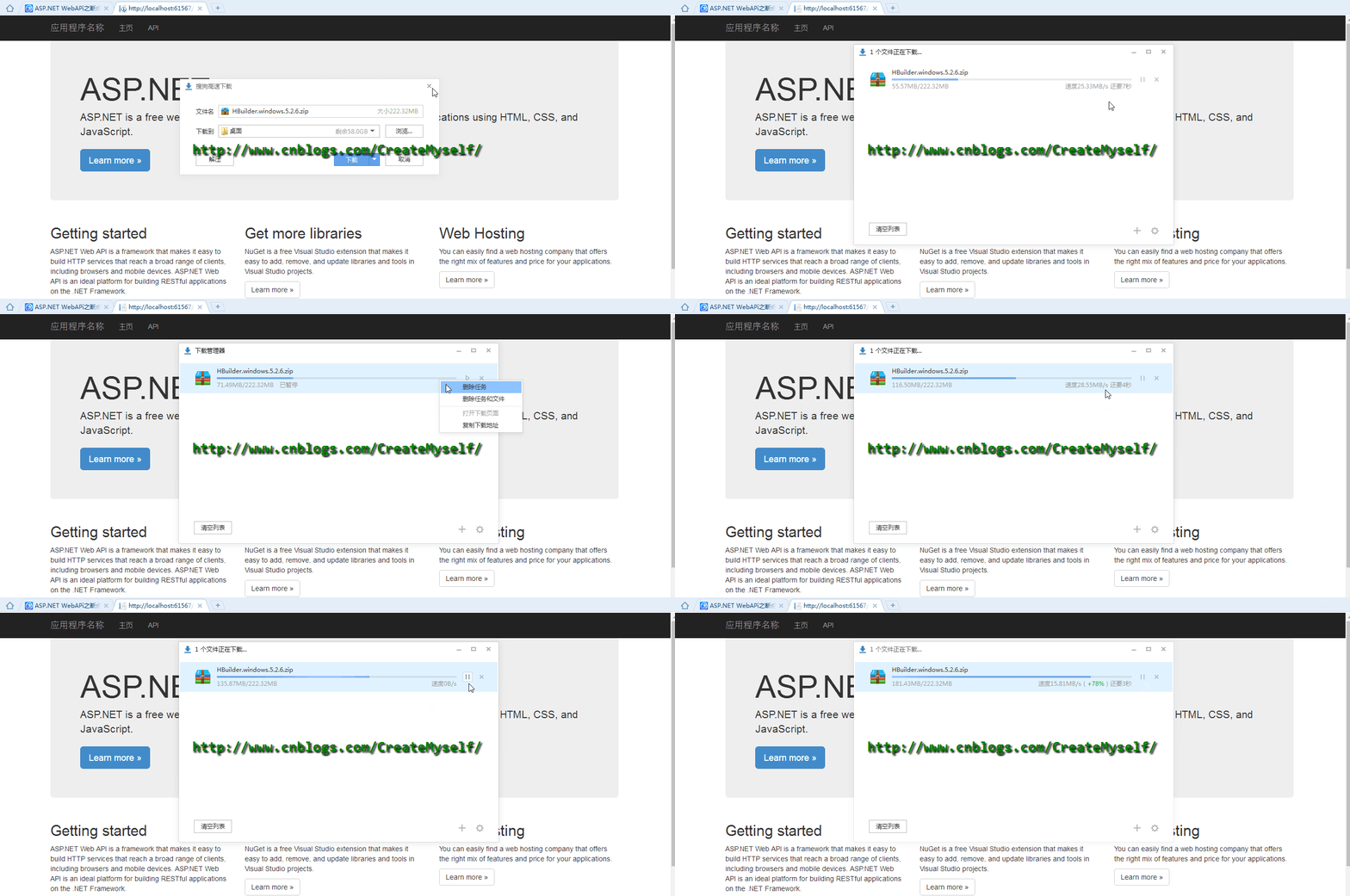
好了,到了这里我们也得到了我们想要的结果。
总结
本节我们将上节遗留的问题一一进行比较详细的叙述并最终解决,是不是就这么完全结束了呢?那本节定义为中篇岂不是不对头了,本节是在web端进行下载,下节我们利用webclient来进行断点续传。想了想无论是mvc上传下载,还是利用webapi来上传下载又或者是将mvc和webapi结合来上传下载基本都已经囊括,这都算是在项目中比较常用的吧,所以也就花了很多时间去研究。对于webapi的断点续传关键它本身就提供了比较多的api来给我们调用,所以还是很不错,webapi一个很轻量的服务框架,你值得拥有see u,反正周末,哟,不早了,休息休息。
ASP.NET WebAPi之断点续传下载(中)的更多相关文章
- ASP.NET WebAPi之断点续传下载(下)
前言 上一篇我们穿插了C#的内容,本篇我们继续来讲讲webapi中断点续传的其他情况以及利用webclient来实现断点续传,至此关于webapi断点续传下载以及上传内容都已经全部完结,一直嚷嚷着把S ...
- ASP.NET WebAPi之断点续传下载(上)
前言 之前一直感觉断点续传比较神秘,于是想去一探究竟,不知从何入手,以为就写写逻辑就行,结果搜索一番,还得了解相关http协议知识,又花了许久功夫去看http协议中有关断点续传知识,有时候发觉东西只有 ...
- NET WebAPi之断点续传下载1
ASP.NET WebAPi之断点续传下载(上) 前言 之前一直感觉断点续传比较神秘,于是想去一探究竟,不知从何入手,以为就写写逻辑就行,结果搜索一番,还得了解相关http协议知识,又花了许久功夫 ...
- NET WebAPi之断点续传下载(下)
NET WebAPi之断点续传下载(下) 前言 上一篇我们穿插了C#的内容,本篇我们继续来讲讲webapi中断点续传的其他情况以及利用webclient来实现断点续传,至此关于webapi断点续传下载 ...
- 在ASP.NET WebAPI 中使用缓存【Redis】
初步看了下CacheCow与OutputCache,感觉还是CacheOutput比较符合自己的要求,使用也很简单 PM>Install-Package Strathweb.CacheOutpu ...
- Asp.Net WebApi Action命名中已‘Get’开头问题
ApiController 中的Action 命名已‘Get’开头,Post方法提交失败 场景: 1.action命名使用Get开头 /// <summary> /// 获取用户的未读消息 ...
- Asp.Net WebAPI 中Cookie 获取操作方式
1. /// <summary> /// 获取上下文中的cookie /// </summary> /// <returns></returns> [H ...
- 关于ASP.NET WebAPI中HTTP模型的相关思考
对于.NET的分布式应用开发,可以供我们选择的技术和框架比较多,例如webservice,.net remoting,MSMQ,WCF等等技术.对于这些技术很多人都不会陌生,即时没有深入的了解,但是肯 ...
- Asp.Net WebAPI及相关技术介绍(含PPT下载)
此PPT讲述了Asp.Net WebAPI及相关Web服务技术发展历史. 共80多页,Asp.Net WebAPI在讲到第36页的时候才会出现,因为这个技术不是凭空产生的,它有着自己的演变进化的历史. ...
随机推荐
- JavaScript-String基础知识
1.字符串可以0个或多个字符串放在一起: " ' ' ".'""' . "\"\"" 2.写法 ...
- fatal error
1. fatal error C1083: 无法打开源文件 编译报此错误: 1>c1xx : fatal error C1083: 无法打开源文件:“Projects\XXXCCCC\VB ...
- WCF自动添加消息头
客户端自定义消息查看器实现IClientMessageInspector接口在消息发送之前添加消息头 class ClientMessageInspector : System.ServiceMode ...
- 利用ajax的方式来提交数据到后台数据库及交互功能
怎么样用ajax来提交数据到后台数据库,并完成交互呢????? 一.当我们在验证表单的时候,为了阻止把错误的也发送到服务器,我们通常这样设置: $(function(){ var ...
- ajax的一些笔试面试题
1. 什么是ajax,为什么要使用Ajax(请谈一下你对Ajax的认识) 什么是ajax: AJAX是“Asynchronous JavaScript and XML”的缩写.他是指一种创建交互式网页 ...
- input在标签内设置禁止输入空格
1.通过正则匹配解决问题 此处涉及\s:匹配任意空白符 \S:匹配任意非空白字符 <input type="text" onkeyup="this.value=t ...
- Smart3D系列教程1之《浅谈无人机倾斜摄影建模的原理与方法》
一.引言 倾斜摄影测量技术是国际测绘遥感领域近年发展起来的一项高新技术,以大范围.高精度.高清晰的方式全面感知复杂场景,通过高效的数据采集设备及专业的数据处理流程生成的数据成果直观反映地物的外观.位置 ...
- HDu--我要拿走你的蜡烛
我要拿走你的蜡烛 Time Limit: 2000/1000 MS (Java/Others) Memory Limit: 32768/32768 K (Java/Others)Total Su ...
- C\C++中声明与定义的区别
声明和定义是完全同的概念,声明是告诉编译器"这个函数或者变量可以在哪找到,它的模样像什么".而定义则是告诉编译器,"在这里建立变量或函数",并且为它们分配内存空 ...
- Python基本数据类型——str
字符串常用操作 移除空白 分割 长度 索引 切片 class str(basestring): """ str(object='') -> string Retur ...