
(转)Arcgis for js加载天地图
http://blog.csdn.net/gisshixisheng/article/details/44494715
综述:本节讲述的是用Arcgis for js加载天地图的切片资源。
天地图的切片地图可以通过esri.layers.TiledMapServiceLayer来加载,在此将之进行了一定的封装,如下:
1、切片线划图——TDTLayer.js
- define(["dojo/_base/declare",
- "esri/layers/tiled"],
- function (declare) {
- return declare(esri.layers.TiledMapServiceLayer, {
- constructor: function () {
- this.spatialReference = new esri.SpatialReference({ wkid: 4326 });
- this.initialExtent = (this.fullExtent = new esri.geometry.Extent(-180.0, -90.0, 180.0, 90.0, this.spatialReference));
- this.tileInfo = new esri.layers.TileInfo({
- "rows": 256,
- "cols": 256,
- "compressionQuality": 0,
- "origin": {
- "x": -180,
- "y": 90
- },
- "spatialReference": {
- "wkid": 4326
- },
- "lods": [
- { "level": 2, "resolution": 0.3515625, "scale": 147748796.52937502 },
- { "level": 3, "resolution": 0.17578125, "scale": 73874398.264687508 },
- { "level": 4, "resolution": 0.087890625, "scale": 36937199.132343754 },
- { "level": 5, "resolution": 0.0439453125, "scale": 18468599.566171877 },
- { "level": 6, "resolution": 0.02197265625, "scale": 9234299.7830859385 },
- { "level": 7, "resolution": 0.010986328125, "scale": 4617149.8915429693 },
- { "level": 8, "resolution": 0.0054931640625, "scale": 2308574.9457714846 },
- { "level": 9, "resolution": 0.00274658203125, "scale": 1154287.4728857423 },
- { "level": 10, "resolution": 0.001373291015625, "scale": 577143.73644287116 },
- { "level": 11, "resolution": 0.0006866455078125, "scale": 288571.86822143558 },
- { "level": 12, "resolution": 0.00034332275390625, "scale": 144285.93411071779 },
- { "level": 13, "resolution": 0.000171661376953125, "scale": 72142.967055358895 },
- { "level": 14, "resolution": 8.58306884765625e-005, "scale": 36071.483527679447 },
- { "level": 15, "resolution": 4.291534423828125e-005, "scale": 18035.741763839724 },
- { "level": 16, "resolution": 2.1457672119140625e-005, "scale": 9017.8708819198619 },
- { "level": 17, "resolution": 1.0728836059570313e-005, "scale": 4508.9354409599309 },
- { "level": 18, "resolution": 5.3644180297851563e-006, "scale": 2254.4677204799655 }
- ]
- });
- this.loaded = true;
- this.onLoad(this);
- },
- getTileUrl: function (level, row, col) {
- return "http://t" + col % 8 + ".tianditu.cn/vec_c/wmts?SERVICE=WMTS&REQUEST=GetTile&VERSION=1.0.0&LAYER=vec&STYLE=default&TILEMATRIXSET=c&TILEMATRIX=" + level + "&TILEROW=" + row + "&TILECOL=" + col + "&FORMAT=tiles";
- }
- });
- });
2、切片标注——TDTAnnoLayer.js
- define(["dojo/_base/declare",
- "esri/layers/tiled"],
- function (declare) {
- return declare(esri.layers.TiledMapServiceLayer, {
- constructor: function () {
- this.spatialReference = new esri.SpatialReference({ wkid: 4326 });
- this.initialExtent = (this.fullExtent = new esri.geometry.Extent(-180.0, -90.0, 180.0, 90.0, this.spatialReference));
- this.tileInfo = new esri.layers.TileInfo({
- "rows": 256,
- "cols": 256,
- "compressionQuality": 0,
- "origin": {
- "x": -180,
- "y": 90
- },
- "spatialReference": {
- "wkid": 4326
- },
- "lods": [
- { "level": 2, "resolution": 0.3515625, "scale": 147748796.52937502 },
- { "level": 3, "resolution": 0.17578125, "scale": 73874398.264687508 },
- { "level": 4, "resolution": 0.087890625, "scale": 36937199.132343754 },
- { "level": 5, "resolution": 0.0439453125, "scale": 18468599.566171877 },
- { "level": 6, "resolution": 0.02197265625, "scale": 9234299.7830859385 },
- { "level": 7, "resolution": 0.010986328125, "scale": 4617149.8915429693 },
- { "level": 8, "resolution": 0.0054931640625, "scale": 2308574.9457714846 },
- { "level": 9, "resolution": 0.00274658203125, "scale": 1154287.4728857423 },
- { "level": 10, "resolution": 0.001373291015625, "scale": 577143.73644287116 },
- { "level": 11, "resolution": 0.0006866455078125, "scale": 288571.86822143558 },
- { "level": 12, "resolution": 0.00034332275390625, "scale": 144285.93411071779 },
- { "level": 13, "resolution": 0.000171661376953125, "scale": 72142.967055358895 },
- { "level": 14, "resolution": 8.58306884765625e-005, "scale": 36071.483527679447 },
- { "level": 15, "resolution": 4.291534423828125e-005, "scale": 18035.741763839724 },
- { "level": 16, "resolution": 2.1457672119140625e-005, "scale": 9017.8708819198619 },
- { "level": 17, "resolution": 1.0728836059570313e-005, "scale": 4508.9354409599309 },
- { "level": 18, "resolution": 5.3644180297851563e-006, "scale": 2254.4677204799655 }
- ]
- });
- this.loaded = true;
- this.onLoad(this);
- },
- getTileUrl: function (level, row, col) {
- return "http://t" + row % 8 + ".tianditu.cn/cva_c/wmts?SERVICE=WMTS&REQUEST=GetTile&VERSION=1.0.0&LAYER=cva&STYLE=default&TILEMATRIXSET=c&TILEMATRIX=" + level + "&TILEROW=" + row + "&TILECOL=" + col + "&FORMAT=tiles";
- }
- });
- });
封装好之后就可以在页面调用了,调用的时候需要导入这些自定义的图层,导入方式为:
- <script type="text/javascript">
- dojoConfig = {
- parseOnLoad: true,
- packages: [{
- name: 'tdlib',
- location: this.location.pathname.replace(/\/[^/]+$/, "")+"/js/tdlib"
- }]
- };
- </script>
- <script src="http://localhost/arcgis_js_api/library/3.9/3.9/init.js"></script>
- <script>
- require(["tdlib/TDTLayer",
- "tdlib/TDTAnnoLayer"],
- function (TDTLayer,
- TDTAnnoLayer
- ){
- var basemap = new TDTLayer();
- map.addLayer(basemap);
- var annolayer = new TDTAnnoLayer();
- map.addLayer(annolayer);
- });
- </script>
完整调用页面代码为:
- <!DOCTYPE html>
- <html>
- <head>
- <meta http-equiv="Content-Type" content="text/html; charset=utf-8" />
- <title>TianDi Map</title>
- <link rel="stylesheet" href="http://localhost/arcgis_js_api/library/3.9/3.9/js/dojo/dijit/themes/tundra/tundra.css">
- <link rel="stylesheet" href="http://localhost/arcgis_js_api/library/3.9/3.9/js/esri/css/esri.css">
- <style>
- html, body, #map {
- height: 100%;
- margin: 0;
- padding: 0;
- }
- </style>
- <script type="text/javascript">
- dojoConfig = {
- parseOnLoad: true,
- packages: [{
- name: 'tdlib',
- location: this.location.pathname.replace(/\/[^/]+$/, "")+"/js/tdlib"
- }]
- };
- </script>
- <script src="http://localhost/arcgis_js_api/library/3.9/3.9/init.js"></script>
- <script>
- var map;
- require(["esri/map",
- "tdlib/TDTLayer",
- "tdlib/TDTAnnoLayer",
- "esri/layers/FeatureLayer",
- "esri/geometry/Point",
- "esri/symbols/SimpleFillSymbol",
- "esri/symbols/SimpleLineSymbol",
- "dojo/_base/Color",
- "dojo/domReady!"],
- function (Map,
- TDTLayer,
- TDTAnnoLayer,
- FeatureLayer,
- Point,
- SimpleFillSymbol,
- SimpleLineSymbol,
- Color
- ){
- map = new Map("map", { logo: false });
- var basemap = new TDTLayer();
- map.addLayer(basemap);
- var annolayer = new TDTAnnoLayer();
- map.addLayer(annolayer);
- var pro = new FeatureLayer("http://localhost:6080/arcgis/rest/services/chinawgs84/MapServer/1");
- map.addLayer(pro);
- var pt = new Point(103.847, 36.0473);
- map.centerAndZoom(pt, 3);
- });
- </script>
- </head>
- <body>
- <div id="map"></div>
- </body>
- </html>
在图中,我还添加了一个我本机用Arcgis Server发布的特征层,完成后效果如下:
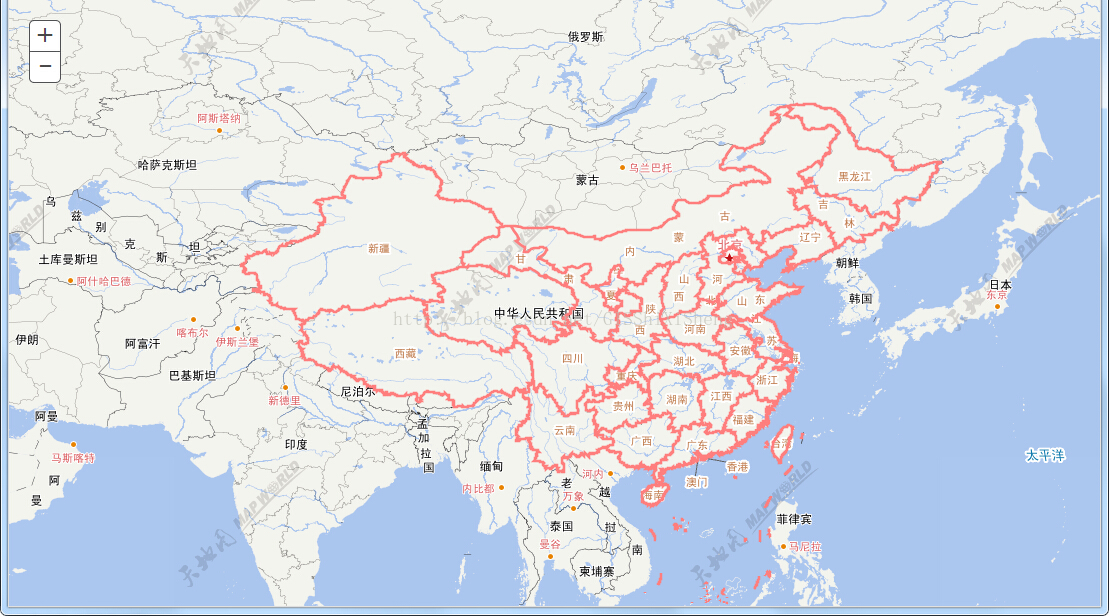
本文抛砖引玉,更多的天地图如影像等请参照:http://www.tianditu.com/guide/index.html
(转)Arcgis for js加载天地图的更多相关文章
- (转) Arcgis for js加载百度地图
http://blog.csdn.net/gisshixisheng/article/details/44853709 概述: 在前面的文章里提到了Arcgis for js加载天地图,在本节,继续讲 ...
- Arcgis for js加载百度地图
看转:https://blog.csdn.net/qq_41046162/article/details/80248281 通过学习了一段时间的arcgis for js,让我来讲一下如何在arcgi ...
- (转载)arcgis for js - 解决加载天地图和WMTS服务,WMTS服务不显示的问题,以及wmts服务密钥。
1 arcgis加载天地图和wmts服务 arcgis for js加载天地图的例子网上有很多,这里先不写了,后期有空再贴代码,这里主要分析下WMTS服务为什么不显示,怎么解决. 条件:这里的WMTS ...
- (转)Openlayers 2.X加载天地图
http://blog.csdn.net/gisshixisheng/article/details/44621923 概述: 在前面的章节,讲到了Arcgis for js加载天地图,在本节讲述如何 ...
- arcgis api 4.x for js 结合 react 入门开发系列react全家桶实现加载天地图(附源码下载)
基于两篇react+arcgis的文章介绍,相信大家也能体会两者的开发区别了.在“初探篇”中作者也讲述了自己的选择,故废话不多说,本篇带大家体验在@arcgis/webpack-plugin环境下,使 ...
- 【ArcGis for javascript从零开始】之一 ArcGis加载天地图
最近做项目需要用到ArcGis来进行数据展示和数据分析.以前从来没有接触过与Gis有关的东西,一切需要从头开始学.没有时间从头系统地学习了,只能用到哪个学习哪里了,本系列只是对学习的路径进行记录.Ar ...
- ArcGis Javascript API (V3.6)加载天地图
Arcgis的Javascript api开发很活跃,不知不觉都发布了3.6的版本了.该版本基于dojo 1.8.3开发的. 从dojo 1.8开始,AMD机制用得越来越多了,而且require([& ...
- ArcGIS API for Javascript 加载天地图(经纬度投影)
<!DOCTYPE html> <html> <head> <meta charset="utf-8"> <title> ...
- ArcGIS API for Javascript 加载天地图(墨卡托投影)
<!DOCTYPE html> <html> <head> <meta charset="utf-8"> <title> ...
随机推荐
- 牛刀小试MySQL学习—MySQL 双主
双主其实说白了也是一个replication,只是推出一些新的拓扑结构 主-主的复制有两种模式: 主动-主动模式下的主-主复制(Master-Master in Active-Active Mod ...
- iOS学习笔记18-CoreData你懂的
一.CoreData介绍 CoreData是iOS5之后新出来的的一个框架, 是对SQLite进行一层封装升级后的一种数据持久化方式. 它提供了对象<-->关系映射的功能,即能够将OC对象 ...
- iOS:制作左右侧滑(抽屉式)菜单
感谢控件作者:https://github.com/SocialObjects-Software/AMSlideMenu 首先上效果图: 这里我们使用AMSlideMenu来实现左右侧滑菜单的效果.控 ...
- request.getInputStream() 的两种解析方式
http://sagewsg.iteye.com/blog/1717923 byte[] bytes = new byte[1024 * 1024]; InputStream is; try { is ...
- Apache + Tomcat + JK 集群
原文请见http://www.cnblogs.com/dennisit/p/3370220.html 本文介绍了集群和负载均衡的基本开源实现,实现了用Apache分发请求到多个Tomcat里面相应的应 ...
- luogu1063 能量项链
题目大意 有一串项链,项链上的每个珠子有首尾两个数字,首尾相连的两个珠子的尾数字和头数字相同.每次选择相连的一对珠子,得到第一个项链的首数字*第一个项链的尾数字(第二个项链的首数字)*第二个项链的尾数 ...
- Git 少用 Pull 多用 Fetch 和 Merge 【已翻译100%】【转】
本文转载自:https://www.oschina.net/translate/git-fetch-and-merge?lang=chs&page=1# 本文有点长而且有点乱,但就像Mark ...
- How to use shared model by git in sql source control of red gate
1.clone the git repository for datbase 2.open sql source control window and select the target databa ...
- EJB是什么鸟东西?
到底EJB是什么 到底EJB是什么?被口口相传的神神秘秘的,百度一番,总觉得没有讲清楚的,仍觉得一头雾水.百度了很久,也从网络的文章的只言片语中,渐渐有了头绪. 用通俗话说,EJB就是:"把 ...
- Codeforces--615B--Longtail Hedgehog(贪心模拟)
B. Longtail Hedgehog time limit per test 3 seconds memory limit per test 256 megabytes input stan ...