
WPF文字描边的解决方法
原文:WPF文字描边的解决方法
由于项目原因,今天研究了一下午WPF的文字描边,网上这方面的资料奇少,搞了半天才发现强大的WPF原来不直接支持文字描边啊。最后求助于MSDN,找到了方案,和大家分享一下:
主要思路:用FormattedText将字符串转换为Geometry,再在重写的OnRender(DrawingContext
drawingContext)方法中绘制Geometry。效果如图。
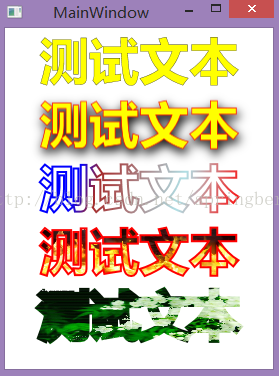
组件的主要属性:
Text属性设置文字
Fill属性设置文本本身的画刷
Stroke属性是描边画刷
StrokeThicknes是描边宽度
其他属性同Label(继承自Label)
XML配置:
<Window x:Class="StrokeableLabelTest.MainWindow"

        xmlns="http://schemas.microsoft.com/winfx/2006/xaml/presentation"

        xmlns:x="http://schemas.microsoft.com/winfx/2006/xaml"

        xmlns:wpflib="clr-namespace:BLCTClassLibrary.WpfLib;assembly=BLCTClassLibrary.WpfLib"

        Title="MainWindow" Height="422" Width="579">

    <Grid ShowGridLines="True">

        <StackPanel Orientation="Vertical" >

            <Label Margin="10"  Content="以下是StrokeableLabel类(相对轻量级)"/>

            <wpflib:StrokeableLabel Text="测试文本" Fill="Yellow" Stroke="Black" StrokeThickness="0.3" FontWeight="Bold" FontSize="50"/>

            <wpflib:StrokeableLabel Text="测试文本" Fill="Yellow" Stroke="Red" StrokeThickness="0.7" FontWeight="DemiBold" FontSize="50">

                <wpflib:StrokeableLabel.Effect>

                    <DropShadowEffect Color="Black" BlurRadius="15" RenderingBias="Quality" Direction="290" ShadowDepth="5" Opacity="1"  />

                </wpflib:StrokeableLabel.Effect>

            </wpflib:StrokeableLabel>

            <wpflib:StrokeableLabel Text="测试文本" Fill="White" StrokeThickness="2" FontWeight="Bold" FontSize="50">

                <wpflib:StrokeableLabel.Stroke>

                    <LinearGradientBrush>

                        <LinearGradientBrush.GradientStops>

                            <GradientStop Color="Blue" Offset="0.2"/>

                            <GradientStop Color="Brown" Offset="0.3"/>

                            <GradientStop Color="PowderBlue" Offset="0.7"/>

                            <GradientStop Color="Red" Offset="1"/>

                        </LinearGradientBrush.GradientStops>

                    </LinearGradientBrush>

                </wpflib:StrokeableLabel.Stroke>

            </wpflib:StrokeableLabel>

            <wpflib:StrokeableLabel Text="测试文本" Stroke="red" StrokeThickness="2"  FontWeight="Bold" FontSize="50">

                <wpflib:StrokeableLabel.Fill>

                    <ImageBrush ImageSource="/StrokeableLabelTest;component/Images/20085385922474_2.jpg" />

                </wpflib:StrokeableLabel.Fill>

            </wpflib:StrokeableLabel>

            <wpflib:StrokeableLabel Fill="Transparent" FontSize="50" FontWeight="Light" StrokeThickness="8" Text="测试文本" >

                <wpflib:StrokeableLabel.Stroke>

                    <ImageBrush ImageSource="/StrokeableLabelTest;component/Images/05.jpg" />

                </wpflib:StrokeableLabel.Stroke>

            </wpflib:StrokeableLabel>

        </StackPanel>

    </Grid>

</Window>
库核心代码:
        private void getformattedText(string str)

        {

            // Create the formatted text based on the properties set.

            FormattedText formattedText = new FormattedText(

                str,

                CultureInfo.GetCultureInfo("en-us"),

                FlowDirection.LeftToRight,

                new Typeface(

                    FontFamily,

                    FontStyle,

                    FontWeight,

                    FontStretch),

                FontSize,

                System.Windows.Media.Brushes.Black // This brush does not matter since we use the geometry of the text.

                );

            this.Width = formattedText.Width;

            this.Height = formattedText.Height;

            // Build the geometry object that represents the text.

            //pg.AddGeometry(formattedText.BuildGeometry(new System.Windows.Point(5, 5)));

            TextGeometry = formattedText.BuildGeometry(new System.Windows.Point(0,0));

            // Build the geometry object that represents the text hightlight.

            if (Highlight == true)

            {

                TextHighLightGeometry = formattedText.BuildHighlightGeometry(new System.Windows.Point(0, 0));

            }

        }

        /// <summary>

        /// OnRender override draws the geometry of the text and optional highlight.

        /// </summary>

        /// <param name="drawingContext">Drawing context of the OutlineText control.</param>

        protected override void OnRender(DrawingContext drawingContext)

        {

            base.OnRender(drawingContext);

            CreateText();

            // Draw the outline based on the properties that are set.

            drawingContext.DrawGeometry(Fill, new System.Windows.Media.Pen(Stroke, StrokeThickness), TextGeometry);

            // Draw the text highlight based on the properties that are set.

            if (Highlight == true)

            {

                drawingContext.DrawGeometry(null, new System.Windows.Media.Pen(Stroke, StrokeThickness), TextHighLightGeometry);

            }

        }
具体代码请参照如下资源:
http://download.csdn.net/detail/wblct/8697005
需要2分的资源分,快没分了,大家谅解啊。
WPF文字描边的解决方法的更多相关文章
- WPF文字描边的解决方法(二)——支持文字竖排和字符间距调整
原文:WPF文字描边的解决方法(二)--支持文字竖排和字符间距调整 自前天格式化文本效果出来后,今天又添加文本竖排和调整字符间距的功能.另外,由于上次仓促,没来得及做有些功能的设计时支持,这次也调整好 ...
- RecyclerView嵌套TextView时显示文字不全的解决方法之一
先描述一下这个小bug:简单的TextView嵌套RecyclerView作为itemView时,可能会在文本中出现布局覆盖的现象,itemView的布局其实很简单,就是一个RelativeLayou ...
- input输入框只允许输入数字/ 数字+小数点/ 文字+字母/ 等解决方法
1.只允许输入数字: <input type="text" onkeyup="this.value=this.value.replace(/[^0-9]/g,'') ...
- wpf ActualWidth为0解决方法
LocalNewsControl() { var descriptor = DependencyPropertyDescriptor.FromProperty(ActualWidthProperty, ...
- WPF文字排列方式解析zz
WPF文字的处理是一个比较基础的技能.在使用WPF开发工具时,对于各种文字的处理时经常会遇到的情况.希望大家可以通过实践经验的积累,牢固掌握这一方面知识. AD:WOT2014:用户标签系统与用户 ...
- CSS3实现文字描边的2种方法
问题 最近遇到一个需求,需要实现文字的描边效果,如下图 解决方法一 首先想到去看CSS3有没有什么属性可以实现,后来被我找到了text-stroke 该属性是一个复 ...
- [WPF] 如何实现文字描边
1. 前言 WPF 的 TextBlock 提供了大部分常用的文字修饰方法,在日常使用中基本够用.如果需要更丰富的表现方式,WPF 也提供了其它用起来复杂一些的工具去实现这些需求.例如这篇文章介绍的文 ...
- MVVM框架从WPF移植到UWP遇到的问题和解决方法
MVVM框架从WPF移植到UWP遇到的问题和解决方法 0x00 起因 这几天开始学习UWP了,之前有WPF经验,所以总体感觉还可以,看了一些基础概念和主题,写了几个测试程序,突然想起来了前一段时间在W ...
- WPF:指定的命名连接在配置中找不到、非计划用于 EntityClient 提供程序或者无效的解决方法
文/嶽永鹏 WPF 数据绑定中绑定到ENTITY,如果把数据文件做成一个类库,在UI文件中去应用它,可能遇到下面这种情况. 指定的命名连接在配置中找不到.非计划用于 EntityClient 提供程序 ...
随机推荐
- 如何把canvas元素作为网站背景总结详解
如何把canvas元素作为网站背景总结详解 一.总结 一句话总结:最简单的做法是绝对定位并且z-index属性设置为负数. 1.如何把canvas元素作为网站背景的两种方法? a.设置层级(本例代码就 ...
- css3-13 如何改变文本框的轮廓颜色
css3-13 如何改变文本框的轮廓颜色 一.总结 一句话总结:outline使用和border很像,几乎一模一样,多了一个offset属性 1.轮廓outline如何使用? 使用和border很像, ...
- 【26.34%】【codeforces 722A】Broken Clock
time limit per test1 second memory limit per test256 megabytes inputstandard input outputstandard ou ...
- Lucene学习总结之六:Lucene打分公式的数学推导 2014-06-25 14:20 384人阅读 评论(0) 收藏
在进行Lucene的搜索过程解析之前,有必要单独的一张把Lucene score公式的推导,各部分的意义阐述一下.因为Lucene的搜索过程,很重要的一个步骤就是逐步的计算各部分的分数. Lucene ...
- Facebook开源软件列表
从 Facebook 的 GitHub 账户中可以看到,Facebook 已经开源的开源项目有近 300 个,领域涉及移动.前端.Web.后端.大数据.数据库.工具和硬件等.Facebook 开源项目 ...
- windows 下安装git
Git是当今最流行的版本控制软件,它包含了许多高级工具,这里小编就讲一下Git的安装. 首先如下图:(点击next) 第二步:文件位置存储,可根据自己盘的情况安装 第三步:安装配置文件,自己需要的都选 ...
- css3 实现水晶按钮
background-image: -webkit-gradient(linear, left top, left bottom, color-stop(0%, #ee432e), color-sto ...
- RSA解密时javax.crypto.BadPaddingException: Data must start with zero
解决方法:要在加密后产生的byte数组转成string时要在各byte之间加个标识符,我加了个空格,然后再根据空格分隔转换回byte数组.如果不加标识符,由于byte值可能是一位到三位,无法知道某一个 ...
- 【codeforces 758C】Unfair Poll
time limit per test1 second memory limit per test256 megabytes inputstandard input outputstandard ou ...
- 【矩阵】概念的理解 —— span、基
span:全部列向量的线性组合构成的集合: span[a1,-,an]={y∈Rm|y=∑k=1nckak}=S 注:ak∈Rm,共 n 个列向量: 集合 S 可以有不同的一组基,但是基中向量的个数是 ...