
关于ExpandableListView的一个小例子
喜欢显示好友QQ那样的列表,可以展开,可以收起,在android中,以往用的比较多的是listview,虽然可以实现列表的展示,但在某些情况下,我们还是希望用到可以分组并实现收缩的列表,那就要用到android的ExpandableListView,今天研究了一下这个的用法,也参考了很多资料动手写了一个小demo,实现了基本的功能,但界面优化方面做得还不够好,有待改进,素材采用了Q版三国杀武将的图片,很有爱哈哈,下面直接上效果图以及源代码~!
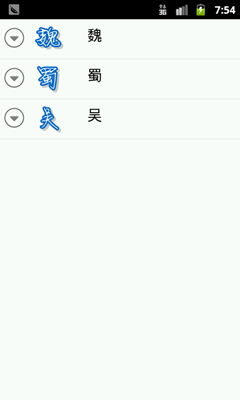
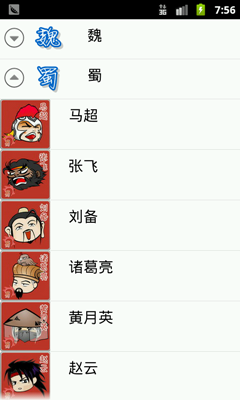
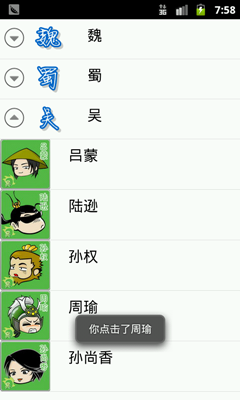
main.xml的布局很简单啦,只是一个ExpandableListView 就OK了
但值得简单说下的是 android:cacheColorHint="#00000000",这个设置可以去除拖动view时背景变成黑色的效果
android:listSelector="#00000000" ,可以去除选中时的黄色底色

1 <?xml version="1.0" encoding="utf-8"?>
2 <LinearLayout xmlns:android="http://schemas.android.com/apk/res/android"
3 android:layout_width="fill_parent"
4 android:layout_height="fill_parent"
5 android:orientation="vertical" >
6 <ExpandableListView
7 android:id="@+id/list"
8 android:layout_width="fill_parent"
9 android:layout_height="fill_parent"
10 android:background="#ffffff"
11 android:cacheColorHint="#00000000"
12 android:listSelector="#00000000"
13 >
14 </ExpandableListView>
15 </LinearLayout>
16
java代码:
package com.eyu.activity_test;
import android.app.Activity;
import android.graphics.Color;
import android.os.Bundle;
import android.view.Gravity;
import android.view.View;
import android.view.ViewGroup;
import android.view.Window;
import android.widget.AbsListView;
import android.widget.BaseExpandableListAdapter;
import android.widget.ExpandableListAdapter;
import android.widget.ExpandableListView;
import android.widget.ExpandableListView.OnChildClickListener;
import android.widget.ImageView;
import android.widget.LinearLayout;
import android.widget.TextView;
import android.widget.Toast;
public class ExpandableList extends Activity{
protected void onCreate(Bundle savedInstanceState) {
// TODO Auto-generated method stub
super.onCreate(savedInstanceState);
requestWindowFeature(Window.FEATURE_NO_TITLE);
setContentView(R.layout.main);
final ExpandableListAdapter adapter = new BaseExpandableListAdapter() {
//设置组视图的图片
int[] logos = new int[] { R.drawable.wei, R.drawable.shu,R.drawable.wu};
//设置组视图的显示文字
private String[] generalsTypes = new String[] { "魏", "蜀", "吴" };
//子视图显示文字
private String[][] generals = new String[][] {
{ "夏侯惇", "甄姬", "许褚", "郭嘉", "司马懿", "杨修" },
{ "马超", "张飞", "刘备", "诸葛亮", "黄月英", "赵云" },
{ "吕蒙", "陆逊", "孙权", "周瑜", "孙尚香" }
};
//子视图图片
public int[][] generallogos = new int[][] {
{ R.drawable.xiahoudun, R.drawable.zhenji,
R.drawable.xuchu, R.drawable.guojia,
R.drawable.simayi, R.drawable.yangxiu },
{ R.drawable.machao, R.drawable.zhangfei,
R.drawable.liubei, R.drawable.zhugeliang,
R.drawable.huangyueying, R.drawable.zhaoyun },
{ R.drawable.lvmeng, R.drawable.luxun, R.drawable.sunquan,
R.drawable.zhouyu, R.drawable.sunshangxiang } };
//自己定义一个获得文字信息的方法
TextView getTextView() {
AbsListView.LayoutParams lp = new AbsListView.LayoutParams(
ViewGroup.LayoutParams.FILL_PARENT, 64);
TextView textView = new TextView(
ExpandableList.this);
textView.setLayoutParams(lp);
textView.setGravity(Gravity.CENTER_VERTICAL);
textView.setPadding(36, 0, 0, 0);
textView.setTextSize(20);
textView.setTextColor(Color.BLACK);
return textView;
}
//重写ExpandableListAdapter中的各个方法
@Override
public int getGroupCount() {
// TODO Auto-generated method stub
return generalsTypes.length;
}
@Override
public Object getGroup(int groupPosition) {
// TODO Auto-generated method stub
return generalsTypes[groupPosition];
}
@Override
public long getGroupId(int groupPosition) {
// TODO Auto-generated method stub
return groupPosition;
}
@Override
public int getChildrenCount(int groupPosition) {
// TODO Auto-generated method stub
return generals[groupPosition].length;
}
@Override
public Object getChild(int groupPosition, int childPosition) {
// TODO Auto-generated method stub
return generals[groupPosition][childPosition];
}
@Override
public long getChildId(int groupPosition, int childPosition) {
// TODO Auto-generated method stub
return childPosition;
}
@Override
public boolean hasStableIds() {
// TODO Auto-generated method stub
return true;
}
@Override
public View getGroupView(int groupPosition, boolean isExpanded,
View convertView, ViewGroup parent) {
// TODO Auto-generated method stub
LinearLayout ll = new LinearLayout(
ExpandableList.this);
ll.setOrientation(0);
ImageView logo = new ImageView(ExpandableList.this);
logo.setImageResource(logos[groupPosition]);
logo.setPadding(50, 0, 0, 0);
ll.addView(logo);
TextView textView = getTextView();
textView.setTextColor(Color.BLACK);
textView.setText(getGroup(groupPosition).toString());
ll.addView(textView);
return ll;
}
@Override
public View getChildView(int groupPosition, int childPosition,
boolean isLastChild, View convertView, ViewGroup parent) {
// TODO Auto-generated method stub
LinearLayout ll = new LinearLayout(
ExpandableList.this);
ll.setOrientation(0);
ImageView generallogo = new ImageView(
ExpandableList.this);
generallogo
.setImageResource(generallogos[groupPosition][childPosition]);
ll.addView(generallogo);
TextView textView = getTextView();
textView.setText(getChild(groupPosition, childPosition)
.toString());
ll.addView(textView);
return ll;
}
@Override
public boolean isChildSelectable(int groupPosition,
int childPosition) {
// TODO Auto-generated method stub
return true;
}
};
ExpandableListView expandableListView = (ExpandableListView) findViewById(R.id.list);
expandableListView.setAdapter(adapter);
//设置item点击的监听器
expandableListView.setOnChildClickListener(new OnChildClickListener() {
@Override
public boolean onChildClick(ExpandableListView parent, View v,
int groupPosition, int childPosition, long id) {
Toast.makeText(
ExpandableList.this,
"你点击了" + adapter.getChild(groupPosition, childPosition),
Toast.LENGTH_SHORT).show();
return false;
}
});
}
}
关于ExpandableListView的一个小例子的更多相关文章
- java连接mysql的一个小例子
想要用java 连接数据库,需要在classpath中加上jdbc的jar包路径 在eclipse中,Project的properties里面的java build path里面添加引用 连接成功的一 ...
- java操作xml的一个小例子
最近两天公司事比较多,这两天自己主要跟xml打交道,今天更一下用java操作xml的一个小例子. 原来自己操作xml一直用这个包:xstream-1.4.2.jar.然后用注解的方式,很方便,自己只要 ...
- MVVM模式的一个小例子
使用SilverLight.WPF也有很长时间了,但是知道Binding.Command的基本用法,对于原理性的东西,一直没有深究.如果让我自己建一个MVVM模式的项目,感觉还是无从下手,最近写了一个 ...
- 使用Trinity拼接以及分析差异表达一个小例子
使用Trinity拼接以及分析差异表达一个小例子 2017-06-12 09:42:47 293 0 0 Trinity 将测序数据分为许多独立的de Brujin grap ...
- 从一个小例子认识SQL游标
1 什么是游标: 关系数据库中的操作会对整个行集起作用. 例如,由 SELECT 语句返回的行集包括满足该语句的 WHERE 子句中条件的所有行. 这种由语句返回的完整行集称为结果集. 应用程序 ...
- 关于SVN配置文件的一个小例子
1 背景假设 厦门央瞬公司是一家电子元器件设备供应商,其中有个ARM部门,专门负责ARM芯片的方案设计.销售,并在北京.上海各设立了一个办事处.对于工作日志,原先采用邮件方式发给经理,但是这种方式 ...
- Vue2.x源码学习笔记-从一个小例子查看vm实例生命周期
学习任何一门框架,都不可能一股脑儿的从入口代码从上到下,把代码看完, 这样其实是很枯燥的,我想也很少有人这么干,或者这么干着干着可能干不下去了. 因为肯定很无聊. 我们先从一个最最简单的小例子,来查看 ...
- Spring和Hibernate结合的一个小例子
1.新建一个SpringHibernate的maven项目 2.pom文件的依赖为 <dependency> <groupId>junit</groupId> &l ...
- Spring.Net在ASP.NET Mvc里使用的一个小例子
就贴个小例子,就不注意格式了. 1.下载dll NuGet的下载地址:http://docs.nuget.org/docs/start-here/installing-nuget 在vs的NuGet里 ...
随机推荐
- 解决linux下cocos2dx不能播放声音
cocos2dx2.2.1在linux下引用#include "SimpleAudioEngine.h".报错找不到该文件. 改动makefile文件,加入 SHAREDLIBS ...
- html表单元素及表单元素详解
原文 https://www.jianshu.com/p/b427daa8663d 大纲 1.认识表单 2.认识表单元素 3.表单元素的分类 4.表单元素——文本框 5.表单元素button 6.表单 ...
- 解决Eclipse中的卡死现象
解决Eclipse中的卡死现象 取消验证 windows–>perferences–>validation 把 除了manual 下面的全部点掉,build下只留 classpath de ...
- jquery-11 jquery中的事件切换如何实现
jquery-11 jquery中的事件切换如何实现 一.总结 一句话总结:事件切换hover()和toggle()函数.参数两个,都是函数,依次执行两个函数. 1.如何实现单击切换图片? 用togg ...
- printk()函数的总结
我们在使用printk()函数中使用日志级别为的是使编程人员在编程过程中自定义地进行信息的输出,更加容易地掌握系统当前的状况.对程序的调试起到了很重要的作用.(下文中的日志级别和控制台日志控制级别是一 ...
- 小强的HTML5移动开发之路(48)——(小练习)新闻订阅系统【1】
一.总体设计 二.数据库设计 --新闻类别表 create table news_cate( news_cateid int primary key auto_increment, news_icon ...
- unresolved external symbol __forceAtlDllManifest错误的解决
作者:朱金灿 来源:http://blog.csdn.net/clever101 晚上编译一个ATL程序,出现一些诡异的错误: 1>CGreet.obj : error LNK2001: unr ...
- JavaScript经典面试题(二)
前言: 近年来T行业就业者越来越多,有关于编程行业的高薪工作也变得越来越难找,竞争力越来越大,想要在众多的应聘者当中脱颖而出,面试题和笔试题一定要多加研究和琢磨,以下记录的是自己的面试过程之中遇到的一 ...
- 【codeforces 752F】Santa Clauses and a Soccer Championship
time limit per test2 seconds memory limit per test256 megabytes inputstandard input outputstandard o ...
- 理解Erlang/OTP - Application
http://www.cnblogs.com/me-sa/archive/2011/12/27/erlang0025.html 1>application:start(log4erl). 我们就 ...