
appium滑动
在app应用日常使用过程中,会经常用到在屏幕滑动操作。如刷朋友圈上下滑操作、浏览图片左右滑动操作等。在自动化脚本该如何实现这些操作呢?
在Appium中模拟用户滑动操作需要使用swipe方法,该方法定义如下:
def swipe(self, start_x, start_y, end_x, end_y, duration=None):
"""Swipe from one point to another point, for an optional duration.
:Args:
- start_x - x-coordinate at which to start
- start_y - y-coordinate at which to start
- end_x - x-coordinate at which to stop
- end_y - y-coordinate at which to stop
- duration - (optional) time to take the swipe, in ms.
:Usage:
driver.swipe(100, 100, 100, 400)
滑动解析
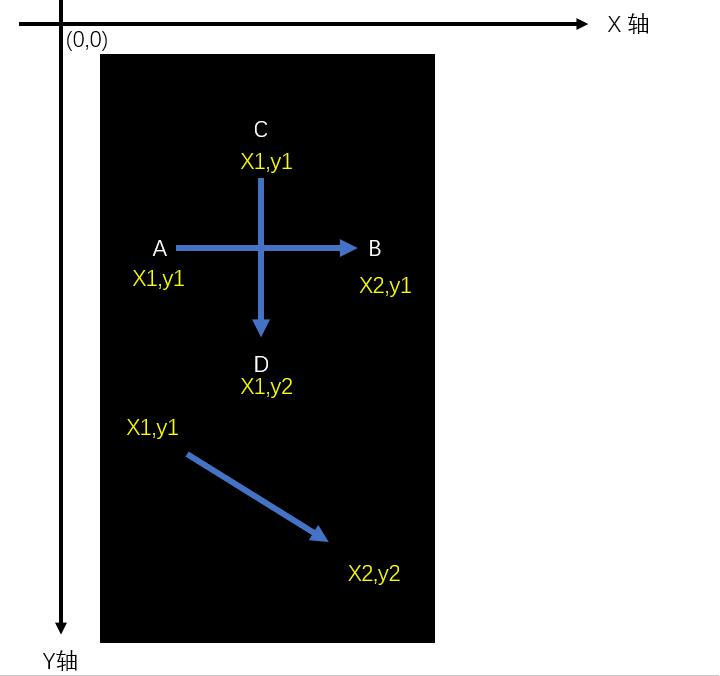
滑动主要分为:
- 水平滑动
- 垂直滑动
- 任意方向滑动
滑动轨迹图如下:
实践应用
测试场景
- 安装启动考研帮,手动向水平左滑动首页引导页面。
- 点击“立即体验”进入登录页面。
代码实现
from time import sleep
from find_element.capability import driver
#获取屏幕尺寸
def get_size():
x=driver.get_window_size()['width']
y=driver.get_window_size()['height']
return x,y
#显示屏幕尺寸(width,height)
l=get_size()
print(l)
#向左滑动
def swipeLeft():
l=get_size()
x1=int(l[0]*0.9)
y1=int(l[1]*0.5)
x2=int(l[0]*0.1)
driver.swipe(x1,y1,x2,y1,1000)
#向左滑动2次
for i in range(2):
swipeLeft()
sleep(0.5)
driver.find_element_by_id('com.tal.kaoyan:id/activity_splash_guidfinish').click()
注意:运行前记得将capablity里面的check_skipBtn()先注释掉,否则直接跳过了无法滑动引导页面。
课后作业
把垂直上下滑动以及向右滑动的也封装并实践。
- def swipeUp()
- def swipeDown()
- def swipeRight()
参考答案
def swipeUp():
l = get_size()
x1 = int(l[0] * 0.5)
y1 = int(l[1] * 0.95)
y2 = int(l[1] * 0.35)
driver.swipe(x1, y1, x1, y2, 1000)
def swipeDown():
l=get_size()
x1 = int(l[0] * 0.5)
y1 = int(l[1] * 0.35)
y2 = int(l[1] * 0.85)
driver.swipe(x1, y1, x1, y2, 1000)
def swipeRight():
l=get_size()
y1 = int(l[1] * 0.5)
x1 = int(l[0] * 0.25)
x2 = int(l[0] * 0.95)
driver.swipe(x1, y1, x2, y1, 1000)
appium滑动的更多相关文章
- appium滑动操作(向上、向下、向左、向右)
appium滑动操作(向上滑动.向下滑动.向左滑动.向右滑动) 测试app:今日头条apk 测试设备:夜游神模拟器 代码如下: 先用x.y获取当前的width和height def getSize() ...
- Python Appium 滑动、点击等操作
Python Appium 滑动.点击等操作 1.手机滑动-swipe # FileName : Tmall_App.py # Author : Adil # DateTime : 2018/3/25 ...
- Appium 滑动界面swipe用法
Appium 滑动API:Swipe(int start x,int start y,int end x,int y,duration) 解释:int start x-开始滑动的x坐标, int st ...
- appium 滑动
前些日子,配置好了appium测试环境,至于环境怎么搭建,参考:http://www.cnblogs.com/tobecrazy/p/4562199.html 知乎Android客户端登陆:htt ...
- Appium滑动函数:Swipe()
Appium处理滑动方法是swipe 滑动API:Swipe(int start x,int start y,int end x,int y,duration) 解释: int start x-开始滑 ...
- Appium 滑动踩坑记
前言 对于不同java-client版本,很多的API已经产生大的变化,所以一些API大家会发现已经失效或者使用方式发生了变化,滑动就是其中一项,这篇文章对滑动在不同的java-client版本以及不 ...
- appium 滑动封装
#获得机器屏幕大小x,y def getSize(): x = dr.get_window_size()['width'] y = dr.get_window_size()['heig ...
- Appium for iOS setup
windows下appium设置 之前研究了一段时间的appium for native app 相应的总结如下: ...
- appium for hybrid app 处理webview
之前研究了一段时间的appium for native app 相应的总结如下: appium测试环境搭建 :ht ...
随机推荐
- JAVA的堆和栈(转)
堆栈是 两种数据结构.堆栈都是一种数据项按序排列的数据结构,只能在一端(称为栈顶(top))对数据项进行插入和删除.在单片机应用中,堆栈是个特殊的存储 区,主要功能是暂时存放数据和地址,通常用来保护断 ...
- 高仿QQ6.0之側滑删除
前两天已经完毕了高仿QQ6.0側滑和优化,今天来看下側滑删除的实现吧,假设有兴趣,能够去看下之前的两篇,仿QQ6.0側滑之ViewDragHelper的使用(一)和高仿QQ6.0側滑菜单之滑动优化(二 ...
- 逆波兰法求解数学表达示(C++)
主要是栈的应用,里面有两个函数deleteSpace(),stringToDouble()在我还有一篇博客其中:对string的一些扩展函数. 本程序仅仅是主要的功能实现,没有差错控制. #inclu ...
- POJ 2891 Strange Way to Express Integers 中国剩余定理解法
一种不断迭代,求新的求余方程的方法运用中国剩余定理. 总的来说,假设对方程操作.和这个定理的数学思想运用的不多的话.是非常困难的. 參照了这个博客的程序写的: http://scturtle.is-p ...
- oc35--自定义构造方法
// // Person.h #import <Foundation/Foundation.h> @interface Person : NSObject @property int ag ...
- SQL 琐碎记录
1. 查看mysql现在已提供什么存储引擎: SHOW ENGINES ; 2. 查看mysql当前默认的存储引擎: SHOW VARIABLES LIKE '%storage_engine%'; 3 ...
- bzoj2303
并查集+数学 这道题网上好像有两种解法. 这位写的很可读:http://blog.csdn.net/unicornt_/article/details/51901225 然后看完大概就懂了做法,但是实 ...
- myeclipse视图布局恢复
使用Windows 菜单下的 Reset Perspective
- 原生JS---3
原生js学习笔记3——数组 定义数组 两种方式定义一个数组: 1. var array1 = new array(1, 2, 3, 4); 2. var array2 = [1, 2, 3, 4]; ...
- c#调用带有自定义表结构的存储过程
1.新建自定义表结构 CREATE TYPE [dbo].[HBForHBGHDR] AS TABLE( [序号] [int] NULL, [客户编号] [varchar](15) NULL ) GO ...