
OpenCASCADE 麻花钻头造型实例分析
OpenCASCADE 麻花钻头造型实例分析
Abstract. OpenCASCADE provides a simple twist drill bit modeling example in Tcl script. The blog will give a details of some key points, when you understand the key points, you can modeling the shape like that.
Key Words. OpenCASCADE, Twist Drill Bit Modeling, Tcl
1.Introduction
OpenCASCADE的Draw Test Harness中提供了一个麻花钻头造型的实例,如下图所示:
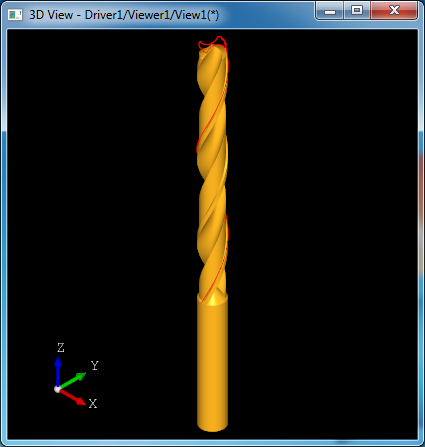
Figure 1. A Simple Twist Drill Bit by OpenCASCADE
钻头造型主要涉及到旋转形状的造型方法,放样造型及布尔操作。本文结合钻头的Tcl脚本来详细说明造型过程。对于有同样造型需求的,可以在理解造型方法的基础上实现自己需要的参数化形状。
2.Modeling Tcl Script
通过Draw Test Harness的菜单Samples->View samples可以找到Drill例子,如下图所示:
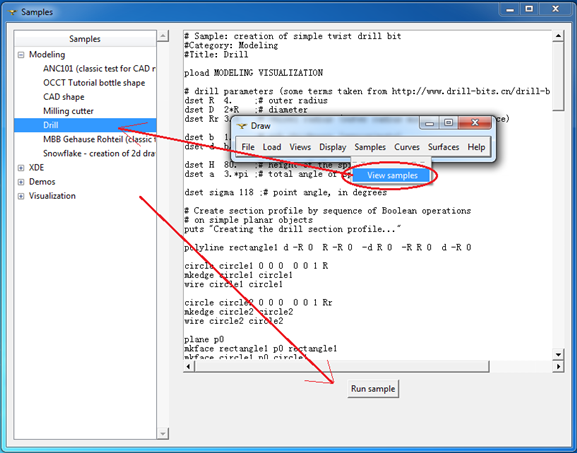
Figure 2. Drill bit modeling sample
对应的Tcl脚本位于samples/tcl文件夹中,列出如下:
# Sample: creation of simple twist drill bit

#Category: Modeling

#Title: Drill

pload MODELING VISUALIZATION

# drill parameters (some terms taken from http://www.drill-bits.cn/drill-bits-quality.asp)

dset R  .    ;# outer radius

dset D  *R   ;# diameter

dset Rr 3.5   ;# chisel radius (outer radius minus body clearance)

dset b  .    ;# web thickness (approximate)

dset d  b/

dset H  .   ;# height of the spiral part

dset a  .*pi ;# total angle of spiral rotation

dset sigma  ;# point angle, in degrees

# Create section profile by sequence of Boolean operations

# on simple planar objects

puts "Creating the drill section profile..."

polyline rectangle1 d -R   R -R  -d R  -R R   d -R

circle circle1       R

mkedge circle1 circle1

wire circle1 circle1

circle circle2       Rr

mkedge circle2 circle2

wire circle2 circle2

plane p0

mkface rectangle1 p0 rectangle1

mkface circle1 p0 circle1

mkface circle2 p0 circle2

bcommon sec rectangle1 circle1

# note use of 'fuse' instead of 'bfuse' -- we need to get single face

fuse sec sec circle2

# Construct flute profile so as to have cutting lip straight after sharpening.

# Here we need to take into account spiral shift of the flute edge

# along the point length -- the way to do that is to make spiral

# from the desired cutting lip edge and then intersect it by plane

polyline lip d -d/   d -R -R/tan(sigma/*pi/)

polyline sp      H

cylinder cc        -

line ll   a

trim ll ll  sqrt(a*a+H*H)

vertex v1  -R

vertex v2  -R H

trotate v2       .*a/pi

mkedge ee ll cc v1 v2

wire gg ee

mksweep sp

setsweep -G gg

addsweep lip

buildsweep spiral -S

mkface f0 p0 -R R -R R

bsection sflute spiral f0

# here we rely on that section curve is parameterized from 0 to 1

# and directed as cutting lip edge;

# note that this can change if intersection algorithm is modified

explode sflute e

mkcurve cflute sflute_1

cvalue cflute . x0 y0 z0

cvalue cflute . x1 y1 z1

vertex vf0 x0 y0 z0

vertex vf1 x1 y1 z1

# -- variant: replace curve by arc with start at x0,y0,z0 and end at x1,y1,z1,

# -- such that tanget at start point is along Y

#dset Rflute ((x1-x0)*(x1-x0)+(y1-y0)*(y1-y0))/(2*(x1-x0))

#circle aflute x0+Rflute y0 0  0 0 1  Rflute

#mkedge sflute_1 aflute vf0 vf1

# make rounding in the flute; use circle with radius Rr/2

circle cround x0+Rr/ y0     Rr/

vertex vf3 x0+Rr y0

mkedge sflute_2 cround vf3 vf0

vertex vf2 R -R

edge sflute_3 vf3 vf2

edge sflute_4 vf2 vf1

wire w2 sflute_1 sflute_2 sflute_3 sflute_4

mkface flute p0 w2

# cut flute from profile

bcut sec sec flute

trotate flute       .

bcut sec sec flute

donly sec

# sweep profile to get a drill body

puts "Sweeping the profile..."

mksweep sp

setsweep -G gg

explode sec w

addsweep sec_1

buildsweep base -S

# sharpen the drill (see http://tool-land.ru/zatochka-sverla.php)

puts "Sharpening..."

dset theta a*R/H*sin((-sigma/)*pi/)

plane ax1 d 1.9*D "H+1.9*D/tan(pi/180.*sigma/2.)"  - -

pcone sh1 ax1  *sin((sigma-)/*pi/.)

trotate sh1       -theta*/pi

tcopy sh1 sh2

trotate sh2

box sh -D/ -D/  D D

bcommon qq sh1 sh2

bcut sharpener sh qq

bcut body base sharpener

# make a shank

puts "Making a shank..."

plane pl2   -

pcylinder shank pl2

pcone transit R  R

plane pl3   -   -0.5

pcone tail pl3 R  0.5

bfuse shank shank tail

bfuse shank shank transit

bfuse drill body shank

# check result

checkshape drill

# show result

puts "Displaying result..."

incmesh drill 0.01

vdisplay drill

vsetdispmode drill

vrenderparams -msaa

vfit

# show section and sweep path

ttranslate sec_1   H; trotate sec_1       a*/pi; incmesh gg 0.01; vdisplay gg sec_1
下面结合Tcl脚本来对钻头的造型过程进行详细说明。
3.Twist Drill Bit Parameters
脚本首先加载相应的模块:造型模块和显示模块,分别为MODEING和VISUALIZATION。然后设置钻头相关参数变量:
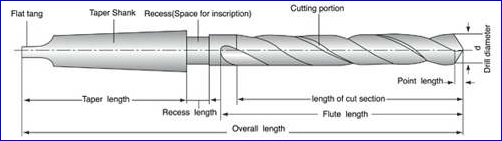
Figure 3. Drill Bit
变量名及其说明:
| 变量名variable | 说明 detail |
| R | 外半径 outer radius |
| D | 直径D |
| Rr | Chisel Radius |
| b | Web thickness(approximate) |
| d | |
| H | 螺旋部分的高度Height of the spiral height |
| a | 螺旋角度Total angle of spiral rotation |
| sigma | 钻尖角度Point angle in degrees. |
先定义这些变量的思想也是参数化的思想,将这些变量值改变就会得到不同的钻头模型。参数化的思想在CAD软件中比较常见,如AutoCAD中的动态块,PDMS中的设备模板Template等,都属于参数化的方法。通过修改参数让一个或多个几何体形状发生变化。
4.Create Drill Section Profile
创建钻头截面的Tcl脚本如下所示:
# Create section profile by sequence of Boolean operations

# on simple planar objects

puts "Creating the drill section profile..."

polyline rectangle1 d -R   R -R  -d R  -R R   d -R

circle circle1       R

mkedge circle1 circle1

wire circle1 circle1

circle circle2       Rr

mkedge circle2 circle2

wire circle2 circle2

plane p0

mkface rectangle1 p0 rectangle1

mkface circle1 p0 circle1

mkface circle2 p0 circle2

bcommon sec rectangle1 circle1

# note use of 'fuse' instead of 'bfuse' -- we need to get single face

fuse sec sec circle2
生成的图形如下图所示:
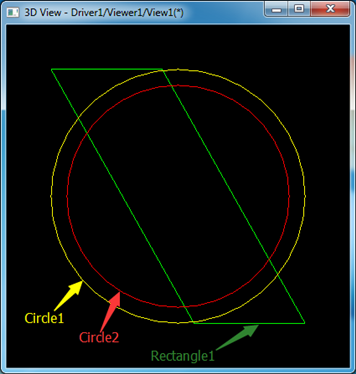
Figure 4 Profile construction curves
其中变量Rectangle1是图中绿色表示的四边形,Circle1是黄色表示的外圆,Circle2是红色表示的内圆。通过布尔操作求取Rectangle1和Circle1的公共部分得到如下图所示的截面:
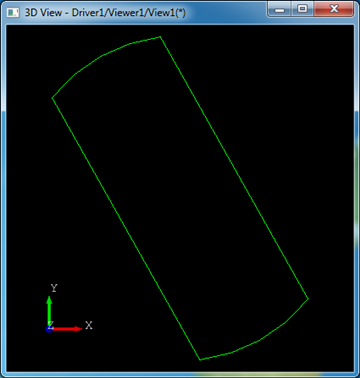
Figure 5 Common of Rectangle1 and Circle1
将公共部分与内圆Circle2合并得到如图所示截面:
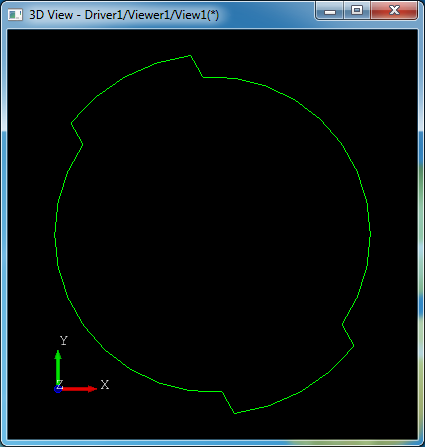
Figure 6. Fuse of Common part and Circle2
下面在这个截面的基础上生成钻头的螺旋凹槽,这里是相对关键的地方,生成凹槽的时候还要考虑螺旋。
# Construct flute profile so as to have cutting lip straight after sharpening.

# Here we need to take into account spiral shift of the flute edge

# along the point length -- the way to do that is to make spiral

# from the desired cutting lip edge and then intersect it by plane

polyline lip d -d/   d -R -R/tan(sigma/*pi/)

polyline sp      H

cylinder cc        -

line ll   a

trim ll ll  sqrt(a*a+H*H)

vertex v1  -R

vertex v2  -R H

trotate v2       .*a/pi

mkedge ee ll cc v1 v2

wire gg ee

mksweep sp

setsweep -G gg

addsweep lip

buildsweep spiral -S

mkface f0 p0 -R R -R R

bsection sflute spiral f0
代码生成的图形如下图所示:
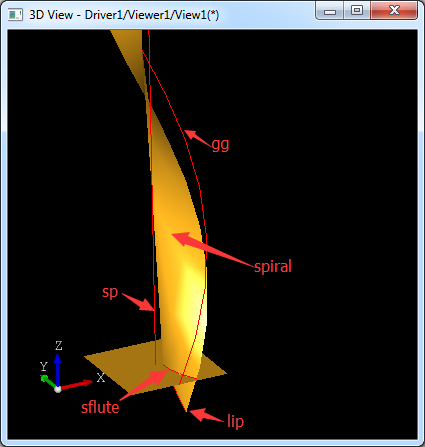
Figure 7. Flute of the drill bit
通过将线lip沿着路径直线sp和螺旋线gg放样得到螺旋截面spiral,再将螺旋截面spiral和底平面f0求交得到sflute。
# here we rely on that section curve is parameterized from 0 to 1

# and directed as cutting lip edge;

# note that this can change if intersection algorithm is modified

explode sflute e

mkcurve cflute sflute_1

cvalue cflute . x0 y0 z0

cvalue cflute . x1 y1 z1

vertex vf0 x0 y0 z0

vertex vf1 x1 y1 z1

# -- variant: replace curve by arc with start at x0,y0,z0 and end at x1,y1,z1,

# -- such that tanget at start point is along Y

#dset Rflute ((x1-x0)*(x1-x0)+(y1-y0)*(y1-y0))/(2*(x1-x0))

#circle aflute x0+Rflute y0 0  0 0 1  Rflute

#mkedge sflute_1 aflute vf0 vf1

# make rounding in the flute; use circle with radius Rr/2

circle cround x0+Rr/ y0     Rr/

vertex vf3 x0+Rr y0

mkedge sflute_2 cround vf3 vf0

vertex vf2 R -R

edge sflute_3 vf3 vf2

edge sflute_4 vf2 vf1

wire w2 sflute_1 sflute_2 sflute_3 sflute_4

mkface flute p0 w2
通过求得的交线再构造圆弧和线段来构造出钻头凹槽的截面,如下图所示:
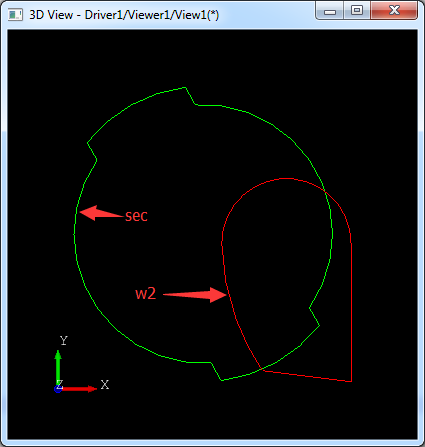
Figure 8. Make flute section
将凹槽截面flute从前面构造的截面中去除:
# cut flute from profile

bcut sec sec flute
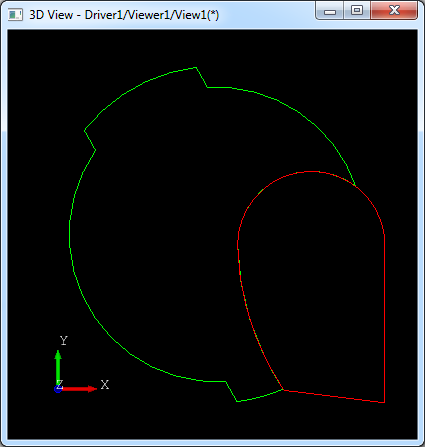
Figure 9. Make drill bit profile
将凹槽截面绕Z轴旋转180度,再去布尔减原来的截面:
trotate flute       .

bcut sec sec flute
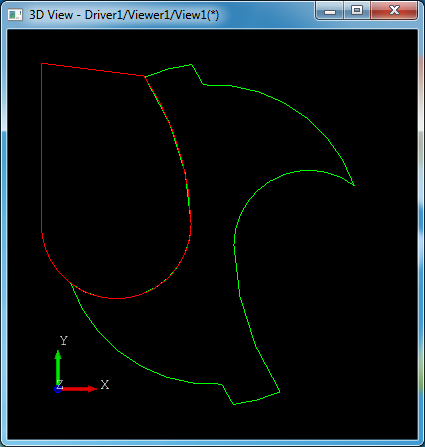
Figure 10. Make drill bit profile
这样钻头的截面就生成了。
5.Sweeping the Profile
将上面钻头截面沿着直线sp和螺旋线gg放样:
# sweep profile to get a drill body

puts "Sweeping the profile..."

mksweep sp

setsweep -G gg

explode sec w

addsweep sec_1

buildsweep base -S
生成图形如下图所示:
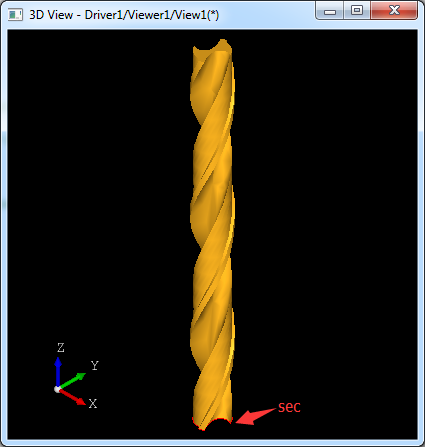
Figure 11. Sweep the profile
通过放样得到了钻头的螺杆base。
6.Sharpening
得到钻头的螺杆后需要生成钻头的钻尖,根据钻尖角point angle变量sigma来造型。
# sharpen the drill (see http://tool-land.ru/zatochka-sverla.php)

puts "Sharpening..."

dset theta a*R/H*sin((-sigma/)*pi/)

plane ax1 d 1.9*D "H+1.9*D/tan(pi/180.*sigma/2.)"  - -

pcone sh1 ax1  *sin((sigma-)/*pi/.)

trotate sh1       -theta*/pi

tcopy sh1 sh2

trotate sh2

box sh -D/ -D/  D D

bcommon qq sh1 sh2

bcut sharpener sh qq

bcut body base sharpener
先构造两个圆锥体(sh1和sh2)和一个长方体sh,再通过布尔运算得到两个圆锥体sh1,sh2的公共部分qq。如下图所示:
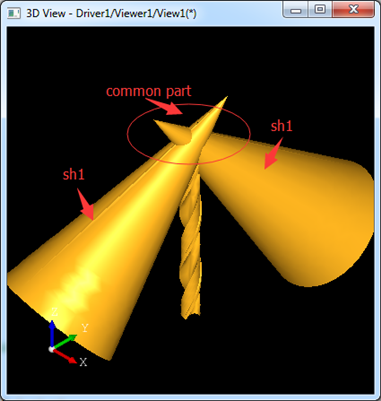
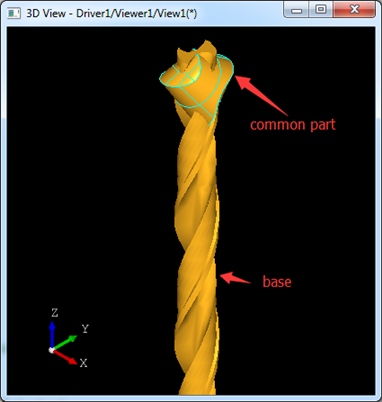
Figure 12. Modeling point angle
再从长方体sh中减去两个圆锥的公共部分得到如下图所示:
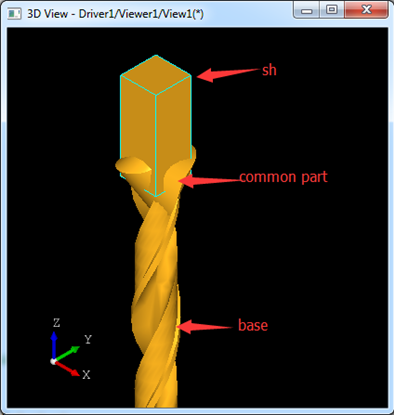
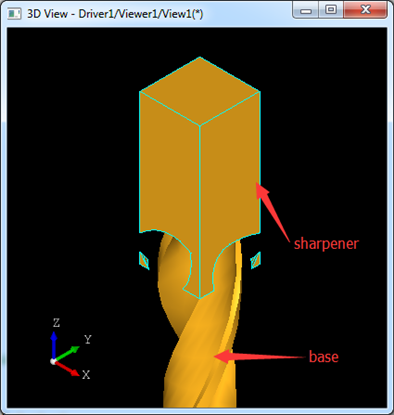
Figure 13. Modeling point angle
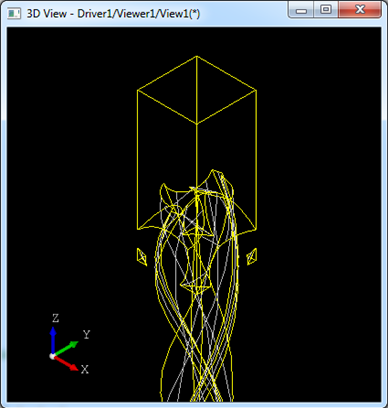
将螺杆减去上面得到的sharpener就完成钻尖的造型,如下图所示:
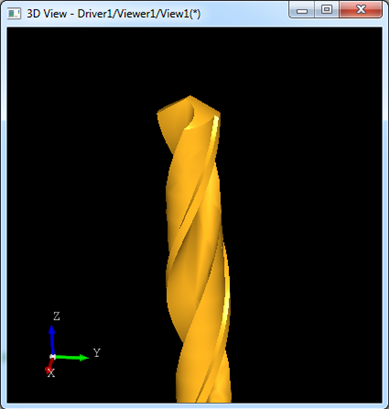
Figure 14. Modeling point angle
7.Make Shank
完成螺杆和钻尖造型后,就来实现麻花钻头的最后部分,钻头柄shank。
# make a shank

puts "Making a shank..."

plane pl2   -

pcylinder shank pl2

pcone transit R  R

plane pl3   -   -0.5

pcone tail pl3 R  0.5

bfuse shank shank tail

bfuse shank shank transit

bfuse drill body shank
钻头柄部由两个圆锥(transit和tail)和一个圆柱shank组成。最后将这三个形状合并得到完成的钻头的柄部shank。
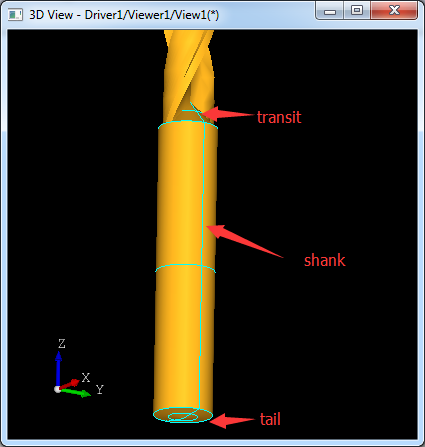
Figure 15. Modeling Shank
8.Conclusion
通过对OpenCASCADE中麻花钻头的造型实例分析,可见这个钻头造型用到的算法主要是放样及布尔操作。在生成螺旋线时主要是使用pcurve的方式。最后还要理解参数化的造型思想,通过定义变量来生成参数化的模型。
OpenCASCADE 麻花钻头造型实例分析的更多相关文章
- RPC原理及RPC实例分析
在学校期间大家都写过不少程序,比如写个hello world服务类,然后本地调用下,如下所示.这些程序的特点是服务消费方和服务提供方是本地调用关系. 1 2 3 4 5 6 public class ...
- java基础学习05(面向对象基础01--类实例分析)
面向对象基础01(类实例分析) 实现的目标 1.如何分析一个类(类的基本分析思路) 分析的思路 1.根据要求写出类所包含的属性2.所有的属性都必须进行封装(private)3.封装之后的属性通过set ...
- (转)实例分析:MySQL优化经验
[IT专家网独家]同时在线访问量继续增大,对于1G内存的服务器明显感觉到吃力,严重时甚至每天都会死机,或者时不时的服务器卡一下,这个问题曾经困扰了我半个多月.MySQL使用是很具伸缩性的算法,因此你通 ...
- sql注入实例分析
什么是SQL注入攻击?引用百度百科的解释: sql注入_百度百科: 所谓SQL注入,就是通过把SQL命令插入到Web表单提交或输入域名或页面请求的查询字符串,最终达到欺骗服务器执行恶意的SQL命令.具 ...
- 实例分析ELF文件静态链接
参考文献: <ELF V1.2> <程序员的自我修养---链接.装载与库>第4章 静态链接 开发平台: [thm@tanghuimin static_link]$ uname ...
- 用实例分析H264 RTP payload
用实例分析H264 RTP payload H264的RTP中有三种不同的基本负载(Single NAL,Non-interleaved,Interleaved) 应用程序可以使用第一个字节来识别. ...
- nodejs的模块系统(实例分析exprots和module.exprots)
前言:工欲善其事,必先利其器.模块系统是nodejs组织管理代码的利器也是调用第三方代码的途径,本文将详细讲解nodejs的模块系统.在文章最后实例分析一下exprots和module.exprots ...
- Android Touch事件原理加实例分析
Android中有各种各样的事件,以响应用户的操作.这些事件可以分为按键事件和触屏事件.而Touch事件是触屏事件的基础事件,在进行Android开发时经常会用到,所以非常有必要深入理解它的原理机制. ...
- Camera图像处理原理及实例分析-重要图像概念
Camera图像处理原理及实例分析 作者:刘旭晖 colorant@163.com 转载请注明出处 BLOG:http://blog.csdn.net/colorant/ 主页:http://rg ...
随机推荐
- centos7 配置redis
文件上传 yum -y install lrzsz 安装redis部署前操作 同时下载redis-.tar.gz安装包 yum -y install gcc-c++ yum -y install tc ...
- 4.C语言文件操作
总论 1.fopen r以只读方式打开文件,该文件必须存在 r+以可读写方式打开文件,文件必须存在 rb+读写打开一个二进制文件,允许读写数据,文件必须存在 rw+读写打开一个文本文件,允许读和写 w ...
- 搭建Hadoop的全分布模式
此教程仅供参考 注意:此文档目的是为了本人方便以后复习,不适合当教程,以免误导萌新... 1.安装三台Linux2.在每台机器上安装JDK3.配置每台机器的免密码登录 (*) 生成每台机器的公钥和私钥 ...
- java9新特性-6-多版本兼容jar包
1.官方Feature 238: Multi-Release JAR Files 2.使用说明 当一个新版本的Java出现的时候,你的库用户要花费数年时间才会切换到这个新的版本.这就意味着库得去向后兼 ...
- NET Core微服务之路:实战SkyWalking+Exceptionless体验生产下追踪系统
原文:NET Core微服务之路:实战SkyWalking+Exceptionless体验生产下追踪系统 前言 当一个APM或一个日志中心实际部署在生产环境中时,是有点力不从心的. 比如如下场景分析的 ...
- 第四讲 Yang-Mills方程与Maxwell方程
一.变分原理 变分原理始于17世纪的速降问题,也就是连接两点的曲线在有重力的情况下,让初速度为0的一小球最快地通过? 这个问题由伯努力给出解答,他的方法非常巧妙,而最后开创了一个学科——变分学.他假设 ...
- C语言调试小技巧
经常看到有人介绍一些IDE或者像gdb这样的调试器的很高级的调试功能,也听人说过有些牛人做工程的时候就用printf来调试,不用特殊的调试器.特别是在代码经过编译器一些比较复杂的优化后,会变得“难以辨 ...
- 洛谷 P1898 缘分计算
P1898 缘分计算 题目描述 缘分是一个外国人难以理解的中文名词.大致说来,缘分是一种冥冥中将两人(通常是情人)结合的力量.仅管这是种迷信,很多人——特别是女生——喜欢去计算它. 不幸的是,644 ...
- linux(debian/ubuntu)下连接安卓手机--小米4为例
更改:如今小米连接Ubuntu等Linux系统,直接改动手机上的连接方式就可以. --------------------------------------------- 因为安卓手机底层就是lin ...
- 基于MVC4+EasyUI的Web开发框架经验总结(13)--DataGrid控件实现自己主动适应宽带高度
在默认情况下,EasyUI的DataGrid好像都没有具备自己主动宽度的适应功能,通常是指定像素宽度的.可是使用的人员计算机的屏幕分辨率可能不一样,因此导致有些地方显示太大或者太小,总是不能达到好的预 ...