
SPM——Using Maven+Junit to test Hello Wudi
Last week, ours teacher taught us 'Software Delivery and Build Management'. And in this class, our teachers gave us a task about Develop the project “HelloWorld” and Install Maven and Build the “HelloWorld” Project. So I want to write something about using Maven and Junit.
1.Download Maven and configure environment variables
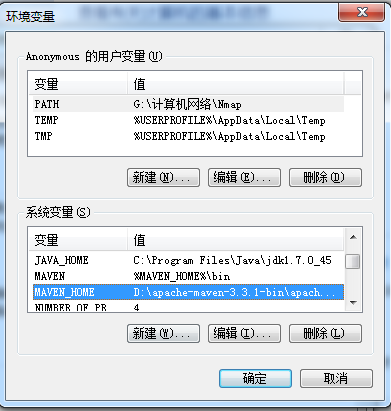
MAVEN_HOME: D:\apache-maven-3.3.1-bin\apache-maven-3.3.1
MAVEN: %MAVEN_HOME%\bin
PATH:%MAVEN%;
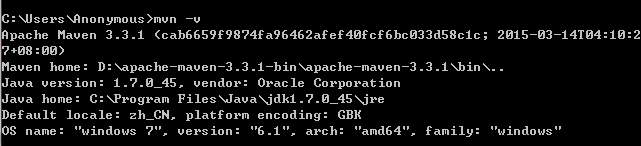
Then use cmd command 'mvn -v' to check the environment variables.
2.Using maven create your own project

After running this command, you will find that in the directory of C:/user/Anonymous, you have created your own project.
my-app-simple
|-- pom.xml
`-- src
|-- main
| `-- java
| `-- com
| `-- mycompany
| `-- app
| `-- App.java
`-- test
`-- java
`-- com
`-- mycompany
`-- app
`-- AppTest.java
3.Compile, test and package
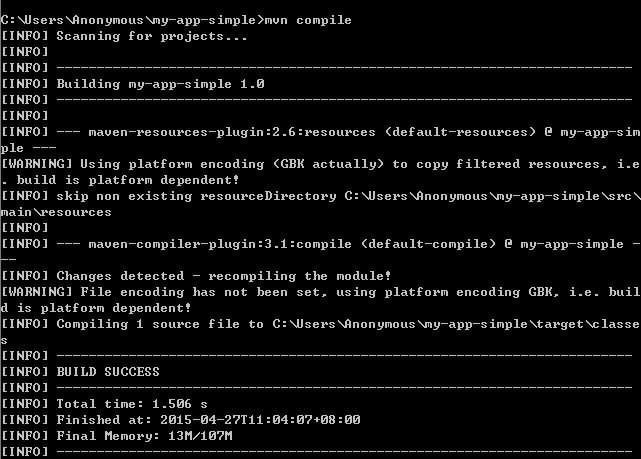
This is compile command.


This is test command.

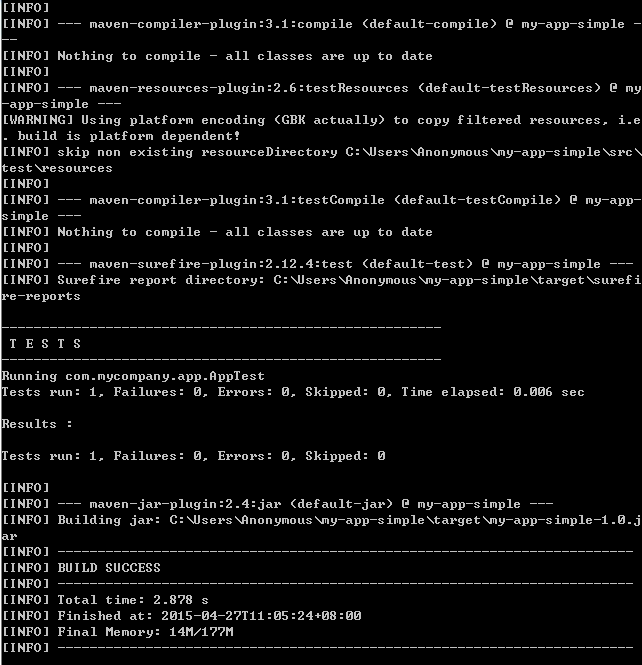
This is package command.
4.Import your project into Eclipse

Window->Preferences->Maven->Installations
Then add your maven into the Eclipse.
Import->Others->Maven->Existing Maven Projects
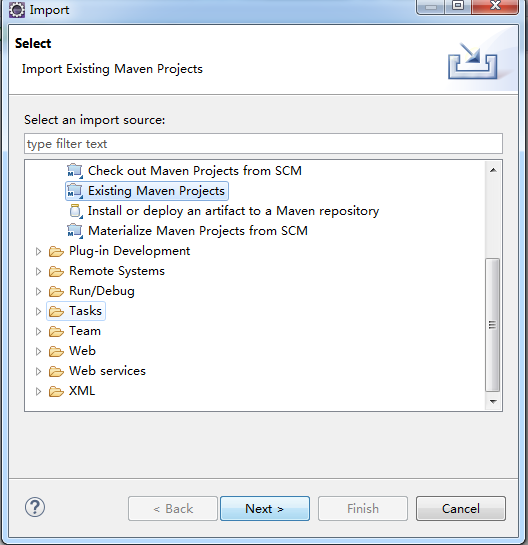


5.Download Junit and configure it

6.Write your own project code and test code
In App.java
package com.mycompany.app;

/**

 * Hello world!

 *

 */

public class App

{

	public String sayApp() {

		return "Hello Wudi!";

	}

    public static void main( String[] args )

    {

    	App app = new App();

        System.out.println( "Hello Wudi!" );

    }

}
In AppTest.java
package com.mycompany.app;

import junit.framework.Test;

import junit.framework.TestCase;

import junit.framework.TestSuite;

/**

 * Unit test for simple App.

 */

public class AppTest

    extends TestCase

{

    /**

     * Create the test case

     *

     * @param testName name of the test case

     */

    public AppTest( String testName )

    {

        super( testName );

    }

    /**

     * @return the suite of tests being tested

     */

    public static Test suite()

    {

        return new TestSuite( AppTest.class );

    }

    /**

     * Rigourous Test :-)

     */

    public void testApp()

    {

    	App app = new com.mycompany.app.App();

    	assertEquals("Hello Wudi!", app.sayApp() );

    }

}
Then you can run your project and get what you want.

That's all.
To be professional.
SPM——Using Maven+Junit to test Hello Wudi的更多相关文章
- jenkins+maven+junit构建自动化测试,整合junit xml生成直观的测试报告[留存]
在自动化测试过程中,测试报告最能直观的体现测试的价值,之前一直使用maven+junit来构建我的自动化测试,但这样有几个缺点,一是,不能定时构建自动化任务(也许是我没有找到maven有没有提供这样的 ...
- [Java] Spring + SpringMVC + Maven + JUnit 搭建
示例项目下载: https://github.com/yangyxd/SpringDemo 利用前面 SpringMVC 项目的配置方式,完成初步的项目创建.下面只讲一些不同之处. 传送门: [Jav ...
- spring && Cobertura && maven &&junit 单元测试以及测试覆盖率
1. 目的: junit 单元测试,Cobertura 测试覆盖率报告 项目目录结构 2. maven 配置 <project xmlns= ...
- maven junit 单元测试插件配置
单元测试插件配置 pom.xml中增加 <dependency> <groupId>junit</groupId> <artifactId>junit& ...
- IntelliJ Idea + Maven + Junit
Caculate.java package com.yxj.TestJunit; /** * Created by ubd on 15-4-17. */ public class Caculate { ...
- 传统项目目录结构下maven+junit+junitReport
<build> <defaultGoal>compile</defaultGoal> <sourceDirectory>${basedir}/src&l ...
- maven junit.framework不存在问题解决
问题 在使用maven进行一个工程的编译,已加入junit包的依赖,编译的时候却总是报“junit.framework不存在”错误. pom.xml中junit包加入如下: <dependenc ...
- junit+maven单元测试
一.概念 junit是一个专门测试的框架 集合maven进行单元测试,可批量测试类中的大量方法是否符合预期 二.作用:单元测试:测试的内容是类中的方法,每一个方法都是独立测试的.方法是测试的基本单位. ...
- Maven生命周期,插件,单元测试junit
maven生命周期,maven命令,maven插件 maven生命周期:就是maven构建项目的过程,清理,编译,测试,报告,打包,安装,部署 maven命令:maven独立使用,通过命令,完成mav ...
随机推荐
- HDU 3046
http://acm.hdu.edu.cn/showproblem.php?pid=3046 典型的最小割模型 #include <iostream> #include <cstdi ...
- Xcode C++ and Objective-C refactoring
Is there a way to refactor mixed C++/Objective-C code in Xcode ?? I am writing a game using Cocos2D ...
- stm32内部温度计算方法
计算公式:Temperature = {(V25 - VSENSE) / Avg_Slope} + 25 V25 最小=1.34V 典型=1.43V 最大=1. ...
- [LeetCode&Python] Problem 811. Subdomain Visit Count
A website domain like "discuss.leetcode.com" consists of various subdomains. At the top le ...
- HDU1024 最大M子段和问题 (单调队列优化)
Max Sum Plus Plus Time Limit: 2000/1000 MS (Java/Others) Memory Limit: 65536/32768 K (Java/Others ...
- zookeeper windows 下配置和基础命令
原文链接:http://blog.csdn.net/woshioosm/article/details/45560177 1, 解压zookeeper ,在目录下建立文件夹 data 和log 2,在 ...
- eclipse/idea批量替换空白行
批量替换空行Ctrl+F 快捷方式打开Find/Replace工具窗选择Regular expression(idea是regex)项,允许查询匹配正则表达式在Find文本框输入正则表达式:^\s*\ ...
- CTF之ROT加解密
常见的ROT加密包括ROT5,ROT13,ROT18,ROT47 ROT5:只是对数字进行编码.用当前数字往后数的第五个数字替换当前数字: 例:123sb——>678sb ROT13:只是对字母 ...
- Properties类与配置文件
//加载文件public static void testLoadProperties() throws Exception { Properties properties = new Propert ...
- ZH奶酪:【数据结构与算法】基础排序算法总结与Python实现
1.冒泡排序(BubbleSort) 介绍:重复的遍历数列,一次比较两个元素,如果他们顺序错误就进行交换. 2016年1月22日总结: 冒泡排序就是比较相邻的两个元素,保证每次遍历最后的元素最大. 排 ...