
SPM——Using Maven+Junit to test Hello Wudi
Last week, ours teacher taught us 'Software Delivery and Build Management'. And in this class, our teachers gave us a task about Develop the project “HelloWorld” and Install Maven and Build the “HelloWorld” Project. So I want to write something about using Maven and Junit.
1.Download Maven and configure environment variables
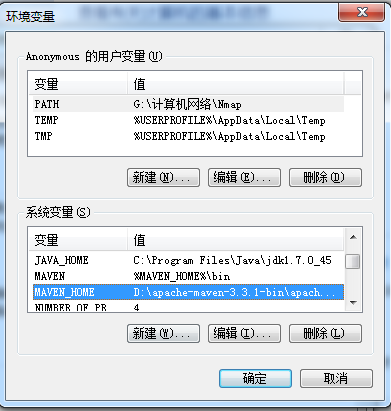
MAVEN_HOME: D:\apache-maven-3.3.1-bin\apache-maven-3.3.1
MAVEN: %MAVEN_HOME%\bin
PATH:%MAVEN%;
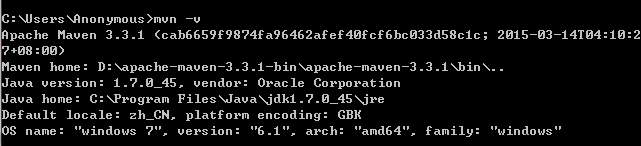
Then use cmd command 'mvn -v' to check the environment variables.
2.Using maven create your own project

After running this command, you will find that in the directory of C:/user/Anonymous, you have created your own project.
my-app-simple
|-- pom.xml
`-- src
|-- main
| `-- java
| `-- com
| `-- mycompany
| `-- app
| `-- App.java
`-- test
`-- java
`-- com
`-- mycompany
`-- app
`-- AppTest.java
3.Compile, test and package
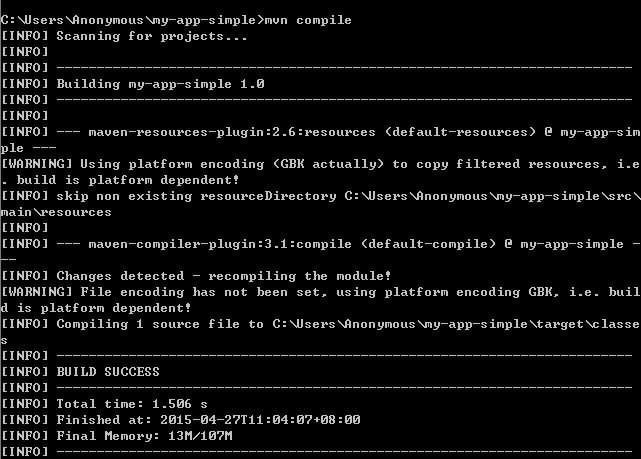
This is compile command.


This is test command.

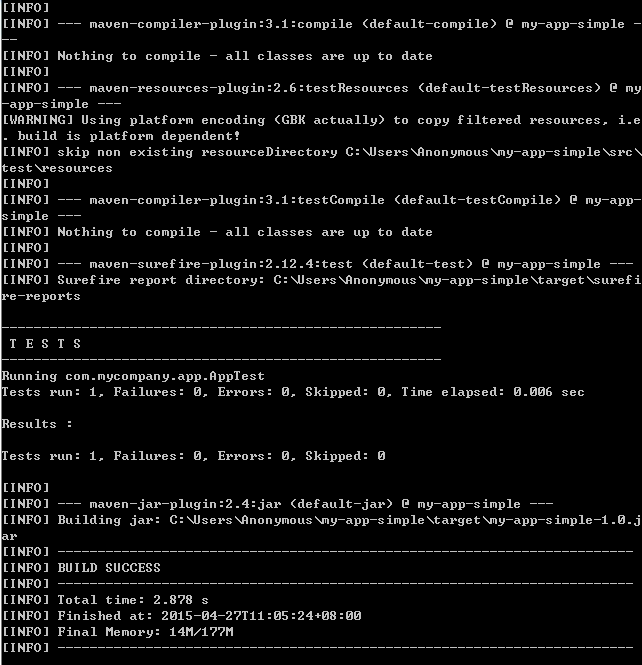
This is package command.
4.Import your project into Eclipse

Window->Preferences->Maven->Installations
Then add your maven into the Eclipse.
Import->Others->Maven->Existing Maven Projects
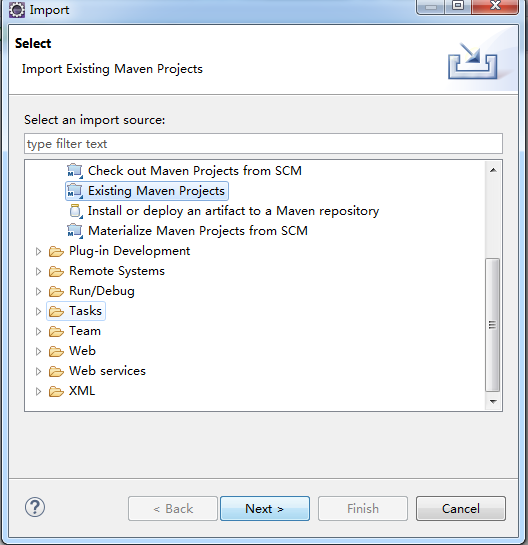


5.Download Junit and configure it

6.Write your own project code and test code
In App.java
package com.mycompany.app;

/**

 * Hello world!

 *

 */

public class App

{

	public String sayApp() {

		return "Hello Wudi!";

	}

    public static void main( String[] args )

    {

    	App app = new App();

        System.out.println( "Hello Wudi!" );

    }

}
In AppTest.java
package com.mycompany.app;

import junit.framework.Test;

import junit.framework.TestCase;

import junit.framework.TestSuite;

/**

 * Unit test for simple App.

 */

public class AppTest

    extends TestCase

{

    /**

     * Create the test case

     *

     * @param testName name of the test case

     */

    public AppTest( String testName )

    {

        super( testName );

    }

    /**

     * @return the suite of tests being tested

     */

    public static Test suite()

    {

        return new TestSuite( AppTest.class );

    }

    /**

     * Rigourous Test :-)

     */

    public void testApp()

    {

    	App app = new com.mycompany.app.App();

    	assertEquals("Hello Wudi!", app.sayApp() );

    }

}
Then you can run your project and get what you want.

That's all.
To be professional.
SPM——Using Maven+Junit to test Hello Wudi的更多相关文章
- jenkins+maven+junit构建自动化测试,整合junit xml生成直观的测试报告[留存]
在自动化测试过程中,测试报告最能直观的体现测试的价值,之前一直使用maven+junit来构建我的自动化测试,但这样有几个缺点,一是,不能定时构建自动化任务(也许是我没有找到maven有没有提供这样的 ...
- [Java] Spring + SpringMVC + Maven + JUnit 搭建
示例项目下载: https://github.com/yangyxd/SpringDemo 利用前面 SpringMVC 项目的配置方式,完成初步的项目创建.下面只讲一些不同之处. 传送门: [Jav ...
- spring && Cobertura && maven &&junit 单元测试以及测试覆盖率
1. 目的: junit 单元测试,Cobertura 测试覆盖率报告 项目目录结构 2. maven 配置 <project xmlns= ...
- maven junit 单元测试插件配置
单元测试插件配置 pom.xml中增加 <dependency> <groupId>junit</groupId> <artifactId>junit& ...
- IntelliJ Idea + Maven + Junit
Caculate.java package com.yxj.TestJunit; /** * Created by ubd on 15-4-17. */ public class Caculate { ...
- 传统项目目录结构下maven+junit+junitReport
<build> <defaultGoal>compile</defaultGoal> <sourceDirectory>${basedir}/src&l ...
- maven junit.framework不存在问题解决
问题 在使用maven进行一个工程的编译,已加入junit包的依赖,编译的时候却总是报“junit.framework不存在”错误. pom.xml中junit包加入如下: <dependenc ...
- junit+maven单元测试
一.概念 junit是一个专门测试的框架 集合maven进行单元测试,可批量测试类中的大量方法是否符合预期 二.作用:单元测试:测试的内容是类中的方法,每一个方法都是独立测试的.方法是测试的基本单位. ...
- Maven生命周期,插件,单元测试junit
maven生命周期,maven命令,maven插件 maven生命周期:就是maven构建项目的过程,清理,编译,测试,报告,打包,安装,部署 maven命令:maven独立使用,通过命令,完成mav ...
随机推荐
- 轻松制作儿童趣味算术软件 - imsoft.cnblogs
轻松制作儿童趣味算术软件 马震安 电脑爱好者 2014-07-23 08:38技巧 0 条评论 标签:软件 兴趣是学习的动力,以动感的软件和自动判断得分的形式测试孩子的算术能力,总要比在白纸上出几 ...
- 取消word中所有超链接
我用的是M-O-W2007,最近做了一个文档,里面很多网上拷下来的图片,很多都有超链接,不想一个一个的取消,请高手帮忙教下有没有措施一次性都取消? 最佳答案: 三种方法,任意选用其中之一: 第一种方法 ...
- Spring DI
一. Spring DI 依赖注入 利用spring IOC实例化了对象,而DI将实例化的对象注入到需要对象的地方,完成初始化任务. 对象由spring创建,之后再由spring给属性赋值 spr ...
- Word所有字体按比例缩小
ctrl + [ 不然每次都要一部分一部分的修改啊
- 《DSP using MATLAB》Problem 4.11
代码: %% ---------------------------------------------------------------------------- %% Output Info a ...
- js 命名空间
yui的命名空间和继承机制 var YAHOO = window.YAHOO || {};YAHOO.namespace = function(ns) { if (!ns || !ns. ...
- web.xml中context-param详解
<context-param> <param-name>contextConfigLocation</param-name> <param-value> ...
- Postman 常用测试结果验证及使用技巧
Postman的test本质上是JavaScript代码,通过我们编写测试代码,每一个tests返回True,或是False.每一个tests实际上就是一个测试用例 官方文档给出了很多验证方式,我们通 ...
- pykd试用
啥是pykd? 一个windbg插件,能在windbg里面运行python指令 试用步骤 下载from https://pykd.codeplex.com/releases/view/615625 解 ...
- python之 数据类型判定与类型转换
一. 判断数据类型 0.type(x)type()可以接收任何东西作为参数――并返回它的数据类型.整型.字符串.列表.字典.元组.函数.类.模块,甚至类型对象都可以作为参数被 type 函数接受. & ...