
在windows 2008 R2中SQl Server 2008中代理启动失败的一个原因总结
启动SQL代理的时候报错如下:
关调用实时(JIT)调试而不是此对话框的详细信息,
请参见此消息的结尾。
************** 异常文本 **************
System.NullReferenceException: 未将对象引用设置到对象的实例。
Server stack trace:
在 Microsoft.SqlServer.Management.UI.VSIntegration.ObjectExplorer.ObjectExplorer.FindObjectExplorerFrame()
在 Microsoft.SqlServer.Management.UI.VSIntegration.ObjectExplorer.ObjectExplorer.GetObjectExplorer(Boolean activateWindow)
在 Microsoft.SqlServer.Management.UI.VSIntegration.ObjectExplorer.ObjectExplorer.ShowError(Exception e)
在 Microsoft.SqlServer.Management.UI.VSIntegration.ObjectExplorer.Service.Start()
在 System.Runtime.Remoting.Messaging.StackBuilderSink._PrivateProcessMessage(IntPtr md, Object[] args, Object server, Int32 methodPtr, Boolean fExecuteInContext, Object[]& outArgs)
在 System.Runtime.Remoting.Messaging.StackBuilderSink.PrivateProcessMessage(RuntimeMethodHandle md, Object[] args, Object server, Int32 methodPtr, Boolean fExecuteInContext, Object[]& outArgs)
在 System.Runtime.Remoting.Messaging.StackBuilderSink.AsyncProcessMessage(IMessage msg, IMessageSink replySink)
Exception rethrown at [0]:
在 System.Runtime.Remoting.Proxies.RealProxy.EndInvokeHelper(Message reqMsg, Boolean bProxyCase)
在 System.Runtime.Remoting.Proxies.RemotingProxy.Invoke(Object NotUsed, MessageData& msgData)
在 Microsoft.SqlServer.Management.UI.VSIntegration.ObjectExplorer.ServiceActionHandler.EndInvoke(IAsyncResult result)
在 Microsoft.SqlServer.Management.UI.VSIntegration.ObjectExplorer.ServiceControlProgress.ActionCompletedHandler(IAsyncResult result)
************** 已加载的程序集 **************
mscorlib
程序集版本: 2.0.0.0
Win32 版本: 2.0.50727.4984 (win7RTMGDR.050727-4900)
基本代码: file:///C:/Windows/Microsoft.NET/Framework/v2.0.50727/mscorlib.dll
----------------------------------------
ControlService
程序集版本: 10.0.0.0
Win32 版本: 2007.0100.1600.022 ((SQL_PreRelease).080709-1414 )
基本代码: file:///C:/Program%20Files%20(x86)/Microsoft%20SQL%20Server/100/Tools/Binn/VSShell/Common7/IDE/ControlService.exe
----------------------------------------
mscorlib.resources
程序集版本: 2.0.0.0
Win32 版本: 2.0.50727.4984 (win7RTMGDR.050727-4900)
基本代码: file:///C:/Windows/Microsoft.NET/Framework/v2.0.50727/mscorlib.dll
----------------------------------------
System
程序集版本: 2.0.0.0
Win32 版本: 2.0.50727.4985 (win7RTMGDR.050727-4900)
基本代码: file:///C:/Windows/assembly/GAC_MSIL/System/2.0.0.0__b77a5c561934e089/System.dll
----------------------------------------
Microsoft.NetEnterpriseServers.ExceptionMessageBox
程序集版本: 10.0.0.0
Win32 版本: 10.0.1600.22 ((SQL_PreRelease).080709-1414 )
基本代码: file:///C:/Windows/assembly/GAC_MSIL/Microsoft.NetEnterpriseServers.ExceptionMessageBox/10.0.0.0__89845dcd8080cc91/Microsoft.NetEnterpriseServers.ExceptionMessageBox.dll
----------------------------------------
System.Windows.Forms
程序集版本: 2.0.0.0
Win32 版本: 2.0.50727.4986 (win7RTMGDR.050727-4900)
基本代码: file:///C:/Windows/assembly/GAC_MSIL/System.Windows.Forms/2.0.0.0__b77a5c561934e089/System.Windows.Forms.dll
----------------------------------------
System.Drawing
程序集版本: 2.0.0.0
Win32 版本: 2.0.50727.4985 (win7RTMGDR.050727-4900)
基本代码: file:///C:/Windows/assembly/GAC_MSIL/System.Drawing/2.0.0.0__b03f5f7f11d50a3a/System.Drawing.dll
----------------------------------------
ControlService.resources
程序集版本: 10.0.0.0
Win32 版本: 2007.0100.1600.022 ((SQL_PreRelease).080709-1414 )
基本代码: file:///C:/Program%20Files%20(x86)/Microsoft%20SQL%20Server/100/Tools/Binn/VSShell/Common7/IDE/zh-CHS/ControlService.resources.DLL
----------------------------------------
Microsoft.SqlServer.SString
程序集版本: 10.0.0.0
Win32 版本: 10.0.1600.22 ((SQL_PreRelease).080709-1414 )
基本代码: file:///C:/Windows/assembly/GAC_MSIL/Microsoft.SqlServer.SString/10.0.0.0__89845dcd8080cc91/Microsoft.SqlServer.SString.dll
----------------------------------------
System.Xml
程序集版本: 2.0.0.0
Win32 版本: 2.0.50727.4927 (NetFXspW7.050727-4900)
基本代码: file:///C:/Windows/assembly/GAC_MSIL/System.Xml/2.0.0.0__b77a5c561934e089/System.Xml.dll
----------------------------------------
ObjectExplorer
程序集版本: 10.0.0.0
Win32 版本: 10.0.1600.22 ((SQL_PreRelease).080709-1414 )
基本代码: file:///C:/Program%20Files%20(x86)/Microsoft%20SQL%20Server/100/Tools/Binn/VSShell/Common7/IDE/ObjectExplorer.DLL
----------------------------------------
System.Management
程序集版本: 2.0.0.0
Win32 版本: 2.0.50727.4927 (NetFXspW7.050727-4900)
基本代码: file:///C:/Windows/assembly/GAC_MSIL/System.Management/2.0.0.0__b03f5f7f11d50a3a/System.Management.dll
----------------------------------------
ObjectExplorer.resources
程序集版本: 10.0.0.0
Win32 版本: 10.0.1600.22 ((SQL_PreRelease).080709-1414 )
基本代码: file:///C:/Program%20Files%20(x86)/Microsoft%20SQL%20Server/100/Tools/Binn/VSShell/Common7/IDE/zh-CHS/ObjectExplorer.resources.DLL
----------------------------------------
Microsoft.NetEnterpriseServers.ExceptionMessageBox.resources
程序集版本: 10.0.0.0
Win32 版本: 10.0.1600.22 ((SQL_PreRelease).080709-1414 )
基本代码: file:///C:/Windows/assembly/GAC_MSIL/Microsoft.NetEnterpriseServers.ExceptionMessageBox.resources/10.0.0.0_zh-CHS_89845dcd8080cc91/Microsoft.NetEnterpriseServers.ExceptionMessageBox.resources.dll
----------------------------------------
System.Data
程序集版本: 2.0.0.0
Win32 版本: 2.0.50727.4927 (NetFXspW7.050727-4900)
基本代码: file:///C:/Windows/assembly/GAC_32/System.Data/2.0.0.0__b77a5c561934e089/System.Data.dll
----------------------------------------
System.Web
程序集版本: 2.0.0.0
Win32 版本: 2.0.50727.4971 (win7RTMGDR.050727-4900)
基本代码: file:///C:/Windows/assembly/GAC_32/System.Web/2.0.0.0__b03f5f7f11d50a3a/System.Web.dll
----------------------------------------
Microsoft.SqlServer.SqlTools.VSIntegration
程序集版本: 10.0.0.0
Win32 版本: 10.0.1600.22 ((SQL_PreRelease).080709-1414 )
基本代码: file:///C:/Program%20Files%20(x86)/Microsoft%20SQL%20Server/100/Tools/Binn/VSShell/Common7/IDE/Microsoft.SqlServer.SqlTools.VSIntegration.DLL
----------------------------------------
Microsoft.VisualStudio.Shell.Interop
程序集版本: 7.1.40304.0
Win32 版本: 7.10.6071
基本代码: file:///C:/Windows/assembly/GAC/Microsoft.VisualStudio.Shell.Interop/7.1.40304.0__b03f5f7f11d50a3a/Microsoft.VisualStudio.Shell.Interop.dll
----------------------------------------
Microsoft.VisualStudio.OLE.Interop
程序集版本: 7.1.40304.0
Win32 版本: 7.10.6070
基本代码: file:///C:/Windows/assembly/GAC/Microsoft.VisualStudio.OLE.Interop/7.1.40304.0__b03f5f7f11d50a3a/Microsoft.VisualStudio.OLE.Interop.dll
----------------------------------------
SqlWorkbench.Interfaces
程序集版本: 10.0.0.0
Win32 版本: 10.0.1600.22 ((SQL_PreRelease).080709-1414 )
基本代码: file:///C:/Program%20Files%20(x86)/Microsoft%20SQL%20Server/100/Tools/Binn/VSShell/Common7/IDE/SqlWorkbench.Interfaces.DLL
----------------------------------------
Microsoft.VisualStudio.Shell
程序集版本: 2.0.0.0
Win32 版本: 2.0.50727.1826 (QFE.050727-1800)
基本代码: file:///C:/Windows/assembly/GAC_MSIL/Microsoft.VisualStudio.Shell/2.0.0.0__b03f5f7f11d50a3a/Microsoft.VisualStudio.Shell.dll
----------------------------------------
Microsoft.VisualStudio.Shell.Interop.8.0
程序集版本: 8.0.0.0
Win32 版本: 8.0.50727.1826 (QFE.050727-1800)
基本代码: file:///C:/Windows/assembly/GAC/Microsoft.VisualStudio.Shell.Interop.8.0/8.0.0.0__b03f5f7f11d50a3a/Microsoft.VisualStudio.Shell.Interop.8.0.dll
----------------------------------------
Microsoft.SqlServer.Management.SDK.SqlStudio
程序集版本: 10.0.0.0
Win32 版本: 10.0.1600.22 ((SQL_PreRelease).080709-1414 )
基本代码: file:///C:/Program%20Files%20(x86)/Microsoft%20SQL%20Server/100/Tools/Binn/VSShell/Common7/IDE/Microsoft.SqlServer.Management.SDK.SqlStudio.DLL
----------------------------------------
System.Windows.Forms.resources
程序集版本: 2.0.0.0
Win32 版本: 2.0.50727.4927 (NetFXspW7.050727-4900)
基本代码: file:///C:/Windows/assembly/GAC_MSIL/System.Windows.Forms.resources/2.0.0.0_zh-CHS_b77a5c561934e089/System.Windows.Forms.resources.dll
----------------------------------------
************** JIT 调试 **************
要启用实时(JIT)调试,
该应用程序或计算机的 .config 文件(machine.config)的 system.windows.forms 节中必须设置
jitDebugging 值。
编译应用程序时还必须启用
调试。
例如:
<configuration>
<system.windows.forms jitDebugging="true" />
</configuration>
启用 JIT 调试后,任何无法处理的异常
都将被发送到在此计算机上注册的 JIT 调试器,
而不是由此对话框处理。
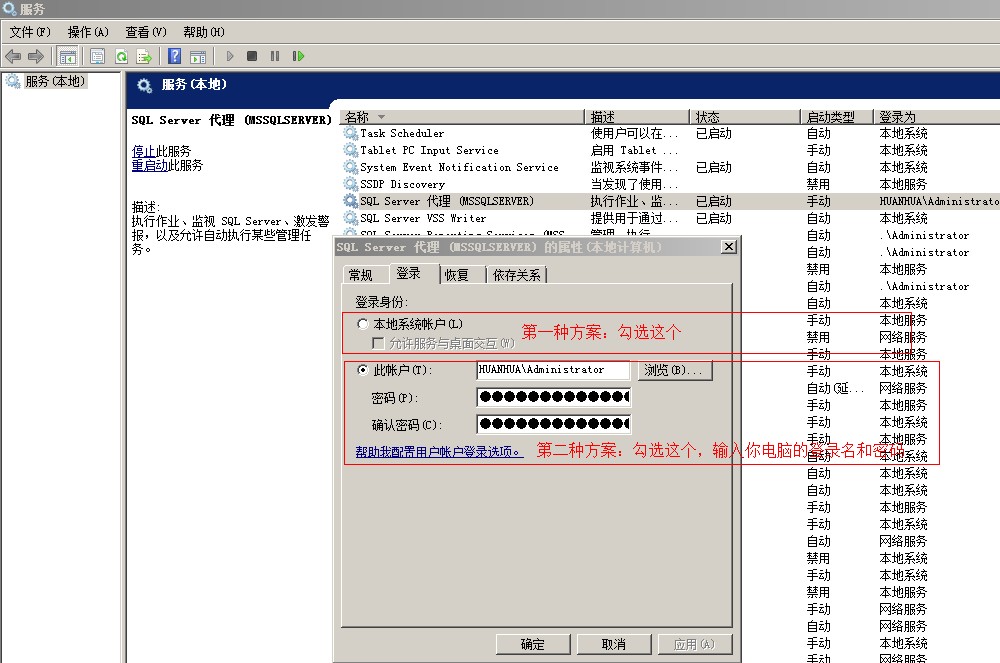
经过我几天的努力和查找原因:是服务中启动帐户的问题。
在windows 2008 R2中SQl Server 2008中代理启动失败的一个原因总结的更多相关文章
- Win 2008 R2安装SQL Server 2008“性能计数器注册表配置单元一致性”失败的解决办法
Win 2008 R2安装SQL Server 2008“性能计数器注册表配置单元一致性”失败的解决办法(2011-02-23 19:37:32) 转载▼ 今天在惠普服务器上安装数据库2008时, ...
- [转]无网络环境,在Windows Server 2008 R2和SQL Server 2008R2环境安装SharePoint2013 RT
无网络环境,在Windows Server 2008 R2和SQL Server 2008R2环境安装SharePoint2013 RT,这个还有点麻烦,所以记录一下,下次遇到省得绕弯路.进入正题: ...
- 安装 sql server 2008出现重启电脑,另在server 2012 r2安装sql server 2008 安装不上
时即使是进行电脑重启,也会报这个错误,那么就不是电脑的问题了,其实是系统注册表在作怪,解决方法如下: 1.开始-->运行,输入regedit,打开注册表管理器: 2. 找到 HKEY_LOCAL ...
- Windows 2003 下安装 SQL Server 2008 Express
.NET Framework 3.5 Service Pack 1(完整程序包) https://www.microsoft.com/zh-cn/download/details.aspx?id=25 ...
- 安装SQL server 2008 R2和QL server 2008,与SQL server 2008升级SQL server 2008 R2
安装SQL server 2008 R2和由SQL server 2008升级SQL server 2008 R2 前提条件: 由SQL server2008 升级SQL server2008 R2 ...
- 安装sql server 2008 提示错误 SQL Server 2005 Express 工具。 失败
安装sql server 2008 management,提示错误:Sql2005SsmsExpressFacet 检查是否安装了 SQL Server 2005 Express 工具. 失败,已安装 ...
- C#中SQL SERVER 2008字符数据类型使用心得
一.尽可能使用Varchar,少使用或者不使用Char字符类型 因为char类型输入的数据长度达不到设计长度,会用空格补足,下面是数据表设计图: 下面是编辑前200行的图: 凡是输入的数据长度达不到设 ...
- SQL Server 2008 R2 数据库安装
操作系统 Windows server 2008 R2 数据库 SQL Server 2008 R2 注意:SQL Server 2008 R2需要操作系统首先安装.NET Frame ...
- SQL Server 2008 R2 主从数据库同步
一.准备工作: 主数据库服务器: OS:Windows Server 2008 R2 DB: SQL Server 2008 R2 Hostname : CXMasterDB IP: 192.1 ...
随机推荐
- led的驱动及测试程序
一.驱动源码 #include <linux/module.h> #include <linux/kernel.h> #include <linux/fs.h> # ...
- Apache JMeter配置、安装
一. 工具描述 apache jmeter是100%的java桌面应用程序,它被设计用来加载被测试软件功能特性.度量被测试软件的性能.设计jmeter的初衷是测试web应用,后来又扩充了其它的功能.j ...
- Linux 期中架构 Ansible
ansible 自动化软件 基于Python开发 特点概述: 配置文件不需要过多配置 了解就可以了 ###部署ansble软件 ##受控主机部署 backup nfs01 web01 ...
- CorelDRAW X4常用快捷键大全
材料/工具 CorelDRAW X4 方法 1 F1:帮助信息 F2:缩小 F3:放大 F4:缩放到将所有对象置于窗口中 F5:手绘(Freehand)工具 F6:矩形(Rectangle)工具 F7 ...
- 开发组件:ZeroMQ
ZeroMQ https://blog.csdn.net/w174504744/article/details/73187697
- selenium+python自动化91-unittest多线程生成报告(BeautifulReport)
前言 selenium多线程跑用例,这个前面一篇已经解决了,如何生成一个测试报告这个是难点,刚好在github上有个大神分享了BeautifulReport,完美的结合起来,就能生成报告了. 环境必备 ...
- Android手机图片路径
H:\dcim\100MEDIA H:\Tencent\MobileQQ\photo H:\Tencent\MobileQQ\photo H:\Tencent\MobileQQ\thumb H:\Te ...
- 表单:checkbox、radio样式(用图片换掉默认样式)
checkbox.radio样式(用图片换掉默认样式) <!doctype html> <html> <head> <meta charset="u ...
- 34. Studio字符串分割split用法
var v = "1,2,3"; var arr = v.toString().split(","); 备注:最好先toString()转为字符串,不然有些情况 ...
- RabbitMQ 端口号解析
转自:https://www.cnblogs.com/liuxingke/articles/9889517.html 端口号解析 12345 - 4369 (epmd), 25672 (Erlang ...