
Mac - MySQL初始密码忘记重置MySQL root密码
在什么情况下,需要重置root密码呢?那就是我们忘记了。还有一种比较坑的,那就是笔者的这种情况。按照正常的情况下,MySQL安装完之后,会弹出一个对话框,显示着一个临时的root密码,但无论笔者如何重装MySQL,始终不给我一个临时的root的密码,导致笔者一直无法登陆MySQL,没办法,只能用硬的,那就是重置密码。
停止MySQL的服务,打开系统的偏好设置,找到MySQL 进去后,点击Stop MySQL Server即可。
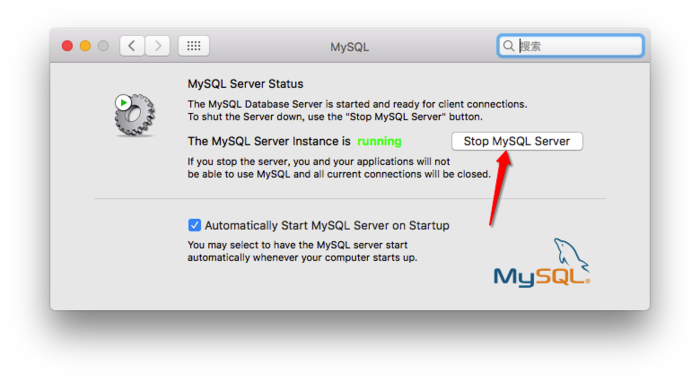
step1:

苹果->系统偏好设置->最下边点mysql 在弹出页面中 关闭mysql服务(点击stop mysql server)

step2:

进入终端输入:cd /usr/local/mysql/bin/

回车后 登录管理员权限 sudo su

回车后输入以下命令来禁止mysql验证功能 ./mysqld_safe --skip-grant-tables &

回车后mysql会自动重启(偏好设置中mysql的状态会变成running)
开启两个终端,在第一个终端输入sudo /usr/local/mysql/bin/mysqld_safe --skip-grant-tables,输入当前用户的密码:
ERROR (): Access denied for user 'root'@'localhost' (using password: NO)
那么就换下面这种:
macdeMacBook-Pro:~ mac$ mysql -uroot -h127.0.0. -p

Enter password:

ERROR  (): Access denied for user 'root'@'localhost' (using password: YES)
然后在第二个终端输入sudo /usr/local/mysql/bin/mysql -u root,然后输入当前用户的密码后,出现以下的界面
macdeMacBook-Pro:~ mac$ sudo /usr/local/mysql/bin/mysql -u root

Password:

Welcome to the MySQL monitor.  Commands end with ; or \g.

Your MySQL connection id is

Server version: 5.7. Homebrew

Copyright (c) , , Oracle and/or its affiliates. All rights reserved.

Oracle is a registered trademark of Oracle Corporation and/or its

affiliates. Other names may be trademarks of their respective

owners.

Type 'help;' or '\h' for help. Type '\c' to clear the current input statement.

mysql>
然后输入命令UPDATE mysql.user SET authentication_string=PASSWORD('新密码') WHERE User='root';回车,出现以下的界面,说明修改成功。
mysql> UPDATE mysql.user SET authentication_string=PASSWORD('') WHERE User='root';

Query OK,  row affected,  warning (0.00 sec)

Rows matched:   Changed:   Warnings:
接下来输入FLUSH PRIVILEGES;回车,出现下面的界面
mysql> FLUSH PRIVILEGES;

Query OK,  rows affected (0.01 sec)
最后,输入\q,退出。关闭第一个终端,回到系统的偏好设置,重新开启MySQL即可。
mysql> \q

Bye
macdeMacBook-Pro:~ mac$ mysql -uroot -h127.0.0. -p

Enter password:

ERROR  (): Access denied for user 'root'@'localhost' (using password: YES)

macdeMacBook-Pro:~ mac$ sudo /usr/local/mysql/bin/mysql -u root

Password:

Welcome to the MySQL monitor.  Commands end with ; or \g.

Your MySQL connection id is

Server version: 5.7. Homebrew

Copyright (c) , , Oracle and/or its affiliates. All rights reserved.

Oracle is a registered trademark of Oracle Corporation and/or its

affiliates. Other names may be trademarks of their respective

owners.

Type 'help;' or '\h' for help. Type '\c' to clear the current input statement.

mysql> UPDATE mysql.user SET authentication_string=PASSWORD('') WHERE User='root';

Query OK,  row affected,  warning (0.00 sec)

Rows matched:   Changed:   Warnings:

mysql> FLUSH PRIVILEGES;

Query OK,  rows affected (0.01 sec)

mysql> \q

Bye

macdeMacBook-Pro:~ mac$
Mac - MySQL初始密码忘记重置MySQL root密码的更多相关文章
- mysql忘记密码如何重置密码,以及修改root密码的三种方法
1.先将MySQL停止. 命令:systemctl stop mysqld #停掉MySQL 命令:systemctl status mysqld #查看状态 2.然后跳 ...
- [转帖]忘记了MariaDB root密码的解决办法
忘记了MariaDB root密码的解决办法 https://www.cnblogs.com/liaojie970/p/6126322.html 貌似跟 mysql 是一样的. 1.停掉mariaDB ...
- [转帖]Ubuntu忘记超级用户root密码,重新设置密码
Ubuntu忘记超级用户root密码,重新设置密码 版权声明:本文为博主原创文章,转载必须指明出处. https://blog.csdn.net/weixin_37909391/article/det ...
- Linux(Unix)密码策略问题导致root密码不能修改
Linux(Unix)密码策略问题导致root密码不能修改 发布时间: 2016-01-19 浏览次数: 1034 下载次数: 5 用户修改了密码配置文件,导致root账户修改密码时报如下错误: ...
- mysql root密码忘记重置及相关注意事项
1.使用mysqld_safe --skip-grant-tables跳过授权,进入mysql操作界面或者在配置文件mysqld 添加skip-grant-tables也行,找回后需要删除..恢复原样 ...
- Mysql(Linux服务器)root用户密码忘记重置方法
MySQL是非常常见的开源数据库,使用者众多,若是不小心忘记了安装在服务器的mysql密码,无法登陆,应该如何重置呢?方法很简单,现在和大家分享下.(系统环境:CentOs 6.5 软件:Mysql ...
- MySQL忘记密码,或:root密码重置报错:mysqladmin: connect to server at 'localhost' failed的解决方案
MySQL root密码重置报错:mysqladmin: connect to server at 'localhost' failed的解决方案 1 登陆失败,mysqladmin修改密码失败 ...
- mysql root密码忘记重置
1.修改/etc/my.cnf文件 找到mysqld选项,增加子项skip-grant-tables 2.重新启动mysql服务 service mysqld restart 3.进入mysql 在s ...
- 在Ubuntu 18.04 下安装mysql,没有初始密码,重设root密码
在Ubuntu 18.04 下安装mysql 不知道是由于mysql更新为新版还是.Ubuntu18.04中的特性,安装过程中没有设置密码的环节,在网络上找了半天,总算解决了!特此记录下来,以便以后查 ...
随机推荐
- mySql的desc与explain分析性能(主要分析索引)
desc select * from A where id =‘110’; 查询结果的含义请参考:http://www.2cto.com/database/201209/156466.html
- CentOS “/lib64/libc.so.6: version `GLIBC_2.14′ not found”系统glibc版本太低
1.试图运行程序提示”libc.so.6: version `GLIBC_2.14′ not found”,原因是系统的glibc版本太低,软件编译时使用了较高版本的glibc引起的.2.查看系统gl ...
- Sublime text2插件
Sublime插件: Sublime有好几种安装插件的方法,但是最好用也是最长用的是ctrl+shift+p. 第一步: 使用ctrl+` 调出Sublime控制台,在控制台中输入 import ur ...
- tomcat 的 server.xml配置文件
tomcat的配置文件在其安装后生成的conf目录下,其中主配置文件便是conf下的server.xml文件. server.xml文件由server->service->engine-& ...
- mongodb安装使用笔记
mongodb安装使用 安装后配置环境变量 创建数据库文件夹并连接数据库,并执行mongod --dbpath c:\workname 打开新的cmd,执行mongo命令,管理数据库 show dbs ...
- java中的编码和编码格式问题
看来问的人和回答的人都不一定清楚什么是“编码和编码格式”,以及如何理解“java中字符串的编码”;首先明确几点: unicode是一种“编码”,所谓编码就是一个编号(数字)到字符的一种映射关系,就仅仅 ...
- 2. Oracle体系结构
一. Oracle体系结构图 体系结构图如下: 体系结构图看似简单:其中很有玄机.它对Oracle来讲:相当于武功中的心法.配合体系结构来学Oracle:能起到事半功倍的效果.我们平时遇到Oracle ...
- 【RF库XML测试】Get Element Text
Name:Get Element TextSource:XML <test library>Arguments:[ source | xpath=. | normalize_whitesp ...
- Handler基本用法
片断一:mHandler = new Handler();mRunnable = new Runnable() { @Override public void run() { currentPosit ...
- LinQ的初步学习与总结
嘿嘿,说起来ORM和LinQ,就感觉离我好遥远的,在学校是没有学习的,所以总感觉学习了LinQ就是大神,现在嘛,终于也体会一点,感觉LinQ只是初步学习,没有太难,当然以后使用在项目中就没有这样的简单 ...