
机器学习中,使用NMS对框取优
一、NMS实现代码
# http://www.pyimagesearch.com/2015/02/16/faster-non-maximum-suppression-python/

import numpy as np

class NMSuppression(object):

    def __init__(self, bbs, overlapThreshold = 0.45):

        self.bbs = bbs

        self.overlapThreshold = overlapThreshold

    def _check_empty(self):

        # return an empty list, if there are no boxes

        if len(self.bbs) == 0:

            return []

        else:

            return self.bbs

    def _check_dtype(self):

        # if the bounding boxes integers, convert them to floats (divisions)

        if self.bbs.dtype.kind == "i":

            self.bbs = self.bbs.astype("float")

        return self.bbs

    def bb_coordinates(self):

        # get the coordinates of the bounding boxes

        x1 = self.bbs[:, 0]

        y1 = self.bbs[:, 1]

        x2 = self.bbs[:, 2]

        y2 = self.bbs[:, 3]

        return x1, y1, x2, y2

    def bb_area(self):

        # compute the area of the bounding boxes

        x1, y1, x2, y2 = self.bb_coordinates()

        area = (x2 - x1 + 1) * (y2 - y1 + 1)

        return area

    def calc_ovarlap(self, x1, y1, x2, y2, idxs, last, i, area):

        # find the largest (x, y) coordinates for the start of

        # the bounding box and the smallest (x, y) coordinates

        # for the end of the bounding box

        xx1 = np.maximum(x1[i], x1[idxs[:last]])

        yy1 = np.maximum(y1[i], y1[idxs[:last]])

        xx2 = np.minimum(x2[i], x2[idxs[:last]])

        yy2 = np.minimum(y2[i], y2[idxs[:last]])

        # compute the width and height of the bounding box

        w = np.maximum(0, xx2 - xx1 + 1)

        h = np.maximum(0, yy2 - yy1 + 1)

        # compute the ratio of overlap

        overlap = (w * h) / area[idxs[:last]]

        return overlap

    def slow_suppress(self):

        self._check_empty()

        self._check_dtype()

        # initialize the list of picked indexes

        picked = []

        x1, y1, x2, y2 = self.bb_coordinates()

        # compute the area of the bounding boxes

        area = self.bb_area()

        # sort the bounding boxes by the bottom-right y-coordinate of the bounding box

        idxs = np.argsort(y2)

        # keep looping while some indexes still remain in the indexes list

        while len(idxs) > 0:

            # grab the last index in the indexes list, add the index

            # value to the list of picked indexes, then initialize

            # the suppression list (i.e. indexes that will be deleted)

            # using the last index

            last = len(idxs) - 1

            i = idxs[last]

            picked.append(i)

            suppress = [last]

            # loop over all indexes in the indexes list

            for pos in xrange(0, last):

                # grab the current index

                j = idxs[pos]

                # find the largest (x, y) coordinates for the start of

                # the bounding box and the smallest (x, y) coordinates

                # for the end of the bounding box

                xx1 = max(x1[i], x1[j])

                yy1 = max(y1[i], y1[j])

                xx2 = min(x2[i], x2[j])

                yy2 = min(y2[i], y2[j])

                # compute the width and height of the bounding box

                w = max(0, xx2 - xx1 + 1)

                h = max(0, yy2 - yy1 + 1)

                # compute the ratio of overlap between the computed

                # bounding box and the bounding box in the area list

                overlap = float(w * h) / area[j]

                # if there is sufficient overlap, suppress the

                # current bounding box

                if overlap > self.overlapThreshold:

                    suppress.append(pos)

            # delete all indexes from the index list that are in the

            # suppression list

            idxs = np.delete(idxs, suppress)

        # return only the bounding boxes that were picked

        return self.bbs[picked]

    def fast_suppress(self):

        self._check_empty()

        self._check_dtype()

        # initialize the list of picked indexes

        picked = []

        x1, y1, x2, y2 = self.bb_coordinates()

        # compute the area of the bounding boxes

        area = self.bb_area()

        # sort the bounding boxes by the bottom-right y-coordinate of the bounding box

        idxs = np.argsort(y2)

        # keep looping while some indexes still remain in the indexes list

        while len(idxs) > 0:

            # take the last index in the indexes list and add the

            # index value to the list of picked indexes

            last = len(idxs) - 1

            i = idxs[last]

            picked.append(i)

            overlap = self.calc_ovarlap(x1, y1, x2, y2, idxs, last, i, area)

            # delete all indexes from the index list that have

            idxs = np.delete(idxs, np.concatenate(([last], np.where(overlap > self.overlapThreshold)[0])))

            # return only the bounding boxes that were picked using the

            # integer data type

        return self.bbs[picked].astype("int")
二、调用测试
#taken from: http://www.pyimagesearch.com/2014/11/17/non-maximum-suppression-object-detection-python

"""

Project parts (taken from the tutorial above):

1.    Sampling positive images

2.    Sampling negative images

3.    Training a Linear SVM

4.    Performing hard-negative mining

5.    Re-training your Linear SVM using the hard-negative samples

6.    Evaluating your classifier on your test dataset, utilizing non-maximum

        suppression to ignore redundant, overlapping bounding boxes

The sample images in this project are taken from the web (labeled as: no licensing needed for non-comertial use).

"""

from nm_suppression import NMSuppression

import numpy as np

import cv2

# construct a list containing the images that will be examined

# along with their respective bounding boxes

images = [

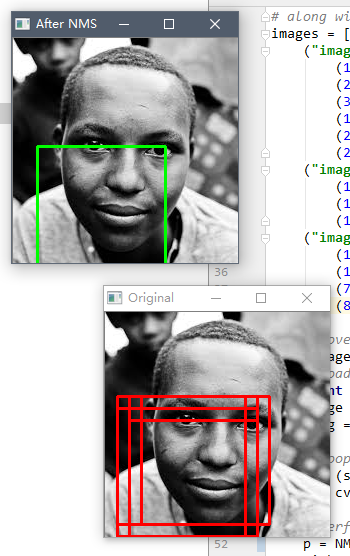
    ("images/africa.jpeg", np.array([

        (12, 84, 140, 212),

        (24, 84, 152, 212),

        (36, 84, 164, 212),

        (12, 96, 140, 224),

        (24, 96, 152, 224),

        (24, 108, 152, 236)])),

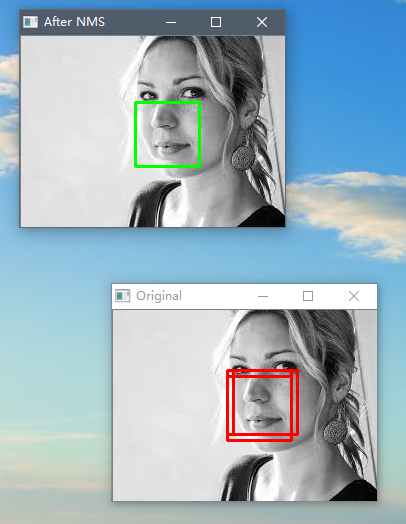
    ("images/girl.jpeg", np.array([

        (114, 60, 178, 124),

        (120, 60, 184, 124),

        (114, 66, 178, 130)])),

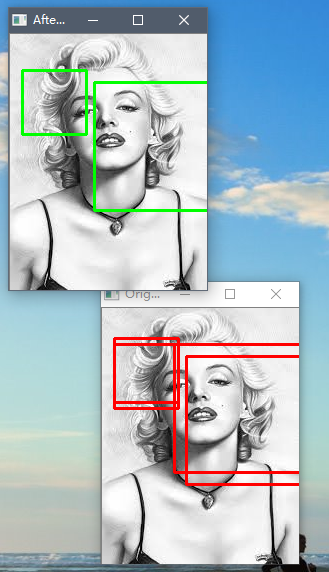
    ("images/monroe.jpeg", np.array([

        (12, 30, 76, 94),

        (12, 36, 76, 100),

        (72, 36, 200, 164),

        (84, 48, 212, 176)]))]

# loop over the images

for (imagePath, boundingBoxes) in images:

    # load the image and clone it

    print "[x] %d initial bounding boxes" % (len(boundingBoxes))

    image = cv2.imread(imagePath)

    orig = image.copy()

    # loop over the bounding boxes for each image and draw them

    for (startX, startY, endX, endY) in boundingBoxes:

        cv2.rectangle(orig, (startX, startY), (endX, endY), (0, 0, 255), 2)

    # perform non-maximum suppression on the bounding boxes

    p = NMSuppression(bbs=boundingBoxes, overlapThreshold=0.5)

    pick = p.fast_suppress()

    print "[x] after applying non-maximum, %d bounding boxes" % (len(pick))

    # loop over the picked bounding boxes and draw them

    for (startX, startY, endX, endY) in pick:

        cv2.rectangle(image, (startX, startY), (endX, endY), (0, 255, 0), 2)

    # display the images

    cv2.imshow("Original", orig)

    cv2.imshow("After NMS", image)

    cv2.waitKey(0)
三、效果
机器学习中,使用NMS对框取优的更多相关文章
- paper 126:[转载] 机器学习中的范数规则化之(一)L0、L1与L2范数
机器学习中的范数规则化之(一)L0.L1与L2范数 zouxy09@qq.com http://blog.csdn.net/zouxy09 今天我们聊聊机器学习中出现的非常频繁的问题:过拟合与规则化. ...
- 机器学习中的范数规则化之(一)L0、L1与L2范数(转)
http://blog.csdn.net/zouxy09/article/details/24971995 机器学习中的范数规则化之(一)L0.L1与L2范数 zouxy09@qq.com http: ...
- 机器学习中的范数规则化之(一)L0、L1与L2范数 非常好,必看
机器学习中的范数规则化之(一)L0.L1与L2范数 zouxy09@qq.com http://blog.csdn.net/zouxy09 今天我们聊聊机器学习中出现的非常频繁的问题:过拟合与规则化. ...
- 机器学习中的范数规则化-L0,L1和L2范式(转载)
机器学习中的范数规则化之(一)L0.L1与L2范数 zouxy09@qq.com http://blog.csdn.net/zouxy09 今天我们聊聊机器学习中出现的非常频繁的问题:过拟合与规则化. ...
- 机器学习中模型泛化能力和过拟合现象(overfitting)的矛盾、以及其主要缓解方法正则化技术原理初探
1. 偏差与方差 - 机器学习算法泛化性能分析 在一个项目中,我们通过设计和训练得到了一个model,该model的泛化可能很好,也可能不尽如人意,其背后的决定因素是什么呢?或者说我们可以从哪些方面去 ...
- 机器学习中的算法(2)-支持向量机(SVM)基础
版权声明:本文由LeftNotEasy发布于http://leftnoteasy.cnblogs.com, 本文可以被全部的转载或者部分使用,但请注明出处,如果有问题,请联系wheeleast@gma ...
- 机器学习中的规则化范数(L0, L1, L2, 核范数)
目录: 一.L0,L1范数 二.L2范数 三.核范数 今天我们聊聊机器学习中出现的非常频繁的问题:过拟合与规则化.我们先简单的来理解下常用的L0.L1.L2和核范数规则化.最后聊下规则化项参数的选择问 ...
- 机器学习中的损失函数 (着重比较:hinge loss vs softmax loss)
https://blog.csdn.net/u010976453/article/details/78488279 1. 损失函数 损失函数(Loss function)是用来估量你模型的预测值 f( ...
- 机器学习中的范数规则化 L0、L1与L2范数 核范数与规则项参数选择
http://blog.csdn.net/zouxy09/article/details/24971995 机器学习中的范数规则化之(一)L0.L1与L2范数 zouxy09@qq.com http: ...
随机推荐
- iphone手势识别(双击、捏、旋转、拖动、划动、长按)UITapGestureRecognizer
首先新建一个基于Sigle view Application的项目,名为GestureTest;我的项目结构如下: 往viewController.xib文件里拖动一个imageView,并使覆盖整个 ...
- String转Date的类型转换器
import org.apache.commons.beanutils.Converter; import org.apache.commons.lang.StringUtils; /* * 定义转换 ...
- 常见排序的JAVA实现和性能测试
五种常见的排序算法实现 算法描述 1.插入排序 从第一个元素开始,该元素可以认为已经被排序 取出下一个元素,在已经排序的元素序列中从后向前扫描 如果该元素(已排序)大于新元素,将该元素移到下一位置 重 ...
- 处理【Illegal mix of collations (utf8_general_ci,IMPLICIT) and (utf8_unicode_ci,IMPLICIT) for operatio】
错误详情]:{DAL:DAL05}{Host:192.168.100.158}Illegal mix of collations (utf8_general_ci,IMPLICIT) and (utf ...
- 都市侠盗第五季/全集Leverage迅雷下载
第五季 Leverage Season 5 (2012)看点:TNT电视网砍掉了<都市侠盗>(Leverage),这部已经播出至第5季的团队盗窃现代罗宾汉剧集将在今年完结,这样的决定对&l ...
- Win8 Metro风格的Web桌面HteOS
前言 曾经天天折腾ExtJS,折腾累了.近期这段时间開始用jquery来做一些东西,发现还是蛮有意思的.可是做到最后才发现,原来做好设计真的很重要. 上图就是HteOS项目的截图,眼下正在开发 ...
- TK1 设置最大频率
支持的值:cat /sys/kernel/debug/clock/gbus/possible_rates当前值:cat /sys/kernel/debug/clock/gbus/rate 设置最大值: ...
- Android 判断是否能真正上网
有时候我们连接上一个没有外网连接的WiFi或者有线就会出现这种极端的情况,目前Android SDK还不能识别这种情况,一般的解决办法就是ping一个外网. * @author suncat * @c ...
- 用FadingActionBar实现有头图的ActionBar
FadingActionBar这个开源项目在社区上很火,感觉Google I/O 2014中就有它的身影.今天我们来介绍下这个实用的开源项目. 首先是到这里(https://github.c ...
- AsyncTask中各个函数详细的调用过程,初步实现异步任务
AsyncTask内部类可能会产生内存泄露的问题 解决上述内部类可能引起的内存泄露问题的方法 将AsyncTask或者Thread的子类作为单独的类文件,不持有Activity的强引用 将Async ...