
机器学习中,使用NMS对框取优
一、NMS实现代码
# http://www.pyimagesearch.com/2015/02/16/faster-non-maximum-suppression-python/

import numpy as np

class NMSuppression(object):

    def __init__(self, bbs, overlapThreshold = 0.45):

        self.bbs = bbs

        self.overlapThreshold = overlapThreshold

    def _check_empty(self):

        # return an empty list, if there are no boxes

        if len(self.bbs) == 0:

            return []

        else:

            return self.bbs

    def _check_dtype(self):

        # if the bounding boxes integers, convert them to floats (divisions)

        if self.bbs.dtype.kind == "i":

            self.bbs = self.bbs.astype("float")

        return self.bbs

    def bb_coordinates(self):

        # get the coordinates of the bounding boxes

        x1 = self.bbs[:, 0]

        y1 = self.bbs[:, 1]

        x2 = self.bbs[:, 2]

        y2 = self.bbs[:, 3]

        return x1, y1, x2, y2

    def bb_area(self):

        # compute the area of the bounding boxes

        x1, y1, x2, y2 = self.bb_coordinates()

        area = (x2 - x1 + 1) * (y2 - y1 + 1)

        return area

    def calc_ovarlap(self, x1, y1, x2, y2, idxs, last, i, area):

        # find the largest (x, y) coordinates for the start of

        # the bounding box and the smallest (x, y) coordinates

        # for the end of the bounding box

        xx1 = np.maximum(x1[i], x1[idxs[:last]])

        yy1 = np.maximum(y1[i], y1[idxs[:last]])

        xx2 = np.minimum(x2[i], x2[idxs[:last]])

        yy2 = np.minimum(y2[i], y2[idxs[:last]])

        # compute the width and height of the bounding box

        w = np.maximum(0, xx2 - xx1 + 1)

        h = np.maximum(0, yy2 - yy1 + 1)

        # compute the ratio of overlap

        overlap = (w * h) / area[idxs[:last]]

        return overlap

    def slow_suppress(self):

        self._check_empty()

        self._check_dtype()

        # initialize the list of picked indexes

        picked = []

        x1, y1, x2, y2 = self.bb_coordinates()

        # compute the area of the bounding boxes

        area = self.bb_area()

        # sort the bounding boxes by the bottom-right y-coordinate of the bounding box

        idxs = np.argsort(y2)

        # keep looping while some indexes still remain in the indexes list

        while len(idxs) > 0:

            # grab the last index in the indexes list, add the index

            # value to the list of picked indexes, then initialize

            # the suppression list (i.e. indexes that will be deleted)

            # using the last index

            last = len(idxs) - 1

            i = idxs[last]

            picked.append(i)

            suppress = [last]

            # loop over all indexes in the indexes list

            for pos in xrange(0, last):

                # grab the current index

                j = idxs[pos]

                # find the largest (x, y) coordinates for the start of

                # the bounding box and the smallest (x, y) coordinates

                # for the end of the bounding box

                xx1 = max(x1[i], x1[j])

                yy1 = max(y1[i], y1[j])

                xx2 = min(x2[i], x2[j])

                yy2 = min(y2[i], y2[j])

                # compute the width and height of the bounding box

                w = max(0, xx2 - xx1 + 1)

                h = max(0, yy2 - yy1 + 1)

                # compute the ratio of overlap between the computed

                # bounding box and the bounding box in the area list

                overlap = float(w * h) / area[j]

                # if there is sufficient overlap, suppress the

                # current bounding box

                if overlap > self.overlapThreshold:

                    suppress.append(pos)

            # delete all indexes from the index list that are in the

            # suppression list

            idxs = np.delete(idxs, suppress)

        # return only the bounding boxes that were picked

        return self.bbs[picked]

    def fast_suppress(self):

        self._check_empty()

        self._check_dtype()

        # initialize the list of picked indexes

        picked = []

        x1, y1, x2, y2 = self.bb_coordinates()

        # compute the area of the bounding boxes

        area = self.bb_area()

        # sort the bounding boxes by the bottom-right y-coordinate of the bounding box

        idxs = np.argsort(y2)

        # keep looping while some indexes still remain in the indexes list

        while len(idxs) > 0:

            # take the last index in the indexes list and add the

            # index value to the list of picked indexes

            last = len(idxs) - 1

            i = idxs[last]

            picked.append(i)

            overlap = self.calc_ovarlap(x1, y1, x2, y2, idxs, last, i, area)

            # delete all indexes from the index list that have

            idxs = np.delete(idxs, np.concatenate(([last], np.where(overlap > self.overlapThreshold)[0])))

            # return only the bounding boxes that were picked using the

            # integer data type

        return self.bbs[picked].astype("int")
二、调用测试
#taken from: http://www.pyimagesearch.com/2014/11/17/non-maximum-suppression-object-detection-python

"""

Project parts (taken from the tutorial above):

1.    Sampling positive images

2.    Sampling negative images

3.    Training a Linear SVM

4.    Performing hard-negative mining

5.    Re-training your Linear SVM using the hard-negative samples

6.    Evaluating your classifier on your test dataset, utilizing non-maximum

        suppression to ignore redundant, overlapping bounding boxes

The sample images in this project are taken from the web (labeled as: no licensing needed for non-comertial use).

"""

from nm_suppression import NMSuppression

import numpy as np

import cv2

# construct a list containing the images that will be examined

# along with their respective bounding boxes

images = [

    ("images/africa.jpeg", np.array([

        (12, 84, 140, 212),

        (24, 84, 152, 212),

        (36, 84, 164, 212),

        (12, 96, 140, 224),

        (24, 96, 152, 224),

        (24, 108, 152, 236)])),

    ("images/girl.jpeg", np.array([

        (114, 60, 178, 124),

        (120, 60, 184, 124),

        (114, 66, 178, 130)])),

    ("images/monroe.jpeg", np.array([

        (12, 30, 76, 94),

        (12, 36, 76, 100),

        (72, 36, 200, 164),

        (84, 48, 212, 176)]))]

# loop over the images

for (imagePath, boundingBoxes) in images:

    # load the image and clone it

    print "[x] %d initial bounding boxes" % (len(boundingBoxes))

    image = cv2.imread(imagePath)

    orig = image.copy()

    # loop over the bounding boxes for each image and draw them

    for (startX, startY, endX, endY) in boundingBoxes:

        cv2.rectangle(orig, (startX, startY), (endX, endY), (0, 0, 255), 2)

    # perform non-maximum suppression on the bounding boxes

    p = NMSuppression(bbs=boundingBoxes, overlapThreshold=0.5)

    pick = p.fast_suppress()

    print "[x] after applying non-maximum, %d bounding boxes" % (len(pick))

    # loop over the picked bounding boxes and draw them

    for (startX, startY, endX, endY) in pick:

        cv2.rectangle(image, (startX, startY), (endX, endY), (0, 255, 0), 2)

    # display the images

    cv2.imshow("Original", orig)

    cv2.imshow("After NMS", image)

    cv2.waitKey(0)
三、效果
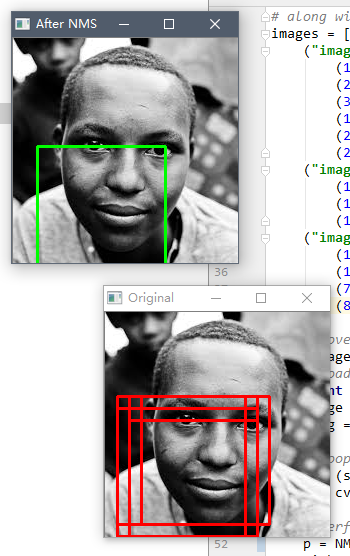
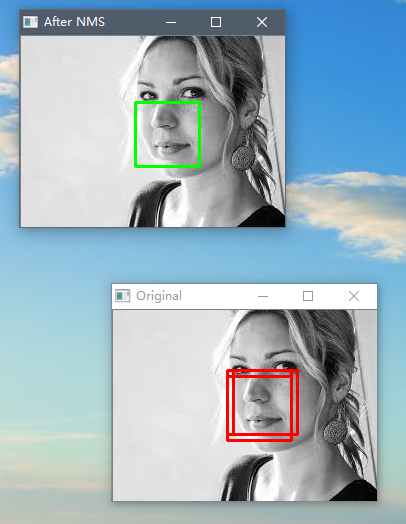
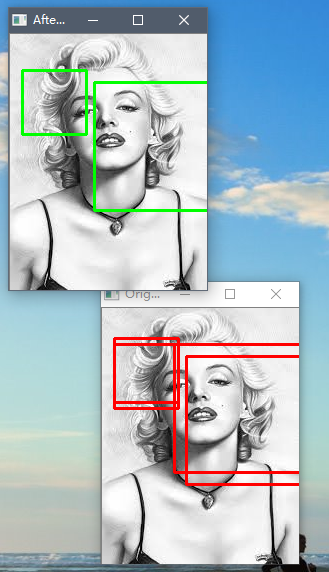
机器学习中,使用NMS对框取优的更多相关文章
- paper 126:[转载] 机器学习中的范数规则化之(一)L0、L1与L2范数
机器学习中的范数规则化之(一)L0.L1与L2范数 zouxy09@qq.com http://blog.csdn.net/zouxy09 今天我们聊聊机器学习中出现的非常频繁的问题:过拟合与规则化. ...
- 机器学习中的范数规则化之(一)L0、L1与L2范数(转)
http://blog.csdn.net/zouxy09/article/details/24971995 机器学习中的范数规则化之(一)L0.L1与L2范数 zouxy09@qq.com http: ...
- 机器学习中的范数规则化之(一)L0、L1与L2范数 非常好,必看
机器学习中的范数规则化之(一)L0.L1与L2范数 zouxy09@qq.com http://blog.csdn.net/zouxy09 今天我们聊聊机器学习中出现的非常频繁的问题:过拟合与规则化. ...
- 机器学习中的范数规则化-L0,L1和L2范式(转载)
机器学习中的范数规则化之(一)L0.L1与L2范数 zouxy09@qq.com http://blog.csdn.net/zouxy09 今天我们聊聊机器学习中出现的非常频繁的问题:过拟合与规则化. ...
- 机器学习中模型泛化能力和过拟合现象(overfitting)的矛盾、以及其主要缓解方法正则化技术原理初探
1. 偏差与方差 - 机器学习算法泛化性能分析 在一个项目中,我们通过设计和训练得到了一个model,该model的泛化可能很好,也可能不尽如人意,其背后的决定因素是什么呢?或者说我们可以从哪些方面去 ...
- 机器学习中的算法(2)-支持向量机(SVM)基础
版权声明:本文由LeftNotEasy发布于http://leftnoteasy.cnblogs.com, 本文可以被全部的转载或者部分使用,但请注明出处,如果有问题,请联系wheeleast@gma ...
- 机器学习中的规则化范数(L0, L1, L2, 核范数)
目录: 一.L0,L1范数 二.L2范数 三.核范数 今天我们聊聊机器学习中出现的非常频繁的问题:过拟合与规则化.我们先简单的来理解下常用的L0.L1.L2和核范数规则化.最后聊下规则化项参数的选择问 ...
- 机器学习中的损失函数 (着重比较:hinge loss vs softmax loss)
https://blog.csdn.net/u010976453/article/details/78488279 1. 损失函数 损失函数(Loss function)是用来估量你模型的预测值 f( ...
- 机器学习中的范数规则化 L0、L1与L2范数 核范数与规则项参数选择
http://blog.csdn.net/zouxy09/article/details/24971995 机器学习中的范数规则化之(一)L0.L1与L2范数 zouxy09@qq.com http: ...
随机推荐
- 排名前16的Java工具类
原文:https://www.jianshu.com/p/9e937d178203 在Java中,工具类定义了一组公共方法,这篇文章将介绍Java中使用最频繁及最通用的Java工具类.以下工具类.方法 ...
- .Net中集合排序
public class StockQuantity { public StockQuantity(string status, DateTime dateTime, int quantity) { ...
- Windows 下安装NPM
第一步: 下载node.js的windows版 当前最新版本是https://nodejs.org/dist/ 第二步:设置环境变量 把node.exe所在目录加入到PATH环境变量中. 配置成功 ...
- 基于Memcached的tomcat集群session共享所用的jar
多个tomcat各种序列化策略配置如下:一.java默认序列化tomcat配置conf/context.xml添加<Manager className="de.javakaffee.w ...
- SharePoint 如何导出部署的场解决方案
前言 当我们在做服务器场迁移或者备份的时候,经常需要场中部署的解决方案包,然而,很多时候,我们无法找到这些解决方案包.很多解决方案在部署的时候,可能就已经删掉了,很多解决方案由于时间久远,我们不知道哪 ...
- IDA修改游戏
用GM找到机器码 基址 400000 偏移是401940-400000 = 0x1940 UE去到D40位置修改
- CSS3 Flex布局整理(一)
一.说明 1.在以往的布局方案中,都是基于盒装模型,依赖display属性+position属性+float属性等. 他对于那些特殊布局非常不方便,比如,垂直居中等. 并且不同浏览器的盒模型还有些差异 ...
- securecrt 多窗口执行命令
首先在SecureCRT里同时打开多个服务器session(必须是有相同目录结构) 选择菜单栏View –>Chat Windows 对号,此时所有服务器连接下方应该有个空白的部分 在空白的部分 ...
- jQuery中attr()和prop()的区别,修改checked属性 jquery attr('checked' 不起作用 attr('checked' 不对
在做复选框全选按钮的时候,出现了一个问题,使用语句$.attr('checked',true),将复选框的属性改为被选中,在chrome浏览器中第一次点击有效后面就不行了,IE8倒是没有问题. 百度了 ...
- OpenGL和D3D11中的深度模版测试
在OpenGL和D3D11的管线中,像素shader之后的操作就是深度模版测试,深度模版测试是以sample为单位进行的,就是一个像素上可以有多个采样点,每个采样点都有深度信息.深度模版测试对 ...