
Mybatis源码分析之Mapper执行SQL过程(三)
上两篇已经讲解了SqlSessionFactory的创建和SqlSession创建过程。今天我们来分析myabtis的sql是如何一步一步走到Excutor。
还是之前的demo
   public static void main(String[] args) throws Exception {

        SqlSessionFactory sessionFactory = null;

        String resource = "configuration.xml";

        sessionFactory = new SqlSessionFactoryBuilder().build(Resources.getResourceAsReader(resource));

        SqlSession sqlSession = sessionFactory.openSession();

        UserMapper userMapper = sqlSession.getMapper(UserMapper.class);

        System.out.println(userMapper.findUserById(1));

    }
我们想看下基本的时序图有个大致了解
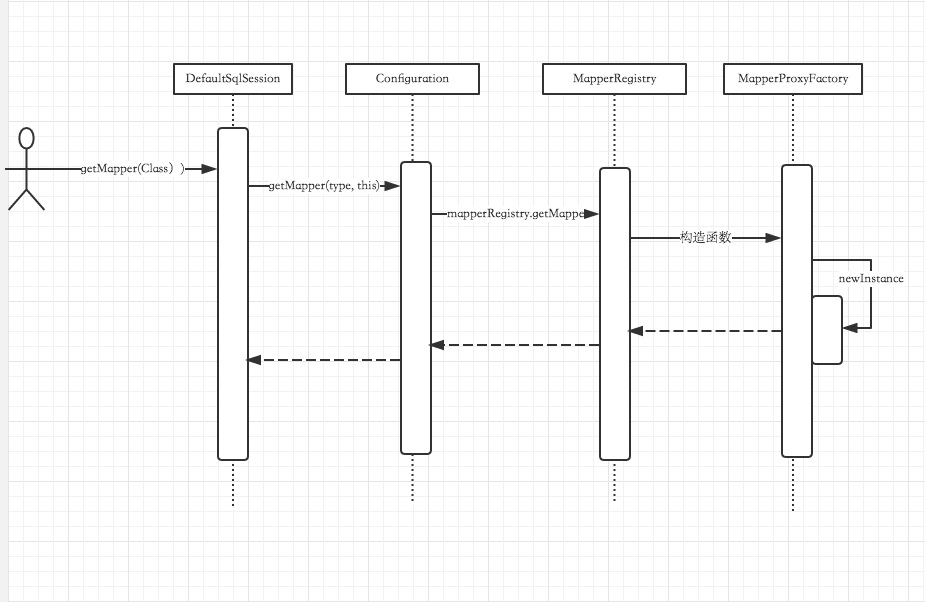
1:DefaultSqlSession获取getMapper
  @Override

  public  T getMapper(Class type) {

    return configuration.getMapper(type, this);

  }
2:Configuration获取getMapper
 public  T getMapper(Class type, SqlSession sqlSession) {

   return mapperRegistry.getMapper(type, sqlSession);

 }
Configuration和DefaultSqlSession什么都没有做,交给了MapperRegistry,我们看下MapperRegistry做了什么。
3:MapperRegistry获取getMapper
 @SuppressWarnings("unchecked")

  public  T getMapper(Class type, SqlSession sqlSession) {

    final MapperProxyFactory mapperProxyFactory = (MapperProxyFactory) knownMappers.get(type);

    if (mapperProxyFactory == null) {

      throw new BindingException("Type " + type + " is not known to the MapperRegistry.");

    }

    try {

      return mapperProxyFactory.newInstance(sqlSession);

    } catch (Exception e) {

      throw new BindingException("Error getting mapper instance. Cause: " + e, e);

    }

  }
通过knownMappers获取一个MapperProxyFactory,后然newInstance了一下,那么newInstance得到了什么东西呢?
4:MapperProxyFactory
  @SuppressWarnings("unchecked")

  protected T newInstance(MapperProxy mapperProxy) {

  //java代理

    return (T) Proxy.newProxyInstance(mapperInterface.getClassLoader(), new Class[] { mapperInterface }, mapperProxy);

  }
  public T newInstance(SqlSession sqlSession) {

    final MapperProxy mapperProxy = new MapperProxy(sqlSession, mapperInterface, methodCache);

    return newInstance(mapperProxy);

  }
通过以上的动态代理,咱们就可以方便地使用dao接口啦。到这里我们还没有看到任何执行sql有关的信息,或者说还没走到文章开始说的的Excutor, 我们看下MapperProxy代理类
MapperProxy
public class MapperProxy implements InvocationHandler, Serializable {

  private static final long serialVersionUID = -6424540398559729838L;

  private final SqlSession sqlSession;

  private final Class mapperInterface;

  private final Map methodCache;

  public MapperProxy(SqlSession sqlSession, Class mapperInterface, Map methodCache) {

    this.sqlSession = sqlSession;

    this.mapperInterface = mapperInterface;

    this.methodCache = methodCache;

  }

  @Override

  public Object invoke(Object proxy, Method method, Object[] args) throws Throwable {

    if (Object.class.equals(method.getDeclaringClass())) {

      try {

        return method.invoke(this, args);

      } catch (Throwable t) {

        throw ExceptionUtil.unwrapThrowable(t);

      }

    }

    final MapperMethod mapperMethod = cachedMapperMethod(method);

    return mapperMethod.execute(sqlSession, args);

  }

  private MapperMethod cachedMapperMethod(Method method) {

    MapperMethod mapperMethod = methodCache.get(method);

    if (mapperMethod == null) {

      mapperMethod = new MapperMethod(mapperInterface, method, sqlSession.getConfiguration());

      methodCache.put(method, mapperMethod);

    }

    return mapperMethod;

  }

}
代理类交给了mapperMethod.execute进行处理,到这里我们只是看到了execute字眼了,我们继续往下看。
  public Object execute(SqlSession sqlSession, Object[] args) {

    Object result;

    if (SqlCommandType.INSERT == command.getType()) {

      Object param = method.convertArgsToSqlCommandParam(args);

      result = rowCountResult(sqlSession.insert(command.getName(), param));

    } else if (SqlCommandType.UPDATE == command.getType()) {

      Object param = method.convertArgsToSqlCommandParam(args);

      result = rowCountResult(sqlSession.update(command.getName(), param));

    } else if (SqlCommandType.DELETE == command.getType()) {

      Object param = method.convertArgsToSqlCommandParam(args);

      result = rowCountResult(sqlSession.delete(command.getName(), param));

    } else if (SqlCommandType.SELECT == command.getType()) {

      if (method.returnsVoid() && method.hasResultHandler()) {

        executeWithResultHandler(sqlSession, args);

        result = null;

      } else if (method.returnsMany()) {

        result = executeForMany(sqlSession, args);

      } else if (method.returnsMap()) {

        result = executeForMap(sqlSession, args);

      } else if (method.returnsCursor()) {

        result = executeForCursor(sqlSession, args);

      } else {

        Object param = method.convertArgsToSqlCommandParam(args);

        result = sqlSession.selectOne(command.getName(), param);

      }

    } else if (SqlCommandType.FLUSH == command.getType()) {

        result = sqlSession.flushStatements();

    } else {

      throw new BindingException("Unknown execution method for: " + command.getName());

    }

    if (result == null && method.getReturnType().isPrimitive() && !method.returnsVoid()) {

      throw new BindingException("Mapper method '" + command.getName()

          + " attempted to return null from a method with a primitive return type (" + method.getReturnType() + ").");

    }

    return result;

  }
上面代码先是判断CRUD类型,然后根据类型去选择到底执行sqlSession中的哪个方法,我们现在是查询那么程序应该走到sqlSession.selectOne。
  @Override

  public  T selectOne(String statement, Object parameter) {

    // Popular vote was to return null on 0 results and throw exception on too many.

    List list = this.selectList(statement, parameter);

    if (list.size() == 1) {

      return list.get(0);

    } else if (list.size() > 1) {

      throw new TooManyResultsException("Expected one result (or null) to be returned by selectOne(), but found: " + list.size());

    } else {

      return null;

    }

  }
  @Override

  public  List selectList(String statement, Object parameter, RowBounds rowBounds) {

    try {

      MappedStatement ms = configuration.getMappedStatement(statement);

      //终于看到我们要找的executor接口了

      return executor.query(ms, wrapCollection(parameter), rowBounds, Executor.NO_RESULT_HANDLER);

    } catch (Exception e) {

      throw ExceptionFactory.wrapException("Error querying database.  Cause: " + e, e);

    } finally {

      ErrorContext.instance().reset();

    }

  }
我们终于看到executor类了, 调用了query方法,接下来的事情全部交给了executor处理了,
executor底层的分析已经在上一篇已经分享了。
我们代理执行sql的基本顺序是
MapperMethod.execute() --> DefaultSqlSession.selectOne --> BaseExecutor.query --> SimpleExecutor.doQuery --> SimpleStatementHandler.query --> DefaultResultSetHandler.handleResultSets(Statement stmt) 最终得到数据。
Mybatis源码分析之Mapper执行SQL过程(三)的更多相关文章
- 精尽 MyBatis 源码分析 - SqlSession 会话与 SQL 执行入口
该系列文档是本人在学习 Mybatis 的源码过程中总结下来的,可能对读者不太友好,请结合我的源码注释(Mybatis源码分析 GitHub 地址.Mybatis-Spring 源码分析 GitHub ...
- mybatis源码分析(五)------------SQL的执行过程
在对SQL的执行过程进行分析前,先看下测试demo: /** * @author chenyk * @date 2018年8月20日 */ public class GoodsDaoTest { pr ...
- Mybatis源码分析之Mapper的创建和获取
Mybatis我们一般都是和Spring一起使用的,它们是怎么融合到一起的,又各自发挥了什么作用? 就拿这个Mapper来说,我们定义了一个接口,声明了一个方法,然后对应的xml写了这个sql语句, ...
- LinqToDB 源码分析——生成与执行SQL语句
生成SQL语句的功能可以算是LinqToDB框架的最后一步.从上一章中我们可以知道处理完表达式树之后,相关生成SQL信息会被保存在一个叫SelectQuery类的实例.有了这个实例我们就可以生成对应的 ...
- Mybatis源码分析之Mapper文件解析
感觉CSDN对markdown的支持不够友好,总是伴随各种问题,很恼火! xxMapper.xml的解析主要由XMLMapperBuilder类完成,parse方法来完成解析: public void ...
- 精尽MyBatis源码分析 - 文章导读
该系列文档是本人在学习 Mybatis 的源码过程中总结下来的,可能对读者不太友好,请结合我的源码注释(Mybatis源码分析 GitHub 地址.Mybatis-Spring 源码分析 GitHub ...
- MyBatis源码分析-SQL语句执行的完整流程
MyBatis 是支持定制化 SQL.存储过程以及高级映射的优秀的持久层框架.MyBatis 避免了几乎所有的 JDBC 代码和手动设置参数以及获取结果集.MyBatis 可以对配置和原生Map使用简 ...
- 精尽MyBatis源码分析 - SQL执行过程(二)之 StatementHandler
该系列文档是本人在学习 Mybatis 的源码过程中总结下来的,可能对读者不太友好,请结合我的源码注释(Mybatis源码分析 GitHub 地址.Mybatis-Spring 源码分析 GitHub ...
- 精尽MyBatis源码分析 - MyBatis 的 SQL 执行过程(一)之 Executor
该系列文档是本人在学习 Mybatis 的源码过程中总结下来的,可能对读者不太友好,请结合我的源码注释(Mybatis源码分析 GitHub 地址.Mybatis-Spring 源码分析 GitHub ...
随机推荐
- jQuery把所有被选中的checkbox的某个属性值连接成字符串
有这样的一个需求:对于一组checkbox,当点击每个checkbox后,把当前处于选中状态的checkbox的某个属性值取出来连接成字符串,并以逗号分开. html部分: <input typ ...
- 【Devops】【docker】【CI/CD】docker启动的Jenkins容器 - 系统管理 - 全局工具配置 - 自动安装JDK、Maven、Git、Docker
本篇适用于jenkins是启动的docker容器,自动安装JDK Maven Git Docker等全局工具 ========================================= ...
- eclipse 中 import sun.misc.BASE64Decoder; 报错
from://http://blog.sina.com.cn/s/blog_48964b120101ahrf.html 在android做3DES加密功能时 eclipse 中 import sun. ...
- Quartz:不要重复造轮子,一款企业级任务调度框架。
背景 第一次遇到定时执行某些任务的需求时,很多朋友可能设计了一个小类库,这个类图提高了一个接口,然后由调度器调度所有注册的接口类型,我就是其中之一,随着接触的开源项目越来越多,我的某些开发习惯受到了影 ...
- 霍夫曼编码(Huffman Coding)
霍夫曼编码(Huffman Coding)是一种编码方法,霍夫曼编码是可变字长编码(VLC)的一种. 霍夫曼编码使用变长编码表对源符号(如文件中的一个字母)进行编码,其中变长编码表是通过一种评估来源符 ...
- mysql查询字段时实现左右补零
右补0:select RPAD(id,8,'0') as pad from tmp; 左补0:select LPAD(id,8,'0') as pad from tmp;
- Android5.0 ListView特效的简单实现
Android5.0中对于动画可所谓是情有独钟,在设计规范中大量展现了listview的动画,其实也就是一个目的:将items动画显示出来.这个看起来很炫的效果,其实实现也蛮简单的,我下面就来用动画简 ...
- 《Linux就是这个范儿》
<Linux就是这个范儿> 基本信息 作者: 赵鑫磊 (加)Jie Zhang(张洁) 丛书名: 图灵原创 出版社:人民邮电出版社 ISBN:9787115359360 上架时间:2 ...
- 升级pip后出现 ImportError: cannot import name main
原文链接 https://blog.csdn.net/accumulate_zhang/article/details/80269313 在Ubuntu中,升级了pip,再次使用pip 安装相关的 ...
- Unicode 和 UTF-8 的区别
作者:于洋链接:https://www.zhihu.com/question/23374078/answer/69732605来源:知乎著作权归作者所有.商业转载请联系作者获得授权,非商业转载请注明出 ...