
SpringMVC的注解方式配置
SpringMVC支持使用注解方式配置,比配置文件方式更加灵活易用,是SpringMVC使用的主流模式。
1.在配置文件中开启SpringMVC的注解
    <!-- 开启包扫描 -->

    <context:component-scan base-package="cn.tedu.springmvc.controller"></context:component-scan>

    <!-- 开启SpringMVC的注解形式 -->

    <mvc:annotation-driven/>
<?xml version="1.0" encoding="UTF-8"?>

<beans xmlns="http://www.springframework.org/schema/beans"

    xmlns:xsi="http://www.w3.org/2001/XMLSchema-instance"

    xmlns:mvc="http://www.springframework.org/schema/mvc"

    xmlns:context="http://www.springframework.org/schema/context"

    xsi:schemaLocation="

    http://www.springframework.org/schema/mvc

    http://www.springframework.org/schema/mvc/spring-mvc-3.2.xsd

    http://www.springframework.org/schema/beans

    http://www.springframework.org/schema/beans/spring-beans-3.2.xsd

    http://www.springframework.org/schema/context

    http://www.springframework.org/schema/context/spring-context-3.2.xsd">

    <!-- 开启包扫描 -->

    <context:component-scan base-package="cn.tedu.springmvc.controller"></context:component-scan>

    <!-- 开启SpringMVC的注解形式 -->

    <mvc:annotation-driven/>

    <!-- 配置处理器映射器的路径和控制器的映射关系  -->

    <!-- <bean name="/hello.action" class="cn.tedu.springmvc.controller.Hello"></bean>     -->

    <!-- 配置视图解析器中 视图名称 和 真正视图页面的映射关系 -->

    <bean class="org.springframework.web.servlet.view.InternalResourceViewResolver">

        <property name="prefix" value="/WEB-INF/"></property>

        <property name="suffix" value=".jsp"></property>

    </bean>

</beans>
xml
2.使用注解开发Controller
package cn.tedu.springmvc.controller;

import javax.servlet.http.HttpServletRequest;

import org.springframework.stereotype.Controller;

import org.springframework.ui.Model;

import org.springframework.ui.ModelMap;

import org.springframework.web.bind.annotation.RequestMapping;

// 使当前类被Spring管理

@Controller

public class Hello {

    // 将当前方法注册为一个Controller,

    // 当访问指定路径时,当前类的方法执行处理

    @RequestMapping("/hello.action")

    public String hello(ModelMap model){

        model.addAttribute("msg", "hello springMvc,hello World~");

        return "hello";

    }

    // 一个Controller可以配置多个Controller方法,

    // 指定不用的路径,访问不同路径执行不同方法

    @RequestMapping("/hello2.action")

    public String hello2(Model model){

        model.addAttribute("msg", "hello springMvc2,hello World2~");

        return "hello";

    }

}
3.发布应用,通过浏览器进行访问
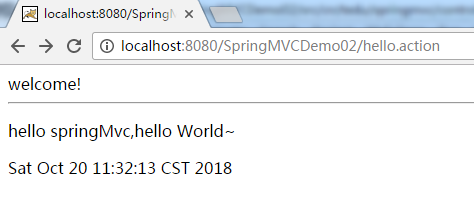
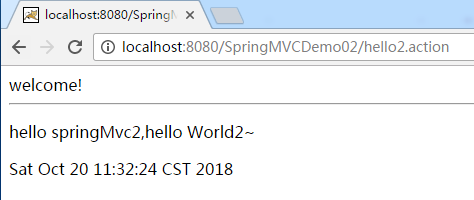
4.SpringMVC注解方式工作原理
(1)当服务器启动时,会加载web.xml,之后通过引入核心配置文件加载springmvc-servlet.xml就会 解析该xml配置文件。
(2)当解析到包扫描时,根据指定的包将含有@Controller注解的类,=围棋创建对象。
(3)当解析到<mvc:annotation-driven/>开始匹配MVC注解。
(4)之后解析@RequestMapping("/hello.action")之后会将value值进行保存,将方法进行绑定。
(5)当用户发出请求时,处理器映射器就是匹配用户的url和保存号的value值,如果匹配成功,则会执行方法;如果匹配不成功,则报404。
SpringMVC的注解方式配置的更多相关文章
- atitit.ajax bp dwr 3.的注解方式配置使用流程总结 VO9o.....
atitit.ajax bp dwr 3.的注解方式配置使用流程总结 VO9o..... 1. 安装配置 1 1.1. 下载 dwr.jar 1M 1 1.2. 配置注解方式..web.xml 1 ...
- atitit.ajax bp dwr 3.的注解方式配置使用流程总结.....
atitit.ajax bp dwr 3.的注解方式配置使用流程总结..... 1. 下载 dwr.jar 1M 1 2. 配置注解方式..web.xml 1 3. Class 配置 2 4. 测试 ...
- SSH深度历险(十) AOP原理及相关概念学习+AspectJ注解方式配置spring AOP
AOP(Aspect Oriented Programming),是面向切面编程的技术.AOP基于IoC基础,是对OOP的有益补充. AOP之所以能得到广泛应用,主要是因为它将应用系统拆分分了2个部分 ...
- Spring Aop实例@Aspect、@Before、@AfterReturning@Around 注解方式配置
用过spring框架进行开发的人,多多少少会使用过它的AOP功能,都知道有@Before.@Around和@After等advice.最近,为了实现项目中的输出日志和权限控制这两个需求,我也使用到了A ...
- 跟着刚哥学习Spring框架--通过注解方式配置Bean(四)
组件扫描:Spring能够从classpath下自动扫描,侦测和实例化具有特定注解的组件. 特定组件包括: 1.@Component:基本注解,识别一个受Spring管理的组件 2.@Resposit ...
- spring学习笔记 星球日two - 注解方式配置bean
注解要放在要注解的对象的上方 @Autowired private Category category; <?xml version="1.0" encoding=" ...
- Spring框架学习(6)使用ioc注解方式配置bean
内容源自:使用ioc注解方式配置bean context层 : 上下文环境/容器环境 applicationContext.xml 1 ioc注解功能 注解 简化xml文件配置 如 hibernate ...
- SpringMVC的注解方式
mvc-servlet.xml <?xml version="1.0" encoding="UTF-8"?> <beans xmlns=&qu ...
- Spring boot 基于注解方式配置datasource
Spring boot 基于注解方式配置datasource 编辑 Xml配置 我们先来回顾下,使用xml配置数据源. 步骤: 先加载数据库相关配置文件; 配置数据源; 配置sqlSessionF ...
随机推荐
- 递归算法,如何把list中父子类对象递归成树
以前写代码for循环写的多,递归除了在大学学习以外,真没怎么用过! 最近项目中使用到了关于族谱排列的问题,就是怎么把数据库里的多个子父类people对象,在界面中用树的结构展示出来 假设数据库中peo ...
- 《Python》 内置函数补充、匿名函数、递归初识
一.内置函数补充: 1.数据结构相关(24): 列表和元祖(2):list.tuple list:将一个可迭代对象转化成列表(如果是字典,默认将key作为列表的元素). tuple:将一个可迭代对象转 ...
- Socket缓冲区
1.由于可读状态是在对方写入数据后或socket关闭时才能出现,因此如果客户端和服务端都停留在read时,如果没有任何一方,向对方写入数据,这将会产生一个死锁. 2.此外,在本地接收操作发起之前,很可 ...
- 拷贝构造函数(define)
1.拷贝构造函数是一种特殊的构造函数,具有单个形参,此形参是对该类型的引用. 当定义一个新对象并用一个同类型的对象对它进行初始化时,将显示使用拷贝构造函数. 2.当将该类型的对象传递给函数或从函数返回 ...
- django2 删除图片或其他
首先从数据库中获取图片的名称,然后拼接图片的物理地址,最后就是删除. # 物理删除图片 d = os.path.dirname(os.path.dirname(os.path.abspath(__fi ...
- css3 制作平滑过度动画
-webkit-transition(属性渐变) -webkit-transition:CSS属性(none|all|属性) 持续时间 时间函数 延迟时间 CSS属性(transition-pr ...
- Samsung_tiny4412(驱动笔记07)----spinlock,semaphore,atomic,mutex,completion,interrupt
/*********************************************************************************** * * spinlock,se ...
- Texas Instruments matrix-gui-2.0 hacking -- app_description.php
<?php /* * Copyright (C) 2011 Texas Instruments Incorporated - http://www.ti.com/ * * * Redistrib ...
- Unity3D游戏-愤怒的小鸟游戏源码和教程(一)
Unity愤怒的小鸟游戏教程 本文提供全流程,中文翻译.Chinar坚持将简单的生活方式,带给世人!(拥有更好的阅读体验 -- 高分辨率用户请根据需求调整网页缩放比例) AngryEva游戏效果: 1 ...
- 八皇后 递归or迭代
递归: #include <iostream> #include <cstdlib> #include <cstdio> using namespace std; ...