
Pandas系列(十四)- 实战案例
一、series
import pandas as pd

import string

#创建Series的两种方式

#方式一

t = pd.Series([1,2,3,4,43],index=list('asdfg'))

print(t)

#方式二

temp_dict = {'name':'xiaohong','age':30,'tel':10086}

t2 = pd.Series(temp_dict)

print(t2)

#字典推导式

a = {string.ascii_uppercase[i]:i for i in range(10)}

print(a)

print(pd.Series(a))

print(pd.Series(a,index=list(string.ascii_uppercase[5:15])))
二、read_file
import pandas as pd

from pymongo import MongoClient

#pandas读取csv文件

# df = pd.read_csv('dogNames2.csv')

# print(df)

client = MongoClient()

collection = client['meipai']['meipai_video']

data = collection.find()

data_list = []

for i in data:

    temp = {}

    temp['cut_url'] = i['cut_url']

    temp['create_time'] = i['create_time']

    temp['title'] = i['title']

    temp['video_url'] = i['video_url']

    data_list.append(temp)

# print(data)

# t1 = data[0]

# t1 = pd.Series(t1)

# print(t1)

df = pd.DataFrame(data_list)

print(df.info())

print(df.describe())

# print(df.head())

# print('*'*100)

# print(df.tail())
三、dataframe
示例一
import pandas as pd

temp_dict = {'name':['xiaohong','xiaozhang'],'age':[30,23],'tel':[10086,10010]}

t1 = pd.DataFrame(temp_dict)

print(t1)

temp_dict1 = [{'name':'xiaohong','age':23,'tel':10086},{'name':'xiaogang','age':12},{'name':'xiaozhang','tel':10010}]

t2 = pd.DataFrame(temp_dict1)

print(t2)
示例二
import pandas as pd

#pandas读取csv文件

df = pd.read_csv('dogNames2.csv')

# print(df.head())

# print(df.info())

#DataFrame中排序的方法

df = df.sort_values(by='Count_AnimalName',ascending=False)

# print(df.head())

#pandas取行和列的注意事项

# - 方括号写数组,表示取行,对行进行操作

# - 写字符串,表示取列索引,对列进行操作

print(df[:20])

print(df[:20]['Row_Labels'])

print(type(df['Row_Labels']))

#bool索引

print(df[(df['Row_Labels'].str.len()>4)&(df['Count_AnimalName']>800)])
四、电影数据案例
import pandas as pd

from matplotlib import pyplot as plt

file_path = './IMDB-Movie-data.csv'

df = pd.read_csv(file_path)

# print(df.head(1))

# print(df.info())

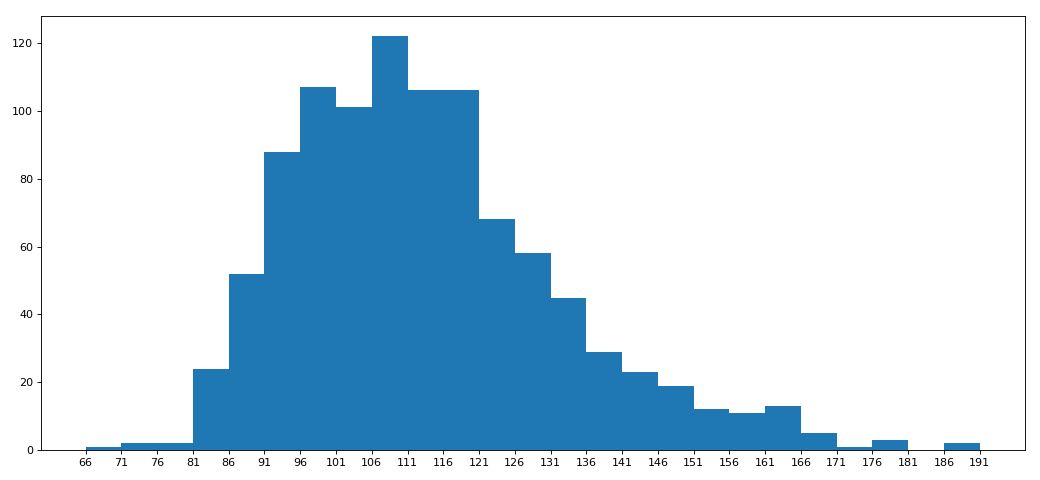
# rating,runtime分布情况

# 选择图形:直方图

# 准备数据

runtime_data = df['Runtime (Minutes)'].values

max_runtime = runtime_data.max()

min_runtime = runtime_data.min()

#计算组距

num_bin = (max_runtime-min_runtime)//5

#设置图行大小

plt.figure(figsize=(13,6),dpi=80)

#画直方图

plt.hist(runtime_data,num_bin)

plt.xticks(range(min_runtime,max_runtime+5,5))

#显示

plt.show()
电影案例二
import pandas as pd

from matplotlib import pyplot as plt

from functools import reduce

file_path = './IMDB-Movie-data.csv'

df = pd.read_csv(file_path)

# print(df.head(1))

# print(df.info())

# rating,runtime分布情况

# 选择图形:直方图

# 准备数据

# runtime_data = df['Runtime (Minutes)'].values

rate_data = df['Rating'].values

max_rate = rate_data.max()

min_rate = rate_data.min()

#设置不等宽组距,hist方法中取到的会是一个左闭右开的区间[1,9,3.5)

num_bin_list = [1.9,3.5]

i = 3.5

while i<=max_rate:

    i += 0.5

    num_bin_list.append(i)

print(num_bin_list)

#设置图形大小

plt.figure(figsize=(13,6),dpi=80)

#画直方图

plt.hist(rate_data,num_bin_list)

#xticks让之前的组距能够对上

plt.xticks(num_bin_list)

#显示

plt.show()

[1.9, 3.5, 4.0, 4.5, 5.0, 5.5, 6.0, 6.5, 7.0, 7.5, 8.0, 8.5, 9.0, 9.5]
五。常用统计方法
import numpy

import pandas as pd

df = pd.read_csv('IMDB-Movie-Data.csv')

print(df.info())

print(df.describe())

#获取评分的均分

rate_mean = df.Rating.mean()

print(rate_mean)

#获取导演的人数

print(df.Director.value_counts().count())

print(len(set(df.Director.tolist())))

print(len(df.Director.unique()))

#获取演员的人数

temp_actors_list = df.Actors.str.split(',').tolist()

actors_list = [i for j in temp_actors_list for i in j]

# numpy.array(temp_actors_list).flatten()

actors_num = len(set(actors_list))

print(actors_num)

<class 'pandas.core.frame.DataFrame'>

RangeIndex: 1000 entries, 0 to 999

Data columns (total 12 columns):

Rank                  1000 non-null int64

Title                 1000 non-null object

Genre                 1000 non-null object

Description           1000 non-null object

Director              1000 non-null object

Actors                1000 non-null object

Year                  1000 non-null int64

Runtime (Minutes)     1000 non-null int64

Rating                1000 non-null float64

Votes                 1000 non-null int64

Revenue (Millions)    872 non-null float64

Metascore             936 non-null float64

dtypes: float64(3), int64(4), object(5)

memory usage: 93.8+ KB

None

              Rank         Year     ...      Revenue (Millions)   Metascore

count  1000.000000  1000.000000     ...              872.000000  936.000000

mean    500.500000  2012.783000     ...               82.956376   58.985043

std     288.819436     3.205962     ...              103.253540   17.194757

min       1.000000  2006.000000     ...                0.000000   11.000000

25%     250.750000  2010.000000     ...               13.270000   47.000000

50%     500.500000  2014.000000     ...               47.985000   59.500000

75%     750.250000  2016.000000     ...              113.715000   72.000000

max    1000.000000  2016.000000     ...              936.630000  100.000000

[8 rows x 7 columns]
六、统计分类情况
# -*- coding: utf-8 -*-

"""

@Datetime: 2018/11/19

@Author: Zhang Yafei

"""

"""

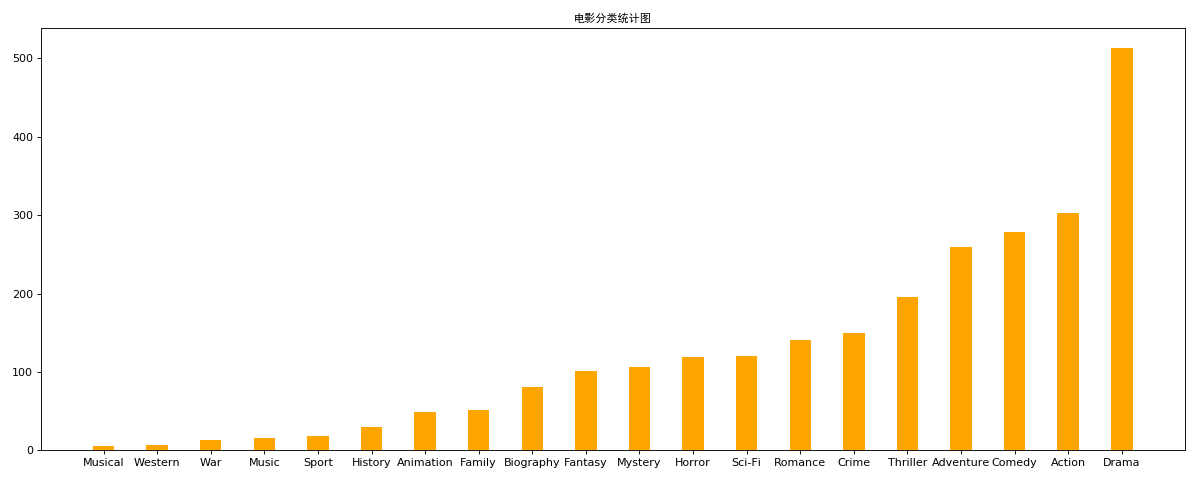
对于这一组电影数据,如果我们希望统计电影分类(genre)的情况,应该如何处理数据?

思路:重新构造一个全为0的数组,列名为分类,如果某一条数据中分类出现过,就让0变为1

"""

import numpy as np

import pandas as pd

from matplotlib import pyplot as plt

from matplotlib import font_manager

#中文字体

my_font = font_manager.FontProperties(family='SimHei')

#显示完整的列

pd.set_option('display.max_columns', None)

df = pd.read_csv('IMDB-Movie-Data.csv')

#统计分类列表

temp_list = df.Genre.str.split(',').tolist()

genre_list = list(set([i for j in temp_list for i in j]))

#构造全为0的数组

zero_df = pd.DataFrame(np.zeros((df.shape[0],len(genre_list))),columns=genre_list)

# print(zero_df)

#给每个电影出现分类的位置赋值1

for i in range(df.shape[0]):

    zero_df.loc[i,temp_list[i]] = 1

# print(zero_df.head(1))

genre_count = zero_df.sum(axis=0)

print(genre_count)

#排序

genre_count = genre_count.sort_values()

_x = genre_count.index

_y = genre_count.values

#画图

plt.figure(figsize=(15,6),dpi=80)

plt.bar(range(len(_x)),_y,width=0.4,color="orange")

plt.xticks(range(len(_x)),_x)

plt.title('电影分类统计图',fontproperties=my_font)

plt.show()
七、数据分组与聚合
# -*- coding: utf-8 -*-

"""

@Datetime: 2018/11/19

@Author: Zhang Yafei

"""

"""

现在我们有一组关于全球星巴克店铺的统计数据,如果我想知道美国的星巴克数量和中国的哪个多,或者我想知道中国每个省份星巴克的数量的情况,那么应该怎么办?

思路:遍历一遍,每次加1 ???

"""

import pandas as pd

pd.set_option('display.max_columns', None)

df = pd.read_csv('starbucks_store_worldwide.csv')

# print(df.head(1))

# print(df.info())

grouped = df.groupby(by='Country')

# print(grouped)

# DataFrameGroupBy

# 可以进行遍历

# for i,j in grouped:

#     print(i)

#     print('-'*100)

#     print(j)

#     print('*'*100)

country_count = grouped['Brand'].count()

# print(country_count['US'])

# print(country_count['CN'])

#统计中国每个省份店铺的数量

china_data = df[df.Country == 'CN']

china_grouped = china_data.groupby(by='State/Province').count()['Brand']

# print(china_grouped)

#数据按照多个条件进行分组

brand_grouped = df['Brand'].groupby(by=[df['Country'],df['State/Province']]).count()

# print(brand_grouped)

# print(type(brand_grouped))

#数据按照多个条件进行分组,返回dataframe

brand_grouped1 = df[['Brand']].groupby(by=[df['Country'],df['State/Province']]).count()

brand_grouped2 = df.groupby(by=[df['Country'],df['State/Province']])[['Brand']].count()

brand_grouped3 = df.groupby(by=[df['Country'],df['State/Province']]).count()[['Brand']]

# print(brand_grouped1)

# print(brand_grouped2)

# print(brand_grouped3)

#索引的方法和属性

print(brand_grouped1)

print(brand_grouped1.index)
八、分组聚合
import pandas as pd

from matplotlib import pyplot as plt

pd.set_option('display.max_columns', None)

df = pd.read_csv('starbucks_store_worldwide.csv')

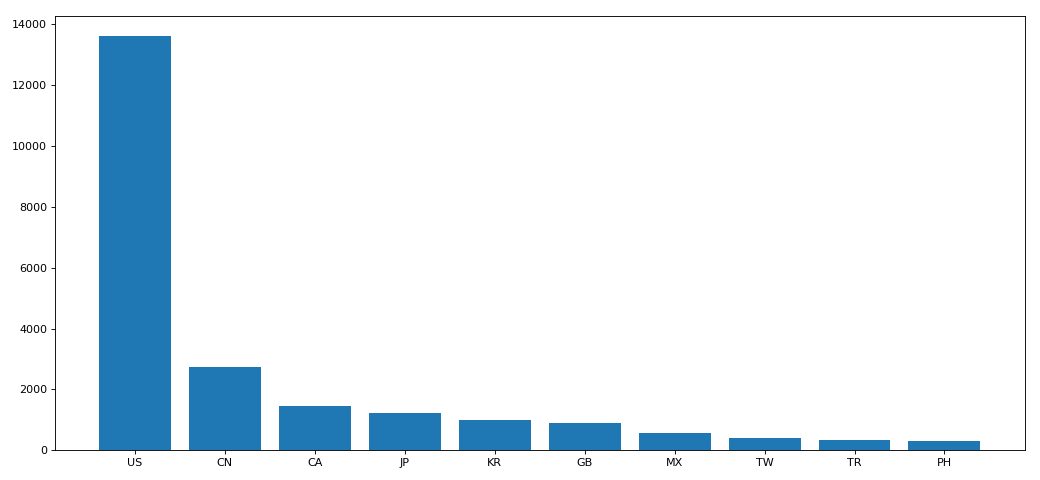
df = df.groupby(by='Country').count()['Brand'].sort_values(ascending=False)[:10]

_x = df.index

_y = df.values

#画图

plt.figure(figsize=(13,6),dpi=80)

plt.bar(_x,_y)

plt.show()
分组聚合二
import pandas as pd

from matplotlib import pyplot as plt

from matplotlib import font_manager

my_font = font_manager.FontProperties(family='SimHei')

pd.set_option('display.max_columns', None)

df = pd.read_csv('starbucks_store_worldwide.csv')

df = df[df['Country']=='CN']

print(df.head(1))

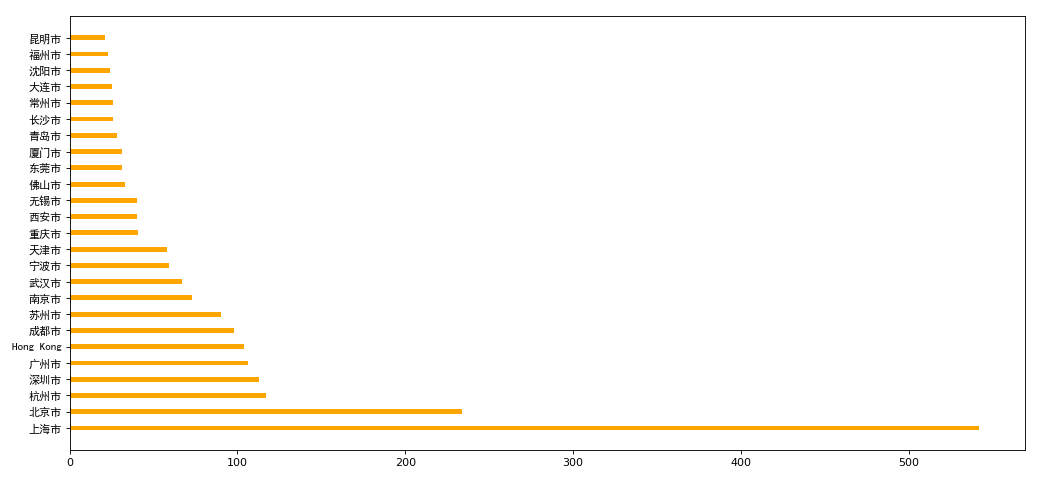
df = df.groupby(by='City').count()['Brand'].sort_values(ascending=False)[:25]

_x = df.index

_y = df.values

#画图

plt.figure(figsize=(13,6),dpi=80)

# plt.bar(_x,_y,width=0.3,color='orange')

plt.barh(_x,_y,height=0.3,color='orange')

# plt.xticks(_x,fontproperties=my_font)

plt.yticks(_x,fontproperties=my_font)

plt.show()
九、book_data
import pandas as pd

from matplotlib import pyplot as plt

pd.set_option('display.max_columns', None)

df = pd.read_csv('books.csv')

# print(df.info())

data = df[pd.notnull(df['original_publication_year'])]

grouped = data.groupby(by='original_publication_year').count()['title']

# print(grouped)

grouped1 = data.average_rating.groupby(by=data['original_publication_year']).mean()

# print(grouped1)

_x = grouped1.index

_y = grouped1.values

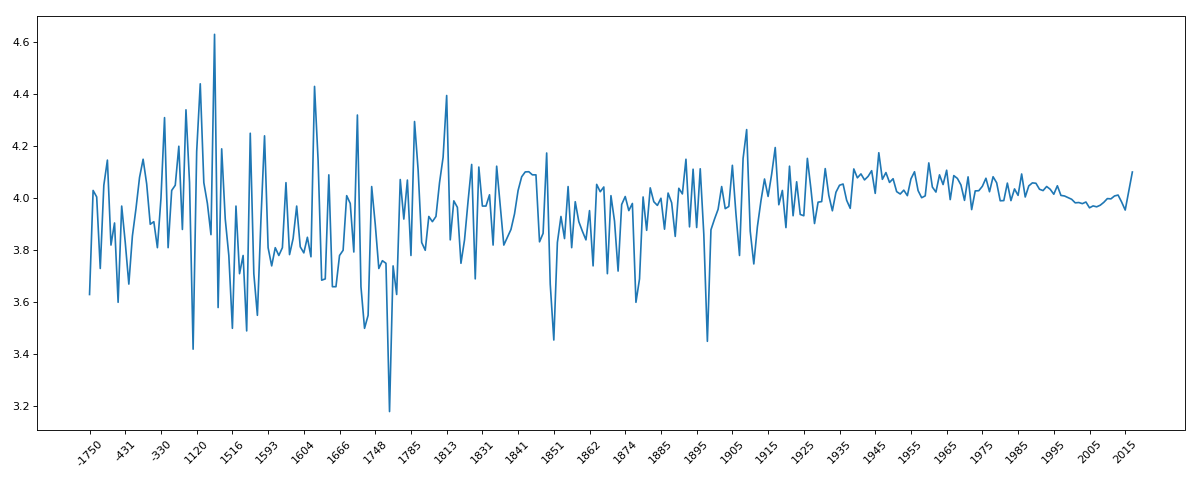
plt.figure(figsize=(15,6),dpi=80)

plt.plot(range(len(_x)),_y)

plt.xticks(range(len(_x))[::10],_x[::10].astype(int),rotation=45)

plt.show()
十、911data
import pandas as pd

from matplotlib import pyplot as plt

import numpy as np

pd.set_option('display.max_columns',None)

df = pd.read_csv('911.csv')

# print(df.head(1))

# print(df.info())

#获取分类

temp_list = df.title.str.split(':').tolist()

cate_list = list(set([i[0] for i in temp_list]))

# print(cate_list)

#构造全为0的数组

zeros_df = pd.DataFrame(np.zeros((df.shape[0],len(cate_list))),columns=cate_list)

#赋值

for cate in cate_list:

    zeros_df[cate][df.title.str.contains(cate)] = 1

print(zeros_df)

sum_ret = zeros_df.sum(axis=0)

print(sum_ret)
示例二
import pandas as pd

from matplotlib import pyplot as plt

import numpy as np

pd.set_option('display.max_columns',None)

df = pd.read_csv('911.csv')

# print(df.head(1))

# print(df.info())

#获取分类

temp_list = df.title.str.split(':').tolist()

cate_list = [i[0] for i in temp_list]

df['cate'] = pd.DataFrame(np.array(cate_list).reshape(df.shape[0],1))

print(df.groupby(by='cate').count()['title'])
十一、时间序列
实例一
# -*- coding: utf-8 -*-

"""

@Datetime: 2018/11/19

@Author: Zhang Yafei

"""

"""

统计出911数据中不同月份电话次数的变化情况

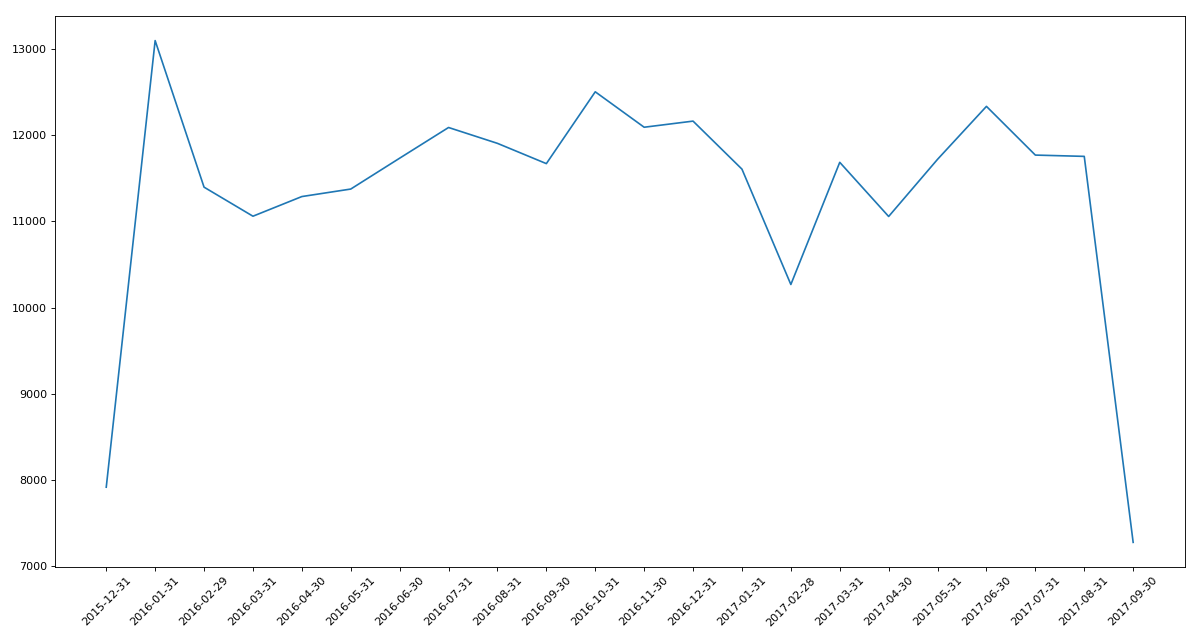
"""

import pandas as pd

from matplotlib import pyplot as plt

import numpy as np

pd.set_option('display.max_columns',None)

df = pd.read_csv('911.csv')

df.drop_duplicates()

df.timeStamp = pd.to_datetime(df.timeStamp)  #时间字符串转时间格式

df.set_index('timeStamp',inplace=True)  #设置时间格式为索引

# print(df.head())

#统计出911数据中不同月份电话次数

count_by_month = df.resample('M').count()['title']

print(count_by_month)

#画图

_x = count_by_month.index

_y = count_by_month.values

plt.figure(figsize=(15,8),dpi=80)

plt.plot(range(len(_x)),_y)

plt.xticks(range(len(_x)),_x.strftime('%Y-%m-%d'),rotation=45)

plt.show()
实例二
# -*- coding: utf-8 -*-

"""

@Datetime: 2018/11/19

@Author: Zhang Yafei

"""

"""

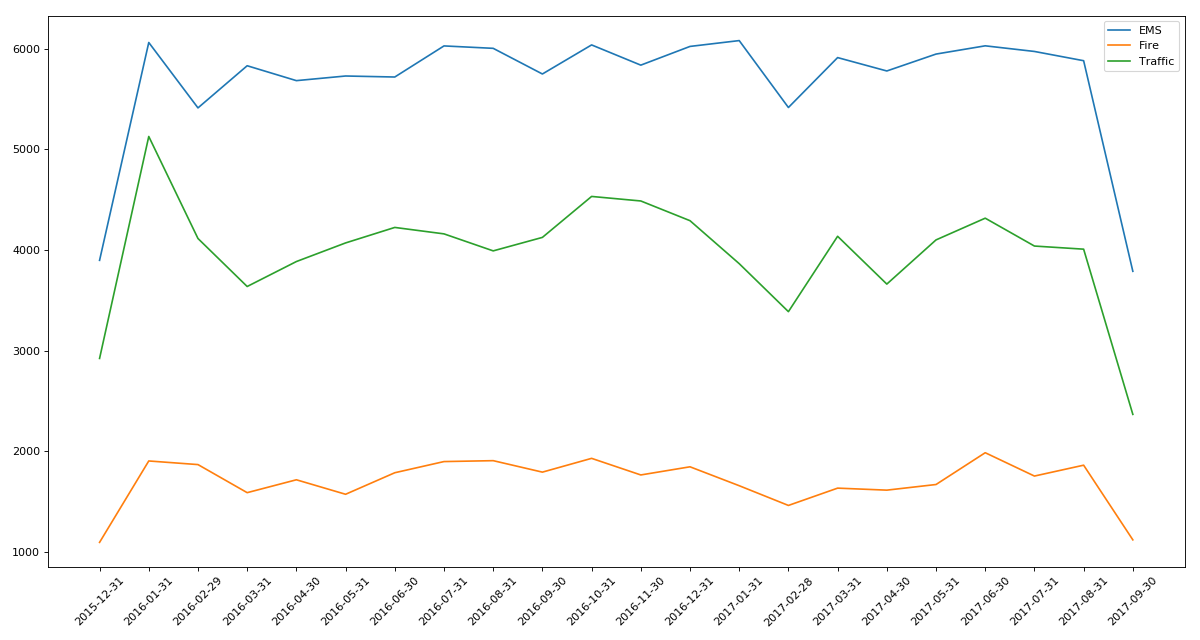
统计出911数据中不同月份不同类型的电话的次数的变化情况

"""

import pandas as pd

from matplotlib import pyplot as plt

import numpy as np

pd.set_option('display.max_columns',None)

df = pd.read_csv('911.csv')

#把时间字符串转化为时间类型设置为索引

df.timeStamp = pd.to_datetime(df.timeStamp)

#添加列,表示分类

temp_list = df.title.str.split(':').tolist()

cate_list = [i[0] for i in temp_list]

df['cate'] = pd.DataFrame(np.array(cate_list).reshape(df.shape[0],1))

df.set_index('timeStamp',inplace=True)

plt.figure(figsize=(15, 8), dpi=80)

#分组

for group_name,group_data in df.groupby(by='cate'):

    #对不同的分类都进行绘图

    count_by_month = group_data.resample('M').count()['title']

    # 画图

    _x = count_by_month.index

    _y = count_by_month.values

    plt.plot(range(len(_x)),_y,label=group_name)

plt.xticks(range(len(_x)), _x.strftime('%Y-%m-%d'), rotation=45)

plt.legend(loc='best')

plt.show()
实例三:pm2.5
# -*- coding: utf-8 -*-

"""

@Datetime: 2018/11/19

@Author: Zhang Yafei

"""

"""

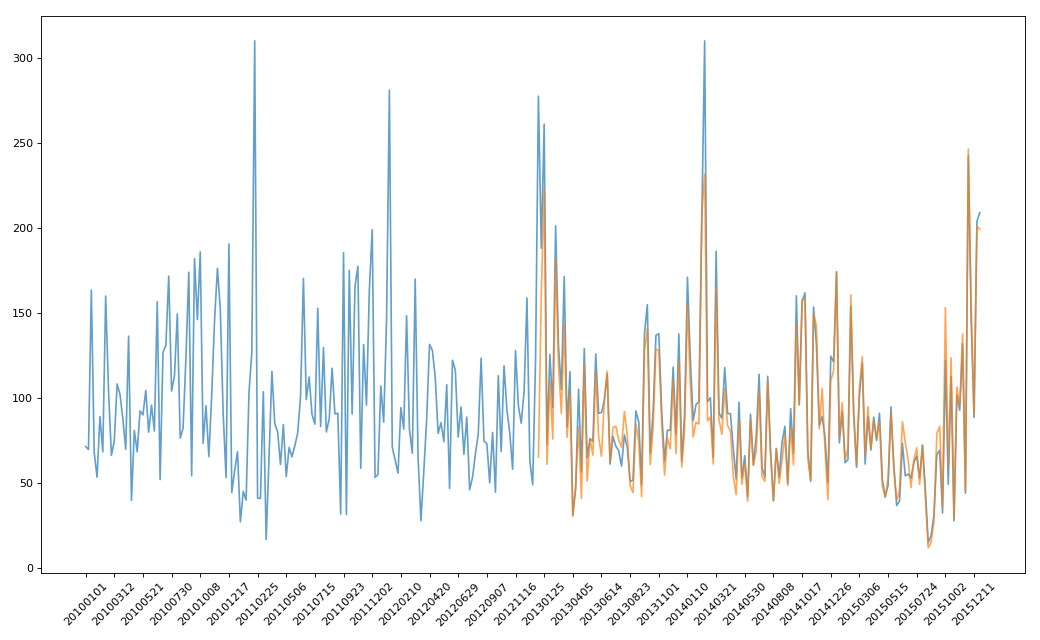
绘制美国和中国PM2.5随时间的变化情况

"""

import pandas as pd

from matplotlib import pyplot as plt

pd.set_option('display.max_columns',None)

df = pd.read_csv('PM2.5/BeijingPM20100101_20151231.csv')

# print(df.head())

#把分开的时间字符串通过periodIndex的方法转化为pandas的时间类型

period = pd.PeriodIndex(year=df.year,month=df.month,day=df.day,hour=df.hour,freq='H')

df['datetime'] = period

print(df.head(10))

#把datetime设置为索引

df.set_index('datetime',inplace=True)

#进行降采样

df = df.resample('7D').mean()

#处理缺失值,删除缺失数据

# data = df['PM_US Post'].dropna()

# china_data = df['PM_Nongzhanguan'].dropna()

data = df['PM_US Post']

china_data = df['PM_Nongzhanguan']

#画图

_x = data.index

_y = data.values

_x_china = china_data.index

_y_china = china_data.values

plt.figure(figsize=(13,8),dpi=80)

plt.plot(range(len(_x)),_y,label='US_POST',alpha=0.7)

plt.plot(range(len(_x_china)),_y_china,label='CN_POST',alpha=0.7)

plt.xticks(range(0,len(_x_china),10),list(_x_china.strftime('%Y%m%d'))[::10],rotation=45)

plt.show()
Pandas系列(十四)- 实战案例的更多相关文章
- struts2官方 中文教程 系列十四:主题Theme
介绍 当您使用一个Struts 2标签时,例如 <s:select ..../> 在您的web页面中,Struts 2框架会生成HTML,它会显示外观并控制select控件的布局.样式和 ...
- MP实战系列(十四)之分页使用
MyBatis Plus的分页,有插件式的,也有其自带了,插件需要配置,说麻烦也不是特别麻烦,不过觉得现有的MyBatis Plus足以解决,就懒得配置插件了. MyBatis Plus的资料不算是太 ...
- 闯祸了,生成环境执行了DDL操作《死磕MySQL系列 十四》
由于业务随着时间不停的改变,起初的表结构设计已经满足不了如今的需求,这时你是不是想那就加字段呗!加字段也是个艺术活,接下来由本文的主人咔咔给你吹. 试想一下这个场景 事务A在执行一个非常大的查询 事务 ...
- 学习ASP.NET Core Razor 编程系列十四——文件上传功能(二)
学习ASP.NET Core Razor 编程系列目录 学习ASP.NET Core Razor 编程系列一 学习ASP.NET Core Razor 编程系列二——添加一个实体 学习ASP.NET ...
- Netty实战十四之案例研究(一)
1.Droplr——构建移动服务 Bruno de Carvalho,首席架构师 在Droplr,我们在我的基础设施的核心部分.从我们的API服务器到辅助服务的各个部分都使用了Netty. 这是一个关 ...
- shiro实战系列(十四)之配置
Shiro 被设计成能够在任何环境下工作,从最简单的命令行应用程序到最大的的企业群集应用.由于环境的多样性,使得许多配置机制适用于它的配置. 一. 许多配置选项 Shiro的SecurityManag ...
- SpringCloud系列十四:实现容错的手段
1. 回顾 前面已用Eureka实现了微服务的注册与发现,Ribbon实现了客户端侧的负载均衡,Feign实现了声明式的API调用. 2. 实现容错的手段 如果服务提供者响应非常慢,那么消费者对提供者 ...
- WPF入门教程系列十四——依赖属性(四)
六.依赖属性回调.验证及强制值 我们通过下面的这幅图,简单介绍一下WPF属性系统对依赖属性操作的基本步骤: 借用一个常见的图例,介绍一下WPF属性系统对依赖属性操作的基本步骤: 第一步,确定Base ...
- Pandas系列(四)-文本数据处理
内容目录 1. 为什么要用str属性 2. 替换和分割 3. 提取子串 3.1 提取第一个匹配的子串 3.2 匹配所有子串 3.3 测试是否包含子串 3.4 生成哑变量 3.5 方法摘要 一.为什么要 ...
- 单点登录(十四)-----实战-----cas5.0.x登录mongodb验证方式常规的四种加密的思考和分析
我们在上一篇文章中已经讲解了cas4.2.X登录启用mongodb验证方式 单点登录(十三)-----实战-----cas4.2.X登录启用mongodb验证方式完整流程 但是密码是明文存储的,也就是 ...
随机推荐
- EF ORM
//新增 UserInfo userInfo = new UserInfo(); userInfo.UserName = "YANG"; userInfo.UserPass = & ...
- git取消跟踪已版本控制的文件
git 不再追踪文件改动 git update-index --assume-unchanged filePath git 恢复追踪文件改动 git update-index —no-assume-u ...
- oracle EM 如何调整界面显示的语言
EM是通过浏览器语言来识别界面语言的,没有选项调整.我以chrome为例将默认中文改为英文: EM调整前为中文界面: 调整chrome语言显示为英文: 再重新开一个窗口,打开EM,界面已经调整为英文了 ...
- 我认知的javascript之函数调用
今天刚好周六没事,又由于工作的原因导致早上醒来就睡不着,无聊之下,就想到了 js 的function调用问题.当然,网上也是对javascript的一些事情说得很透了,但我觉得还是有必要把自己的想法说 ...
- Win10系统如何在防火墙里开放端口
Win10系统如何在防火墙里开放端口(下面傻瓜式教学) 然后怎么做呢?????? 下一步.下一步.下一步.下一步.下一步.下一步.下一步.下一步.下一步.下一步......... 随便起个名字 KO
- Mac下MySql初始密码设置及mysql数据库操作
1. 首先 点击系统偏好设置 -> 点击MySQL, 在弹出的页面中,关闭服务.2. 进入终端命令输出: cd /usr/local/mysql/bin/ 命令,回车.3. 回车后,输入命令:s ...
- python小白——进阶之路——day3天-———容器类型数据+Number类型强制类型转换
-->Number 部分 int : 整型 浮点型 布尔类型 纯数字字符串 float: 整型 浮点型 布尔类型 纯数字字符串 complex: 整型 浮点型 布 ...
- 三:OVS+GRE之完整网络流程
知识点一:linux网桥提供安全组 知识点二:每新建一个网络,在网络节点都会新建一个namespace,只要为该网络建立子网,那么该namespace里就新增dhcp来为该子网分配ip,也可以为该网络 ...
- c#, AOP动态代理实现动态权限控制(一)
因最近工作需要一个动态的权限配置功能,具体实现逻辑是c#的动态代理功能,废话不多说,直接干货.需求: 用户分为管理员.普通用户 不同用户拥有不同功能权限 用户的权限可配置 新增功能时,不用修改权限配置 ...
- Winform 最小化双击显示,最小化右键退出。退出
WinForm 之 窗口最小化到托盘及右键图标显示菜单 Form最小化是指整个Form都缩小到任务栏上,但是窗体以Form的标题栏形式显示在任务栏上, 若是想让Form以Icon的形式显示在任务栏右下 ...