
XUnit 依赖注入
XUnit 依赖注入
Intro
现在的开发中越来越看重依赖注入的思想,微软的 Asp.Net Core 框架更是天然集成了依赖注入,那么在单元测试中如何使用依赖注入呢?
本文主要介绍如何通过 XUnit 来实现依赖注入, XUnit 主要借助 SharedContext 来共享一部分资源包括这些资源的创建以及释放。
Scoped
针对 Scoped 的对象可以借助 XUnit 中的 IClassFixture 来实现
- 定义自己的 Fixture,需要初始化的资源在构造方法里初始化,如果需要在测试结束的时候释放资源需要实现
IDisposable接口 - 需要依赖注入的测试类实现接口
IClassFixture<Fixture> - 在构造方法中注入实现的 Fixture 对象,并在构造方法中使用 Fixture 对象中暴露的公共成员
Singleton
针对 Singleton 的对象可以借助 XUnit 中的 ICollectionFixture 来实现
- 定义自己的
Fixture,需要初始化的资源在构造方法里初始化,如果需要在测试结束的时候释放资源需要实现IDisposable接口 - 创建 CollectionDefinition,实现接口
ICollectionFixture<Fixture>,并添加一个[CollectionDefinition("CollectionName")]Attribute,CollectionName需要在整个测试中唯一,不能出现重复的CollectionName - 在需要注入的测试类中添加
[Collection("CollectionName")]Attribute,然后在构造方法中注入对应的Fixture
Tips
- 如果有多个类需要依赖注入,可以通过一个基类来做,这样就只需要一个基类上添加
[Collection("CollectionName")]Attribute,其他类只需要集成这个基类就可以了
Samples
Scoped Sample
这里直接以 XUnit 的示例为例:
public class DatabaseFixture : IDisposable

{

    public DatabaseFixture()

    {

        Db = new SqlConnection("MyConnectionString");

        // ... initialize data in the test database ...

    }

    public void Dispose()

    {

        // ... clean up test data from the database ...

    }

    public SqlConnection Db { get; private set; }

}

public class MyDatabaseTests : IClassFixture<DatabaseFixture>

{

    DatabaseFixture fixture;

    public MyDatabaseTests(DatabaseFixture fixture)

    {

        this.fixture = fixture;

    }

    [Fact]

    public async Task GetTest()

    {

        // ... write tests, using fixture.Db to get access to the SQL Server ...

        // ... 在这里使用注入 的 DatabaseFixture

    }

}
Singleton Sample
这里以一个对 asp.net core API 的测试为例
- 自定义 Fixture
/// <summary>

/// Shared Context https://xunit.github.io/docs/shared-context.html

/// </summary>

public class APITestFixture : IDisposable

{

    private readonly IWebHost _server;

    public IServiceProvider Services { get; }

    public HttpClient Client { get; }

    public APITestFixture()

    {

        var baseUrl = $"http://localhost:{GetRandomPort()}";

        _server = WebHost.CreateDefaultBuilder()

            .UseUrls(baseUrl)

            .UseStartup<TestStartup>()

            .Build();

        _server.Start();

        Services = _server.Services;

        Client = new HttpClient(new WeihanLi.Common.Http.NoProxyHttpClientHandler())

        {

            BaseAddress = new Uri($"{baseUrl}")

        };

        // Add Api-Version Header

        // Client.DefaultRequestHeaders.TryAddWithoutValidation("Api-Version", "1.2");

        Initialize();

        Console.WriteLine("test begin");

    }

    /// <summary>

    /// TestDataInitialize

    /// </summary>

    private void Initialize()

    {

    }

    public void Dispose()

    {

        using (var dbContext = Services.GetRequiredService<ReservationDbContext>())

        {

            if (dbContext.Database.IsInMemory())

            {

                dbContext.Database.EnsureDeleted();

            }

        }

        Client.Dispose();

        _server.Dispose();

        Console.WriteLine("test end");

    }

    private static int GetRandomPort()

    {

        var random = new Random();

        var randomPort = random.Next(10000, 65535);

        while (IPGlobalProperties.GetIPGlobalProperties().GetActiveTcpListeners().Any(p => p.Port == randomPort))

        {

            randomPort = random.Next(10000, 65535);

        }

        return randomPort;

    }

}

[CollectionDefinition("APITestCollection")]

public class APITestCollection : ICollectionFixture<APITestFixture>

{

}
- 自定义Collection
[CollectionDefinition("TestCollection")]

public class TestCollection : ICollectionFixture<TestStartupFixture>

{

}
- 自定义一个 TestBase
[Collection("APITestCollection")]

public class ControllerTestBase

{

    protected HttpClient Client { get; }

    protected IServiceProvider Services { get; }

    public ControllerTestBase(APITestFixture fixture)

    {

        Client = fixture.Client;

        Services = fixture.Services;

    }

}
- 需要依赖注入的Test类写法
public class NoticeControllerTest : ControllerTestBase

{

    public NoticeControllerTest(APITestFixture fixture) : base(fixture)

    {

    }

    [Fact]

    public async Task GetNoticeList()

    {

        using (var response = await Client.GetAsync("/api/notice"))

        {

            Assert.Equal(HttpStatusCode.OK, response.StatusCode);

            var responseString = await response.Content.ReadAsStringAsync();

            var result = JsonConvert.DeserializeObject<PagedListModel<Notice>>(responseString);

            Assert.NotNull(result);

        }

    }

    [Fact]

    public async Task GetNoticeDetails()

    {

        var path = "test-notice";

        using (var response = await Client.GetAsync($"/api/notice/{path}"))

        {

            Assert.Equal(HttpStatusCode.OK, response.StatusCode);

            var responseString = await response.Content.ReadAsStringAsync();

            var result = JsonConvert.DeserializeObject<Notice>(responseString);

            Assert.NotNull(result);

            Assert.Equal(path, result.NoticeCustomPath);

        }

    }

    [Fact]

    public async Task GetNoticeDetails_NotFound()

    {

        using (var response = await Client.GetAsync("/api/notice/test-notice1212"))

        {

            Assert.Equal(HttpStatusCode.NotFound, response.StatusCode);

        }

    }

}
运行测试,查看我们的 APITestFixture 是不是只实例化了一次,查看输出日志:
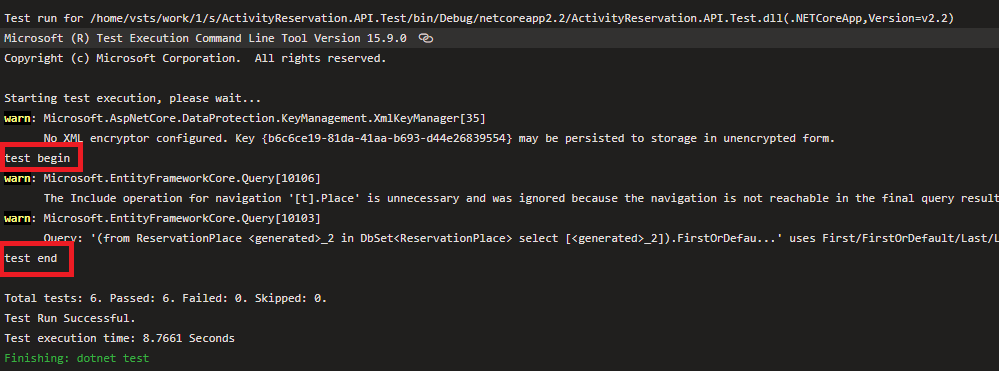
可以看到我们输出的日志只有一次,说明在整个测试过程中确实只实例化了一次,只会启动一个 web server,确实是单例的
Memo
微软推荐的是用 Microsoft.AspNetCore.Mvc.Testing 组件去测试 Controller,但是个人感觉不如自己直接去写web 服务去测试,如果没必要引入自己不熟悉的组件最好还是不要去引入新的东西,否则可能就真的是踩坑不止了。
Reference
- https://xunit.github.io/docs/shared-context.html
- https://github.com/WeihanLi/ActivityReservation/tree/dev/ActivityReservation.API.Test
XUnit 依赖注入的更多相关文章
- 在 xunit 测试项目中使用依赖注入
在 xunit 测试项目中使用依赖注入 Intro 之前写过几篇 xunit 依赖注入的文章,今天这篇文章将结合我在 .NET Conf 上的分享,更加系统的分享一下在测试中的应用案例. 之所以想分享 ...
- 在 XUnit 中使用依赖注入
在 XUnit 中使用依赖注入 Intro 之前写过一篇 xunit 的依赖注入相关的文章,但是实际使用起来不是那么方便 今天介绍一个基于xunit和微软依赖注入框架的"真正"的依 ...
- 更优雅的在 Xunit 中使用依赖注入
Xunit.DependencyInjection 7.0 发布了 Intro 上次我们已经介绍过一次大师的 Xunit.DependencyInjection https://www.cnblogs ...
- C#中的依赖注入和IoC容器
在本文中,我们将通过用C#重构一个非常简单的代码示例来解释依赖注入和IoC容器. 简介: 依赖注入和IoC乍一看可能相当复杂,但它们非常容易学习和理解. 在本文中,我们将通过在C#中重构一个非常简单的 ...
- webapi - 使用依赖注入
本篇将要和大家分享的是webapi中如何使用依赖注入,依赖注入这个东西在接口中常用,实际工作中也用的比较频繁,因此这里分享两种在api中依赖注入的方式Ninject和Unity:由于快过年这段时间打算 ...
- ASP.NET Core 中文文档 第四章 MVC(3.8)视图中的依赖注入
原文:Dependency injection into views 作者:Steve Smith 翻译:姚阿勇(Dr.Yao) 校对:孟帅洋(书缘) ASP.NET Core 支持在视图中使用 依赖 ...
- 在WPF中使用依赖注入的方式创建视图
在WPF中使用依赖注入的方式创建视图 0x00 问题的产生 互联网时代桌面开发真是越来越少了,很多应用都转到了浏览器端和移动智能终端,相应的软件开发上的新技术应用到桌面开发的文章也很少.我之前主要做W ...
- MVVM模式解析和在WPF中的实现(六) 用依赖注入的方式配置ViewModel并注册消息
MVVM模式解析和在WPF中的实现(六) 用依赖注入的方式配置ViewModel并注册消息 系列目录: MVVM模式解析和在WPF中的实现(一)MVVM模式简介 MVVM模式解析和在WPF中的实现(二 ...
- .Net Core MVC 网站开发(Ninesky) 2.3、项目架构调整-控制反转和依赖注入的使用
再次调整项目架构是因为和群友dezhou的一次聊天,我原来的想法是项目尽量做简单点别搞太复杂了,仅使用了DbContext的注入,其他的也没有写接口耦合度很高.和dezhou聊过之后我仔细考虑了一下, ...
随机推荐
- [Swift]LeetCode150. 逆波兰表达式求值 | Evaluate Reverse Polish Notation
Evaluate the value of an arithmetic expression in Reverse Polish Notation. Valid operators are +, -, ...
- [Swift]LeetCode245.最短单词距离 III $ Shortest Word Distance III
This is a follow up of Shortest Word Distance. The only difference is now word1 could be the same as ...
- [Swift]LeetCode643. 子数组最大平均数 I | Maximum Average Subarray I
Given an array consisting of n integers, find the contiguous subarray of given length k that has the ...
- [Swift]LeetCode945. 使数组唯一的最小增量 | Minimum Increment to Make Array Unique
Given an array of integers A, a move consists of choosing any A[i], and incrementing it by 1. Return ...
- [Swift]LeetCode1030. 距离顺序排列矩阵单元格 | Matrix Cells in Distance Order
We are given a matrix with R rows and C columns has cells with integer coordinates (r, c), where 0 & ...
- Mysql、Hbuilder、Idea快捷键
MyEclipse 快捷键 ↑ ↓ ← →多 1.方法抽取,Alt+Shift+M 2.多行注释:Ctrl+Shift+/ 3.对象.方法; Ctrl+2 + ↓+回车 ,自动生成返回类型和变量 (非 ...
- 前端(各种demo)二:左侧导航栏的折叠和打开(不使用js)基础版和升级版
1.给div设置定位. 复习一下—— css中position有五种属性: static:默认值,没有定位 absolute:绝对定位,相对于父级元素进行定位 relative:相对定位 fixed: ...
- 【转】getopt模块,实现获取命令行参数
python中 getopt 模块,该模块是专门用来处理命令行参数的 函数getopt(args, shortopts, longopts = []) 参数args一般是sys.argv[1:],sh ...
- 【转】CGI
CGI是什么 (一): CGI是Common Gateway Interface 的简称.是一个用于定Web服务器与外部程序之间通信方式的标准,使得外部程序能生成HTML.图像或者其他内容,而服务器处 ...
- ORA-01034: ORACLE not available问题
通过DBCA新建一个数据库后,执行以下命令报错:SQL> shutdown immediate;ERROR:ORA-01034: ORACLE not availableORA-27101: s ...