
xampp——apache服务启动问题(端口占用)
Apache启动提示
20:39:02 [Apache] Error: Apache shutdown unexpectedly.
20:39:02 [Apache] This may be due to a blocked port, missing dependencies,
20:39:02 [Apache] improper privileges, a crash, or a shutdown by another method.
20:39:02 [Apache] Press the Logs button to view error logs and check
20:39:02 [Apache] the Windows Event Viewer for more clues
20:39:02 [Apache] If you need more help, copy and post this
20:39:02 [Apache] entire log window on the forums
20:46:47 [Apache] Problem detected!
20:46:47 [Apache] Port 443 in use by ""D:\Program Files (x86)\VMware\VMware Workstation\vmware-hostd.exe" -u "C:\ProgramData\VMware\hostd\config.xml"" with PID 9168!
20:46:47 [Apache] Apache WILL NOT start without the configured ports free!
20:46:47 [Apache] You need to uninstall/disable/reconfigure the blocking application
20:46:47 [Apache] or reconfigure Apache and the Control Panel to listen on a different port
上面说明VMware占用了443端口
以下通过修改配置文件来修改默认端口(当没有安装VMware不会占用端口)
2.httpd-ssl.conf(修改无效)
3.修改properties.ini
右键记事本打开或notepad++打开properties.ini
[General]
installdir=D:\xampp
base_stack_name=XAMPP
base_stack_version=1.8.3-1
base_stack_platform=windows
require_root_privileges=1
[Apache]
apache_server_port=80
apache_server_ssl_port=443
apache_root_directory=/xampp/apache
apache_htdocs_directory=D:\xampp/htdocs
apache_domainname=127.0.0.1
apache_configuration_directory=D:\xampp/apache/conf
apache_unique_service_name=
[MySQL]
mysql_port=3306
mysql_host=localhost
mysql_root_directory=D:\xampp\mysql
mysql_binary_directory=D:\xampp\mysql\bin
mysql_data_directory=D:\xampp\mysql\data
mysql_arguments=-u root -P3306
mysql_unique_service_name=
[PHP]
php_binary_directory=D:\xampp\php
php_configuration_directory=D:\xampp\php
修改成(默认除apache,禁止修改其他内容,如悉例外)
apache_server_port=8080
apache_server_ssl_port=4433
ctrl+S保存
star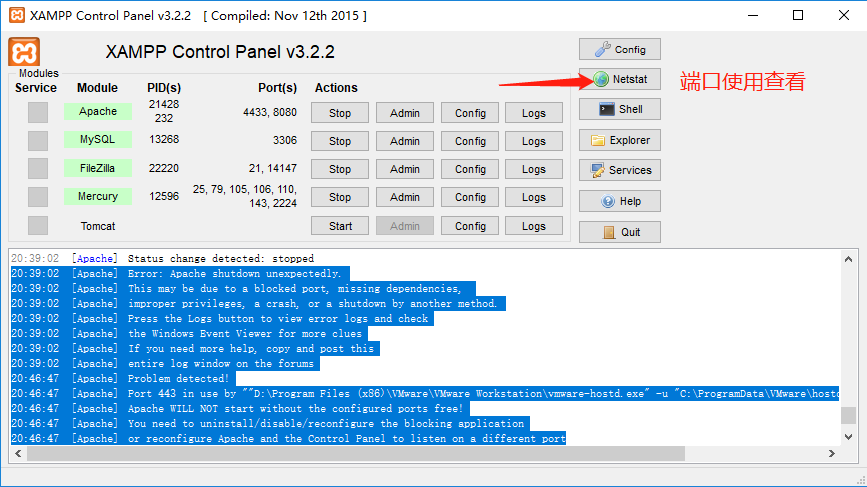
当然也有其他方法,只是有些方法效率不高则不做修改方法
xampp——apache服务启动问题(端口占用)的更多相关文章
- Apache -- XAMPP Apache 无法启动原因及解决方法
XAMPP Apache 无法启动原因1(缺少VC运行库): 这个就是我遇到的问题原因,下载安装的XAMPP版本是xampp-win32-1.7.7-VC9,而现有的Windows XP系统又没有安装 ...
- 关于XAMPP Apache无法启动问题解决方案
安装好XAMPP后,启动Apache服务启动失败,然后从xampp安装目录下执行apache_start.bat文件,如下图 显示443端口被占用. 解决方法: 启动cmd,输入netstat -a ...
- Windows下Apache服务多个端口反向代理配置
修改\Apache24\conf\httpd.conf: 1.修改安装包地址: Define SRVROOT "/Apache24" 修改为: Define SRVROOT &qu ...
- bitnami-redmine Apache服务启动不起来
方法一: 通过 netstat -a -o 查看端口占用情况,关闭调用相关端口的进程. c:\> netstat -a -o Active Connections Proto Local ...
- 关于centOS 7的服务启动,端口查询,防火墙管理
端口的查询与开启 CentOS 7 默认没有使用iptables,所以通过编辑iptables的配置文件来开启80端口是不可以的CentOS 7 采用了 firewalld 防火墙 如要查询是否开启8 ...
- Myeclipse 自带Tomcat启动8080端口占用
在启动Myeclipse自带的Tomcat发现报错,显示8080端口被占用 第一步:window+r 组合键,调出命令窗口. 第二步:输出命令:netstat -ano|findstr 8080 ...
- tomcat启动项目 端口占用
转自:https://blog.csdn.net/u010427935/article/details/77297529 有时候电脑比较卡,项目比较大的情况下,eclipse没有完全停止tomcat的 ...
- tomcat启动时端口占用的问题怎么解决
PS:web项目在启动的时候,一般会报Address already in use: bind,常规的处理思路为:删除任务管理器中的javaw.exe进程即可:当删除仍然解决不了时,一般处理思路如下, ...
- mysql服务启动 但端口未监听
mysql 启动了,用 localhost 可以连接,但是用 127.0.0.1 不能连接.可能的原因是 1. mysql为了增强安全性而跳过了端口监听,查看方法: 用mysql> SHOW V ...
随机推荐
- 脚本:截取euroc数据集bag文件的其中一段
脚本:截取euroc数据集bag文件的其中一段 功能:截取euroc数据集bag中的一段供算法测试 python脚本 #!/usr/bin/env python # ----------------- ...
- 20175303 2018-2019-2 《Java程序设计》第7周学习总结
20175303 2018-2019-2 <Java程序设计>第7周学习总结 教材学习内容总结 1.String类: Java专门提供了用来处理字符序列的String类 构造String对 ...
- oracle初级语法
--select关键字第一个句型: select emp.ename,emp.sal from emp; --from 关键字后面跟 需要查询表名: select ename from emp; -- ...
- 使用vue-cli3搭建一个项目
前面说过用vue-cli3快速开发原型的搭建,下面来说一下搭建一个完整的项目 首先我们可以输入命令(创建一个项目名为test的项目) vue create test 输完这个命令后,会让你选择配置项, ...
- 用web技术写APP
_ 听说会写web的人也能写APP, 抱着尝试的心态踏上路体验一番 http://www.ionic.wang/start-index.html 0x00 框架环境介绍 ionic是什么? https ...
- python练习题-day23
1.人狗大战(组合) class Person: def __init__(self,name,hp,aggr,sex,money): self.name=name self.hp=hp self.a ...
- opencart 3添加pdf文档下载功能
opencart 3适合做外贸商城,如果能在产品页那边添加pdf文档功能是最好的,符合国外用户的使用习惯,增加客户的黏性.其实opencart已经有一个downloadable product可下载产 ...
- ytkah常用网址导航 关于网站运营等
关于运营的网站 人人都是产品经理 产品100 爱运营 A5网站运营 姑婆那些事儿 馒头商学院 运营者 91运营网 互联网的一些事 jb51网站运营 三联网站运营 从零开始做运营 科技/互联网 cn ...
- SQL Server脚本
-- 清楚缓冲区 DBCC DROPCLEANBUFFERS -- 删除计划高速缓存中的元素 DBCC FREEPROCCACHE -- 执行时间 SET STATISTICS TIME ON -- ...
- Anaconda spyder 设置tab键为2个空格
tool -> Preference->