
ASP.NET - Validators
ASP.NET validation controls validate the user input data to ensure that useless, unauthenticated, or contradictory data don't get stored.
ASP.NET provides the following validation controls:
- RequiredFieldValidator
- RangeValidator
- CompareValidator
- RegularExpressionValidator
- CustomValidator
- ValidationSummary
BaseValidator Class
The validation control classes are inherited from the BaseValidator class hence they inherit its properties and methods.
Therefore, it would help to take a look at the properties and the methods of this base class, which are common for all the validation controls:
| Members | Description |
|---|---|
| ControlToValidate | Indicates the input control to validate. |
| Display | Indicates how the error message is shown. |
| EnableClientScript | Indicates whether client side validation will take. |
| Enabled | Enables or disables the validator. |
| ErrorMessage | Indicates error string. |
| Text | Error text to be shown if validation fails. |
| IsValid | Indicates whether the value of the control is valid. |
| SetFocusOnError | It indicates whether in case of an invalid control, the focus should switch to the related input control. |
| ValidationGroup | The logical group of multiple validators, where this control belongs. |
| Validate() | This method revalidates the control and updates the IsValid property. |
RequiredFieldValidator Control
The RequiredFieldValidator control ensures that the required field is not empty. It is generally tied to a text box to force input into the text box.
The syntax of the control is as given:
<asp:RequiredFieldValidator ID="rfvcandidate"

   runat="server" ControlToValidate ="ddlcandidate"

   ErrorMessage="Please choose a candidate"

   InitialValue="Please choose a candidate">

</asp:RequiredFieldValidator>
RangeValidator Control
The RangeValidator control verifies that the input value falls within a predetermined range.
It has three specific properties:
| Properties | Description |
|---|---|
| Type | It defines the type of the data. The available values are: Currency, Date, Double, Integer, and String. |
| MinimumValue | It specifies the minimum value of the range. |
| MaximumValue | It specifies the maximum value of the range. |
The syntax of the control is as given:
<asp:RangeValidator ID="rvclass" runat="server" ControlToValidate="txtclass"

   ErrorMessage="Enter your class (6 - 12)" MaximumValue="12"

   MinimumValue="6" Type="Integer">

</asp:RangeValidator>
CompareValidator Control
The CompareValidator control compares a value in one control with a fixed value or a value in another control.
It has the following specific properties:
| Properties | Description |
|---|---|
| Type | It specifies the data type. |
| ControlToCompare | It specifies the value of the input control to compare with. |
| ValueToCompare | It specifies the constant value to compare with. |
| Operator | It specifies the comparison operator, the available values are: Equal, NotEqual, GreaterThan, GreaterThanEqual, LessThan, LessThanEqual, and DataTypeCheck. |
The basic syntax of the control is as follows:
<asp:CompareValidator ID="CompareValidator1" runat="server"

   ErrorMessage="CompareValidator">

</asp:CompareValidator>
RegularExpressionValidator
The RegularExpressionValidator allows validating the input text by matching against a pattern of a regular expression. The regular expression is set in the ValidationExpression property.
The following table summarizes the commonly used syntax constructs for regular expressions:
| Character Escapes | Description |
|---|---|
| \b | Matches a backspace. |
| \t | Matches a tab. |
| \r | Matches a carriage return. |
| \v | Matches a vertical tab. |
| \f | Matches a form feed. |
| \n | Matches a new line. |
| \ | Escape character. |
Apart from single character match, a class of characters could be specified that can be matched, called the metacharacters.
| Metacharacters | Description |
|---|---|
| . | Matches any character except \n. |
| [abcd] | Matches any character in the set. |
| [^abcd] | Excludes any character in the set. |
| [2-7a-mA-M] | Matches any character specified in the range. |
| \w | Matches any alphanumeric character and underscore. |
| \W | Matches any non-word character. |
| \s | Matches whitespace characters like, space, tab, new line etc. |
| \S | Matches any non-whitespace character. |
| \d | Matches any decimal character. |
| \D | Matches any non-decimal character. |
Quantifiers could be added to specify number of times a character could appear.
| Quantifier | Description |
|---|---|
| * | Zero or more matches. |
| + | One or more matches. |
| ? | Zero or one matches. |
| {N} | N matches. |
| {N,} | N or more matches. |
| {N,M} | Between N and M matches. |
The syntax of the control is as given:
<asp:RegularExpressionValidator ID="string" runat="server" ErrorMessage="string"

   ValidationExpression="string" ValidationGroup="string">

</asp:RegularExpressionValidator>
CustomValidator
The CustomValidator control allows writing application specific custom validation routines for both the client side and the server side validation.
The client side validation is accomplished through the ClientValidationFunction property. The client side validation routine should be written in a scripting language, such as JavaScript or VBScript, which the browser can understand.
The server side validation routine must be called from the control's ServerValidate event handler. The server side validation routine should be written in any .Net language, like C# or VB.Net.
The basic syntax for the control is as given:
<asp:CustomValidator ID="CustomValidator1" runat="server"

   ClientValidationFunction=.cvf_func. ErrorMessage="CustomValidator">

</asp:CustomValidator>
ValidationSummary
The ValidationSummary control does not perform any validation but shows a summary of all errors in the page. The summary displays the values of the ErrorMessage property of all validation controls that failed validation.
The following two mutually inclusive properties list out the error message:
ShowSummary : shows the error messages in specified format.
ShowMessageBox : shows the error messages in a separate window.
The syntax for the control is as given:
<asp:ValidationSummary ID="ValidationSummary1" runat="server"

   DisplayMode = "BulletList" ShowSummary = "true" HeaderText="Errors:" />
Validation Groups
Complex pages have different groups of information provided in different panels. In such situation, a need might arise for performing validation separately for separate group. This kind of situation is handled using validation groups.
To create a validation group, you should put the input controls and the validation controls into the same logical group by setting their ValidationGroup property.
Example
The following example describes a form to be filled up by all the students of a school, divided into four houses, for electing the school president. Here, we use the validation controls to validate the user input.
This is the form in design view:
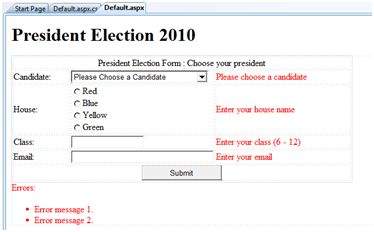
The content file code is as given:
<form id="form1" runat="server">

   <table style="width: 66%;">

      <tr>

         <td class="style1" colspan="3" align="center">

         <asp:Label ID="lblmsg"

            Text="President Election Form : Choose your president"

            runat="server" />

         </td>

      </tr>

      <tr>

         <td class="style3">

            Candidate:

         </td>

         <td class="style2">

            <asp:DropDownList ID="ddlcandidate" runat="server"  style="width:239px">

               <asp:ListItem>Please Choose a Candidate</asp:ListItem>

               <asp:ListItem>M H Kabir</asp:ListItem>

               <asp:ListItem>Steve Taylor</asp:ListItem>

               <asp:ListItem>John Abraham</asp:ListItem>

               <asp:ListItem>Venus Williams</asp:ListItem>

            </asp:DropDownList>

         </td>

         <td>

            <asp:RequiredFieldValidator ID="rfvcandidate"

               runat="server" ControlToValidate ="ddlcandidate"

               ErrorMessage="Please choose a candidate"

               InitialValue="Please choose a candidate">

            </asp:RequiredFieldValidator>

         </td>

      </tr>

      <tr>

         <td class="style3">

            House:

         </td>

         <td class="style2">

            <asp:RadioButtonList ID="rblhouse" runat="server" RepeatLayout="Flow">

               <asp:ListItem>Red</asp:ListItem>

               <asp:ListItem>Blue</asp:ListItem>

               <asp:ListItem>Yellow</asp:ListItem>

               <asp:ListItem>Green</asp:ListItem>

            </asp:RadioButtonList>

         </td>

         <td>

            <asp:RequiredFieldValidator ID="rfvhouse" runat="server"

               ControlToValidate="rblhouse" ErrorMessage="Enter your house name" >

            </asp:RequiredFieldValidator>

            <br />

         </td>

      </tr>

      <tr>

         <td class="style3">

            Class:

         </td>

         <td class="style2">

            <asp:TextBox ID="txtclass" runat="server"></asp:TextBox>

         </td>

         <td>

            <asp:RangeValidator ID="rvclass"

               runat="server" ControlToValidate="txtclass"

               ErrorMessage="Enter your class (6 - 12)" MaximumValue="12"

               MinimumValue="6" Type="Integer">

            </asp:RangeValidator>

         </td>

      </tr>

      <tr>

         <td class="style3">

            Email:

         </td>

         <td class="style2">

            <asp:TextBox ID="txtemail" runat="server" style="width:250px">

            </asp:TextBox>

         </td>

         <td>

            <asp:RegularExpressionValidator ID="remail" runat="server"

               ControlToValidate="txtemail" ErrorMessage="Enter your email"

               ValidationExpression="\w+([-+.']\w+)*@\w+([-.]\w+)*\.\w+([-.]\w+)*">

            </asp:RegularExpressionValidator>

         </td>

      </tr>

      <tr>

         <td class="style3" align="center" colspan="3">

            <asp:Button ID="btnsubmit" runat="server" onclick="btnsubmit_Click"

               style="text-align: center" Text="Submit" style="width:140px" />

         </td>

      </tr>

   </table>

   <asp:ValidationSummary ID="ValidationSummary1" runat="server"

      DisplayMode ="BulletList" ShowSummary ="true" HeaderText="Errors:" />

</form>
The code behind the submit button:
protected void btnsubmit_Click(object sender, EventArgs e)

{

   if (Page.IsValid)

   {

      lblmsg.Text = "Thank You";

   }

   else

   {

      lblmsg.Text = "Fill up all the fields";

   }

}
ASP.NET - Validators的更多相关文章
- ASP.NET AJAX入门系列(1):概述
经常关注我的Blog的朋友可能注意到了,在我Blog的左边系列文章中,已经移除了对Atlas学习手记系列文章的推荐,因为随着ASP.NET AJAX 1.0 Beta版的发布,它们已经不再适用,为了不 ...
- asp.net三层架构详解
一.数据库 /*==============================================================*/ /* DBMS name: Microsof ...
- 扩展 ASP.NET MVC 模型扩展 – ASP.NET MVC 4 系列
大部分人不能将核心运行时(System.Web 中的类)和 ASP.NET Web Forms 应用程序平台(System.Web.UI 中的类)区分开来. ASP.NET ...
- CKEditor Html Helpers for ASP.NET MVC3 Razor/WebForms Views
一.原生方法: 在 razor 中 使用Fckeditor 编辑内容,需要引入js <script src="@Url.Content("~/fckeditor/fckedi ...
- ASP.NET MVC中使用FluentValidation验证实体
1.FluentValidation介绍 FluentValidation是与ASP.NET DataAnnotataion Attribute验证实体不同的数据验证组件,提供了将实体与验证分离开来的 ...
- ASP.NET Web API Help Pages using Swagger
Understanding the various methods of an API can be a challenge for a developer when building a consu ...
- 您可能不知道的ASP.Net小技巧
<!-- 页码和简介 --> 1. 在提交页面之后,保持滚动条的位置 可以在page指令上加上MaintainScrollPositionOnPostback指令 <%@ Page ...
- ASP.NET 运行机制续(完结)
上一篇说到applicationInstance会执行一些列的事件.下面是我在msdn上找到有关asp.net程序生命周期相关的描述及图片 声明周期的起始 ASP.NET 应用程序的生命周期以浏览器向 ...
- Asp.Net细节性问题精萃
1.<%=…%>与<%#… %>的区别: 答:<%=…%>是在程序执行时调用,<%#… %>是在DataBind()方法之后被调用 2.控件接收哪些类型 ...
随机推荐
- 2018-2019-2 网络对抗技术 20165336 Exp1 PC平台逆向破解
2018-2019-2 网络对抗技术 20165336 Exp1 PC平台逆向破解 1. 逆向及Bof基础实践说明 1.1 实践目标 本次实践的对象是一个名为pwn1的linux可执行文件.该程序正常 ...
- Linux协议栈-netfilter-conntrack
原文连接:https://blog.csdn.net/jasonchen_gbd/article/details/44874321?utm_source=blogxgwz8
- mysql关于排序值的问题,指定排序值
SELECT a.* FROM `catalog_eav_attribute` ea JOIN `eav_attribute` a ON ea.`attribute_id`=a.`attribute_ ...
- mysql distinct()用法
在使用mysql时,有时需要查询出某个字段不重复的记录,虽然mysql提供有distinct这个关键字来过滤掉多余的重复记录只保留一条,但往往只用它来返回不重复记录的条数,而不是用它来返回不重记录的所 ...
- Cross-Origin跨域问题
为什么会跨域,要先了解浏览器的同源策略SOP(Same Orign Policy) https://segmentfault.com/a/1190000015597029 同源: 如果两个页面的协议 ...
- php java aes
class CryptAES{ protected $cipher = MCRYPT_RIJNDAEL_128; protected $mode = MCRYPT_MODE_ECB; protecte ...
- Mac对gdb签名
codesign -f -s gdb-cert $(which gdb) gdb_cert为自己创建的证书名 添加证书信任 activity-monitor双击taskgated 关闭 gdb成功运行
- C++实验三
part2 graph.h #ifndef GRAPH_H#define GRAPH_H// 类Graph的声明 class Graph { public: Graph(char ch, int n) ...
- c#十进制转二进制算法 和字符串反转算法
去某软面试 面试官给个题上黑板做,写个算法 求95转2进制后1的个数. 我在黑板上敲了 static int count = 0; /// <summary> /// 获取10进制数转2进 ...
- Vue父子组件及非父子组件如何通信
1.父组件传递数据给子组件 父组件数据如何传递给子组件呢?可以通过props属性来实现 父组件: 子组件通过props来接收数据: 方式1: 方式2 : 方式3: 这样呢,就实现了父组件向子组件传递数 ...