
Echarts 几个常用图
最近公司业务上的 需求,要求做一些图表,我们技术框架上选择方便使用的Echarts.
下面是效果图:
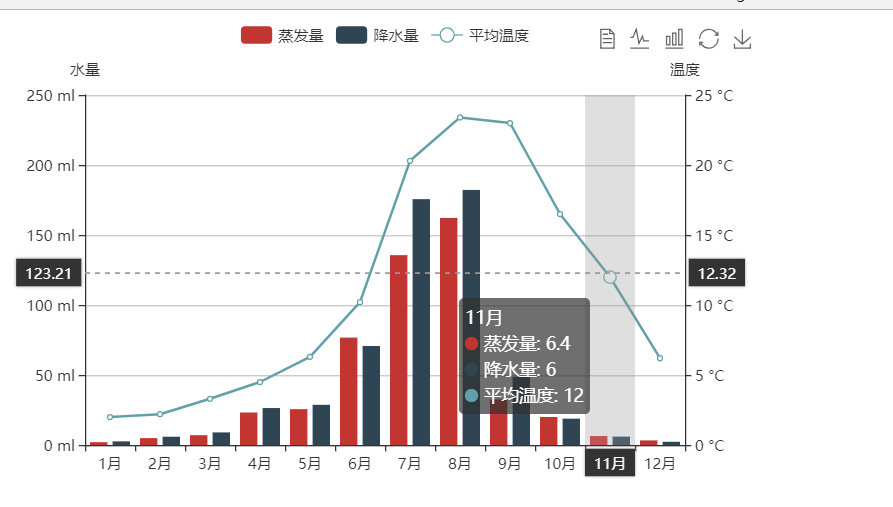
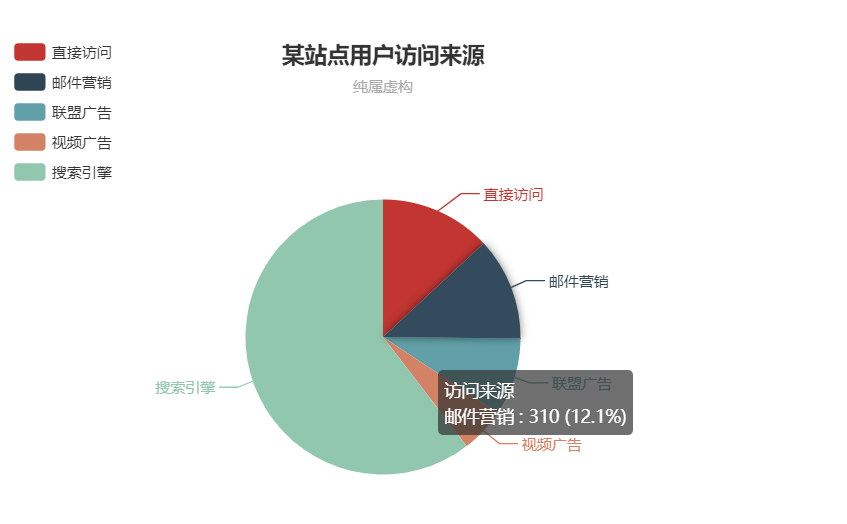
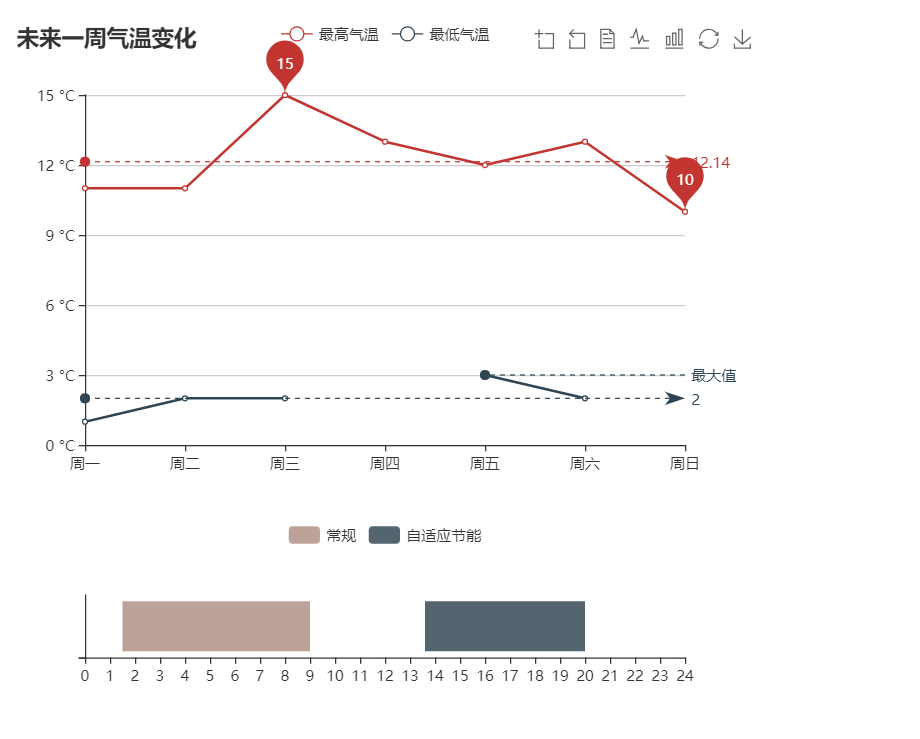
下面是具体代码:
<!DOCTYPE html>

<html>

<head>

    <meta charset="utf-8">

    <title>折柱混合</title>

    <!-- 引入 echarts.js -->

    <script src="https://cdn.bootcss.com/echarts/4.1.0.rc2/echarts.min.js"></script>

</head>

<body>

<!-- 为ECharts准备一个具备大小(宽高)的Dom -->

<div id="main" style="width: 600px;height:400px;"></div>

<div id="main2" style="width: 600px;height:400px;"></div>

<div id="main3" style="width: 600px;height:400px;"></div>

<div id="main4" style="width: 600px;height:400px;"></div>

<script type="text/javascript">

    // 基于准备好的dom,初始化echarts实例

    var myChart = echarts.init(document.getElementById('main'));

    var myChart2 = echarts.init(document.getElementById('main2'));

    var myChart3 = echarts.init(document.getElementById('main3'));

    var myChart4 = echarts.init(document.getElementById('main4'));

    //app.title = '折柱混合';

    option = {

        tooltip: {

            trigger: 'axis',

            axisPointer: {

                type: 'cross',

                crossStyle: {

                    color: '#999'

                }

            }

        },

        toolbox: {

            feature: {

                dataView: {show: true, readOnly: false},

                magicType: {show: true, type: ['line', 'bar']},

                restore: {show: true},

                saveAsImage: {show: true}

            }

        },

        legend: {

            data:['蒸发量','降水量','平均温度']

        },

        xAxis: [

            {

                type: 'category',

                data: ['1月','2月','3月','4月','5月','6月','7月','8月','9月','10月','11月','12月'],

                axisPointer: {

                    type: 'shadow'

                }

            }

        ],

        yAxis: [

            {

                type: 'value',

                name: '水量',

                min: 0,

                max: 250,

                interval: 50,

                axisLabel: {

                    formatter: '{value} ml'

                }

            },

            {

                type: 'value',

                name: '温度',

                min: 0,

                max: 25,

                interval: 5,

                axisLabel: {

                    formatter: '{value} °C'

                }

            }

        ],

        series: [

            {

                name:'蒸发量',

                type:'bar',

                data:[2.0, 4.9, 7.0, 23.2, 25.6, 76.7, 135.6, 162.2, 32.6, 20.0, 6.4, 3.3]

            },

            {

                name:'降水量',

                type:'bar',

                data:[2.6, 5.9, 9.0, 26.4, 28.7, 70.7, 175.6, 182.2, 48.7, 18.8, 6.0, 2.3]

            },

            {

                name:'平均温度',

                type:'line',

                yAxisIndex: 1,

                data:[2.0, 2.2, 3.3, 4.5, 6.3, 10.2, 20.3, 23.4, 23.0, 16.5, 12.0, 6.2]

            }

        ]

    };

    option2 = {

        title : {

            text: '某站点用户访问来源',

            subtext: '纯属虚构',

            x:'center'

        },

        tooltip : {

            trigger: 'item',

            formatter: "{a} <br/>{b} : {c} ({d}%)"

        },

        legend: {

            orient: 'vertical',

            left: 'left',

            data: ['直接访问','邮件营销','联盟广告','视频广告','搜索引擎']

        },

        series : [

            {

                name: '访问来源',

                type: 'pie',

                radius : '55%',

                center: ['50%', '60%'],

                data:[

                    {value:335, name:'直接访问'},

                    {value:310, name:'邮件营销'},

                    {value:234, name:'联盟广告'},

                    {value:135, name:'视频广告'},

                    {value:1548, name:'搜索引擎'}

                ],

                itemStyle: {

                    emphasis: {

                        shadowBlur: 10,

                        shadowOffsetX: 0,

                        shadowColor: 'rgba(0, 0, 0, 0.5)'

                    }

                }

            }

        ]

    };

    option3 = {

        title: {

        text: '未来一周气温变化',

        },

        tooltip: {

            trigger: 'axis'

        },

        legend: {

            data:['最高气温','最低气温']

        },

        toolbox: {

            show: true,

            feature: {

                dataZoom: {

                    yAxisIndex: 'none'

                },

                dataView: {readOnly: false},

                magicType: {type: ['line', 'bar']},

                restore: {},

                saveAsImage: {}

            }

        },

        xAxis:  {

            type: 'category',

            boundaryGap: false,

            data: ['周一','周二','周三','周四','周五','周六','周日']

        },

        yAxis: {

            type: 'value',

            axisLabel: {

                formatter: '{value} °C'

            }

        },

        series: [

            {

                name:'最高气温',

                type:'line',

                data:[11, 11, 15, 13, 12, 13, 10],

                markPoint: {

                    data: [

                        {type: 'max', name: '最大值'},

                        {type: 'min', name: '最小值'}

                    ]

                },

                markLine: {

                    data: [

                        {type: 'average', name: '平均值'}

                    ]

                }

            },

            {

                name:'最低气温',

                type:'line',

                data:[1, 2, 2, '', 3, 2, ],

                markPoint: {

                    data: [

                        {name: '周最低', value: -2, xAxis: 1, yAxis: -1.5}

                    ]

                },

                markLine: {

                    data: [

                        {type: 'average', name: '平均值'},

                        [{

                            symbol: 'none',

                            x: '90%',

                            yAxis: 'max'

                        }, {

                            symbol: 'circle',

                            label: {

                                normal: {

                                    position: 'start',

                                    formatter: '最大值'

                                }

                            },

                            type: 'max',

                            name: '最高点'

                        }]

                    ]

                }

            }

        ]

        };

    option4 = {

        tooltip:{

            show:false

        },

        legend: {

            data: ['1', '常规','1','自适应节能','1'],

        },

        color:[ 'transparent', '#bda29a','transparent', '#546570', 'transparent'],

        grid: {

            height:50

        },

        xAxis:  {

            type: 'value',

            min: 0,

            max: 24,

            maxInterval: 1,

            splitLine:{

                show:false

            },

        },

        yAxis: {

            type: 'category',

            data: [''],

        },

        series: [

            {

                name: '',

                type: 'bar',

                stack: '总量',

                label: {

                    normal: {

                        show: false,

                    }

                },

                data: [1.5]

            },

            {

                name: '常规',

                type: 'bar',

                stack: '总量',

                label: {

                    normal: {

                         show: false,

                        //show: true,

                    }

                },

                data: [7.5]

            },

            {

                name: '',

                type: 'bar',

                stack: '总量',

                label: {

                    normal: {

                         show: false,

                        //show: true,

                    }

                },

                data: [4.6]

            },

            {

                name: '自适应节能',

                type: 'bar',

                stack: '总量',

                label: {

                    normal: {

                         show: false,

                        //show: true,

                    }

                },

                data: [6.4]

            },

            {

                name: '',

                type: 'bar',

                stack: '总量',

                label: {

                    normal: {

                        show: true,

                    }

                },

                data: [2]

            }

        ]

    };

    // 使用刚指定的配置项和数据显示图表。

    myChart.setOption(option);

    myChart2.setOption(option2);

    myChart3.setOption(option3);

    myChart4.setOption(option4);

</script>

</body>

</html>
Echarts 几个常用图的更多相关文章
- ECharts系列:玩转ECharts之常用图(折线、柱状、饼状、散点、关系、树)
一.背景 最近产品叫我做一些集团系列的统计图,包括集团组织.协作.销售.采购等方面的.作为一名后端程序员,于是趁此机会来研究研究这个库. 如果你仅仅停留在用的层面,那还是蛮简单的. 二.介绍 ECha ...
- UML常用图
序列图 活动图
- UML常用图的几种关系的总结
在UML的 类图中,常见的有以下几种关系: 泛化(Generalization), 实现(Realization), 关联(Association), 聚合(Aggregation), 组合(Com ...
- (转)UML常用图的几种关系的总结
在UML的类图中,常见的有以下几种关系: 泛化(Generalization), 实现(Realization), 关联(Association), 聚合(Aggregation), 组合(Comp ...
- Enterprise Architect与startUML表示UML常用图
转自:http://www.cnblogs.com/alexlee73/archive/2011/11/05/2237294.html 附下载地址:http://download.csdn.net/d ...
- iOS 常用图尺寸 汇总
iCON 准备一张1024x1024尺寸的图,打开链接 http://www.atool.org/ios_logo.php 在线批量生成各种尺寸的图片 启动图LaunchImage 640x960 2 ...
- python数据分析常用图大集合
目录 一.折线图 二.直方图 三.垂直条形图 四.水平条形图 五.饼图 六.箱线图 七.热力图 八.散点图 九.蜘蛛图 十.二元变量分布 十一.面积图 十二.六边形图 以下默认所有的操作都先导入了Nu ...
- Python数据分析入门(十四):数据分析中常用图
折线图: 折线图用于显示数据在一个连续的时间间隔或者时间跨度上的变化,它的特点是反映事物随时间或有序类别而变化的趋势.示例图如下: 折线图应用场景: 折线图适合X轴是一个连续递增或递减的,对于没有规律 ...
- Apache 的 httpd.conf 详解
ServerRoot “/usr/local“ ServerRoot用于指定守护进程httpd的运行目录,httpd在启动之后将自动将进程的当前目录改变为这个目录,因此如果设置文件中指定的文件或目录是 ...
随机推荐
- MongoDB数据库(二):增删查改
MongoDB数据库的增删查改 1.插入数据 语法: db.集合名称.insert(document) db.table_name.insert({name:'gj',gender:1}) db.ta ...
- LoadRunner监控数据库服务
一.LR监控SQL Server SQL Server自身提供的性能计数器指标有: 指标名称 指标描述 指标范围 指标单位 1.SQL Server中访问方法(Access Methods)对象包含的 ...
- Day04.a(对象类型的转换,多态)
对象类型的转换 Dog dog = new Dog(); 通常情况下,对象(new Dog())类型和引用(dog)类型是相同的,当引用类型和对象类型不一致时,就需要类型转换. 向上转型:将较具体的类 ...
- C# .net 填充无效,无法被移除 微信小程序解密失败的解决办法
微信小程序获取用户信息诸如unionId的时候需要解密,如果遇到偶然的解密失败(填充无效,无法被移除),原因很有可能是session_key错误, 也是就你用作解密的session_key并不是微信用 ...
- Gradle 打包上传至私有仓库配置
allprojects{ apply plugin: 'java' apply plugin: 'idea' apply plugin: 'maven' group 'com.xxxxx.base' ...
- vue-router 去掉#
vue-router默认的路由模式是hash,我们要去掉url中的#需要将路由模式切换为history const router = new VueRouter({ mode: 'history', ...
- jquery的选择器——[作为学习备用]
1,转载:https://www.cnblogs.com/onlys/articles/jQuery.html jQuery 的选择器可谓之强大无比,这里简单地总结一下常用的元素查找方法 $(&quo ...
- windows许可证即将过期
win+R 输入 slmgr.vbs -xpr 查看日期 激活工具地址: 链接: https://pan.baidu.com/s/1S5nealQM1bytPYV6CYbgyg 提取码: sbmu 1 ...
- if(){}使用
1.当作 if else时使用 是判断if()括号内的内容和给定内容是不是相同 package cn.lyun.thread; class Demo{ boolean flag = false; pu ...
- Linux指令集
最近在学习Linux虚拟机,下面是我在学习虚拟机的过程中使用过的一些指令,及其作用. pwd-> 列出当前目录路径 ls-> 列出当前目录列表 cd-> 改变目录 mkdir-> ...