
python基础知识11---函数1
函数
一、背景
在学习函数之前,一直遵循:面向过程编程,即:根据业务逻辑从上到下实现功能,其往往用一长段代码来实现指定功能,开发过程中最常见的操作就是粘贴复制,也就是将之前实现的代码块复制到现需功能处,如下:
while True:

    if cpu利用率 > 90%:

        #发送邮件提醒

        连接邮箱服务器

        发送邮件

        关闭连接

    if 硬盘使用空间 > 90%:

        #发送邮件提醒

        连接邮箱服务器

        发送邮件

        关闭连接

    if 内存占用 > 80%:

        #发送邮件提醒

        连接邮箱服务器

        发送邮件

        关闭连接
腚眼一看上述代码,if条件语句下的内容可以被提取出来公用,如下:
def 发送邮件(内容)

    #发送邮件提醒

    连接邮箱服务器

    发送邮件

    关闭连接

while True:

    if cpu利用率 > 90%:

        发送邮件('CPU报警')

    if 硬盘使用空间 > 90%:

        发送邮件('硬盘报警')

    if 内存占用 > 80%:
对于上述的两种实现方式,第二次必然比第一次的重用性和可读性要好,其实这就是函数式编程和面向过程编程的区别:
- 函数式:将某功能代码封装到函数中,日后便无需重复编写,仅调用函数即可
- 面向对象:对函数进行分类和封装,让开发“更快更好更强...”
函数式编程最重要的是增强代码的重用性和可读性
二、定义和使用
def 函数名(参数):

    ...

    函数体

    ...

    返回值
函数的定义主要有如下要点:
- def:表示函数的关键字
- 函数名:函数的名称,日后根据函数名调用函数
- 函数体:函数中进行一系列的逻辑计算,如:发送邮件、计算出 [11,22,38,888,2]中的最大数等...
- 参数:为函数体提供数据
- 返回值:当函数执行完毕后,可以给调用者返回数据
1、返回值
函数是一个功能块,该功能到底执行成功与否,需要通过返回值来告知调用者。
以上要点中,比较重要有参数和返回值:
def 发送短信():

    发送短信的代码...

    if 发送成功:

        return True

    else:

        return False

while True:

    # 每次执行发送短信函数,都会将返回值自动赋值给result

    # 之后,可以根据result来写日志,或重发等操作

    result = 发送短信()

    if result == False:

        记录日志,短信发送失败...
2、参数
为什么要有参数?
def CPU报警邮件()

    #发送邮件提醒

    连接邮箱服务器

    发送邮件

    关闭连接

def 硬盘报警邮件()

    #发送邮件提醒

    连接邮箱服务器

    发送邮件

    关闭连接

def 内存报警邮件()

    #发送邮件提醒

    连接邮箱服务器

    发送邮件

    关闭连接

while True:

    if cpu利用率 > 90%:

        CPU报警邮件()

    if 硬盘使用空间 > 90%:

        硬盘报警邮件()

    if 内存占用 > 80%:

        内存报警邮件()

无参数实现
无参数实现
def 发送邮件(邮件内容)

    #发送邮件提醒

    连接邮箱服务器

    发送邮件

    关闭连接

while True:

    if cpu利用率 > 90%:

        发送邮件("CPU报警了。")

    if 硬盘使用空间 > 90%:

        发送邮件("硬盘报警了。")

    if 内存占用 > 80%:

        发送邮件("内存报警了。")

有参数实现
有参数实现
函数的有三中不同的参数:
- 普通参数
- 默认参数
- 动态参数
# ######### 定义函数 #########

# name 叫做函数func的形式参数,简称:形参

def func(name):

    print name

# ######### 执行函数 #########

#  'wupeiqi' 叫做函数func的实际参数,简称:实参

func('wupeiqi')

普通参数
普通参数
def func(name, age = 18):

    print "%s:%s" %(name,age)

# 指定参数

func('wupeiqi', 19)

# 使用默认参数

func('alex')

注:默认参数需要放在参数列表最后

默认参数
默认参数
def func(*args):

    print args

# 执行方式一

func(11,33,4,4454,5)

# 执行方式二

li = [11,2,2,3,3,4,54]

func(*li)

动态参数
动态参数
def func(**kwargs):

    print args

# 执行方式一

func(name='wupeiqi',age=18)

# 执行方式二

li = {'name':'wupeiqi', age:18, 'gender':'male'}

func(**li)

动态参数2
动态参数2
def func(*args, **kwargs):

    print args

    print kwargs
动态参数3
扩展:发送邮件实例
import smtplib

from email.mime.text import MIMEText

from email.utils import formataddr

msg = MIMEText('邮件内容', 'plain', 'utf-8')

msg['From'] = formataddr(["武沛齐",'wptawy@126.com'])

msg['To'] = formataddr(["走人",'424662508@qq.com'])

msg['Subject'] = "主题"

server = smtplib.SMTP("smtp.126.com", 25)

server.login("wptawy@126.com", "邮箱密码")

server.sendmail('wptawy@126.com', ['424662508@qq.com',], msg.as_string())

server.quit()

发送邮件实例
发送邮件实例
内置函数
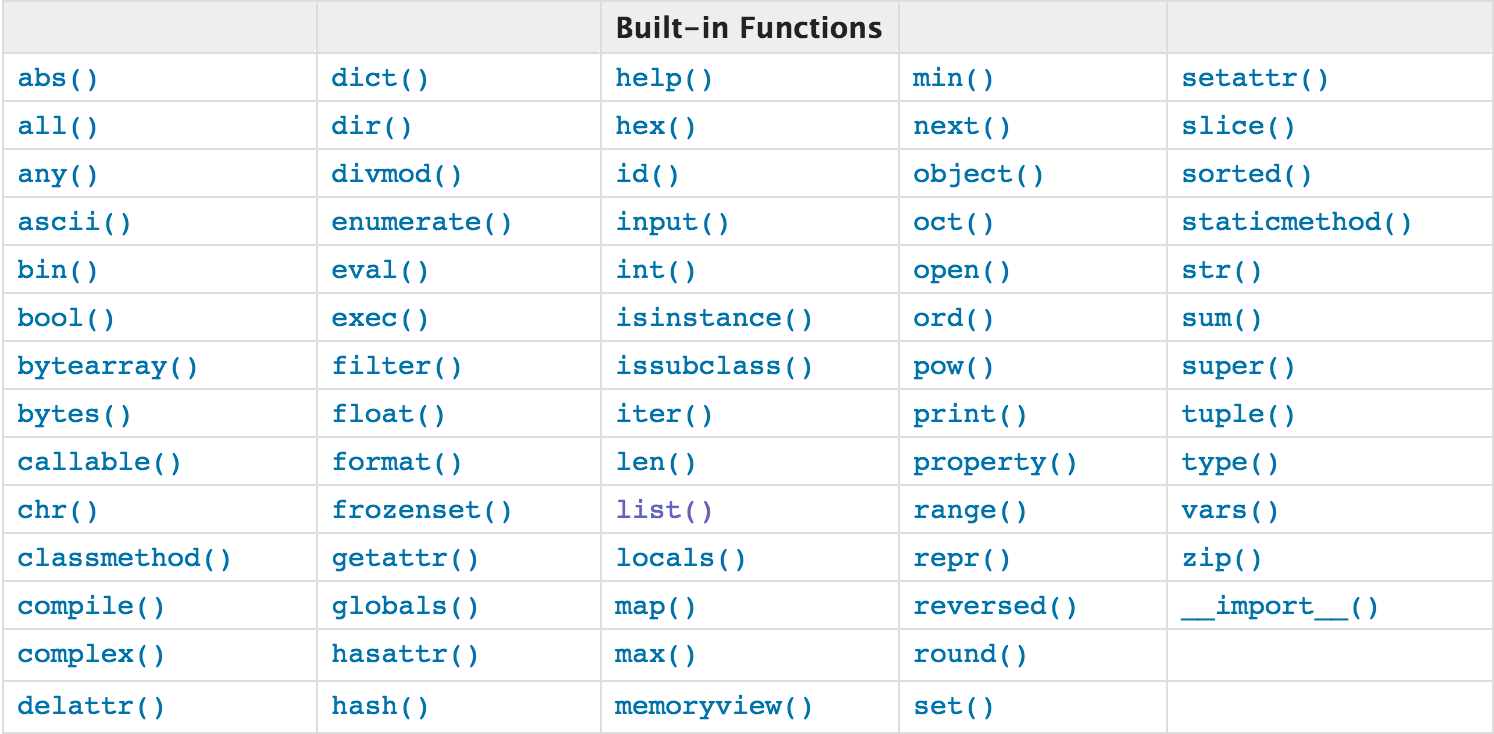
注:查看详细猛击这里
open函数,该函数用于文件处理
操作文件时,一般需要经历如下步骤:
- 打开文件
- 操作文件
一、打开文件
文件句柄 = open('文件路径', '模式')
打开文件时,需要指定文件路径和以何等方式打开文件,打开后,即可获取该文件句柄,日后通过此文件句柄对该文件操作。
打开文件的模式有:
- r ,只读模式【默认】
- w,只写模式【不可读;不存在则创建;存在则清空内容;】
- x, 只写模式【不可读;不存在则创建,存在则报错】
- a, 追加模式【可读; 不存在则创建;存在则只追加内容;】
"+" 表示可以同时读写某个文件
- r+, 读写【可读,可写】
- w+,写读【可读,可写】
- x+ ,写读【可读,可写】
- a+, 写读【可读,可写】
"b"表示以字节的方式操作
- rb 或 r+b
- wb 或 w+b
- xb 或 w+b
- ab 或 a+b
注:以b方式打开时,读取到的内容是字节类型,写入时也需要提供字节类型
二、操作
class file(object)

    def close(self): # real signature unknown; restored from __doc__

        关闭文件

        """

        close() -> None or (perhaps) an integer.  Close the file.

        Sets data attribute .closed to True.  A closed file cannot be used for

        further I/O operations.  close() may be called more than once without

        error.  Some kinds of file objects (for example, opened by popen())

        may return an exit status upon closing.

        """

    def fileno(self): # real signature unknown; restored from __doc__

        文件描述符

         """

        fileno() -> integer "file descriptor".

        This is needed for lower-level file interfaces, such os.read().

        """

        return 0

    def flush(self): # real signature unknown; restored from __doc__

        刷新文件内部缓冲区

        """ flush() -> None.  Flush the internal I/O buffer. """

        pass

    def isatty(self): # real signature unknown; restored from __doc__

        判断文件是否是同意tty设备

        """ isatty() -> true or false.  True if the file is connected to a tty device. """

        return False

    def next(self): # real signature unknown; restored from __doc__

        获取下一行数据,不存在,则报错

        """ x.next() -> the next value, or raise StopIteration """

        pass

    def read(self, size=None): # real signature unknown; restored from __doc__

        读取指定字节数据

        """

        read([size]) -> read at most size bytes, returned as a string.

        If the size argument is negative or omitted, read until EOF is reached.

        Notice that when in non-blocking mode, less data than what was requested

        may be returned, even if no size parameter was given.

        """

        pass

    def readinto(self): # real signature unknown; restored from __doc__

        读取到缓冲区,不要用,将被遗弃

        """ readinto() -> Undocumented.  Don't use this; it may go away. """

        pass

    def readline(self, size=None): # real signature unknown; restored from __doc__

        仅读取一行数据

        """

        readline([size]) -> next line from the file, as a string.

        Retain newline.  A non-negative size argument limits the maximum

        number of bytes to return (an incomplete line may be returned then).

        Return an empty string at EOF.

        """

        pass

    def readlines(self, size=None): # real signature unknown; restored from __doc__

        读取所有数据,并根据换行保存值列表

        """

        readlines([size]) -> list of strings, each a line from the file.

        Call readline() repeatedly and return a list of the lines so read.

        The optional size argument, if given, is an approximate bound on the

        total number of bytes in the lines returned.

        """

        return []

    def seek(self, offset, whence=None): # real signature unknown; restored from __doc__

        指定文件中指针位置

        """

        seek(offset[, whence]) -> None.  Move to new file position.

        Argument offset is a byte count.  Optional argument whence defaults to

(offset from start of file, offset should be >= 0); other values are 1

        (move relative to current position, positive or negative), and 2 (move

        relative to end of file, usually negative, although many platforms allow

        seeking beyond the end of a file).  If the file is opened in text mode,

        only offsets returned by tell() are legal.  Use of other offsets causes

        undefined behavior.

        Note that not all file objects are seekable.

        """

        pass

    def tell(self): # real signature unknown; restored from __doc__

        获取当前指针位置

        """ tell() -> current file position, an integer (may be a long integer). """

        pass

    def truncate(self, size=None): # real signature unknown; restored from __doc__

        截断数据,仅保留指定之前数据

        """

        truncate([size]) -> None.  Truncate the file to at most size bytes.

        Size defaults to the current file position, as returned by tell().

        """

        pass

    def write(self, p_str): # real signature unknown; restored from __doc__

        写内容

        """

        write(str) -> None.  Write string str to file.

        Note that due to buffering, flush() or close() may be needed before

        the file on disk reflects the data written.

        """

        pass

    def writelines(self, sequence_of_strings): # real signature unknown; restored from __doc__

        将一个字符串列表写入文件

        """

        writelines(sequence_of_strings) -> None.  Write the strings to the file.

        Note that newlines are not added.  The sequence can be any iterable object

        producing strings. This is equivalent to calling write() for each string.

        """

        pass

    def xreadlines(self): # real signature unknown; restored from __doc__

        可用于逐行读取文件,非全部

        """

        xreadlines() -> returns self.

        For backward compatibility. File objects now include the performance

        optimizations previously implemented in the xreadlines module.

        """

        pass

2.x
2.x
class TextIOWrapper(_TextIOBase):

    """

    Character and line based layer over a BufferedIOBase object, buffer.

    encoding gives the name of the encoding that the stream will be

    decoded or encoded with. It defaults to locale.getpreferredencoding(False).

    errors determines the strictness of encoding and decoding (see

    help(codecs.Codec) or the documentation for codecs.register) and

    defaults to "strict".

    newline controls how line endings are handled. It can be None, '',

    '\n', '\r', and '\r\n'.  It works as follows:

    * On input, if newline is None, universal newlines mode is

      enabled. Lines in the input can end in '\n', '\r', or '\r\n', and

      these are translated into '\n' before being returned to the

      caller. If it is '', universal newline mode is enabled, but line

      endings are returned to the caller untranslated. If it has any of

      the other legal values, input lines are only terminated by the given

      string, and the line ending is returned to the caller untranslated.

    * On output, if newline is None, any '\n' characters written are

      translated to the system default line separator, os.linesep. If

      newline is '' or '\n', no translation takes place. If newline is any

      of the other legal values, any '\n' characters written are translated

      to the given string.

    If line_buffering is True, a call to flush is implied when a call to

    write contains a newline character.

    """

    def close(self, *args, **kwargs): # real signature unknown

        关闭文件

        pass

    def fileno(self, *args, **kwargs): # real signature unknown

        文件描述符

        pass

    def flush(self, *args, **kwargs): # real signature unknown

        刷新文件内部缓冲区

        pass

    def isatty(self, *args, **kwargs): # real signature unknown

        判断文件是否是同意tty设备

        pass

    def read(self, *args, **kwargs): # real signature unknown

        读取指定字节数据

        pass

    def readable(self, *args, **kwargs): # real signature unknown

        是否可读

        pass

    def readline(self, *args, **kwargs): # real signature unknown

        仅读取一行数据

        pass

    def seek(self, *args, **kwargs): # real signature unknown

        指定文件中指针位置

        pass

    def seekable(self, *args, **kwargs): # real signature unknown

        指针是否可操作

        pass

    def tell(self, *args, **kwargs): # real signature unknown

        获取指针位置

        pass

    def truncate(self, *args, **kwargs): # real signature unknown

        截断数据,仅保留指定之前数据

        pass

    def writable(self, *args, **kwargs): # real signature unknown

        是否可写

        pass

    def write(self, *args, **kwargs): # real signature unknown

        写内容

        pass

    def __getstate__(self, *args, **kwargs): # real signature unknown

        pass

    def __init__(self, *args, **kwargs): # real signature unknown

        pass

    @staticmethod # known case of __new__

    def __new__(*args, **kwargs): # real signature unknown

        """ Create and return a new object.  See help(type) for accurate signature. """

        pass

    def __next__(self, *args, **kwargs): # real signature unknown

        """ Implement next(self). """

        pass

    def __repr__(self, *args, **kwargs): # real signature unknown

        """ Return repr(self). """

        pass

    buffer = property(lambda self: object(), lambda self, v: None, lambda self: None)  # default

    closed = property(lambda self: object(), lambda self, v: None, lambda self: None)  # default

    encoding = property(lambda self: object(), lambda self, v: None, lambda self: None)  # default

    errors = property(lambda self: object(), lambda self, v: None, lambda self: None)  # default

    line_buffering = property(lambda self: object(), lambda self, v: None, lambda self: None)  # default

    name = property(lambda self: object(), lambda self, v: None, lambda self: None)  # default

    newlines = property(lambda self: object(), lambda self, v: None, lambda self: None)  # default

    _CHUNK_SIZE = property(lambda self: object(), lambda self, v: None, lambda self: None)  # default

    _finalizing = property(lambda self: object(), lambda self, v: None, lambda self: None)  # default

3.x
3.x
三、管理上下文
为了避免打开文件后忘记关闭,可以通过管理上下文,即:
with open('log','r') as f:

    ...
如此方式,当with代码块执行完毕时,内部会自动关闭并释放文件资源。
在Python 2.7 及以后,with又支持同时对多个文件的上下文进行管理,即:
with open('log1') as obj1, open('log2') as obj2:

    pass
lambda表达式
学习条件运算时,对于简单的 if else 语句,可以使用三元运算来表示,即:
# 普通条件语句

if 1 == 1:

    name = 'wupeiqi'

else:

    name = 'alex'

# 三元运算

name = 'wupeiqi' if 1 == 1 else 'alex'
对于简单的函数,也存在一种简便的表示方式,即:lambda表达式
# ###################### 普通函数 ######################

# 定义函数(普通方式)

def func(arg):

    return arg + 1

# 执行函数

result = func(123)

# ###################### lambda ######################

# 定义函数(lambda表达式)

my_lambda = lambda arg : arg + 1

# 执行函数

result = my_lambda(123)
递归
利用函数编写如下数列:
斐波那契数列指的是这样一个数列 0, 1, 1, 2, 3, 5, 8, 13, 21, 34, 55, 89, 144, 233,377,610,987,1597,2584,4181,6765,10946,17711,28657,46368...
def func(arg1,arg2):

    if arg1 == 0:

        print arg1, arg2

    arg3 = arg1 + arg2

    print arg3

    func(arg2, arg3)

func(0,1)
练习题
1、简述普通参数、指定参数、默认参数、动态参数的区别
2、写函数,计算传入字符串中【数字】、【字母】、【空格] 以及 【其他】的个数
3、写函数,判断用户传入的对象(字符串、列表、元组)长度是否大于5。
4、写函数,检查用户传入的对象(字符串、列表、元组)的每一个元素是否含有空内容。
5、写函数,检查传入列表的长度,如果大于2,那么仅保留前两个长度的内容,并将新内容返回给调用者。
6、写函数,检查获取传入列表或元组对象的所有奇数位索引对应的元素,并将其作为新列表返回给调用者。
7、写函数,检查传入字典的每一个value的长度,如果大于2,那么仅保留前两个长度的内容,并将新内容返回给调用者。
dic = {"k1": "v1v1", "k2": [11,22,33,44]}

PS:字典中的value只能是字符串或列表
8、写函数,利用递归获取斐波那契数列中的第 10 个数,并将该值返回给调用者。
作业需求:
模拟实现一个ATM + 购物商城程序
- 额度 15000或自定义
- 实现购物商城,买东西加入 购物车,调用信用卡接口结账
- 可以提现,手续费5%
- 每月22号出账单,每月10号为还款日,过期未还,按欠款总额 万分之5 每日计息
- 支持多账户登录
- 支持账户间转账
- 记录每月日常消费流水
- 提供还款接口
- ATM记录操作日志
- 提供管理接口,包括添加账户、用户额度,冻结账户等。。。
- 用户认证用装饰器
示例代码 https://github.com/triaquae/py3_training/tree/master/atm
简易流程图:https://www.processon.com/view/link/589eb841e4b0999184934329
python基础知识11---函数1的更多相关文章
- python 基础篇 11 函数进阶----装饰器
11. 前⽅⾼能-装饰器初识本节主要内容:1. 函数名的运⽤, 第⼀类对象2. 闭包3. 装饰器初识 一:函数名的运用: 函数名是一个变量,但他是一个特殊变量,加上括号可以执行函数. ⼆. 闭包什么是 ...
- python基础知识6——函数
函数:自定义函数:函数的参数:不带参数,普通参数,默认参数,动态参数:返回值return:函数作用域:内置函数高阶函数:map,reduce,filter,sorted:lambda表达式:文件操作: ...
- Python基础知识:函数
1.定义函数和调用函数 #定义函数def def greet_user(username): '''简单的问候语''' print('Hello,%s!'%username) greet_user(' ...
- 深入理解python(四)python基础知识之函数
函数部分 函数部分大概想分成两个部分来讲,第一部分是关于对函数参数的介绍,第二部分是局部变量全局变量和内置变量也就是变量作用域的LGB原则 函数的参数 1.关于形参和实参的问题 第一点要注意的是pyt ...
- python基础知识(函数2)
返回值 return return[value] 多个值用,逗号分开,没有返回值,会返回none值,函数不给指定返回值也会返回none值 def functionname(p1,p2,p3): re ...
- python基础知识(函数)
创建函数 def 函数名(可以选参数): 可选参数 ''' ''' 用三引号括起来的注释 说明功能和参数信息 可选参数指定函数体 执行函数程序代码 创建一个空函数 def empty(): p ...
- Python基础知识总结笔记(四)函数
Python基础知识总结笔记(四)函数python中的函数函数中的参数变量作用域偏函数PFA递归函数高阶函数BIFs中的高阶函数匿名函数lambda闭包Closure装饰器Decorator函数式编程 ...
- Python开发【第二篇】:Python基础知识
Python基础知识 一.初识基本数据类型 类型: int(整型) 在32位机器上,整数的位数为32位,取值范围为-2**31-2**31-1,即-2147483648-2147483647 在64位 ...
- python基础知识小结-运维笔记
接触python已有一段时间了,下面针对python基础知识的使用做一完整梳理:1)避免‘\n’等特殊字符的两种方式: a)利用转义字符‘\’ b)利用原始字符‘r’ print r'c:\now' ...
- python基础知识部分练习大全
python基础知识部分练习大全 1.执行 Python 脚本的两种方式 答:1.>>python ../pyhton.py 2. >>python.py #必须在首行 ...
随机推荐
- 测试工具安装(JMeter,Postman)
Jmeter的安装依赖Java环境,所以必须安装JDK(1.8版本以上的),与JRE集成安装.记得配置环境变量.(5H) Postman,我安装的windows64的,直接在官网下载就好了.不需要在c ...
- Linux命名空间
Linux Namespaces机制提供一种资源隔离方案.PID,IPC,Network等系统资源不再是全局性的,而是属于特定的Namespace.每个Namespace里面的资源对其他Namespa ...
- lsmod语法
lsmod——显示已载入系统的模块 lsmod 其实就是list modules的缩写,即 列出所有模块. 功能说明:显示已载入系统的模块. 语法:lsmod 说明:执行lsmod指令,会列出所有已载 ...
- 今天想写一下关于SpringMVC的视图解释器
昨天我写了一下SpringMVC最爱金丹的项目的配置流程,这样搭建完项目之后呢我发现我每个请求都得加个.do什么的后缀,这让我开发得很不爽,于是呢今天就想配置一下这个试图解释器,这样做的目的有两个:第 ...
- Verdi 看波形常用快捷操作
Verdi看波形的基本操作小结: 快捷键:(大写字母=Shift+小写) g get, signlas添加信号,显示波形n next, Search Forward选定信号按指定的值(上升 ...
- String、StringBuffer和StringBuilder的区别及应用场景
1. 运行速度:StringBulider>StringBuffer>String String为什么运行行慢呢? String:字符串常量 StringBuffer.StringBuli ...
- Java程序员从阿里面试回来,这些面试题你们会吗?
前不久刚从阿里面试回来,为了这场面试可以说准备了一个半月,做的准备就是刷题和看视频看书充实自己的技术,话说是真难啊,不过还算顺利拿到了offer,有很多面试题我已经记不起来了,这些是当天回家整理好的, ...
- python爬虫,使用urllib2库报错
urllib2发生报错URLError: <urlopen error [Errno 10061]:首先检查网址是否正确其次如果报这种错误,是因为ie里设置了代理,取消即可, 步骤: 打开IE浏 ...
- TFS2015安装、配置
一.安装,参考:http://www.cnblogs.com/WilsonWu/archive/2011/11/24/2261674.html 二.配置,参考:http://www.cnblogs.c ...
- DG Switch over
DG切换迁移Switch over切换文档 本篇文档,整体结构:1.切换前检查确认2.DG切换角色操作3.切换后检查确认 目录:一.切换前检查确认1.数据库版本2.DG架构,IP信息及切换角色前后3. ...