
ROS kinetic语音识别
1.安装依赖
1.1安装ros-kinetic-audio-common
sudo apt-get install ros-kinetic-audio-common
1.2 安装libasound2
sudo apt-get install libasound2
1.3 安装libgstreamer0.10
sudo apt-get install gstreamer0.10-*
1.4安装python-gst0.10
sudo apt-get install python-gst0.10
2.安装 libsphinxbase1
下载地址:https://packages.debian.org/jessie/libsphinxbase1
sudo dpkg -i libsphinxbase1_0.8-6_amd64.deb
3. 安装libpocketsphinx1
下载地址:https://packages.debian.org/jessie/libpocketsphinx1
sudo dpkg -i libpocketsphinx1_0.8-5_amd64.deb
4.安装gstreamer0.10-pocketsphinx
下载地址:https://packages.debian.org/jessie/gstreamer0.10-pocketsphinx
sudo dpkg -i gstreamer0.10-pocketsphinx_0.8-5_amd64.deb
5.安装pocketsphinx
5.1进入工作空间,git源码
cd ~/dev/catkin_ws/src
git clone https://github.com/mikeferguson/pocketsphinx
5.2下载英文语音包pocketsphinx-hmm-en-tidigits (0.8-5)
下载的网站:https://packages.debian.org/jessie/pocketsphinx-hmm-en-tidigits
sudo dpkg -i pocketsphinx-hmm-en-tidigits_0.-5_all.deb
会加压安装到/usr/share/目录如下所示
/usr/share/doc/pocketsphinx-hmm-en-tidigits/changelog.Debian.gz

/usr/share/doc/pocketsphinx-hmm-en-tidigits/changelog.gz

/usr/share/doc/pocketsphinx-hmm-en-tidigits/copyright

/usr/share/pocketsphinx/model/hmm/en/tidigits/feat.params

/usr/share/pocketsphinx/model/hmm/en/tidigits/mdef

/usr/share/pocketsphinx/model/hmm/en/tidigits/means

/usr/share/pocketsphinx/model/hmm/en/tidigits/sendump

/usr/share/pocketsphinx/model/hmm/en/tidigits/transition_matrices

/usr/share/pocketsphinx/model/hmm/en/tidigits/variances

/usr/share/pocketsphinx/model/lm/en/tidigits.DMP

/usr/share/pocketsphinx/model/lm/en/tidigits.dic

/usr/share/pocketsphinx/model/lm/en/tidigits.fsg
在包pocketsphinx下面建一个model目录,存放语音模型文件
cd ~/dev/catkin_ws/src/pocketsphinx

mkdir model
将下载好的语音文件,解压后,将其中的model文件下的所有文件拷贝到~/dev/catkin_ws/src/pocketsphinx/model下,也可以不复制。
6 启动pocketsphinx测试
直接运行pocketsphinx启动脚本命令“roslaunch pocketsphinx robocup.launch”会出现如下错误,
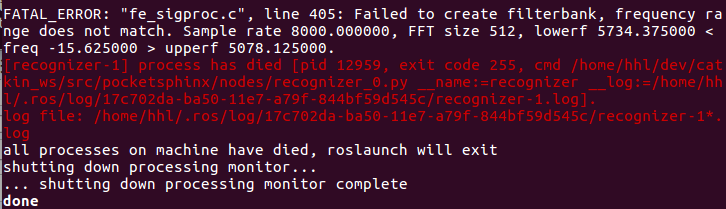
为此,首先我对recognizer.py的做了如下修改:
1)注释掉self.asr.set_property('configured', True)
2)添加lm,dict,hmm支持英语识别(如果是其他语言(如普通话)可以改为别的路径)
self.asr.set_property('lm', '/usr/share/pocketsphinx/model/lm/en/tidigits.DMP')

self.asr.set_property('dict', '/usr/share/pocketsphinx/model/lm/en/tidigits.dic')

self.asr.set_property('hmm', '/usr/share/pocketsphinx/model/hmm/en/tidigits')
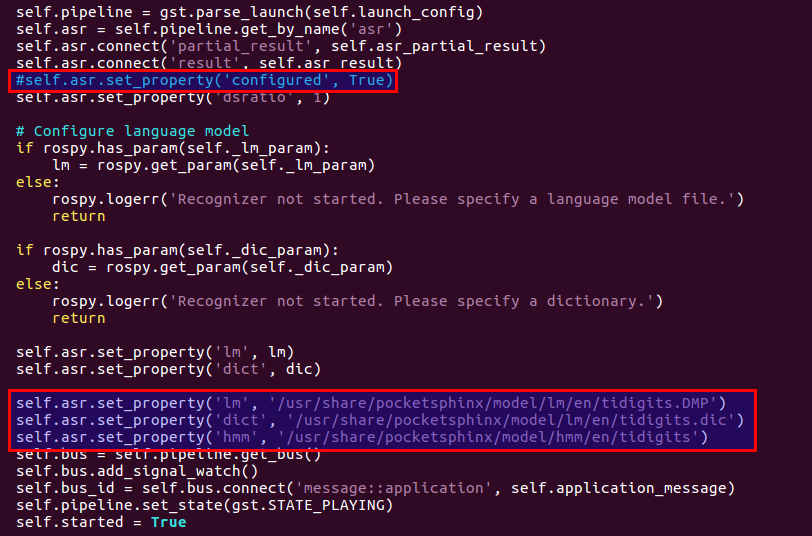
这些安装好之后,可以开始测试pocketsphinx的语音识别功能了:
1.终端运行launch启动文件:
roslaunch pocketsphinx robocup.launch
2.尝试说一些简单的语句,(如果使用英文库,说一些数字;如果使用普通话库讲中文),查看识别结果
3.用rostopic echo进行查看识别的输出,即ROS发布的结果消息)
rostopic echo /recognizer/output
7.也可以下载其他包进行测试
中文普通话
pocketsphinx-hmm-zh-tdt https://packages.debian.org/jessie/pocketsphinx-hmm-zh-tdt
pocketsphinx-lm-zh-hans-gigatdt https://packages.debian.org/jessie/pocketsphinx-lm-zh-hans-gigatdt
后期考虑在launch文件中设置参数,在recognizer.py加载参数的读取
参考:http://blog.csdn.net/x_r_su/article/details/53022746?locationNum=1&fps=1
http://www.ncnynl.com/archives/201701/1220.html
ROS kinetic语音识别的更多相关文章
- ROS Kinetic 使用PocketSphinx进行语音识别报错
已解决,重启电脑,装环境把声卡驱动那些似乎死机了 ROS Kinetic 使用PocketSphinx进行语音识别教程 https://www.ncnynl.com/archives/201701/ ...
- ros kinetic安装rbx1
1.首先安装一些依赖包 sudo apt-get install ros-kinetic-turtlebot-bringup \ ros-kinetic-turtlebot-create ros-ki ...
- Ubuntu 16.04 + ROS Kinetic 机器人操作系统学习镜像分享与使用安装说明
Ubuntu 16.04 + ROS Kinetic 镜像分享与使用安装说明 内容概要:1 网盘文件介绍 2 镜像制作 3 系统使用与安装 ---- 祝ROS爱好者和开发者新年快乐:-) ---- ...
- ROS_Kinetic_02 ROS Kinetic 迁移指南及中文wiki指南(Migration guide)
ROS_Kinetic_02 ROS Kinetic 迁移指南(Migration guide) 对于ROS Kinetic Kame有些功能包已经更新改变,提供关于这些包的迁移注意或教程.主要针对于 ...
- ROS_Kinetic_01 在ubuntu 16.04安装ROS Kinetic 2017.01更新
ROS_Kinetic系列学习(一),在ubuntu 16.04安装ROS Kinetic. Celebrating 9 Years of ROS! ubuntu16.04已经发布半年多了,ROS的K ...
- SLAM+语音机器人DIY系列:(二)ROS入门——3.在ubuntu16.04中安装ROS kinetic
摘要 ROS机器人操作系统在机器人应用领域很流行,依托代码开源和模块间协作等特性,给机器人开发者带来了很大的方便.我们的机器人“miiboo”中的大部分程序也采用ROS进行开发,所以本文就重点对ROS ...
- Ros Kinetic 配置 OpenCV2和CV_bridge (Python, C++)
本篇介绍如何在Ros-kinetic环境下运用opencv2进行开发的配置,系统平台为64位Ubuntu16.04. 需要系统环境: 1.Ros kinetic版本,一般自带cv_bridge, 若没 ...
- Ubuntu 16.04 使用docker资料汇总与应用docker安装caffe并使用Classifier(ros kinetic+usb_cam+caffe)
Docker是开源的应用容器引擎.若想简单了解一下,可以参考百度百科词条Docker.好像只支持64位系统. Docker官网:https://www.docker.com/ Docker - 从入门 ...
- 在ROS Kinetic和Gazebo 8中使用智能汽车仿真演示
在ROS Kinetic和Gazebo 8中使用智能汽车仿真演示 智能车无人驾驶技术是目前人工智能和机器人技术的研究热点,有许多开源平台可以使我们零基础零成本入门无人驾驶技术.本文分享一下目前ROS官 ...
随机推荐
- rsyslog 移植与配置方案介绍
rsyslog介绍 rsyslog是一个 syslogd 的多线程增强版.它提供高性能.极好的安全功能和模块化设计.虽然它基于常规的 syslogd,但 rsyslog 已经演变成了一个强大的工具,可 ...
- 转 InnoDB Error Handling
14.20.4 InnoDB Error Handling Error handling in InnoDB is not always the same as specified in the SQ ...
- 解析库之re,Beautifulsoup
本篇导航: 介绍 基本使用 遍历文档树 搜索文档树 总结 re模块在之前的python进阶中有讲过不再做过多的阐述,本篇为BeautifulSoup库的分析 20.collections模块和 ...
- 艺术模板 art-template-web
艺术模板 art-template____jQuery 项目可用 最快的模板渲染引擎 兼容 ejs 语法 推荐语法 {{each arr}} {{$value}} ---- {{$index}} {{ ...
- mongodb聚合命令
聚合aggregate 聚合(aggregate)是基于数据处理的聚合管道,每个文档通过一个由多个阶段(stage)组成管道,可以对每个阶段的管道进行分组.过滤等功能,然后经过一系列的处理,输出相应的 ...
- DataTable数据存储问题
需求: 我想要实现这样一个效果:用户可以在表中通过右键新建行.删除行(这两个后面再写),编辑数据后进行保存.这里保存需要做一个区分,就是新增的和修改的.他们的区别就是新增的主键为空,而修改的因为原本就 ...
- MySQL数据库的几种引擎
有些东西其实一直在用,但是突然问起来它是啥,可能你会很陌生,很陌生,很陌生 ....... mysql的四种引擎: 1.MyISAM存储引擎 不支持事务,不支持外键,优势是访问速度快,对事务完整性没有 ...
- poj 3422 最小费用流
如果不是从费用流区做这个题几乎不会想到用费用流 点有权值很容易想到拆点 问题是求最大sum ... 把权值取负 这样最小费用流的相反数就是最大sum 源点S汇点T k为移动次数 矩阵中的点拆成入点出 ...
- js上课笔记
Html 结构化CSS 样式JavaScript 行为交互01.JavaScript基础02.JavaScript操作BOM对象03.JavaScript操作DOM对象 *****04.JavaScr ...
- get与post请求问题
req.url可以获取请求路径: 为避免浏览器自身发送的'/favicon.ico'的影响,获取路径后可利用if(req.url=='/favicon.ico') return ;处理 url.pa ...