
定位crash的问题
一般都要符号化crash日志,但是低内存奔溃却没有堆栈日志
A Low Memory report differs from other crash reports in that there are no backtraces in this type of report. When a low memory crash happens, you must investigate your memory usage patterns and your responses to low memory warnings. This document points to you several memory management references that you might find useful.
内存低的崩溃日志,有一个进程表,列有几种原因。如果没有,可能就不是内存低导致的崩溃,请使用VM Tracker工具来检查。
[per-process-limit]: The process crossed its system-imposed memory limit. Per-process limits on resident memory are established by the system for all applications. Crossing this limit makes the process eligible for termination.
Note: Extensions have much lower per-process memory limit. Certain technologies, such as map views and SpriteKit, carry a high baseline memory cost and may be unsuitable for use in an extension.
[vm-pageshortage]/[vm-thrashing]/[vm]: The process was killed due to memory pressure.
[vnode-limit]: Too many files are open.
Note: The system avoids killing the frontmost app when vnodes are nearly exhausted. This means that your application, when in the background, may be terminated even if it is not the source of excess vnode usage.
[highwater]: A system daemon crossed its high water mark for memory usage.
[jettisoned]: The process was jettisoned for some other reason.
一般来说,xcode都会自动化符号化,如果没有(比如是从itunes上下载dSYM),可以手动符号化
xcrun dsymutil -symbol-map
xcrun dsymutil -symbol-map ~/Library/Developer/Xcode/Archives/2017-11-23/MyGreatApp\ 11-23-17\,\ 12.00\ PM.xcarchive/BCSymbolMaps ~/Downloads/dSYMs/3B15C133-88AA-35B0-B8BA-84AF76826CE0.dSYM |
xcode符号化需要三种条件
1. APP二进制文件和dSYM
2. 自定义的framework对应的二进制与dSYM
3. 与APP崩溃是的运行OS对应的符号,符号表是与OS相关的。
缺少一个都导致无法完全符号化。
第三方的framework,需要第三方提供作者创建的dSYM文件。
The binaries and
dSYMfiles for all custom frameworks that the application links against. For frameworks that were built from source with the application, theirdSYMfiles are copied into the archive alongside the application'sdSYMfile. For frameworks that were built by a third-party, you will need to ask the author for thedSYMfile.
没有符号化就要使用atos
Symbolicating Crash Reports With atos
The atos command converts numeric addresses to their symbolic equivalents. If full debug symbol information is available then the output of
atoswill include file name and source line number information. Theatoscommand can be used to symbolicate individual addresses in the backtrace of an unsymbolicated, or partially symbolicated, crash report. To symbolicate a part of a crash report usingatos:
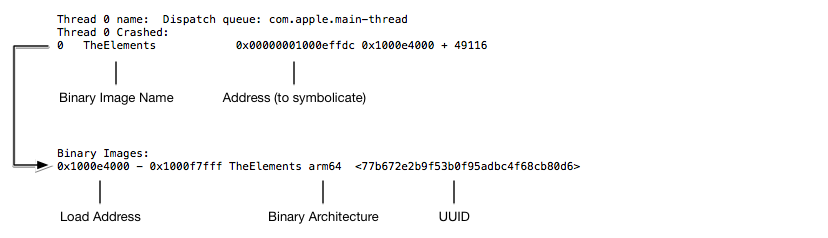
根据Binary Image的UUID找到对应的dSYM
1. 在崩溃日志里面,使用命令行快速找到UUID这一行。
$ grep --after-context= "Binary Images:" <Path to Crash Report> | grep <Binary Name>
2. 32位的UUID转换格式为 8-4-4-4-12 (XXXXXXXX-XXXX-XXXX-XXXX-XXXXXXXXXXXX). 全部为大写字母。
3. 使用mfind寻找dSYM文件,其中格式是包括尖括号的
$ mdfind "com_apple_xcode_dsym_uuids == <UUID>"
如果找到对应的dSYM文件,xcode不能解析,这个就是xcode的bug。
如果找不到对应的dSYM文件,检查是否下载对了文件。使用命令行查看Binary Image的UUID
xcrun dwarfdump --uuid <Path to dSYM file>
这个是一个使用例子:
1. 打开xcode
2. 获取APP
ljydeMacBook-Pro:~ admin$ cd /Users/admin/Library/Developer/Xcode/DerivedData/rcpi-hcfcbslblbqkydeyajzrmaoddwou/Bui ld/Products/Debug-iphoneos
ljydeMacBook-Pro:Debug-iphoneos admin$ ls
ProtocolBuffers.framework cwf.framework iwf.framework.dSYM xxx.app
ProtocolBuffers.framework.dSYM iwf.framework libjscocos2d iOS.a xxx.swiftmodule
确保APP的架构版本是跟崩溃的APP的是一样的。
3. 确定版本, 找到你的应用XXX.app文件 通过应用“终端、Terminal” 查看其UUID
在命令行输入“dwarfdump --uuid XXX.app/XXX”
4.定位错误
直接在终端中输入以下命令“atos -o XXX.app/XXX -arch arm64 xxxxxxxx ”
ljydeMacBook-Pro:Debug-iphoneos admin$ atos -o rcpi.app/rcpi -arch arm64 0x0000000100e57fb0 0x0000000100e7e374 0x0000000100e7da38 0x0000000100e7b1d8

tx_ABGRToUVRow_C (in rcpi) +

-[TXLiveBeauty addBeautyTarget] (in rcpi) +

txrtmp_soundtouch::TDStretch::seekBestOverlapPositionQuick(short const*) (in rcpi) +

-[TXLivePushSingleton createPixelBufferAt:width:height:pixelFormatType:] (in rcpi) +
定位crash的问题的更多相关文章
- 利用.dSYM跟.app文件准确定位Crash位置
本文转载至 http://blog.csdn.net/lvxiangan/article/details/28102629 利用.dSYM和.app文件准确定位Crash位置首先,确保 ...
- Xcode如何快速定位crash的位置?
最近发现经常有人程序崩掉后不知道怎么定位crash的位置 如何快速定位crash的位置? 选择右箭头 选择Add Exception Breakpoint 这样如果你的app再crash就会自动定位到 ...
- iOS crash 追终 ,iOS 如何定位crash 位置
https://developer.apple.com/library/ios/technotes/tn2151/_index.html 错误分析是基于设备中的crash log 与 编译文件时生成的 ...
- 【转】 利用.dSYM和.app文件准确定位Crash位置
http://blog.csdn.net/jinzhu117/article/details/20615991 首先,确保在release(Ad Hoc或者App Store)一个版本时,保存了对应的 ...
- Linux内核crash/Oops异常定位分析方法
在内核开发的过程中,经常会碰到内核崩溃,比如空指针异常,内存访问越界.通常我们只能靠崩溃之后打印出的异常调用栈信息来定位crash的位置和原因.总结下分析的方法和步骤. 通常oops发生之后,会在串口 ...
- ios系统crash文件分析
分析crash文件必备条件:crash文件的uuid,app的uuid,dsym文件的uuid必须一致 1> crash文件的uuid为Binary Images:0x4000 - 0x1173 ...
- 【转】调试Release发布版程序的Crash错误
http://www.cppblog.com/Walker/archive/2012/11/08/146153.html http://blog.sina.com.cn/s/blog_48f93b53 ...
- 调试Release发布版程序的Crash错误
http://www.cppblog.com/Walker/archive/2012/11/08/146153.html http://blog.sina.com.cn/s/blog_48f93b53 ...
- 调试Release发布版程序的Crash错误(转)
http://blog.sina.com.cn/s/blog_48f93b530100fsln.html 在Windows平台下用C++开发应用程序,最不想见到的情况恐怕就是程序崩溃,而要想解决引起问 ...
随机推荐
- VBS数组导入Excel
<script language="vbscript"> dim arr(9999,4) for i=0 to 9999 for j = 0 to 4 arr(i,j) ...
- GIT----玩转Git
版本控制 说到版本控制,脑海里总会浮现大学毕业是写毕业论文的场景,你电脑上的毕业论文一定出现过这番景象! 1 2 3 4 5 6 7 8 9 10 11 毕业论文_初稿.doc 毕业论文_修改1.do ...
- .net webservice的get支持,
默认创建的webservices.asmx是不支持get的, 如 [WebMethod] public string HelloWorld() { return "Hello World&q ...
- POJ 2408 - Anagram Groups - [字典树]
题目链接:http://poj.org/problem?id=2408 World-renowned Prof. A. N. Agram's current research deals with l ...
- 从一条巨慢SQL看基于Oracle的SQL优化(重磅彩蛋+PPT)
本文根据DBAplus社群第110期线上分享整理而成,文末还有好书送哦~ 讲师介绍 丁俊 新炬网络首席性能优化专家 SQL审核产品经理 DBAplus社群联合发起人.<剑破冰山-Oracle开发 ...
- Hadoop开发环境配置2-eclipse集成maven插件
1.下载eclipse:eclipse-SDK-4.5-win32-x86_64.zip 下载地址: http://archive.eclipse.org/eclipse/downloads/drop ...
- Google 的 OKR 制度与KPI 有什么不同?
https://mp.weixin.qq.com/s/aMGJvPPBA9d2uq8DOi3xFg
- javascript中的值如何传递到django下的views.py中或者数据库中?
用Ajax,Ajax有很多种写法,包括JQuery和JS,这里贴一个用JQuery写的最通用的Ajax,POST方法传递JSON格式数据: $.ajax({ url: "your url&q ...
- C# decimal指定精度
最近做一个项目.遇到了decimal 如何指定精度的问题 一般的指定参数 param = new SqlParameter(ParamName, DbType); 但decimal就不能只通过构 ...
- 关于ADC采集
对于ADC采集,想问的一些问题 1.如何初始化? 需要初始化 2.哪里可以看到是多少位采集? 3.8位ADC采集的误差是多少? 4.基准电压从哪里取?