
react全局的公共组件-------弹框 (Alert)
最近研究react,发现写一个组件很容易,但是要写一个全局的好像有点麻烦。不能像VUE一样,直接在原型上面扩展,注册全局组件
下面实现一个弹框,只需要引入之后,直接调用方法即可,不需要写入组件
给出我写react全局组件的思路。
创建一个 div加入到body,用这个div当容器,渲染react组件,然后由改变组件的 state来控制弹框的显示隐藏
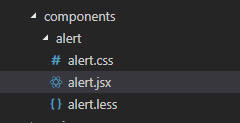
代码结构如下:
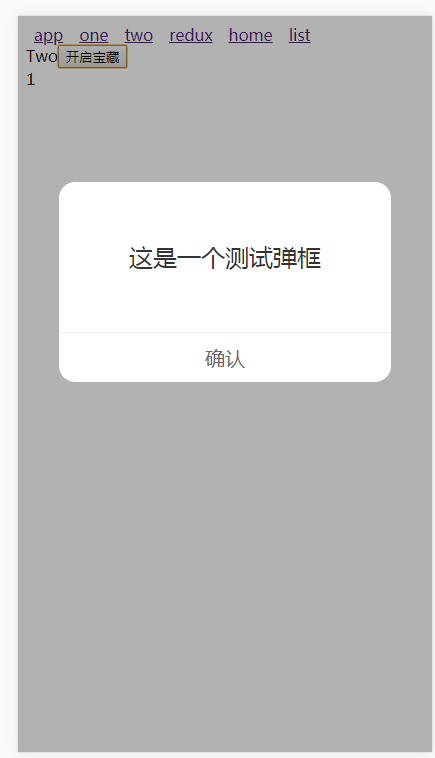
效果图如下:
alert.jsx
import React, { Component } from 'react';

import { is, fromJS } from 'immutable';

import ReactDOM from 'react-dom';

import ReactCSSTransitionGroup from 'react-addons-css-transition-group';

import './alert.css';

let defaultState = {

  alertStatus:false,

  alertTip:"提示",

  closeAlert:function(){}

}

class Alert extends Component{

  state = {

    ...defaultState

  };

  // css动画组件设置为目标组件

  FirstChild = props => {

    const childrenArray = React.Children.toArray(props.children);

    return childrenArray[0] || null;

  }

  // 关闭弹框

  confirm = () => {

    this.setState({

      alertStatus:false

    })

    this.state.closeAlert();

  }

  open =(options)=>{

    options = options || {};

    options.alertStatus = true;

    this.setState({

      ...defaultState,

      ...options

    })

  }

  close(){

    this.state.closeAlert();

    this.setState({

      ...defaultState

    })

  }

  shouldComponentUpdate(nextProps, nextState){

    return !is(fromJS(this.props), fromJS(nextProps)) || !is(fromJS(this.state), fromJS(nextState))

  }

  render(){

    return (

      <ReactCSSTransitionGroup

        component={this.FirstChild}

        transitionName='hide'

        transitionEnterTimeout={300}

        transitionLeaveTimeout={300}>

        <div className="alert-con" style={this.state.alertStatus? {display:'block'}:{display:'none'}}>

          <div className="alert-context">

            <div className="alert-content-detail">{this.state.alertTip}</div>

            <div className="comfirm" onClick={this.confirm}>确认</div>

          </div>

        </div>

      </ReactCSSTransitionGroup>

    );

  }

}

let div = document.createElement('div');

let props = {

};

document.body.appendChild(div);

let Box = ReactDOM.render(React.createElement(

  Alert,

  props

),div);

export default Box;
alert.css
.alert-con {

  position: fixed;

  top: 0;

  left: 0;

  width: 100%;

  height: 100%;

  background: rgba(0, 0, 0, 0.3);

  z-index: 11;

}

.alert-context {

  background-color: #fff;

  border-radius: 16px;

  height: 200px;

  width: 80%;

  margin: 40% auto 0;

}

.alert-context .alert-content-detail {

  text-align: center;

  color: #333;

  font-size: 24px;

  height: 150px;

  line-height: 150px;

}

.alert-context .comfirm {

  border-top: 1PX solid #eee;

  box-sizing: border-box;

  height: 50px;

  line-height: 50px;

  text-align: center;

  font-size: 20px;

  color: #666;

}

.alert-enter {

  opacity: 0;

}

.alert-enter.alert-enter-active {

  transition: all 300ms;

  opacity: 1;

}

.alert-leave {

  opacity: 1;

}

.alert-leave.alert-leave-active {

  transition: all 300ms;

  opacity: 0;

}
使用方式:
import React, { Component } from 'react';

import Alert from "../components/alert/alert.jsx";

class Two extends Component {

	constructor(props){

		super(props);

		this.state = {

			num:1

		};

	}

	open=()=>{

		Alert.open({

			alertTip:"这是一个测试弹框",

			closeAlert:function(){

				console.log("关闭了...");

			}

		});

	}

  render() {

    return (

       <div className="Two">

        	Two

		<button onClick={this.open}>

			 开启宝藏

		</button>

        	<div>{this.state.num}</div>

       </div>

    );

  }

}

export default Two;
上面直接引入 alert.jsx之后,调用 open函数即可
这样的好处,解决了弹框的层级问题,使用更加方便快捷
react全局的公共组件-------弹框 (Alert)的更多相关文章
- layer 一款口碑极佳的web弹层组件,弹框专用
研究学习网址: http://layer.layui.com/
- 操作JavaScript的Alert弹框
@Testpublic void testHandleAlert(){ WebElement button =driver.findElement(By.xpath("input" ...
- selenium浏览器弹出框alert 操作
1.简介 在WebDriver中要处理JS生成的alert.confirm以及prompt,需要 switch_to.alert() 来选取(定位)警告弹窗,在对弹窗进行关闭.输入等信息操作. 2.操 ...
- selenium webdriver从安装到使用(python语言),显示等待和隐性等待用法,切换窗口或者frame,弹框处理,下拉菜单处理,模拟鼠标键盘操作等
selenium的用法 selenium2.0主要包含selenium IDE 和selenium webDriver,IDE有点类似QTP和LoadRunner的录制功能,就是firefox浏览器的 ...
- 弹框alertView
// 创建一个弹框UIAlertView *alert = [[UIAlertView alloc] initWithTitle:@“标题” message:@“显示的具体内容” delegate:s ...
- selemiun 下拉菜单、复选框、弹框定位识别
一.下拉菜单识别 对下拉框的操作,主要是通过Select 类里面的方法来实现的,所以需要new 一个Select 对象(org.openqa.selenium.support.ui.Select)来进 ...
- python上selenium的弹框操作
selenium之弹框操作 1,分类 弹框类型自见解分为四种: 1,页面弹框 2,警告提示框(alert) 3,确认消息框(confirm) 4,提示消息对话(prompt) 提示:selenium ...
- react 全局公共组件-----动态弹窗 (dialog)
react 的时候,总是会用到弹窗,并且各种各样的,一般来说,组件层级嵌套之后,就会出现 z-index层级覆盖的问题 这个时候,就需要一个公共的弹出层,然后我们将需要展示的组件,放到弹出层里面 下面 ...
- vue3系列:vue3.0自定义弹框组件V3Popup|vue3.x手机端弹框组件
基于Vue3.0开发的轻量级手机端弹框组件V3Popup. 之前有分享一个vue2.x移动端弹框组件,今天给大家带来的是Vue3实现自定义弹框组件. V3Popup 基于vue3.x实现的移动端弹出框 ...
随机推荐
- html学习_html5 新增标签和属性
html5 新增标签和属性 1.html发展历程(html有很多版本) 2.快捷键生成不同版本(html4.xhtml.html5) 文档类型不同.字符设定 3.常用新标签 (只有html5才识别的标 ...
- Error:..\FreeRTOS\portable\RVDS\ARM_CM3\port.c,378 Error:..\FreeRTOS\portable\RVDS\ARM_CM3\port.c,378 Error:..\FreeRTOS\portable\RVDS\ARM_CM3\port.c,378 Error:..\FreeRTOS\tasks.c,2806
Error:..\FreeRTOS\portable\RVDS\ARM_CM3\port.c,378Error:..\FreeRTOS\portable\RVDS\ARM_CM3\port.c,378 ...
- [No000015B]三十分钟说清经济机器是怎样运行的
https://v.qq.com/x/page/z01685nf12f.html
- [No000014B]Office-PPT设置默认打开视图
打开选项->高级->显示->用此视图打开全部文档 [保存在文件中的视图]改为[幻灯片浏览]
- [No0000155]为什么32位机器最大只能用到4GB内存
在此之前先来了解一些计算机存储单位之间的关系以及计算机系统结构和PC硬件方面的一些知识. 一.计算机存储单位之间的关系 ,最小的存储单位. 个二进制位为一个字节(B),即1B = 8bit,最常用的单 ...
- 10.11JAVA作业
[实验任务一]:素数输出 1. 实验要求: (1)编写判断该数是否为素数的方法,并在主方法中对其进行调用. (2)注意编程规范:程序开头部分的目的,作者以及日期:必要的空格与缩进,适当的注释等: (3 ...
- MAC apache服务器搭建
一.启动原本服务器 首先打开“终端(terminal)”,输入 sudo apachectl -v,(可能需要输入机器秘密).如下显示Apache的版本: 可以输入启动命令进行启动: sudo apa ...
- 一个DRAM的存储单元存储的是0还是1取决于电容是否有电荷,有电荷代表1,无电荷代表0。
小结: 1.一个DRAM的存储单元存储的是0还是1取决于电容是否有电荷,有电荷代表1,无电荷代表0. https://baike.baidu.com/item/随机存取存储器/4099402?fr=a ...
- Copycat - AppendRequest
对于Command,Configuration都要通过appendEntries的方式,把Entries同步给follower LeaderState.configure /** * Commits ...
- mysql学习【第5篇】:事务索引备份视图
狂神声明 : 文章均为自己的学习笔记 , 转载一定注明出处 ; 编辑不易 , 防君子不防小人~共勉 ! mysql学习[第5篇]:事务索引备份视图 MySQL事务 事务就是将一组SQL语句放在同一批次 ...