
客户端负载均衡Feign之二:Feign 功能介绍
一、Ribboon配置
在Spring cloud Feign中客户端负载均衡是通过Spring cloud Ribbon实现的,所以我们可以直接通过配置Ribbon客户端的方式来自定义各个服务客户端调用的参数。那么我们怎么在Spring cloud Feign中配置Ribbon呢?
全局配置
全局配置方法简单,直接用ribbon.<key>=<value>的方式设置ribbon的默认参数。如下:
#ribbon请求连接的超时时间
ribbon.ConnectTimeout=250
#请求处理的超时时间
ribbon.ReadTimeout=1000
#对所有操作请求都进行重试
ribbon.OkToRetryOnAllOperations=true
#对当前实例的重试次数
ribbon.MaxAutoRetries=1
#对下个实例的重试次数
ribbon.MaxAutoRetriesNextServer=1
指定服务配置
为了有针对性的配置,针对各个服务客户端进行个性化配置方式与使用Spring cloud Ribbon时的配置方式一样的,都采用<client>.ribbon.<key>=<value>的格式进行设置。如下:
hello-service.ribbon.ConnectTimeout=500
hello-service.ribbon.ReadTimeout=1000
二、重试机制
#对所有操作请求都进行重试

ribbon.OkToRetryOnAllOperations=false

#对当前实例的重试次数

ribbon.MaxAutoRetries=1

#对下个实例的重试次数

ribbon.MaxAutoRetriesNextServer=1
结果:
未超时(正常)时,compute服务被调用一次。

超时时,compute服务被调用3次。

三、Hystrix配置
在Spring cloud Feign中,除了引入Spring cloud Ribbon之外,还引入了服务保护与容错的工具Hystrix。默认情况下, Spring cloud Feign会为将所有Feign客户端的方法都封装到Hystrix命令中进行服务保护。
那么在Spring cloud Feign如何配置Hystrix的属性以及如何实现服务降级?
全局配置
全局配置通ribbon一样,直接使用它的默认配置前缀hystrix.command.default就可以进行设置,
在设置之前,需要确认feign.hystrix.enabled参数是否设置为false,如果为false则关闭Feign客户端的Hystrix支持。
或者使用hystrix.command.default.execution.timeout.enabled=false来关闭熔断功能。
比如设置全局的超时时间:
hystrix.command.default.execution.isolation.thread.timeoutInMilliseconds
详细参数列表见《服务容错保护断路器Hystrix之二:Hystrix工作流程解析》中的《2.8、关于配置》
指定服务配置
如果想局部关闭Hystrix,需要通过使用@Scope("prototype")注解为指定的客户端配置Feign.Builder实例,详细步骤如下:
package com.dxz.feign;

import org.springframework.context.annotation.Bean;

import org.springframework.context.annotation.Configuration;

import org.springframework.context.annotation.Scope;

import feign.Feign;

@Configuration

public class DisableHystrixConfiguration {

    @Bean

    @Scope("prototype")

    public Feign.Builder feignBuilder() {

        return Feign.builder();

    }

}
package com.dxz.feign.remote;

import org.springframework.cloud.netflix.feign.FeignClient;

import org.springframework.web.bind.annotation.RequestMapping;

import org.springframework.web.bind.annotation.RequestMethod;

import org.springframework.web.bind.annotation.RequestParam;

import com.dxz.feign.DisableHystrixConfiguration;

//@FeignClient("compute-service")

@FeignClient(name="compute-service",configuration=DisableHystrixConfiguration.class)

public interface HelloService {

    @RequestMapping(value="/add", method = RequestMethod.GET)

    String hello(@RequestParam("a") Integer a, @RequestParam("b") Integer b, @RequestParam("sn") Integer sn);

}
结果:
下面的超时,不会熔断调用fallback方法,而是等待。

四、服务降级配置
新增一个服务降级处理类:
package com.dxz.feign.remote;

import org.springframework.stereotype.Service;

@Service

public class HelloServiceFallback implements HelloService {

    @Override

    public String hello(Integer a, Integer b, Integer sn) {

        System.out.println("HelloServiceFallback");

        return "fallback";

    }

}
在服务绑定接口HelloService中,通过@FeignClient注解的fallback属性来指定服务降级处理类:
package com.dxz.feign.remote;

import org.springframework.cloud.netflix.feign.FeignClient;

import org.springframework.web.bind.annotation.RequestMapping;

import org.springframework.web.bind.annotation.RequestMethod;

import org.springframework.web.bind.annotation.RequestParam;

import com.dxz.feign.DisableHystrixConfiguration;

@FeignClient(name="compute-service", fallback=HelloServiceFallback.class)

//@FeignClient(name="compute-service",configuration=DisableHystrixConfiguration.class)

public interface HelloService {

    @RequestMapping(value="/add", method = RequestMethod.GET)

    String hello(@RequestParam("a") Integer a, @RequestParam("b") Integer b, @RequestParam("sn") Integer sn);

}
测试:

其他配置
请求压缩
Spring cloud Feign支持请求与响应的GZIP压缩,以减少通讯过程中的性能损耗。只需要通过下面两个参数设置,就能开启请求与响应的压缩功能:
feign.compression.request.enabled=true
feign.compression.response.enabled=true
日志配置
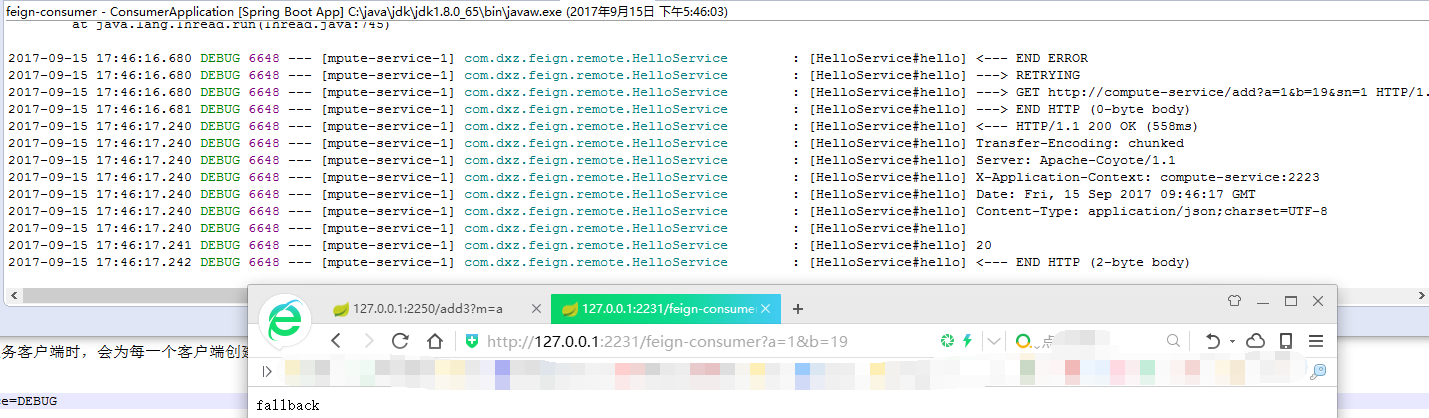
Spring cloud Feign在构建被@FeignClient修饰的服务客户端时,会为每一个客户端创建一个feign.Logger实例,我们可以利用该日志对象的DEBUG模式来帮助分析Feign的请求细节。
开启方式:
logging.level.<FeignClient>=<LEVEL value>
logging.level.com.dxz.feign.remote.HelloService=DEBUG
但是,只添加了如上配置,还无法实现对DEBUG日志的输出,这是由于Feign客户端默认的Logger.LEVEL对象定义为NONE级别。该级别不吉利任何Feign调用过程中的信息,所以需要调整级别,针对全局日志调整,直接在启动类里调整如下,
package com.dxz.feign;

import org.springframework.boot.SpringApplication;

import org.springframework.boot.autoconfigure.SpringBootApplication;

import org.springframework.cloud.client.discovery.EnableDiscoveryClient;

import org.springframework.cloud.netflix.feign.EnableFeignClients;

import org.springframework.context.annotation.Bean;

import feign.Logger;

@SpringBootApplication

@EnableFeignClients

@EnableDiscoveryClient

public class ConsumerApplication {

    @Bean

    Logger.Level feignLoggerLevel() {

        return Logger.Level.FULL;

    }

    public static void main(String[] args) {

        SpringApplication.run(ConsumerApplication.class, args);

    }

}
如果是局部调整,可以为日志级别增加配置类,如下:
package com.dxz.feign;

import org.springframework.context.annotation.Bean;

import org.springframework.context.annotation.Configuration;

import feign.Logger;

@Configuration

public class FullLogConfiguation {

    @Bean

    Logger.Level feignLoggerLevel() {

        return Logger.Level.FULL;

    }

}
package com.dxz.feign.remote;

import org.springframework.cloud.netflix.feign.FeignClient;

import org.springframework.web.bind.annotation.RequestMapping;

import org.springframework.web.bind.annotation.RequestMethod;

import org.springframework.web.bind.annotation.RequestParam;

import com.dxz.feign.DisableHystrixConfiguration;

import com.dxz.feign.FullLogConfiguation;

//@FeignClient(name="compute-service", fallback=HelloServiceFallback.class)

//@FeignClient(name="compute-service",configuration=DisableHystrixConfiguration.class)

@FeignClient(name="compute-service", fallback=HelloServiceFallback.class, configuration=FullLogConfiguation.class)

public interface HelloService {

    @RequestMapping(value="/add", method = RequestMethod.GET)

    String hello(@RequestParam("a") Integer a, @RequestParam("b") Integer b, @RequestParam("sn") Integer sn);

}
测试结果:
客户端负载均衡Feign之二:Feign 功能介绍的更多相关文章
- 客户端负载均衡Ribbon之二:Loadbalance的源码
Load Balance负载均衡是用于解决一台机器(一个进程)无法解决所有请求而产生的一种算法. 像nginx可以使用负载均衡分配流量,ribbon为客户端提供负载均衡,dubbo服务调用里的负载均衡 ...
- gRPC负载均衡(客户端负载均衡)
前言 上篇介绍了如何使用etcd实现服务发现,本篇将基于etcd的服务发现前提下,介绍如何实现gRPC客户端负载均衡. gRPC负载均衡 gRPC官方文档提供了关于gRPC负载均衡方案Load Bal ...
- 客户端负载均衡Feign之一:申明式服务调用Feign入门示例
Spring Cloud提供了Ribbon和Feign作为客户端的负载均衡. 前面使用了Ribbon做客户端负载均衡,使用Hystrix做容错保护,这两者被作为基础工具类框架被广泛地应用在各个微服务的 ...
- Spring Cloud负载均衡:使用Feign作客户端负载均衡
有了一篇服务端负载均衡后,再来一篇客户端负载均衡,客户端负载均衡很简单,无需在zuul中做多余配置(本示例不引入zuul),只需要在客户端进行Feign引入和配置即可. 准备工作很简单,实现客户端负载 ...
- springcloud(十二):Ribbon客户端负载均衡介绍
springcloud(十二):Ribbon客户端负载均衡介绍 Ribbon简介 使用分布式微服务脚骨的应用系统,在部署的时候通常会为部分或者全部微服务搭建集群环境,通过提供多个实例来提高系统的稳定型 ...
- Spring Cloud入门教程(二):客户端负载均衡(Ribbon)
对于大型应用系统负载均衡(LB:Load Balancing)是首要被解决一个问题.在微服务之前LB方案主要是集中式负载均衡方案,在服务消费者和服务提供者之间又一个独立的LB,LB通常是专门的硬件,如 ...
- Spring Cloud 2-Ribbon 客户端负载均衡(二)
Spring Cloud Eureka 1.Hello-Service服务端配置 pom.xml application.yml 启动两个service 2.Ribbon客户端配置 pom.xml ...
- 【SpringCloud微服务实战学习系列】客户端负载均衡Spring Cloud Ribbon
Spring Cloud Ribbon是一个基于HTTP和TCP的客户端负载均衡工具,它基于Netflix Ribbon实现.通过Spring Cloud的封装,可以让我们轻松地将面向服务的RES模板 ...
- 五、springcloud之客户端负载均衡Ribbon
一.简介 在微服务架构中,业务都会被拆分成一个独立的服务,服务与服务的通讯是基于http restful的.Spring cloud有两种服务调用方式: 一种是ribbon+restTemplate, ...
随机推荐
- int &p
int &p为引用,而int p为定义变量.二者区别如下:1 引用在定义的时候必须赋值,否则编译会出错.正确的形式为int &p = a;其中a为int型变量.2 引用在定义时不会分配 ...
- PTA——天平找小球
PTA 7-22 用天平找小球 #include<stdio.h> int main() { int a,b,c; scanf("%d%d%d",&a,& ...
- 滚动加载图片(懒加载)实现原理(这是旧实现,仅做为获取元素宽高api的参考)
https://www.cnblogs.com/flyromance/p/5042187.html 本文主要通过以下几方面来说明懒加载技术的原理,个人前端小菜,有错误请多多指出 一.什么是图片滚动加载 ...
- KiCad 开源元件库收集
KiCad 开源元件库收集 KiCad 官方 https://gitee.com/KiCAD-CN (国内镜像) https://github.com/kicad Digikey KiCad 元件库 ...
- redhat 6.4下PXE+Kickstart无人值守安装操作系统
一 前言 作为中小公司的运维,经常会遇到一些机械式的重复工作,例如:有时公司同时上线几十甚至上百台服务器,而且需要我们在短时间内完成系统安装.常规的办法有什么?1.光盘安装系统:每个服务器DVD内置光 ...
- day4 大纲笔记
01 上周内容回顾 int bool str int <---> str: i1 = 100 str(i1) s1 = '10' int(s1) 字符串必须是数字组成. int <- ...
- 20165308 实验二 Java面向对象程序设计
20165308 实验二 Java面向对象程序设计 实验二 Java面向对象程序设计 一.实验报告封面 课程:Java程序设计 班级:1653班 姓名:张士洋 学号:20165308 指导教师:娄嘉鹏 ...
- Visual Studio中设置Nuget程序包源
用vs2015,默认的程序包源是Microsoft and .NET,很多常见的开源包在里面搜索不到. 这时候就需要配置一个更开放的包源,网上搜了一下,都没人提供这个问题,所以自己动脑花了一番脑经,看 ...
- Visual Studio: 一键卸载所有组件工具,彻底卸载干净。
第一步.手动卸载VS主体 第二步.下载工具并解压 网盘下载地址:https://pan.baidu.com/s/1eSHRYxW 也可以在Github上下载最新版本:https://github.co ...
- paramiko 实现ssh登录和sftp登录
简单ssh登录 import paramiko ssh = paramiko.SSHClient() ssh.set_missing_host_key_policy(paramiko.AutoAddP ...