
Git 修正错误
大部分的人都会犯错。所以每VCS提供了一个功能,修正错误,直到特定的点。 Git提供功能使用,我们可以撤销已作出的修改到本地资源库。
假设用户不小心做了一些更改,以他的本地的仓库,现在他要扔掉这些变化。在这种情况下,恢复操作中起着重要的作用。
恢复未提交的更改
让我们假设Jerry 不小心修改文件从自己的本地仓库。但他想扔掉他的修改。要处理这种情况,我们可以使用git checkout命令。我们可以使用这个命令来恢复文件的内容。
[jerry@CentOS src]$ pwd /home/jerry/jerry_repo/project/src [jerry@CentOS src]$ git status -s M string_operations.c [jerry@CentOS src]$ git checkout string_operations.c
[jerry@CentOS src]$ git status –s
甚至我们可以使用git checkout命令删除的文件从本地库。让我们假设Tom 删除文件从本地存储库,我们希望这个文件。我们可以做到这一点,使用相同的命令。
[tom@CentOS src]$ pwd /home/tom/top_repo/project/src
[tom@CentOS src]$ ls -1 Makefile string_operations.c
[tom@CentOS src]$ rm string_operations.c [tom@CentOS src]$ ls -1 Makefile
[tom@CentOS src]$ git status -s D string_operations.c
Git是显示文件名前的字母D。这标志着该文件已被删除,从本地资源库。
[tom@CentOS src]$ git checkout string_operations.c
[tom@CentOS src]$ ls -1 Makefile string_operations.c
[tom@CentOS src]$ git status -s
注意:我们可以执行所有这些操作之前提交操作。
删除临时区域变化
我们已经看到,当我们执行加法运算;文件移动从本地存储库,参数区域。如果用户不小心修改一个文件,并把它添加到临时区域,但他马上意识到犯了错误。他希望恢复他的改变。我们可以处理这种情况下,通过使用git checkout命令。
在Git是一个HEAD指针始终指向最新提交。如果想撤销变更分阶段区域,那么可以使用git checkout命令,但checkout命令,必须提供额外的参数HEAD指针。额外提交指针参数指示的git checkout命令,重置工作树,还能够去除分阶段。
让我们假设Tom 从自己的本地仓库修改一个文件。如果我们查看这个文件的状态,它会显示文件被修改,但不加入临时区域。
tom@CentOS src]$ pwd /home/tom/top_repo/project/src # Unmodified file
[tom@CentOS src]$ git status -s # Modify file and view it’s status.
[tom@CentOS src]$ git status -s M string_operations.c
[tom@CentOS src]$ git add string_operations.c
Git 的状态显示该文件是在分期区域,现在它恢复使用git checkout命令和视图状态恢复的文件。
[tom@CentOS src]$ git checkout HEAD — string_operations.c
[tom@CentOS src]$ git status -s
将HEAD指针与GIT复位
做一些改变后,可能会决定删除这些更改。 Git 复位命令是用来重置或恢复一些变化。我们可以执行三种不同类型的复位操作。
下图显示图形表示 Git复位命令。
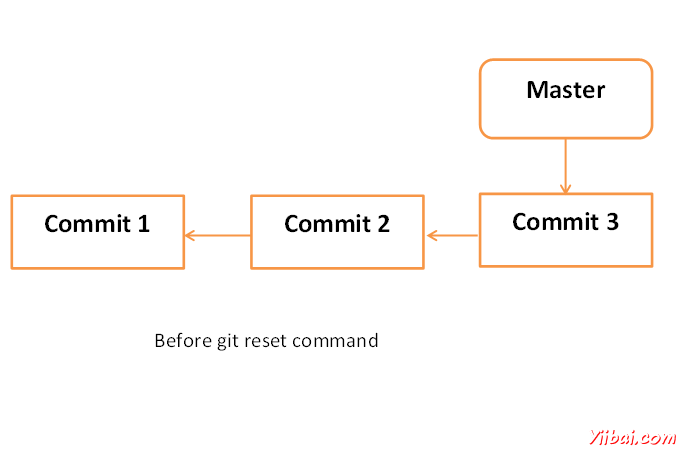

SOFT
每个分支都有HEAD 指针指向最新提交。如果我们使用git –soft复位命令选项,随后提交ID,然后将只有头指针复位,不破坏任何东西。
.git/refs/heads/master 文件存储的提交ID 的HEAD 指针。我们可以验证它通过使用git log -1 命令。
[jerry@CentOS project]$ cat .git/refs/heads/master 577647211ed44fe2ae479427a0668a4f12ed71a1
现在查看最新提交的ID,这将配合上述提交ID。
[jerry@CentOS project]$ git log -2
上面的命令会产生以下结果。
commit
577647211ed44fe2ae479427a0668a4f12ed71a1 Author: Tom Cat
<tom@yiibai.com> Date: Wed Sep 11 10:21:20 2013 +0530 Removed
executable
binary commit 29af9d45947dc044e33d69b9141d8d2dad37cc62 Author: Jerry
Mouse <jerry@yiibai.com> Date: Wed Sep 11 10:16:25 2013 +0530
Added compiled binary
让我们重设HEAD 指针。
[jerry@CentOS project]$ git reset –soft HEAD~
现在我们只重设HEAD 指针回到一个位置。让我们检查内容.git/refs/heads/master 文件.
[jerry@CentOS project]$ cat .git/refs/heads/master 29af9d45947dc044e33d69b9141d8d2dad37cc62
从文件提交ID改变,现在验证通过查看提交的信息。
jerry@CentOS project]$ git log -2
上面的命令会产生以下结果。
commit
29af9d45947dc044e33d69b9141d8d2dad37cc62 Author: Jerry Mouse
<jerry@yiibai.com> Date: Wed Sep 11 10:16:25 2013 +0530 Added
compiled binary commit 94f7b26005f856f1a1b733ad438e97a0cd509c1a Author:
Jerry Mouse <jerry@yiibai.com> Date: Wed Sep 11 10:08:01 2013
+0530 Added Makefile and renamed strings.c to string_operations.c
混合
Git的复位 — mixed选项从分段区域尚未提交还原更改。它仅恢复变化形成暂存区。实际所做的更改到工作副本的文件不受影响。默认的Git的复位相当于git的复位 — mixed。
有关更多详细信息,请参阅部分删除同一章临时区域变化。
HARD
如果使用 – hard选项用 Git复位命令,它会清除暂存区域,它会重设HEAD 指针,以最后一次提交的具体提交ID,也删除本地文件的变化。
让我们检查提交的ID
[jerry@CentOS src]$ pwd /home/jerry/jerry_repo/project/src
[jerry@CentOS src]$ git log -1
上面的命令会产生以下结果。
commit
577647211ed44fe2ae479427a0668a4f12ed71a1 Author: Tom Cat
<tom@yiibai.com> Date: Wed Sep 11 10:21:20 2013 +0530 Removed
executable binary
Jerry 修改过的文件,在文件的开始,加入单行注释。
[jerry@CentOS src]$ head -2 string_operations.c /* This line be removed by git reset operation */ #include <stdio.h>
他使用git status命令验证。
[jerry@CentOS src]$ git status -s M string_operations.c
Jerry 修改后的文件添加到分期区域,并验证它与git的状态运行。
[jerry@CentOS src]$ git add string_operations.c [jerry@CentOS src]$ git status
上面的命令会产生以下结果。
#
On branch master # Changes to be committed: # (use “git reset HEAD
<file>…” to unstage) # # modified: string_operations.c #
Git的状态,显示该文件是在临时区域。现在重置HEAD 用 –hard选项。
[jerry@CentOS src]$ git reset –hard 577647211ed44fe2ae479427a0668a4f12ed71a1 HEAD is now at 5776472 Removed executable binary
Git 复位命令成功,这将恢复从分段区的文件,以及删除本地对文件所做的更改。
[jerry@CentOS src]$ git status -s
Git 状态显示,文件恢复从分段区。
[jerry@CentOS src]$ head -2 string_operations.c #include <stdio.h>
Head 命令还显示,复位操作删除局部变化。
PS:如果您想和业内技术大牛交流的话,请加qq群(521249302)或者关注微信公众
号(AskHarries),谢谢!
Git 修正错误的更多相关文章
- Ubuntu 16.04安装qt5-default报错:qt5-default : 依赖: qtbase5-dev E: 无法修正错误,因为您要求某些软件包保持现状,就是它们破坏了软件包间的依赖关系。(此类问题终极解决方法)
切记:没事不要进行sudo apt-get upgrade 错误: qt5-default : 依赖: qtbase5-dev E: 无法修正错误,因为您要求某些软件包保持现状,就是它们破坏了软件包间 ...
- Mint Linux 安装 DotnetCore 遭遇无法修正错误,因为您要求某些软件包保持现状,就是它们破坏了软件包间的依赖关系
evlon@evlon-ThinkPad-T530 ~ $ apt install dotnet-dev-1.0.0-preview2-003121 正在读取软件包列表... 完成 正在分析软件包的依 ...
- git clone错误
git clone错误 Initialized empty Git repository in ***/.git/ error: The requested URL returned error: 4 ...
- E:无法修正错误,因为您要求某些软件包保持现状,就是它们破坏了软件包间的依赖关系
安装terminator等一些软件等时候,遇到了这样等问题 leo@leo:~$ sudo apt-get install terminator [sudo] password for leo: 正在 ...
- eclipse git 一个错误:the current branch is not configured for pull No value for key branch.xxx.merge found
eclipse git 一个错误:the current branch is not configured for pull No value for key branch.xxx.merge fou ...
- Ubuntu 14.04—无法修正错误,因为您要求某些软件包保持现状,就是它们破坏了软件包间的依赖关系 解决办法
在Ubuntu中使用sudo apt-get install安装是有时候会出现: 无法修正错误,因为您要求某些软件包保持现状,就是它们破坏了软件包间的依赖关系 解决办法 这样的错误,这是因为更新源 ...
- Sublime Text 2 - Unable to find git.exe 错误
今日打开 Sublime Text 2,随即弹出 Package Control - Unable to find git.exe 错误.如下, 原因:曾经通过 git clone 命令获取过 Sub ...
- git常见错误及解决方案总结
git常见错误及解决方案总结 使用git在本地创建一个项目的过程 $ makdir ~/hello-world //创建一个项目hello- ...
- git 邮箱错误-git log 中发现 XXX@163.com邮箱不符合要求,请务必使用公司邮箱。
场景描述: 重新配置电脑之后,提交了git,邮箱发生错误. git log # 查看日志git reset 版本 # 回到之前的版本,版本回退git config --global user.name ...
随机推荐
- 基于tensorflow搭建一个神经网络
一,tensorflow的简介 Tensorflow是一个采用数据流图,用于数值计算的 开源软件库.节点在图中表示数字操作,图中的线 则表示在节点间相互联系的多维数据数组,即张量 它灵活的架构让你可以 ...
- 公开课 之 tony 电子时钟 (课堂笔记)
# tony 之电子时钟from PyQt5.QtWidgets import QApplication, QWidget, QLCDNumber, QDesktopWidget, QVBoxLayo ...
- git小笔记
git账号:eggsy.cao@pictureworks.biz eggsycao 1.新建文件夹,并进入,命令窗口:git init 2.提交文件 git add fileName(git add ...
- jsp导出简单的excel
在jsp中加入以下代码即可 <% String fileName = "导出excel.xls"; fileName = new String(fileName.getByt ...
- Leaflet_创建地图(官网示例,可以直接运行)(2017-10-20)
官网:http://leafletjs.com/examples.html 快速启动指南 http://leafletjs.com/examples/quick-start/example.html ...
- CentOS下多网卡绑定bond/多网卡聚合
网卡bond我直接理解成网卡聚合了,就是把多张网卡虚拟成1张网卡,出口时,这张网卡无论哪个断线都不影响网络,入口时,需要结合交换机的端口聚合功能实现和网卡配置的bond模式进行负载均衡.bond需要在 ...
- Using a Virtex Device to Drive 5V CMOS-Level Signals
Must tri-state outputs and use an external resistor to pull up to 5V To drive 5V CMOS-level inputs, ...
- Java和.Net在做BS结构项目的比较
渊源: Java的J2EE在1999年形成了其成熟的架构,并且到今天已经有相当成熟的经过检验的企业应用系统.而.Net究其渊源是源自微软以前开发企业应用程序的平台DNA(DistributedNetw ...
- Spring boot设置文件上传大小限制
原文:https://blog.csdn.net/lizhangyong1989/article/details/78586421 Spring boot1.0版本的application.prope ...
- WordPress主题开发实例:利用侧边栏工具显示联系方式
利用侧边栏显示联系方式是很方便的 一.先开启侧边栏工具,在functions.php加上 $args = array( 'name' => __( '分类侧边栏'), 'id' => 'c ...