
Delphi不注册COM直接使用ActiveX控件并绑定事件
文笔不行,直接上源码:
主窗口:
unit Unit1; interface uses
Winapi.Windows, Winapi.Messages, System.SysUtils, System.Variants, System.Classes, Vcl.Graphics,
Vcl.Controls, Vcl.Forms, Vcl.Dialogs, Vcl.ExtCtrls, Vcl.StdCtrls, Winapi.ActiveX
, System.Win.ComObj, EventSink; type
TForm1 = class(TForm)
pnlCom: TPanel;
Panel2: TPanel;
Panel3: TPanel;
btnGo: TButton;
edt1: TEdit;
LblStatus: TLabel;
procedure FormCreate(Sender: TObject);
procedure btnGoClick(Sender: TObject);
private
{ Private declarations }
EventSink: TEventSink;
ActiveXCon: Variant;
function InitAtl: Boolean;
procedure EventSinkInvoke(Sender: TObject; DispID: Integer;
const IID: TGUID; LocaleID: Integer; Flags: Word;
Params: tagDISPPARAMS; VarResult, ExcepInfo, ArgErr: Pointer);
public
{ Public declarations }
end; var
Form1: TForm1; const
CLASS_MsRdpClient: TGUID = '{7CACBD7B-0D99-468F-AC33-22E495C0AFE5}';//'{791FA017-2DE3-492E-ACC5-53C67A2B94D0}'; type
PIUnknown=^IUnknown;
TAtlAxAttachControl = function(Control:IUnknown; hwind:hwnd;ppUnkContainer:PIUnknown): HRESULT; stdcall;
//--此处参考mstscax.dll的接口文件,如果没有,在 Component->Import Component->Import a Type Library
//--导入:Microsoft Terminal Services Active Client 1.0 Type Library 1.0
IMsTscAxEvents = dispinterface
['{336D5562-EFA8-482E-8CB3-C5C0FC7A7DB6}']
{
procedure OnConnecting; dispid 1;
procedure OnConnected; dispid 2;
procedure OnLoginComplete; dispid 3;
procedure OnDisconnected(discReason: Integer); dispid 4;
procedure OnEnterFullScreenMode; dispid 5;
procedure OnLeaveFullScreenMode; dispid 6;
procedure OnChannelReceivedData(const chanName: WideString; const data: WideString); dispid 7;
procedure OnRequestGoFullScreen; dispid 8;
procedure OnRequestLeaveFullScreen; dispid 9;
procedure OnFatalError(errorCode: Integer); dispid 10;
procedure OnWarning(warningCode: Integer); dispid 11;
procedure OnRemoteDesktopSizeChange(width: Integer; height: Integer); dispid 12;
procedure OnIdleTimeoutNotification; dispid 13;
procedure OnRequestContainerMinimize; dispid 14;
function OnConfirmClose: WordBool; dispid 15;
function OnReceivedTSPublicKey(const publicKey: WideString): WordBool; dispid 16;
function OnAutoReconnecting(disconnectReason: Integer; attemptCount: Integer): AutoReconnectContinueState; dispid 17;
procedure OnAuthenticationWarningDisplayed; dispid 18;
procedure OnAuthenticationWarningDismissed; dispid 19;
}
end; implementation {$R *.dfm} { TForm1 } function CreateComObjectFromDll(CLSID: TGUID; DllHandle: THandle): IUnknown;
var
Factory: IClassFactory;
DllGetClassObject: function(const CLSID, IID: TGUID; var Obj): HResult; stdcall;
hr: HRESULT;
begin
DllGetClassObject := GetProcAddress(DllHandle, 'DllGetClassObject');
if Assigned(DllGetClassObject) then
begin
hr := DllGetClassObject(CLSID, IClassFactory, Factory);
if hr = S_OK then
try
hr := Factory.CreateInstance(nil, IUnknown, Result);
if hr <> S_OK then begin
ShowMessage('Error');
end;
except
ShowMessage(IntToStr(GetLastError));
end;
end;
end; procedure TForm1.btnGoClick(Sender: TObject);
begin
ActiveXCon.Navigate(edt1.Text);
end; procedure TForm1.EventSinkInvoke(Sender: TObject; DispID: Integer; const IID: TGUID; LocaleID: Integer; Flags: Word;
Params: tagDISPPARAMS; VarResult, ExcepInfo, ArgErr: Pointer);
begin <p> {
这里需要注明Params这个参数, 包含了事件的参数
如:
Params.rgvarg[0] 代表第一个参数
Params.rgvarg[1] 代表第二个参数
......
Params.rgvarg[65535] 代表第65535个参数
最多65535个参数
具体可以参考 tagDISPPARAMS 的定义</p><p> 这里只列出了怎么扑获相关事件,具体功能具体实现
}</p> case dispid of
$: LblStatus.Caption := '正在连接';
$: LblStatus.Caption := '连接成功';
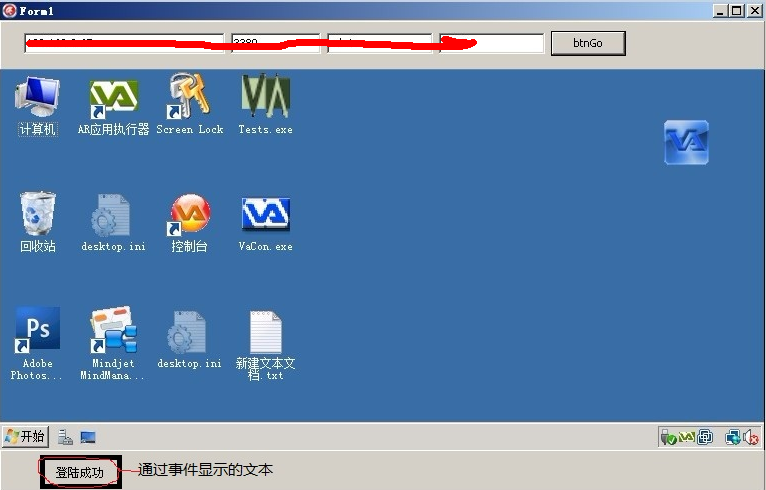
$: LblStatus.Caption := '登陆成功';
$: LblStatus.Caption := '断开连接';
$: LblStatus.Caption := '进入全屏模式';
$: LblStatus.Caption := '离开全屏模式';
$: LblStatus.Caption := '通道接收数据';
$: LblStatus.Caption := 'OnRequestGoFullScreen';
$: LblStatus.Caption := 'OnRequestLeaveFullScreen';
$: LblStatus.Caption := 'OnFatalError';
$: LblStatus.Caption := 'OnWarning';
$: LblStatus.Caption := 'OnRemoteDesktopSizeChange';
$: LblStatus.Caption := 'OnIdleTimeoutNotification';
$: LblStatus.Caption := 'OnRequestContainerMinimize';
$: LblStatus.Caption := 'OnConfirmClose';
$: LblStatus.Caption := 'OnReceivedTSPublicKey';
$: LblStatus.Caption := 'OnAutoReconnecting';
$: LblStatus.Caption := 'OnAuthenticationWarningDisplayed';
$: LblStatus.Caption := 'OnAuthenticationWarningDismissed';
end
end; procedure TForm1.FormCreate(Sender: TObject);
begin
InitAtl;
end; function TForm1.InitAtl: Boolean;
var
hModule, hDll: THandle;
AtlAxAttachControl: TAtlAxAttachControl;
begin
hModule := LoadLibrary('atl.dll');
if hModule < then begin
Exit(False);
end;
AtlAxAttachControl := TAtlAxAttachControl(GetProcAddress(hModule, 'AtlAxAttachControl'));
EventSink := TEventSink.Create(Self);
EventSink.OnInvoke := EventSinkInvoke;
if not Assigned(AtlAxAttachControl) then
Exit(False);
try
{--后期绑定}
// ActiveXCon := CreateComObject(CLASS_MsRdpClient); //CreateOleObject('Shell.Explorer'); //CreateComObject(CLASS_MsRdpClient);
{--前期绑定}
hDll := LoadLibrary('mstscax.dll');
ActiveXCon := CreateComObjectFromDll(CLASS_MsRdpClient, hDll) as IDispatch;
// if Assigned(ActiveXCon) then begin
//
// end;
if VarIsNull(ActiveXCon) then begin
Result := False;
Exit;
end;
EventSink.Connect(ActiveXCon, IMsTscAxEvents);
AtlAxAttachControl(ActiveXCon,pnlCom.Handle, nil);
// ActiveXCon.GoHome;
ActiveXCon.Server := '192.168.8.65';
ActiveXCon.UserName := 'Va_admin';
ActiveXCon.AdvancedSettings2.ClearTextPassword := 'Va5!1232';
ActiveXCon.Connect;
Result := True;
except
Result := False;
end;
end; end.

事件单元:
unit EventSink;

interface

uses

  Winapi.Windows, Winapi.Messages, System.SysUtils, System.Classes,

  Vcl.Graphics, Vcl.Controls, Vcl.Forms, Vcl.Dialogs,

  Winapi.ActiveX;

type

  TInvokeEvent = procedure(Sender: TObject; DispID: Integer; const IID: TGUID;

    LocaleID: Integer; Flags: Word; Params: TDispParams;

    VarResult, ExcepInfo, ArgErr: Pointer) of object;

  TAbstractEventSink = class(TObject, IUnknown, IDispatch)

  private

    FDispatch: IDispatch;

    FDispIntfIID: TGUID;

    FConnection: LongInt;

    FOwner: TComponent;

  protected

    { IUnknown }

    function QueryInterface(const IID: TGUID; out Obj): HRESULT; stdcall;

    function _AddRef: Integer; stdcall;

    function _Release: Integer; stdcall;

    { IDispatch }

    function GetTypeInfoCount(out Count: Integer): HRESULT; stdcall;

    function GetTypeInfo(Index, LocaleID: Integer; out TypeInfo)

      : HRESULT; stdcall;

    function GetIDsOfNames(const IID: TGUID; Names: Pointer;

      NameCount, LocaleID: Integer; DispIDs: Pointer): HRESULT; stdcall;

    function Invoke(DispID: Integer; const IID: TGUID; LocaleID: Integer;

      Flags: Word; var Params; VarResult, ExcepInfo, ArgErr: Pointer)

      : HRESULT; stdcall;

  public

    constructor Create(AOwner: TComponent);

    destructor Destroy; override;

    procedure Connect(AnAppDispatch: IDispatch; const AnAppDispIntfIID: TGUID);

    procedure Disconnect;

  end;

  TEventSink = class(TComponent)

  private

    { Private declarations }

    FSink: TAbstractEventSink;

    FOnInvoke: TInvokeEvent;

  protected

    { Protected declarations }

    procedure DoInvoke(DispID: Integer; const IID: TGUID; LocaleID: Integer;

      Flags: Word; var Params; VarResult, ExcepInfo, ArgErr: Pointer); virtual;

  public

    { Public declarations }

    constructor Create(AOwner: TComponent); override;

    destructor Destroy; override;

    procedure Connect(AnAppDispatch: IDispatch; const AnAppDispIntfIID: TGUID);

  published

    { Published declarations }

    property OnInvoke: TInvokeEvent read FOnInvoke write FOnInvoke;

  end;

implementation

uses

  ComObj;

procedure InterfaceConnect(const Source: IUnknown; const IID: TIID;

  const Sink: IUnknown; var Connection: LongInt);

var

  CPC: IConnectionPointContainer;

  CP: IConnectionPoint;

  i: HRESULT;

begin

  Connection := ;

  if Succeeded(Source.QueryInterface(IConnectionPointContainer, CPC)) then

    if Succeeded(CPC.FindConnectionPoint(IID, CP)) then

      i := CP.Advise(Sink, Connection);

end;

procedure InterfaceDisconnect(const Source: IUnknown; const IID: TIID;

  var Connection: LongInt);

var

  CPC: IConnectionPointContainer;

  CP: IConnectionPoint;

begin

  if Connection <>  then

    if Succeeded(Source.QueryInterface(IConnectionPointContainer, CPC)) then

      if Succeeded(CPC.FindConnectionPoint(IID, CP)) then

        if Succeeded(CP.Unadvise(Connection)) then

          Connection := ;

end;

{ TAbstractEventSink }

function TAbstractEventSink._AddRef: Integer; stdcall;

begin

  Result := ;

end;

function TAbstractEventSink._Release: Integer; stdcall;

begin

  Result := ;

end;

constructor TAbstractEventSink.Create(AOwner: TComponent);

begin

  inherited Create;

  FOwner := AOwner;

end;

destructor TAbstractEventSink.Destroy;

var

  p: Pointer;

begin

  Disconnect;

  inherited Destroy;

end;

function TAbstractEventSink.GetIDsOfNames(const IID: TGUID; Names: Pointer;

  NameCount, LocaleID: Integer; DispIDs: Pointer): HRESULT; stdcall;

begin

  Result := E_NOTIMPL;

end;

function TAbstractEventSink.GetTypeInfo(Index, LocaleID: Integer; out TypeInfo)

  : HRESULT; stdcall;

begin

  Result := E_NOTIMPL;

end;

function TAbstractEventSink.GetTypeInfoCount(out Count: Integer)

  : HRESULT; stdcall;

begin

  Count := ;

  Result := S_OK;

end;

function TAbstractEventSink.Invoke(DispID: Integer; const IID: TGUID;

  LocaleID: Integer; Flags: Word; var Params;

  VarResult, ExcepInfo, ArgErr: Pointer): HRESULT; stdcall;

begin

  (FOwner as TEventSink).DoInvoke(DispID, IID, LocaleID, Flags, Params,

    VarResult, ExcepInfo, ArgErr);

  Result := S_OK;

end;

function TAbstractEventSink.QueryInterface(const IID: TGUID; out Obj)

  : HRESULT; stdcall;

begin

  // We need to return the event interface when it's asked for

  Result := E_NOINTERFACE;

  if GetInterface(IID, Obj) then

    Result := S_OK;

  if IsEqualGUID(IID, FDispIntfIID) and GetInterface(IDispatch, Obj) then

    Result := S_OK;

end;

procedure TAbstractEventSink.Connect(AnAppDispatch: IDispatch;

  const AnAppDispIntfIID: TGUID);

begin

  FDispIntfIID := AnAppDispIntfIID;

  FDispatch := AnAppDispatch;

  // Hook the sink up to the automation server

  InterfaceConnect(FDispatch, FDispIntfIID, Self, FConnection);

end;

procedure TAbstractEventSink.Disconnect;

begin

  if Assigned(FDispatch) then

  begin

    // Unhook the sink from the automation server

    InterfaceDisconnect(FDispatch, FDispIntfIID, FConnection);

    FDispatch := nil;

    FConnection := ;

  end;

end;

{ TEventSink }

procedure TEventSink.Connect(AnAppDispatch: IDispatch;

  const AnAppDispIntfIID: TGUID);

begin

  FSink.Connect(AnAppDispatch, AnAppDispIntfIID);

end;

constructor TEventSink.Create(AOwner: TComponent);

begin

  inherited Create(AOwner);

  FSink := TAbstractEventSink.Create(Self);

end;

destructor TEventSink.Destroy;

begin

  FSink.Free;

  inherited Destroy;

end;

procedure TEventSink.DoInvoke(DispID: Integer; const IID: TGUID;

  LocaleID: Integer; Flags: Word; var Params;

  VarResult, ExcepInfo, ArgErr: Pointer);

begin

  if Assigned(FOnInvoke) then

    FOnInvoke(Self, DispID, IID, LocaleID, Flags, TDispParams(Params),

      VarResult, ExcepInfo, ArgErr);

end;

end.
效果图:
Delphi不注册COM直接使用ActiveX控件并绑定事件的更多相关文章
- 【VS开发】动态添加的ActiveX控件如何响应事件
http://blog.csdn.net/xiaoqiqixiao/article/details/574542 今天在csdn上看到一朋友问如何响应动态添加的控件的事件,搜索资料,发现对于一般的应用 ...
- Wix中注册c#开发的Activex控件
一.使用regasm.exe将DLL提取出TLB文件 regasm.exe "Tools.HMIBrowserDetector.dll" /tlb 二.使用wix的heat.exe ...
- ActiveX控件的Events事件
http://labview360.com/article/info.asp?TID=10152&FID=165 Active X函式库 对使用LabVIEW作为开发环境的开发人员来说,如果能 ...
- Delphi 编写ActiveX控件(OCX控件)的知识和样例(有详细步骤)
一.ActiveX应用情况简介: ActiveX控件也就是一般所说的OCX控件,它是 ActiveX技术的一部分.ActiveX是微软公司推出的基于组件对象模型COM的技术,包括对Windows 32 ...
- 【VS开发】windows注册ActiveX控件
ActiveX控件是一个动态链接库,是作为基于COM服务器进行操作的,并且可以嵌入在包容器宿主应用程序中,ActiveX控件的前身就是OLE控件.由于ActiveX控件与开发平台无关,因此,在一种编程 ...
- ActiveX控件的基本操作方法以及如何在VS2010下使用控件
在此,小编就介绍下ActiveX控件的基本操作方法以及如何在VS2010下使用控件,我们以一个程序为例, (1) 打开VS2010编译器(右键以管理员身份运行,因为ActiveX需要注册), ...
- ActiveX控件
什么是ActiveX控件:一个进程内服务器,支持多种的COM接口.(可以理解为,一个COM接口是一个纯抽象基类,你实现了它,并且它支持自注册,就是一个ActiveX控件了)可以把ActiveX控件看做 ...
- 建立对ActiveX控件的了解
本文来自百度百科:ActiveX控件 ActiveX是Microsoft对于一系列策略性面向对象程序技术和工具的称呼,其中主要的技术是组件对象模型(COM).在有目录和其它支持的网络中,COM变成 ...
- 开发ActiveX控件调用另一个ActiveX系列0——身份证识别仪驱动的问题
程序员要从0下表开始,这篇是介绍这个系列的背景的,没有兴趣的人可以直接跳过. 为什么要开发ActiveX控件 由于工作需要,我们开发了一个网站,使用了一款身份证识别仪的网页ActiveX(OCX)插件 ...
随机推荐
- 通过使用CSS字体阴影效果解决hover图片时显示文字看不清的问题
1.前言 最近需要加入一个小功能,在鼠标越过图片时,提示其大小和分辨率,而不想用增加属性title来提醒,不够好看.然而发现如果文字是一种颜色,然后总有概率碰到那张图上浮一层的文字会看不到,所以加入文 ...
- PYTHON-匿名函数,递归与二分法,面向过程编程-练习
# 四 声明式编程练习题 # 1.将names=['egon','alex_sb','wupeiqi','yuanhao']中的名字全部变大写names = ['egon', 'alex_sb', ' ...
- SQL中的 if 结构和循环(while)结构
- 学习笔记(二)--->《Java 8编程官方参考教程(第9版).pdf》:第七章到九章学习笔记
注:本文声明事项. 本博文整理者:刘军 本博文出自于: <Java8 编程官方参考教程>一书 声明:1:转载请标注出处.本文不得作为商业活动.若有违本之,则本人不负法律责任.违法者自负一切 ...
- 缓存之EHCache(一)
源文: http://blog.csdn.net/l271640625/article/details/20528573 一.简介 非常简单,而且易用. ehcache 是一个非常轻量级的缓存 ...
- TCP/IP、Http大纲
TPC/IP协议是传输层协议,主要解决数据如何在网络中传输,而HTTP是应用层协议,主要解决如何包装数据.关于TCP/IP和HTTP协议的关系,网络有一段比较容易理解的介绍:“我们在传输数据时,可以只 ...
- springMVC源码分析--FlashMap和FlashMapManager重定向数据保存
在上一篇博客springMVC源码分析--页面跳转RedirectView(三)中我们看到了在RedirectView跳转时会将跳转之前的请求中的参数保存到fFlashMap中,然后通过FlashMa ...
- POJ 3259 Wormholes(bellman_ford,判断有没有负环回路)
题意:John的农场里field块地,path条路连接两块地,hole个虫洞,虫洞是一条单向路,不但会把你传送到目的地,而且时间会倒退Ts.我们的任务是知道会不会在从某块地出发后又回来,看到了离开之前 ...
- python全栈开发day21-2 几个装饰器总结
1 @property 将一个方法伪装成属性 2.@propertty @f.setter 设置伪装成方法的属性 3.@propertty @f.deleter 删除一个伪装成方法的属性. class ...
- 基于kubernetes集群部署DashBoard
目录贴:Kubernetes学习系列 在之前一篇文章:Centos7部署Kubernetes集群,中已经搭建了基本的K8s集群,本文将在此基础之上继续搭建K8s DashBoard. 1.yaml文件 ...