
mysql读写分离[高可用]
顾名思义, 在mysql负载均衡中有多种方式, 本人愚钝,只了解驱动中间件和mysql_proxy两种方式, 对于驱动,利用的是ReplicationDriver,具体请看远哥的这篇文章: MySQL读写分离又一好办法 使用 com.mysql.jdbc.ReplicationDriver
本次我要实现利用的方式是:mysql_proxy
下面进入主题
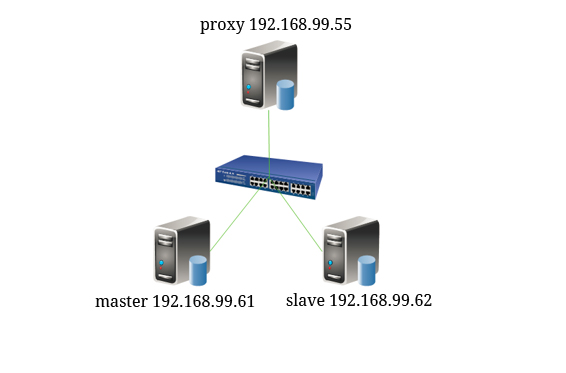
mysql_proxy:192.168.99.55
master:192.168.99.61
slave:192.168.99.62
1.安装mysql_proxy
tar -zxvf mysql-proxy-0.8.4-linux-rhel5-x86-64bit.tar.gz -C /usr/local

cd /usr/local

mv mysql-proxy-0.8.4-linux-rhel5-x86-64bit mysql-proxy
下面是需要的依赖
gcc* gcc-c++* autoconf* automake* zlib* libxml* ncurses-devel* libmcrypt* libtool* flex* pkgconfig*

libevent* glib* readline-devel
2.添加代理用户
useradd -r mysql-proxy
3.sysv服务脚本mysql_proxy
这个脚本放置的位置是:/etc/init.d
记得授权,chmod +x /etc/init.d/mysql_proxy
这个脚本是用来做快捷启动的。
#!/bin/bash

#

# mysql-proxy This script starts and stops the mysql-proxy daemon

#

# chkconfig: - 78 30

# processname: mysql-proxy

# description: mysql-proxy is a proxy daemon for mysql

# Source function library.

. /etc/rc.d/init.d/functions

prog="/usr/local/mysql-proxy/bin/mysql-proxy"

# Source networking configuration.

if [ -f /etc/sysconfig/network ]; then

    . /etc/sysconfig/network

fi

# Check that networking is up.

[ ${NETWORKING} = "no" ] && exit 0

# Set default mysql-proxy configuration.

ADMIN_USER="admin"

ADMIN_PASSWD="admin"

ADMIN_LUA_SCRIPT="/usr/local/mysql-proxy/share/doc/mysql-proxy/admin.lua"

PROXY_OPTIONS="--daemon"

PROXY_PID=/var/run/mysql-proxy.pid

PROXY_USER="mysql-proxy"

# Source mysql-proxy configuration.

if [ -f /etc/sysconfig/mysql-proxy ]; then

    . /etc/sysconfig/mysql-proxy

fi

RETVAL=0

start() {

    echo -n $"Starting $prog: "

    daemon $prog $PROXY_OPTIONS --pid-file=$PROXY_PID --proxy-address="$PROXY_ADDRESS" --user=$PROXY_USER --admin-username="$ADMIN_USER" --admin-lua-script="$ADMIN_LUA_SCRIPT" --admin-password="$ADMIN_PASSWORD"

    RETVAL=$?

    echo

    if [ $RETVAL -eq 0 ]; then

        touch /var/lock/subsys/mysql-proxy

    fi

}

stop() {

    echo -n $"Stopping $prog: "

    killproc -p $PROXY_PID -d 3 $prog

    RETVAL=$?

    echo

    if [ $RETVAL -eq 0 ]; then

        rm -f /var/lock/subsys/mysql-proxy

        rm -f $PROXY_PID

    fi

}

# See how we were called.

case "$1" in

    start)

        start

        ;;

    stop)

        stop

        ;;

    restart)

        stop

        start

        ;;

    condrestart|try-restart)

        if status -p $PROXY_PIDFILE $prog >&/dev/null; then

            stop

            start

        fi

        ;;

    status)

        status -p $PROXY_PID $prog

        ;;

    *)

        echo "Usage: $0 {start|stop|restart|reload|status|condrestart|try-restart}"

        RETVAL=1

        ;;

esac

exit $RETVAL
4.为服务脚本提供配置文件mysql_proxy
这个脚本放在的位置是:/etc/sysconfig(我是根据上面服务脚本的位置放的, 喜欢放在别处的地方可以自行修改)。
# Options for mysql-proxy

ADMIN_USER="admin"

ADMIN_PASSWORD="admin"

ADMIN_ADDRESS=""

ADMIN_LUA_SCRIPT="/usr/local/mysql-proxy/share/doc/mysql-proxy/admin.lua"

PROXY_ADDRESS=""

PROXY_USER="mysql-proxy"

PROXY_OPTIONS="--daemon --log-level=info --log-use-syslog --plugins=proxy --plugins=admin --proxy-backend-addresses=192.168.99.61:3306
--proxy-read-only-backend-addresses=192.168.99.62:3306 --proxy-lua-script=/usr/local/mysql-proxy/share/doc/mysql-proxy/rw-splitting.lua"
5.创建admin.lua
这个脚本放置的位置是:/usr/local/mysql-proxy/share/doc/mysql-proxy
--[[ $%BEGINLICENSE%$

 Copyright (c) 2007, 2012, Oracle and/or its affiliates. All rights reserved.

 This program is free software; you can redistribute it and/or

 modify it under the terms of the GNU General Public License as

 published by the Free Software Foundation; version 2 of the

 License.

 This program is distributed in the hope that it will be useful,

 but WITHOUT ANY WARRANTY; without even the implied warranty of

 MERCHANTABILITY or FITNESS FOR A PARTICULAR PURPOSE. See the

 GNU General Public License for more details.

 You should have received a copy of the GNU General Public License

 along with this program; if not, write to the Free Software

 Foundation, Inc., 51 Franklin St, Fifth Floor, Boston, MA

 02110-1301  USA

 $%ENDLICENSE%$ --]]

function set_error(errmsg)

proxy.response = {

type = proxy.MYSQLD_PACKET_ERR,

errmsg = errmsg or "error"

}

end

function read_query(packet)

if packet:byte() ~= proxy.COM_QUERY then

set_error("[admin] we only handle text-based queries (COM_QUERY)")

return proxy.PROXY_SEND_RESULT

end

local query = packet:sub(2)

local rows = { }

local fields = { }

if query:lower() == "select * from backends" then

fields = {

{ name = "backend_ndx",

 type = proxy.MYSQL_TYPE_LONG },

{ name = "address",

 type = proxy.MYSQL_TYPE_STRING },

{ name = "state",

 type = proxy.MYSQL_TYPE_STRING },

{ name = "type",

 type = proxy.MYSQL_TYPE_STRING },

{ name = "uuid",

 type = proxy.MYSQL_TYPE_STRING },

{ name = "connected_clients",

 type = proxy.MYSQL_TYPE_LONG },

}

for i = 1, #proxy.global.backends do

local states = {

"unknown",

"up",

"down"

}

local types = {

"unknown",

"rw",

"ro"

}

local b = proxy.global.backends[i]

rows[#rows + 1] = {

i,

b.dst.name,          -- configured backend address

states[b.state + 1], -- the C-id is pushed down starting at 0

types[b.type + 1],   -- the C-id is pushed down starting at 0

b.uuid,              -- the MySQL Server's UUID if it is managed

b.connected_clients  -- currently connected clients

}

end

elseif query:lower() == "select * from help" then

fields = {

{ name = "command",

 type = proxy.MYSQL_TYPE_STRING },

{ name = "description",

 type = proxy.MYSQL_TYPE_STRING },

}

rows[#rows + 1] = { "SELECT * FROM help", "shows this help" }

rows[#rows + 1] = { "SELECT * FROM backends", "lists the backends and their state" }

else

set_error("use 'SELECT * FROM help' to see the supported commands")

return proxy.PROXY_SEND_RESULT

end

proxy.response = {

type = proxy.MYSQLD_PACKET_OK,

resultset = {

fields = fields,

rows = rows

}

}

return proxy.PROXY_SEND_RESULT

end
6.修改rw-splitting.lua
修改的是min_idle_connections和max_idle_connections的值,都等于1
local commands    = require("proxy.commands")

local tokenizer   = require("proxy.tokenizer")

local lb          = require("proxy.balance")

local auto_config = require("proxy.auto-config")

--- config

--

-- connection pool

if not proxy.global.config.rwsplit then

	proxy.global.config.rwsplit = {

		min_idle_connections = 1,

		max_idle_connections = 1,

		is_debug = false

	}

end
7.测试mysql_proxy
7.1启动mysql_proxy
service mysql_proxy start
7.2端口进程状态
进程
ps aux | grep mysql-proxy

root     14230  0.0  0.0 103244   836 pts/0    S+   11:25   0:00 grep mysql-proxy

496      28239  0.0  0.0  45772  2104 ?        S    Dec04   0:03 /usr/local/mysql-proxy/libexec/mysql-proxy --daemon --log-level=info --log-use-syslog --plugins=proxy --plugins=admin --proxy-backend-addresses=192.168.75.61:3306 --proxy-read-only-backend-addresses=192.168.75.62:3306 --proxy-lua-script=/usr/local/mysql-proxy/share/doc/mysql-proxy/rw-splitting.lua --pid-file=/var/run/mysql-proxy.pid --proxy-address= --user=mysql-proxy --admin-username=admin --admin-lua-script=/usr/local/mysql-proxy/share/doc/mysql-proxy/admin.lua --admin-password=admin
端口
netstat -tlnp | grep mysql-proxy

tcp        0      0 0.0.0.0:4041                0.0.0.0:*                   LISTEN      28239/mysql-proxy

tcp        0      0 0.0.0.0:3306                0.0.0.0:*                   LISTEN      28239/mysql-proxy
看到上面, 端口有4041与3306, 这两个端口都是关键所在,下面将进行解题。
7.3登录mysql_proxy
随便找一台有mysql客户端的机器登录到mysql_proxy192.168.99.55(也可以在99.55上面安装mysql客户端, 我是在别的机器连得), 这个登录使用的账号密码还记得把?它就是脚本中指定的账号密码,admin:admin
mysql -u admin -p -h 192.168.99.55 --port=4041
必须指定端口, 不然跑的是3306
7.4查询状态
7.4.1 select * from help
+------------------------+------------------------------------+

| command                | description                        |

+------------------------+------------------------------------+

| SELECT * FROM help     | shows this help                    |

| SELECT * FROM backends | lists the backends and their state |

+------------------------+------------------------------------+

2 rows in set (0.00 sec)
7.4.2 SELECT * FROM backends
+-------------+--------------------+-------+------+------+-------------------+

| backend_ndx | address            | state | type | uuid | connected_clients |

+-------------+--------------------+-------+------+------+-------------------+

|           1 | 192.168.99.61:3306 | down    | rw   | NULL |                 0 |

|           2 | 192.168.99.62:3306 | down    | ro   | NULL |                 0 |

+-------------+--------------------+-------+------+------+-------------------+

2 rows in set (0.00 sec)
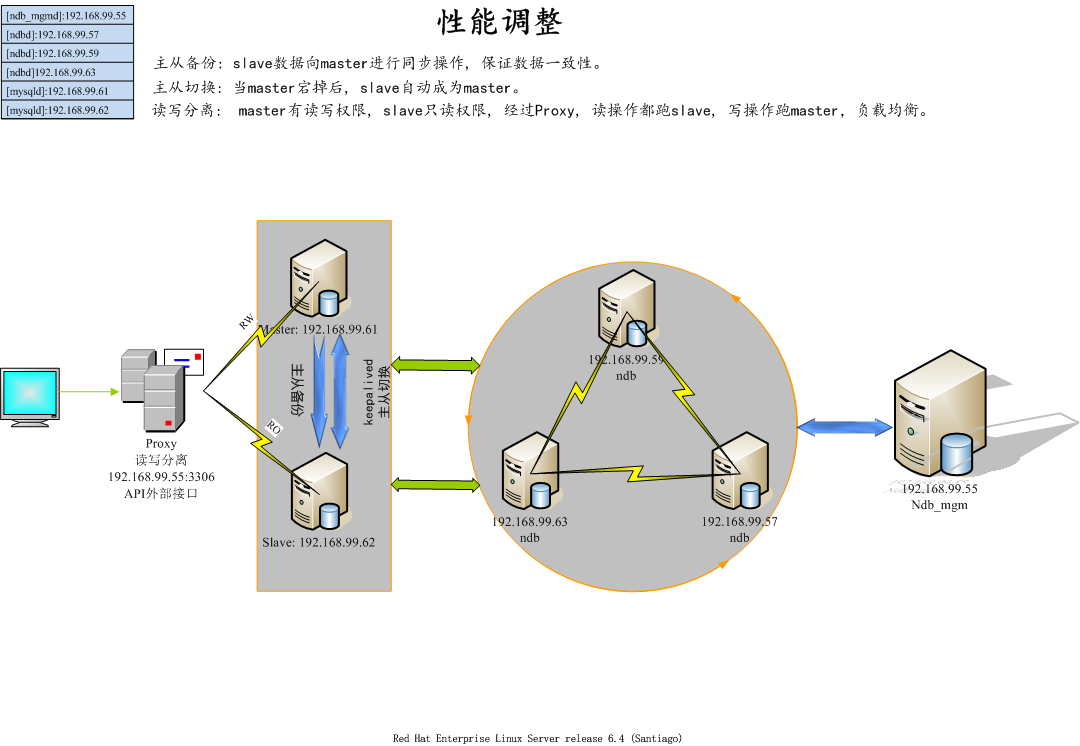
看到上面的信息, master99.61的type是rw(支持读写),slave99.62的type是ro(只读)
7.5抓包分析
在master上:
tcpdump -i eth0 -nn -XX ip dst 192.168.99.61 and tcp dst port 3306
在slave上:
tcpdump -i eth0 -nn -XX ip dst 192.168.99.62 and tcp dst port 3306
7.5.1主从分析
为了更明显操作结果, 停止主从
登录mysql_proxy
mysql -u admin -p -h 192.168.75.55 --port=3306
这次登录的是3306, 上面登录的是4041,请大家不要混淆。
至于3306与4041有什么不一样, 下面我解析一下, 4041就是查询读写分离的状态的, 3306无疑就是提供给外部的接口。
现在往test表插入一条数据
insert into test.testtest values(80,'80');
下面查询, 是查询不到的, 因为主从已经断开, 查的是往62跑, 写是写进61了, 只要把主从配置回来一切正常。
上面的抓包就是没操作一下都会有记录, 这次很明显看出来读写分析所跑的机器。
进行写时, master抓到的包是:
14:25:28.835455 IP 192.168.99.55.45648 > 192.168.99.61.3306: Flags [P.], seq 2082548409:2082548453, ack 3795613073, win 173, options [nop,nop,TS val 2915927263 ecr 2948974813], length 44

        0x0000:  0050 5689 cba6 0050 5689 9616 0800 4508  .PV....PV.....E.

        0x0010:  0060 994f 4000 4006 897b c0a8 4b37 c0a8  .`.O@.@..{..K7..

        0x0020:  4b3d b250 0cea 7c21 2ab9 e23c 7591 8018  K=.P..|!*..<u...

        0x0030:  00ad eed3 0000 0101 080a adcd 84df afc5  ................

        0x0040:  c8dd 2800 0000 0369 6e73 6572 7420 696e  ..(....insert.in

        0x0050:  746f 2074 6573 742e 7465 7374 7465 7374  to.test.testtest

        0x0060:  2076 616c 7565 7328 322c 2732 2729       .values(2,'2')

14:25:28.836543 IP 192.168.99.55.45648 > 192.168.99.61.3306: Flags [.], ack 12, win 173, options [nop,nop,TS val 2915927264 ecr 2949040785], length 0

        0x0000:  0050 5689 cba6 0050 5689 9616 0800 4508  .PV....PV.....E.

        0x0010:  0034 9950 4000 4006 89a6 c0a8 4b37 c0a8  .4.P@.@.....K7..

        0x0020:  4b3d b250 0cea 7c21 2ae5 e23c 759c 8010  K=.P..|!*..<u...

        0x0030:  00ad f329 0000 0101 080a adcd 84e0 afc6  ...)............
slave此时的状态是:
tcpdump: verbose output suppressed, use -v or -vv for full protocol decode

listening on eth0, link-type EN10MB (Ethernet), capture size 65535 bytes
进行读时, slave的状态是:
15:00:36.252068 IP 192.168.99.55.40191 > 192.168.99.62.3306: Flags [P.], seq 853416170:853416202, ack 2118301929, win 184, options [nop,nop,TS val 2915944710 ecr 2911691799], length 32

        0x0000:  0050 5689 a328 0050 5689 9616 0800 4508  .PV..(.PV.....E.

        0x0010:  0054 7caa 4000 4006 a62b c0a8 4b37 c0a8  .T|.@.@..+..K7..

        0x0020:  4b3e 9cff 0cea 32de 18ea 7e42 b8e9 8018  K>....2...~B....

        0x0030:  00b8 0093 0000 0101 080a adcd c906 ad8c  ................

        0x0040:  e417 1c00 0000 0373 656c 6563 7420 2a20  .......select.*.

        0x0050:  6672 6f6d 2074 6573 742e 7465 7374 7465  from.test.testte

        0x0060:  7374                                     st

15:00:36.253339 IP 192.168.99.55.40191 > 192.168.99.62.3306: Flags [.], ack 144, win 223, options [nop,nop,TS val 2915944712 ecr 2912255989], length 0

        0x0000:  0050 5689 a328 0050 5689 9616 0800 4508  .PV..(.PV.....E.

        0x0010:  0034 7cab 4000 4006 a64a c0a8 4b37 c0a8  .4|.@.@..J..K7..

        0x0020:  4b3e 9cff 0cea 32de 190a 7e42 b978 8010  K>....2...~B.x..

        0x0030:  00df 8c29 0000 0101 080a adcd c908 ad95  ...)............

        0x0040:  7ff5                                     ..
最终拓扑
mysql读写分离[高可用]的更多相关文章
- MySQL读写分离高可用集群及读操作负载均衡(Centos7)
目录 概述 keepalived和heartbeat对比 一.环境 二.部署 部署lvs代理和keepalived MySQL+heartbeat+drbd的部署 MySQL主从复制 web服务器及a ...
- MHA+ProxySQL实现读写分离高可用
最近在研究ProxySQL,觉得还挺不错的,所以就简单的折腾了一下,ProxySQL目前也是Percona在推荐的一个读写分离的中间件.关于详细的介绍可以参考官方文档.https://github.c ...
- MySQL for OPS 09:MHA + Atlas 实现读写分离高可用
写在前面的话 前面做了 MHA 高可用,但是存在这样一个问题,我们花了 4 台机器,但是最终被利用起来的也就一台,主库.这样硬件利用率才 25%,这意味着除非发生故障,不然其他几台机器都是摆设.明显的 ...
- Atlas读写分离[高可用]
Atlas下载地址: https://github.com/Qihoo360/Atlas/releases Atlas是出于360的, 比mysql-proxy更稳定, 部署起来更方便. 环境: pr ...
- MHA+ProxySQL 读写分离高可用
文档结构如下: 1.ProxySQL说明 ProxySQL是mysql的一款中间件的产品,是灵活的mysql代理层,可以实现读写分离,支持query路由器的功能,支持动态指定sql进行缓存,支持动态加 ...
- 高可用Mysql架构_Mysql主从复制、Mysql双主热备、Mysql双主双从、Mysql读写分离(Mycat中间件)、Mysql分库分表架构(Mycat中间件)的演变
[Mysql主从复制]解决的问题数据分布:比如一共150台机器,分别往电信.网通.移动各放50台,这样无论在哪个网络访问都很快.其次按照地域,比如国内国外,北方南方,这样地域性访问解决了.负载均衡:M ...
- MySQL数据库的优化(下)MySQL数据库的高可用架构方案
MySQL数据库的优化(下)MySQL数据库的高可用架构方案 2011-03-09 08:53 抚琴煮酒 51CTO 字号:T | T 在上一篇MySQL数据库的优化中,我们跟随笔者学习了单机MySQ ...
- mysql读写分离总结
随着一个网站的业务不断扩展,数据不断增加,数据库的压力也会越来越大,对数据库或者SQL的基本优化可能达不到最终的效果,我们可以采用读写分离的策略来改变现状.读写分离现在被大量应用于很多大型网站,这个技 ...
- mysql读写分离实战
一个完整的MySQL读写分离环境包括以下几个部分: 应用程序client database proxy database集群 在本次实战中,应用程序client基于c3p0连接后端的database ...
随机推荐
- java基础(四) -变量类型
在Java语言中,所有的变量在使用前必须声明.声明变量的基本格式如下: type identifier [ = value][, identifier [= value] ...] ; 格式说明:ty ...
- 转Git配置SSH,并Push到GitHub上的相关流程
首先,你可以试着输入git,看看系统有没有安装Git $ git The program 'git' is currently not installed. You can install it by ...
- LINQ以及LINQ to Object 和LINQ to Entities
LINQ的全称是Language Integrated Query,中文译成“语言集成查询”,是一种查询技术. LINQ查询通过提供一种跨各种数据源和数据格式使用数据的一致模型,简化了查询过程.LIN ...
- node.js初识03
node中的url var http = require("http"); var url = require("url"); var server = htt ...
- 如何控制TextBox的最打输入字符的长度
TextBox控件本身有个maxlength属性,它可以限制TextBox中输入字符的最大长度,所以在只有字符输入的情况下,该属性可以很好的帮助我们达到限制输入长度的目的. 但如果输入包含中文或中英文 ...
- UVa-12563 劲歌金曲
题目 https://vjudge.net/problem/Uva-12563 给出n首歌和KTV的剩余时间T,因为KTV不会在时间到的时候立刻把歌切掉,而是会等它放完.而<劲歌金曲>长达 ...
- 二 js表达式与运算符
/** * Created by Administrator on 2017/12/14. * 表达式与运算符 */ //1.基本表达式 加减乘除 var a = 4; a = 7/6; var b ...
- 《大话设计模式》c++实现 建造者模式
一.UML图 关键词:Subject维护一个Observer列表,Subject执行Notify()时就执行列表中的每个Observer的Update(). 二.概念 观察者模式:定义了一种一对多的依 ...
- python django简单的登陆实现
实现方法: 1,可以先定义一个基础的页面访问路径 例如:http://127.0.0.1:8000/index/ 定义index路径 在urls urlpatterns = [ url(r'^ind ...
- Ubuntu10.04 python2.6下安装matplotlib环境
一.准备工作1.sudo apt-get install python-numpy2.sudo apt-get install python2.6-dev3.sudo apt-get install ...