
PHP7 学习笔记(七)如何使用zephir编译一个扩展记录
一、zephir 编译遇到的错误
安装
git clone https://github.com/phalcon/zephir
$ cd zephir

$ ./install-json

$ ./install -c
编译
www@ubuntu4:~$ zephir build

────────────────────────────────────────────────────────────

  The Zephir Parser extension is not loaded.

  Note: Zephir no longer distributed with internal parser.

  To install latest stable Zephir Parser please refer to:

  https://github.com/phalcon/php-zephir-parser

────────────────────────────────────────────────────────────
二、php-zephir-parser 安装
git clone git://github.com/phalcon/php-zephir-parser.git
php7.0-dev 安装报错
www@ubuntu4:~$ sudo apt-get install php7.-dev gcc make re2c autoconf

Reading package lists... Done

Building dependency tree

Reading state information... Done

E: Unable to locate package php7.-dev

E: Couldn't find any package by regex 'php7.-dev'
如何让解决
1、php7的存储库的问题,添加php7 ppa
sudo add-apt-repository ppa:ondrej/php
2、更新库
sudo apt-get update
3、现在做一个搜索来确认php7是有的
sudo apt search php7
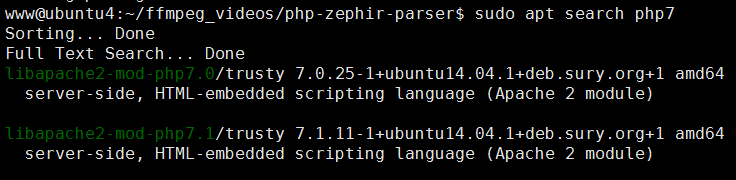
重新安装,则不会报错
www@ubuntu4:~$ sudo apt-get install php7.-dev gcc make re2c autoconf

Reading package lists... Done

Building dependency tree

Reading state information... Done

gcc is already the newest version.

gcc set to manually installed.

make is already the newest version.

re2c is already the newest version.

The following extra packages will be installed:

  automake autotools-dev debhelper dh-apparmor dh-php gettext intltool-debian

  libasprintf-dev libgettextpo-dev libgettextpo0 liblist-moreutils-perl

  libltdl-dev libmail-sendmail-perl libssl1. libsys-hostname-long-perl

  libtool libunistring0 m4 php-common php-pear php-xml php7.-cli

  php7.-common php7.-json php7.-opcache php7.-readline php7.-common

  php7.-xml pkg-php-tools po-debconf shtool xml2
开始编译
www@ubuntu4:~/ffmpeg_videos/php-zephir-parser$ sudo ./install

Generating parser...

Parser statistics:  terminals,  nonterminals,  rules

                    states,  parser table entries,  conflicts

Configuring for:

PHP Api Version:

Zend Module Api No:

Zend Extension Api No:

libtool: compile:  gcc -I. -I/home/www/ffmpeg_videos/php-zephir-parser -DPHP_ATOM_INC -I/home/www/ffmpeg_videos/php-zephir-parser/include
 -I/home/www/ffmpeg_videos/php-zephir-parser/main -I/home/www/ffmpeg_videos/php-zephir-parser -I/usr/include/php/20151012

 -I/usr/include/php//main -I/usr/include/php//TSRM -I/usr/include/php//Zend -I/usr/include/php//ext
-I/usr/include/php//ext/date/lib -DHAVE_CONFIG_H -march=native -mtune=native -O2 -fomit-frame-pointer -fvisibility=hidden -flto
 -c /home/www/ffmpeg_videos/php-zephir-parser/zephir_parser.c  -fPIC -DPIC -o .libs/zephir_parser.o
或者指定编译配置文件
$./install --phpize /usr/local/php-7.1./bin/phpize --php-config /usr/local/php-7.1./bin/php-config

....
See any operating system documentation about shared libraries for
more information, such as the ld(1) and ld.so(8) manual pages.
----------------------------------------------------------------------
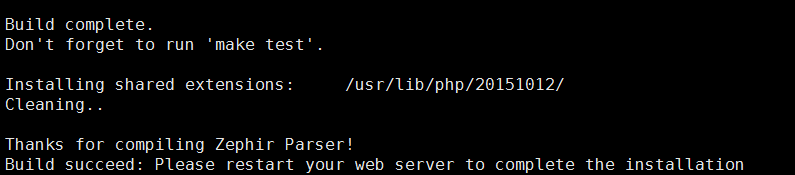
Build complete.
Don't forget to run 'make test'.
Installing shared extensions: /usr/local/php-7.1.11/lib/php/extensions/no-debug-non-zts-20160303/
Cleaning..
Thanks for compiling Zephir Parser!
Build succeed: Please restart your web server to complete the installation
编译完成
查找.so 文件路径
www@ubuntu4:~ sudo find / -name zephir_parser.so

/usr/lib/php//zephir_parser.so
配置php.ini 文件
sudo vim /opt/php-7.1./etc/php.ini
添加一下内容:
[Zephir Parser]

extension=/usr/lib/php//zephir_parser.so
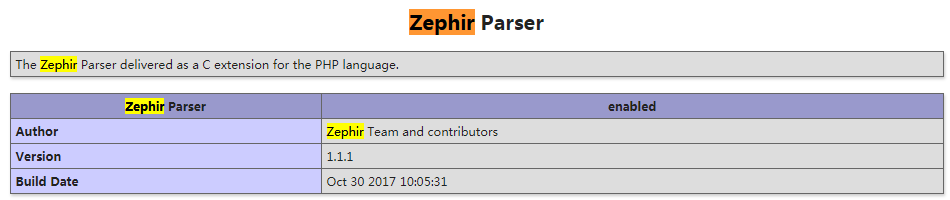
安装完毕
三、重新编译,出现同样的错误:
www@ubuntu4:~/ffmpeg_videos/zephir-framework/lib$ zephir build

────────────────────────────────────────────────────────────

  The Zephir Parser extension is not loaded.

  Note: Zephir no longer distributed with internal parser.

  To install latest stable Zephir Parser please refer to:

  https://github.com/phalcon/php-zephir-parser

────────────────────────────────────────────────────────────
好纠结啊,如何解决:
直接系统自动默认安装的
rm /usr/bin/php
做个软连接
sudo ln -s /opt/php-7.0./bin/php /usr/bin/php
继续,Ok 了:
www@ubuntu4:~/ffmpeg_videos/zephir-framework/zephirlib$ zephir build

Compiling...

Installing...

Extension installed!

Add extension=zephirlib.so to your php.ini
编译PHP7 如何使用 Cli 命令而不是软连接
root用户,sudo vim /etc/profile,添加PHP7编译的路径:
export PATH=$PATH:/usr/local/php-7.1.8/bin,执行source profile使生效
PHP7 学习笔记(七)如何使用zephir编译一个扩展记录的更多相关文章
- PHP7 学习笔记(十六)Yaconf 一个高性能的配置管理扩展
鸟哥博客原文:Yaconf – 一个高性能的配置管理扩展 什么是yaconf ? 它使用单独的一个配置目录(在yaconf.directory指定), 不和代码在一起.它在PHP启动的时候, 处理所有 ...
- Typescript 学习笔记七:泛型
中文网:https://www.tslang.cn/ 官网:http://www.typescriptlang.org/ 目录: Typescript 学习笔记一:介绍.安装.编译 Typescrip ...
- (转)Qt Model/View 学习笔记 (七)——Delegate类
Qt Model/View 学习笔记 (七) Delegate 类 概念 与MVC模式不同,model/view结构没有用于与用户交互的完全独立的组件.一般来讲, view负责把数据展示 给用户,也 ...
- Learning ROS for Robotics Programming Second Edition学习笔记(七) indigo PCL xtion pro live
中文译著已经出版,详情请参考:http://blog.csdn.net/ZhangRelay/article/category/6506865 Learning ROS forRobotics Pro ...
- python3.4学习笔记(七) 学习网站博客推荐
python3.4学习笔记(七) 学习网站博客推荐 深入 Python 3http://sebug.net/paper/books/dive-into-python3/<深入 Python 3& ...
- Go语言学习笔记七: 函数
Go语言学习笔记七: 函数 Go语言有函数还有方法,神奇不.这有点像python了. 函数定义 func function_name( [parameter list] ) [return_types ...
- iOS 学习笔记七 【博爱手把手教你使用2016年gitHub Mac客户端】
iOS 学习笔记七 [博爱手把手教你使用gitHub客户端] 第一步:首先下载git客户端 链接:https://desktop.github.com 第二步:fork 大神的代码[这里以我的代码为例 ...
- 【opencv学习笔记七】访问图像中的像素与图像亮度对比度调整
今天我们来看一下如何访问图像的像素,以及如何改变图像的亮度与对比度. 在之前我们先来看一下图像矩阵数据的排列方式.我们以一个简单的矩阵来说明: 对单通道图像排列如下: 对于双通道图像排列如下: 那么对 ...
- Linux学习笔记(七) 查询系统
1.查看命令 (1)man 可以使用 man 命令名称 命令查看某个命令的详细用法,其显示的内容如下: NAME:命令名称 SYNOPSIS:语法 DESCRIPTION:说明 OPTIONS:选项 ...
随机推荐
- C语言复制文件的两种简单的方法【从根本解决问题】
网上的方法大致有这样几种: 1.使用操作系统提供的复制文件的API 2.使用C语言本身提供的复制文件的函数 3.直接读写文件,从文件角度来操作,从而直接将一个文件复制 这里我们使用的就是这第三种. 复 ...
- Windows环境搭建mysql服务器
Windows环境搭建mysql服务器: 1.下载mysql-installer-community-5.7.3.0-m13.2063434697并安装 安装详细步骤>> 2.安装mys ...
- [CB]IPv6 在中国 - 大规模部署进行中 进展明显
IPv6 在中国 - 大规模部署进行中 进展明显 2019年02月04日 08:21 3078 次阅读 稿源:solidot 0 条评论 中国有着世界上最大的网民人口,但它的 IPv6 普及度却处于世 ...
- Jquery 组 checkbox双向控制与tr变色
<!DOCTYPE html><html lang="zh-cn"><head> <meta charset="utf-8&qu ...
- Python模块笔记
__name__属性 一个模块被另一个程序第一次引入时,其主程序将运行.如果我们想在模块被引入时,模块中的某一程序块不执行,我们可以用__name__属性来使该程序块仅在该模块自身运行时执行. #!/ ...
- C-Lodop获取打印机列表Create_Printer_List
C-Lodop获取打印机列表Create_Printer_List,此方法Lodop不支持,是C-Lodop特有的函数,客户端本地打印单独用c-lodop,或集中打印等,可以获得本机或云主机的打印机列 ...
- JTextPane或JTextPane设置了滚动条,文本增加后,滚动条自动下滑,追加文本的例子
http://zhizaibide1987.iteye.com/blog/1012955 https://zhidao.baidu.com/question/2116908942184706107.h ...
- JavaScript利用递归和循环实现阶乘
[实现方法] 1.利用while循环来做,当然for循环也可以. 2.递归 [代码内容] 偷懒,直接用onkeyup事件来限制来页面的输入 循环代码: //第一种方法 while循环 oCount.o ...
- C# 对象与JSON字符串互相转换的三种方式
C# 对象与JSON字符串互相转换的三种方式 JSON(JavaScript Object Notation, JS 对象标记) 是一种轻量级的数据交换格式. 关于内存对象和JSON字符串的相互转换, ...
- MT【1】终点在球面上的向量
解答: 评:最小值在Q为球心时取到,体现数学对称性的美!