
delphi Image32 路径
用 Image32的理由之一,也是路径这块做得比delphi(FMX)自带的要好,skia中支持svg,但对路径处理功能不够强大。VCL只能使用第三方库。
VCL如果要支持SVG,只有 Image32好点,SVGIconImageList 第三方库也使用 Image32.
unit uFrmPaths;

interface

uses

  Winapi.Windows, Winapi.Messages, System.SysUtils, System.Variants,

  System.Classes, Vcl.Graphics, Vcl.Controls, Vcl.Forms, Vcl.Dialogs, //

  System.Types, System.Math, Img32, Img32.Panels, Img32.Vector, Img32.Extra,

  Img32.Fmt.PNG, Img32.Draw, Img32.Text, Vcl.ComCtrls;

type

  TfrmPaths = class(TForm)

    TabControl1: TTabControl;

    procedure FormCreate(Sender: TObject);

    procedure TabControl1Change(Sender: TObject);

    procedure FormDestroy(Sender: TObject);

    procedure FormResize(Sender: TObject);

  private

    arial12: TFontCache;

    arial16: TFontCache;

    ImagePanel: TImage32Panel;

    procedure ImagePanelClick(Sender: TObject);

    procedure DoClosedPaths1;

    procedure DoClosedPaths2;

    procedure DoOpenPaths;

  end;

var

  frmPaths: TfrmPaths;

implementation

{$R *.dfm}

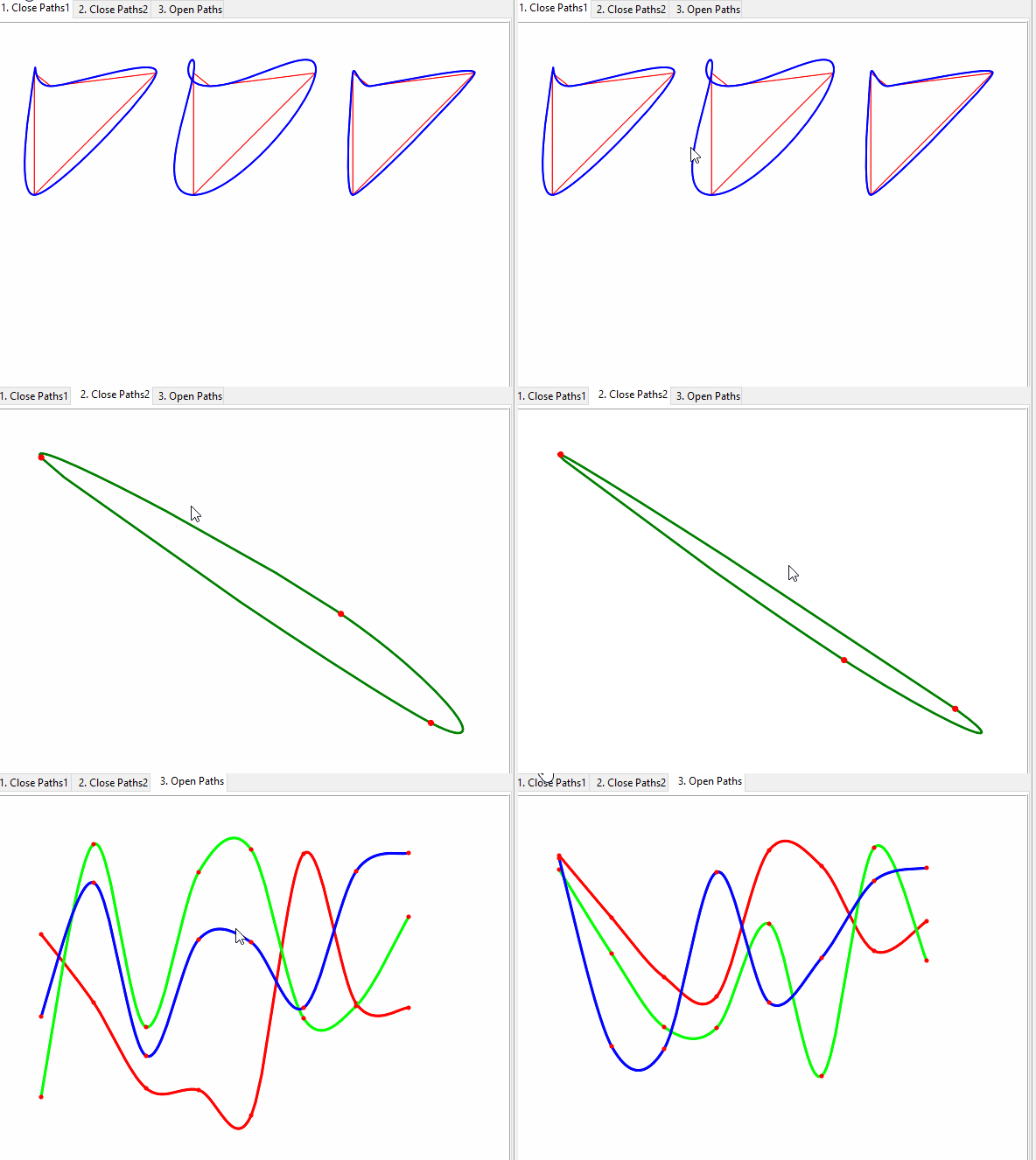
procedure TfrmPaths.DoClosedPaths1;

var

  margin, adjustX: integer;

  path, smoothedPath: TPathD;

  srcRec, spRec, dstRec: TRect;

  Scale, dx, dy: double;

  str: UnicodeString;

begin

  margin := DPIAware(20);

  path := MakePath([190, 120, 240, 160, 560, 120, 190, 490]); // Img32.Vector  数组

  // get the bounds of the smoothpath with the largest bounds

  smoothedPath := SmoothPath(path, true, -1); // 路径点,是否闭合,张力    Img32.Extra

  spRec := GetBounds(smoothedPath);           // Img32.Vector

  // get dstRec

  dstRec := ImagePanel.InnerClientRect;               // 绑定区域

  System.Types.InflateRect(dstRec, -margin, -margin); // 缩小区域

  dstRec.Width := dstRec.Width div 3 - margin;        // 1/3 宽度,后面要显示3组图形

  inc(dstRec.Top, DPIAware(20));                      // making sure there's room for text

  dec(dstRec.Bottom, DPIAware(20));                   // making sure there's room for text

  adjustX := dstRec.Width + margin;

  // 绘制文本

  str := 'SmoothPath function - using different tensions(不同张力)'; // 这里的 中文 如果不能正常显示,是因为字体问题,请参考:FormCreate中描述

  DrawText(ImagePanel.Image, dstRec.Left, dstRec.Top - DPIAware(20), str, arial16);

  Scale := Min(dstRec.Width / spRec.Width, dstRec.Height / spRec.Height); // 最小比例

  path := ScalePath(path, Scale); // 根据比例缩放路径

  dx := dstRec.Left - spRec.Left * Scale;

  dy := dstRec.Top - spRec.Top * Scale;

  path := TranslatePath(path, dx, dy); // 平移路径

  srcRec := GetBounds(path);

  smoothedPath := SmoothPath(path, true, 0); // tensions :0

  // 第1组图形绘制

  DrawLine(ImagePanel.Image, path, DPIAware(1), clRed32, esClosed); // 绘制封闭的红线

  DrawLine(ImagePanel.Image, smoothedPath, DPIAware(2), clBlue32, esClosed); // 绘制封闭的蓝线

  DrawText(ImagePanel.Image, srcRec.Left, srcRec.Bottom + DPIAware(20), '0', arial16); // 绘制文字

  // ====

  path := TranslatePath(path, adjustX, 0);    // 平移路径

  TranslateRect(srcRec, adjustX, 0);          // 平均区域

  smoothedPath := SmoothPath(path, true, -1); // tensions :-1

  // 第2组图形绘制

  DrawLine(ImagePanel.Image, path, DPIAware(1), clRed32, esClosed); // 绘制封闭的红线

  DrawLine(ImagePanel.Image, smoothedPath, DPIAware(2), clBlue32, esClosed); // 绘制封闭的蓝线

  DrawText(ImagePanel.Image, srcRec.Left, srcRec.Bottom + DPIAware(20), '-1', arial16); // 绘制文字

  //

  path := TranslatePath(path, adjustX, 0);

  TranslateRect(srcRec, adjustX, 0);

  smoothedPath := SmoothPath(path, true, 0.5); // tensions :0.5

  // 第2组图形绘制

  DrawLine(ImagePanel.Image, path, DPIAware(1), clRed32, esClosed); // 绘制封闭的红线

  DrawLine(ImagePanel.Image, smoothedPath, DPIAware(2), clBlue32, esClosed); // 绘制封闭的蓝线

  DrawText(ImagePanel.Image, srcRec.Left, srcRec.Bottom + DPIAware(20), '0.5', arial16); // 绘制文字

end;

procedure TfrmPaths.DoClosedPaths2;

var

  i, j, maxX, maxY: integer;

  path, smoothedPath: TPathD;

  dstRec, srcRec: TRect;

  scaleX, scaleY: double;

const

  margin = 50;

  ptCount = 3;

begin

  SetLength(path, ptCount); // 3个点

  dstRec := ImagePanel.InnerClientRect;               // 客户区域

  System.Types.InflateRect(dstRec, -margin, -margin); // 缩小 margin

  maxX := dstRec.Width;

  maxY := dstRec.Height;

  for i := 0 to ptCount - 1 do

    path[i] := PointD(Random(maxX), Random(maxY)); // 随机产生3个点

  smoothedPath := SmoothPath(path, true, -0.5);    // 路径点,是否闭合,张力    Img32.Extra

  srcRec := GetBounds(smoothedPath);               // Img32.Vector

  scaleX := maxX / srcRec.Width;

  scaleY := maxY / srcRec.Height;

  path := ScalePath(path, scaleX, scaleY); // 根据比例缩放路径

  // repeat smoothing now that the path has been properly scaled

  smoothedPath := SmoothPath(path, true, -0.5);

  srcRec := GetBounds(smoothedPath);

  path := TranslatePath(path, margin - srcRec.Left, margin - srcRec.Top); // 路径平移

  smoothedPath := TranslatePath(smoothedPath, margin - srcRec.Left, margin - srcRec.Top);

  DrawLine(ImagePanel.Image, smoothedPath, DPIAware(2.5), clGreen32, esPolygon); // 绘制平滑的闭合路径线

  for j := 0 to High(path) do

  begin

    DrawPoint(ImagePanel.Image, path[j], DPIAware(3.5), clRed32); // 绘制点

    DrawText(ImagePanel.Image, path[j].X - 50, path[j].Y + 0, Format('[%f,%f]', [path[j].X, path[j].Y]), arial16); // 绘制文字

  end;

  DrawText(ImagePanel.Image, 30, 30, '点击后重新生成', arial16); // 绘制文字

end;

procedure TfrmPaths.DoOpenPaths;

var

  i, j, dx: integer;

  paths, smoothedPaths: TPathsD;

  rec: TRect;

const

  margin = 50;

  ptCount = 8;

  pathCount = 3;

begin

  rec := ImagePanel.InnerClientRect;               // 客户区域

  System.Types.InflateRect(rec, -margin, -margin); // 缩小 margin

  dx := rec.Width div (ptCount);                   // 点间距

  SetLength(paths, pathCount);         // 3个路径

  SetLength(smoothedPaths, pathCount); // 3个平滑路径

  for i := 0 to High(paths) do

  begin

    SetLength(paths[i], ptCount); // 每条路径 N 个点

    for j := 0 to High(paths[i]) do

      paths[i][j] := PointD(rec.Left + j * dx, rec.Bottom - Random(rec.Height)); // 每个点 随机值

  end;

  for i := 0 to High(smoothedPaths) do

    smoothedPaths[i] := SmoothPath(paths[i], false, 0); // 生成每条路径的平滑路径

  for i := 0 to High(smoothedPaths) do

  begin

    DrawLine(ImagePanel.Image, smoothedPaths[i], DPIAware(3), RainbowColor(i / pathCount), esSquare); // 绘制平滑路径 (非闭合)

    for j := 0 to High(paths[i]) do

      DrawPoint(ImagePanel.Image, paths[i][j], DPIAware(2.5), clRed32); // 绘制点

  end;

  DrawText(ImagePanel.Image, 30, 30, '点击后重新生成', arial16); // 绘制文字

end;

procedure TfrmPaths.FormCreate(Sender: TObject);

const

  // C_FontName='Arial';           //这个显示不了汉字

  // C_FontName='Arial Unicode MS';//名称 可以从 office Word字体下拉框查找(可以显示汉字)   [控制面板\所有控制面板项\字体]

  C_FontName = '方正舒体'; // 默认找不到字体(需要修改 TFontReader.Load 中 CreateFontIndirect )

var

  arialFont: TFontReader;

begin

  self.BorderStyle := bsNone;

  // Img32.Text中   TFontReader.Load 中 CreateFontIndirect 默认 logFont.lfCharSet:ANSI_CHARSET,很多中文字体是找不到的)

  // 因此,要将   logFont.lfCharSet= GB2312_CHARSET 即可找到中文字体 (如:方正舒体)

  FontManager.Load(C_FontName, 800);

  arialFont := FontManager.GetFont(C_FontName);

  arial12 := TFontCache.Create(arialFont, DPIAware(12));

  arial16 := TFontCache.Create(arialFont, DPIAware(16));

  ImagePanel := TImage32Panel.Create(self);

  ImagePanel.Parent := TabControl1;

  ImagePanel.Align := alClient;

  ImagePanel.OnClick := ImagePanelClick;

  ActiveControl := ImagePanel;

  ImagePanel.BorderWidth := 0; // 默认有14的边框.

  with ImagePanel.InnerClientRect do

    ImagePanel.Image.SetSize(Width, Height);

  TabControl1Change(nil);

end;

procedure TfrmPaths.FormDestroy(Sender: TObject);

begin

  arial12.Free;

  arial16.Free;

end;

procedure TfrmPaths.FormResize(Sender: TObject);

begin

  if Assigned(ImagePanel) then

  begin

    with ImagePanel.InnerClientRect do

      ImagePanel.Image.SetSize(Width, Height);

    TabControl1Change(nil);

  end;

end;

procedure TfrmPaths.ImagePanelClick(Sender: TObject);

begin

  if TabControl1.TabIndex <> 0 then

    TabControl1Change(nil);

end;

procedure TfrmPaths.TabControl1Change(Sender: TObject);

begin

  ImagePanel.Scale := 1.0;

  ImagePanel.Image.Clear;

  case TabControl1.TabIndex of

    0:

      DoClosedPaths1;

    1:

      DoClosedPaths2;

  else

    DoOpenPaths;

  end;

end;

end.
看看效果:
欢迎微信搜一搜 IT软件部落 关注公众号,你可以了解更详细的内容

欢儿微信扫码关注 IT软件部落 公众号,你可以了解更详细的内容

delphi Image32 路径的更多相关文章
- delphi android路径 TPath 文件路径,文件管理
获取Android相关文档路径 delphi 新路径.文件功能 IOUtils单元,文件路径,文件管理 http://docwiki.embarcadero.com/RADStudio/Berlin/ ...
- Delphi - 本地路径的创建、清空本地指定文件夹下的文件
本地路径的创建 在做下载操作时,我们一般先把文件下载到本地指定的路径下,然后再做其他使用. 为了防止程序出现异常,我们通常需要先判断本地是否存在指定的路径. 以C盘Tmp文件夹为例,我们可以这样做,代 ...
- delphi 相对路径
..代表上级目录 .代表当前目录 \代表目录分隔 ..\..\表上上一级目录
- Delphi 文件操作(路径、目录)
Delphi利用系统环境变量获取常用系统目录 //譬如 %WINDIR% 是表示系统目录的系统变量, 可以这样获取: var s: string; begin s := GetEnvironmentV ...
- 使用 InstallShield 制作 Delphi 软件安装包
软件版本: InstallShield 12 Delphi 5/7 SQL Server 2005 一.配置软件信息 二.软件安装的需求配置 三.安装架构 四.安装需要的文件 软件的安装路径.可执行文 ...
- 在Delphi中编写res文件
delphiimagedosinterfaceborland脚本先用记事本编写一个rc的文件. 如内容为: _Comms RCData Comms.jpg Comms.jpg为图片名称, 然后在这个r ...
- Delphi Bpl包学习
对于BPL包,我个人理解是:就是一种封装方式,和DLL,EXE类似,把代码放到包(package)里面保存而已. 一.先说说如何创建BPL包 1. 打开delphi IDE(delphi7 为例) ...
- 在Delphi中编辑res文件
先用记事本编写一个rc的文件.如内容为:_Comms RCData Comms.jpg Comms.jpg为图片名称,然后在这个rc文件和图片拷贝到delphi安装路径的bin文件夹里面,选中这两个文 ...
- Delphi BusinessSkinForm使用说明
1.先放bsBusinessSkinForm.bsSkinData.bsStoredSkin各一个到窗体上 2.修改bsBusinessSkinForm的SkinData属性为bsSkinData1 ...
- Object Pascal对象模型中构造函数之研究
http://www.delphi2007.net/delphiblog/html/delphi_2004511950333715.html 前言 近期,一直在使用 C++ 与 Object Pasc ...
随机推荐
- zabbix基本概念
Zabbix是一个企业级的.开源的.分布式监控解决方案. Zabbix可以监控网络和服务的监控状况. Zabbix利用灵活的告警机制,允许用户对事件发送基于Email的告警. 这样可以保证快速的对问题 ...
- 折腾 Quickwit,Rust 编写的分布式搜索引擎-官方教程
快速上手 在本快速入门指南中,我们将安装 Quickwit,创建一个索引,添加文档,最后执行搜索查询.本指南中使用的所有 Quickwit 命令都在 CLI 参考文档 中进行了记录. https:// ...
- 微信小程序之无需服务端支持实现内容安全检查
微信小程序之无需服务端支持实现内容安全检查 微信小程序审核未通过,原因如下: 为避免您的小程序被滥用,请你完善内容审核机制,如调用小程序内容安全API,或使用其他技术.人工审核手段,过滤色情.违法等有 ...
- elasticsearch单机版安装及安装过程踩的坑整理
elasticsearch单机版安装及安装过程踩的坑整理 环境及版本 Linux版本:centos7.3 JDK版本:1.8 Elasticsearch版本: Linux用户:esuser 说明:因为 ...
- 2023/11/15 NOIP 模拟赛
T1 游戏 标签 尺取 线段树 单调队列 线段树进阶 思路 抽象题意,相当于有 \(t\) 个点,有 \(n\) 个下接 \(x\) 轴的矩形. 首先明显可以按照 \(c\) 排序,然后尺取. 写法 ...
- EF Core报错“Format of the initialization string does not conform to specification starting at index 0.”
问题分析: 今天在EF Core数据库迁移的过程中无意中发现此错误,我的项目仅仅复制黏贴了配置文件而已,自此发现是数据库配置文件json在作祟. 对比了下发现是.json文件没有被设置"复制 ...
- .NET 8 微软免费开源的 Blazor UI 组件库
前言 .NET 8 的发布,微软推出了官方免费且开源的 Blazor UI 组件库 -- Fluent UI Blazor. 组件库提供了Web应用程序所需的工具,确保应用程序能够与 Microsof ...
- CSS – Box Shadow & Text Shadow
前言 之前在 CSS – W3Schools 学习笔记 (3) 介绍过这个功能, 但一直不熟练. 每次用都卡卡的, 估计是没有写一篇独立的笔记的缘故. 特此写一篇. Text Shadow 下面这个是 ...
- 微信小程序开发疑难
1.开发者工具在小程序webview中注入wx时会提示token过期,但真机正常
- C++ 指针基础
指针 指针具有强大的能力,其本质是协助程序员完成内存的直接操作 指针: 特定类型数据在内存中的存储地址,即内存地址 指针只是一个逻辑概念,其实际应用是:指针变量 语法 * 符号有两种含义: 声明时:* ...