
ISE主备注册和同步
Synchronize Primary and Secondary Cisco ISE Nodes
You can make configuration changes to Cisco ISE only through the Primary PAN. The configuration changes get replicated to all the secondary nodes. If, for some reason, this replication does not occur properly, you can manually synchronize the Secondary PAN with the Primary PAN.
您只能通过Primary PAN(Policy Administration Node)对Cisco ISE进行配置更改。 配置更改将复制到所有Secondary节点。 如果由于某种原因,此复制未正确发生,您可以手动将Secondary PAN与Primary PAN同步。
之前遇到过的情况:当Secondary PAN与Primary PAN注册或者同步出现故障时,应该是无法点击Syncup按钮的。
Before you begin
You must click the Syncup button to force a full replication if the Sync Status is set to Out of Sync or if the Replication Status is Failed or Disabled.
如果“同步状态(Sync Status)”设置为“不同步(Out of Sync)”或“复制状态(Replication Status)”为“失败(Failed)”或“已禁用(Disable)”,则必须单击“同步(Syncup)”按钮以强制执行完全复制。
Procedure
Step 1 Log in to the Primary PAN.
Step 2 Choose Administration > System > Deployment.
Step 3 Check the check box next to the node that you want to synchronize with the Primary PAN, and click Syncup to force a full database replication. 选择你想要和Primary PAN同步的节点的勾选框,并且点击Syncup强制执行完全复制。
Change Node Personas and Services
You can edit the Cisco ISE node configuration to change the personas and services that run on the node.
您可以编辑Cisco ISE节点配置以更改在节点上运行的角色和服务。
Before you begin
• When you enable or disable any of the services that run on a Policy Service node or make any changes to a Policy Service node, you will be restarting the application server processes on which these services run. Expect a delay while these services restart.
• Due to this delay in restart of services, auto-failover if enabled in your deployment, might get initiated. To avoid this, make sure that the auto-failover configuration is turned off.
•启用或禁用在策略服务节点上运行的任何服务或对策略服务节点进行任何更改时,您将重新启动运行这些服务的应用程序服务器进程。 这些服务重新启动时会出现延迟。
•由于服务重启的延迟,如果在部署中启用了自动故障转移,则可能会启动。 要避免这种情况,请确保已关闭自动故障转移配置。
Secondary Cannot Register
Procedure
Step 1 Log in to the Primary PAN.
Step 2 Choose Administration > System > Deployment.
Step 3 Check the check box next to the node whose personas or services you want to change, and then click Edit.
Step 4 Choose the personas and services that you want.
Step 5 Click Save.
Step 6 Verify receipt of an alarm on your Primary PAN to confirm the persona or service change. If the persona or service change is not saved successfully, an alarm is not generated.
验证在主PAN上收到警报以确认角色或服务更改。 如果未成功保存角色或服务更改,则不会生成警报(这个告警的意思应该是告知你成功了的情况,不是说不正常的告警信息)。
其他情况下案例:
I had the same thing happen in my ISE 1.4 (two-node deployment). My secondary ISE node stayed in "Not in Sync". I opened a case with Cisco and this is what I had to do to cure it.
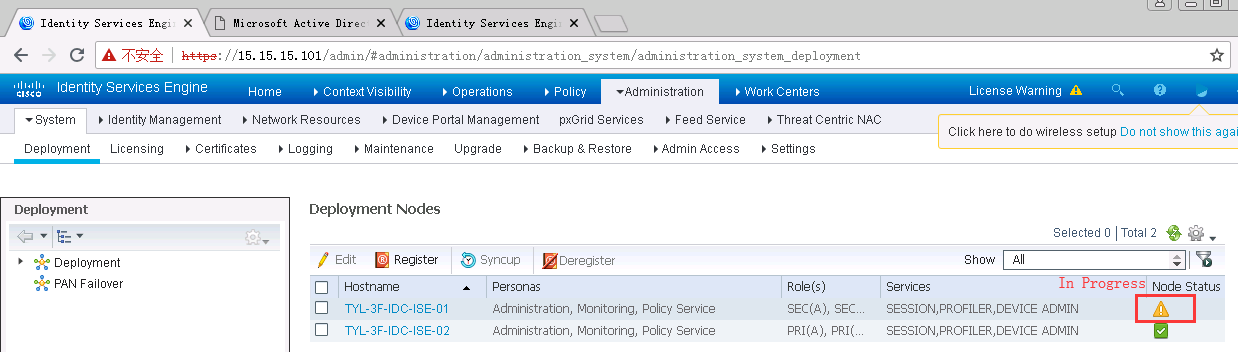
1. Make sure both ISE servers are handling policy service. Do not proceed until you are sure both ISE servers are providing policy service. If they are not both handling policy you will need to open a maintenance window with your organization.
第一点需要确认的是ISE都设置policy service。
2. From the CLI.
a. stop the ISE application. "app stop ise." <----------停止ISE应用
b. reload the application. "reload." My primary ISE server required 35 minutes to reload. Yours may take longer or shorter. <-----------然后通过reload命令重启ISE去开启应用。这个过程比较久,一般在40分钟左右。
3. When the Primary has come back up make sure it is handling policy services. When you have verified it is then…
然后操作的是解除注册(该过程需要几分钟,可能被解除的ISE需要重启,过程需要花费一定的时间)>然后等待ISE启动完成后,在重新注册这个ISE 节点,观察情况,这个注册过程正常情况下不需要很久,但是还是要等待一段时间,可能10分钟左右。看具体的配置情况,在两边配置一样的情况下,可能时间短。
a. Go to Administration > Deployment.
b. Deregister the secondary ISE server. Mine took about 5 minutes to complete.
c. Then Register the secondary ISE node again. You will need the FQDN of the secondary ISE server and login credentials for it. The Register process took about 40 minutes for my deployment. You can monitor the process from the CLI of the secondary node with the command "show app status ISE".
d. Check your "External Identity Sources" after this process. I had to re-connect my secondary node to Active Directory.
Again, my deployment is ISE 1.4, but my problem was exactly what you are describing.
类似案例:
新部署的ISE,Secondary不能注册或同步到Primary,两个ISE的硬件,软件版本,基础配置(除了hostname等等)都一样。DNS配置了,同一个DNS server,NTP同步时间也是从一个NTP server,双方可以通过IP地址或域名互访,但是Secondary就是无法注册或同步到Primary(开始同步之前,确认了Secondary是standalone的模式,且后续可以看到角色已经变成了Secondary,但等待3-4小时之后,就会出现出现如下的报错!)
Sync Node Registration or Sync failed.Please deregister and register the Status:node again
尝试过的操作:
1、切换主备
2、重启设备(两台)
3、查看互联的SW,可以看到两台ISE
解决方法:
1、尝试过开启两台ISE的DNS,单纯开启这个,貌似没什么作用。
2、最终,还是在DNS Server上配置了域名反向查找。再次尝试之后,一会儿就注册并同步了。
Reverse DNS Lookup Configuration
Configure reverse DNS lookup for all Cisco ISE nodes in your distributed deployment in the DNS server(s). Otherwise, you may run into deployment-related issues after upgrade (“ISE Indexing Engine” status turns to “not running”). The secondary PAN cannot join the primary PAN to make a cluster for ISE Indexing engine if reverse DNS is not configured (displays error in VCS pages).
The ise-elasticsearch.log file on secondary PAN will include the SSL Exception “No subject alternative name present”, if reverse DNS is missing.
https://www.cisco.com/c/en/us/td/docs/security/ise/2-3/release_notes/ise23_rn.html#pgfId-781002
配置反向DNS查找:(AD/WIN server 2008/2012)
https://www.petri.com/configure-forward-reverse-lookup-zones-in-windows-server-2008-r2-2012
ISE注册同步的关键点:
1、NTP/time,timezone
2、DNS(include forward & reverse)
3、primary & secondary可达
ISE主备注册和同步的更多相关文章
- MySQL主主互备不同步的解决方法
MySQL主主互备不同步 首先在服务器上执行show slave satus;可以看到很多同步的参数: Master_Log_File: SLAVE中的I/O线程当前正在读取的主服务器二进制日志文件的 ...
- 文件系统:drbd主备服务器文件同步
一. DRBD介绍 DRBD是一种块设备,可以被用于高可用(HA)之中.它类似于一个网络RAID-1功能.当你将数据写入本地 文件系统时,数据还将会被发送到网络中另一台主机上.以相同的形式记录在一个文 ...
- mysql数据库负载均衡高可用之主从、主主备份,实时同步
一:MySQL Replication 什么是MySQL Replication Replication可以实现将数据从一台数据库服务器(master)复制到一或多台数据库服务器(slave) 默认情 ...
- MySQL主从复制,主主复制,半同步复制
实验环境: 系统:CentOS Linux release 7.4.1708 (Core) mariadb:mariadb-server-5.5.56-2.el7.x86_64 node1:172.1 ...
- windows下mysql的数据主主同步
mysql主主备份: 保证各服务器上的数据库中的数据一致,因此需要开启数据库同步机制.由于是一整套系统,并且系统内含数据库.由于任何一台服务器都有可能被选中,因此要让所有的数据库上的数据都是最新的,任 ...
- 配置mysql5.5主从复制、半同步复制、主主复制
mysql主服务器 192.168.8.40 mysql从服务器 192.168.8.41 全新配置过程(主和从数据库都没有数据): 主从复制主服务器设置: 1.改server-id 2.启 ...
- MySQL主从介绍 准备工作 配置主 配置从 测试主从同步
配置主: • 安装mysql • 修改my.cnf,增加server-id=130和log_bin=xiaobo1 • 添加环境变量 Vim /root/.bash_profile PATH=$PAT ...
- 搭建MySQL的主从、半同步、主主复制架构
复制其最终目的是让一台服务器的数据和另外的服务器的数据保持同步,已达到数据冗余或者服务的负载均衡.一台主服务器可以连接多台从服务器,并且从服务器也可以反过来作为主服务器.主从服务器可以位于不同的网络拓 ...
- Linux centosVMware MySQL主从介绍、准备工作、配置主、配置从、测试主从同步
一.MySQL主从介绍 MySQL主从又叫做Replication.AB复制.简单讲就是A和B两台机器做主从后,在A上写数据,另外一台B也会跟着写数据,两者数据实时同步的 MySQL主从是基于binl ...
随机推荐
- 题解【SP1716】GSS3 - Can you answer these queries III
题目描述 You are given a sequence \(A\) of \(N (N <= 50000)\) integers between \(-10000\) and \(10000 ...
- centos 安装mindoc 二进制安装
自建 文档管理系统或者说 wiki系统 mindoc官网: https://www.iminho.me/#%E6%BC%94%E7%A4%BA mindoc github页面:https://gith ...
- CentOS安装docker,及其基本操作
CentOS安装docker,及其基本操作 一.安装docker Docker要求运行在Centos 7上,要求系统为64位,系统内核版本3.10以上 1.uname -an 查看当前系统版本 2.y ...
- EQ实现
原理参考: https://www.cnblogs.com/fellow1988/p/9189338.html https://www.cnblogs.com/fellow1988/p/9136346 ...
- CentOS6.5-6.9安装 docker
安装docker yum -y install docker-io 备注:查看内核版本uname -r ;卸载docker版本命令 yum remove docker 更改配置文件 vim /etc/ ...
- QT(mingw) 编译 boost
参考链接 :https://www.cnblogs.com/zhangnianyong/p/6546712.html Qt为mingw 5.8.0.Boost为1.62.0. 1.安装qt-opens ...
- mysql忘记密码,更改密码
对MySQL有研究的读者,可能会发现MySQL更新很快,在安装方式上,MySQL提供了两种经典安装方式:解压式和一键式,虽然是两种安装方式,但我更提倡选择解压式安装,不仅快,还干净.在操作系统上,My ...
- 编译和链接(lib和dll区别)(转载)
1.头文件并不参加链接和编译.编译器第一步要做的就是简单的把头文件在包含它的源文件中展开.不知你是否能理解这句话.也就是头文件里面有什么内容,通通把它移到包含这个头文件的源文件里.(我觉得这是个很重要 ...
- 【visio】数据可视化 - 形状数据
visio在对数据处理方面也是有一整套的设施,用户可以用visio存储.管理对象数据,利用数据驱动图形设计,让数据形象化,并在团队沟通的时候清晰地展示数据,沟通数据. 1.属性 每个图形都可以设置多个 ...
- Bug搬运工-CSCux99539:Intermittent error message "Power supply 2 failed or shutdown"
Description Symptom:Following error messages will be seen intermittently.%PFMA-2-PS_FAIL: Power supp ...