
io.spring.platform继承方式和import方式更改依赖版本号的问题
使用io.spring.platform时,它会管理各类经过集成测试的依赖版本号。
但有的时候,我们想使用指定的版本号,这个时候就需要去覆盖io.spring.platform的版本号。
前面的文章总结过,使用io.spring.platform有两种方式,一种是继承,一种是导入。
一、先来看继承的方式:
io.spring.platform使用Brussels-SR7版本
<parent>

  <groupId>io.spring.platform</groupId>

  <artifactId>platform-bom</artifactId>

  <version>Brussels-SR7</version>

</parent>
我们想使用阿里的easyexcel框架,2.0.5版本
<dependency>

  <groupId>com.alibaba</groupId>

  <artifactId>easyexcel</artifactId>

  <version>2.0.5</version>

</dependency>
这个时候就出现了依赖问题,easyexcel 2.0.5版本会依赖poi 3.17版本,而io.spring.platform管理的依赖却是3.15版本。
由于依赖都是io.spring.platform管理的,所以打包时会强制使用poi 3.15版本,这会导致代码执行时找不到对应的新版本class,执行失败。
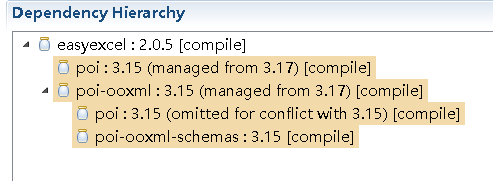
在继承方式使用io.spring.platform时,解决方法也比较简单,覆盖io.spring.platform对poi的版本号管理即可
<properties>

  <poi.version>3.17</poi.version>

</properties>
这个时候在来看依赖关系,发现poi的版本引入变成了3.17
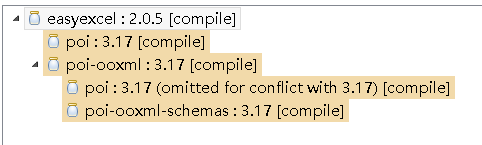
这样就解决了问题。
附上完整pom.xml
<project xmlns="http://maven.apache.org/POM/4.0.0" xmlns:xsi="http://www.w3.org/2001/XMLSchema-instance"

  xsi:schemaLocation="http://maven.apache.org/POM/4.0.0 http://maven.apache.org/xsd/maven-4.0.0.xsd">

  <modelVersion>4.0.0</modelVersion>

  <groupId>com</groupId>

  <artifactId>springboot-dependency7</artifactId>

  <version>0.0.1-SNAPSHOT</version>

  <packaging>jar</packaging>

  <name>springboot-dependency7</name>

  <url>http://maven.apache.org</url>

  <parent>

    <groupId>io.spring.platform</groupId>

    <artifactId>platform-bom</artifactId>

    <version>Brussels-SR7</version>

  </parent>

  <properties>

    <project.build.sourceEncoding>UTF-8</project.build.sourceEncoding>

    <poi.version>3.17</poi.version>

  </properties>

  <dependencies>

    <dependency>

      <groupId>junit</groupId>

      <artifactId>junit</artifactId>

      <scope>test</scope>

    </dependency>

    <dependency>

      <groupId>com.alibaba</groupId>

      <artifactId>easyexcel</artifactId>

      <version>2.0.5</version>

    </dependency>

  </dependencies>

  <build>

    <plugins>

      <plugin>

        <groupId>org.springframework.boot</groupId>

        <artifactId>spring-boot-maven-plugin</artifactId>

        <configuration>

          <mainClass>com.springboot_dependency7.main.Applicaiton</mainClass>

        </configuration>

      </plugin>

    </plugins>

  </build>

</project>
二、再来看import的方式
<dependencyManagement>

  <dependencies>

    <dependency>

      <groupId>io.spring.platform</groupId>

      <artifactId>platform-bom</artifactId>

      <version>Brussels-SR7</version>

      <type>pom</type>

      <scope>import</scope>

    </dependency>

  </dependencies>

</dependencyManagement>
同样引入easyexcel 2.0.5依赖
<dependency>

  <groupId>com.alibaba</groupId>

  <artifactId>easyexcel</artifactId>

  <version>2.0.5</version>

</dependency>
这个时候poi的版本被强制使用3.15
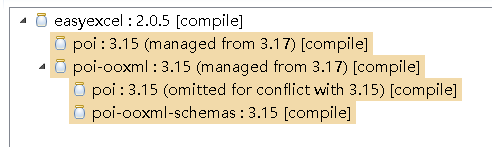
要覆盖io.spring.platform的版本号需要在pom.xml里dependencyManagement节点io.spring.platform引入的前面加上poi的引入
<dependencyManagement>

  <dependencies>

    <dependency>

      <groupId>org.apache.poi</groupId>

      <artifactId>poi</artifactId>

      <version>3.17</version>

    </dependency>

    <dependency>

      <groupId>org.apache.poi</groupId>

      <artifactId>poi-ooxml</artifactId>

      <version>3.17</version>

    </dependency>

    <dependency>

      <groupId>io.spring.platform</groupId>

      <artifactId>platform-bom</artifactId>

      <version>Brussels-SR7</version>

      <type>pom</type>

      <scope>import</scope>

    </dependency>

  </dependencies>

</dependencyManagement>
再来看poi的依赖
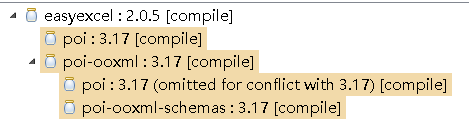
版本已经变成了3.17,解决问题。
附上完整pom.xml
<project xmlns="http://maven.apache.org/POM/4.0.0" xmlns:xsi="http://www.w3.org/2001/XMLSchema-instance"

  xsi:schemaLocation="http://maven.apache.org/POM/4.0.0 http://maven.apache.org/xsd/maven-4.0.0.xsd">

  <modelVersion>4.0.0</modelVersion>

  <groupId>com</groupId>

  <artifactId>springboot-dependency8</artifactId>

  <version>0.0.1-SNAPSHOT</version>

  <packaging>jar</packaging>

  <name>springboot-dependency8</name>

  <url>http://maven.apache.org</url>

  <properties>

    <project.build.sourceEncoding>UTF-8</project.build.sourceEncoding>

  </properties>

  <dependencyManagement>

    <dependencies>

      <dependency>

        <groupId>org.apache.poi</groupId>

        <artifactId>poi</artifactId>

        <version>3.17</version>

      </dependency>

      <dependency>

        <groupId>org.apache.poi</groupId>

        <artifactId>poi-ooxml</artifactId>

        <version>3.17</version>

      </dependency>

      <dependency>

        <groupId>io.spring.platform</groupId>

        <artifactId>platform-bom</artifactId>

        <version>Brussels-SR7</version>

        <type>pom</type>

        <scope>import</scope>

      </dependency>

    </dependencies>

  </dependencyManagement>

  <dependencies>

    <dependency>

      <groupId>junit</groupId>

      <artifactId>junit</artifactId>

      <scope>test</scope>

    </dependency>

    <dependency>

      <groupId>com.alibaba</groupId>

      <artifactId>easyexcel</artifactId>

      <version>2.0.5</version>

    </dependency>

  </dependencies>

  <build>

    <plugins>

      <plugin>

        <groupId>org.springframework.boot</groupId>

        <artifactId>spring-boot-maven-plugin</artifactId>

        <configuration>

          <mainClass>com.springboot_dependency8.main.Applicaiton</mainClass>

        </configuration>

      </plugin>

    </plugins>

  </build>

</project>
io.spring.platform继承方式和import方式更改依赖版本号的问题的更多相关文章
- spring-boot-dependencies、spring-boot-starter-parent、io.spring.platform详解
上一篇文章介绍了springboot依赖版本号管理的几种方式,现在来详细分析一下spring-boot-dependencies.spring-boot-starter-parent.io.sprin ...
- springboot依赖的一些配置:spring-boot-dependencies、spring-boot-starter-parent、io.spring.platform
springboot里会引入很多springboot starter依赖,这些依赖的版本号统一管理,springboot有几种方案可以选择. 一.spring-boot-dependencies 有两 ...
- 覆盖io.spring.platform管理的版本号
使用io.spring.platform时,它会管理各类经过集成测试的依赖版本号.想要覆盖其中某个依赖的版本号个: https://www.cnblogs.com/ld-mars/p/11818252 ...
- CSS的导入方式:link与import方式的区别
在前端开发中,加载CSS样式文件有两种方式:link方式与import方式,它们之间的区别主要有以下几点: 1.兼容性不一样 link是一个HTML标签,所以它不存在兼容性问题,而import方式则具 ...
- spring定时任务的几种实现方式
Spring定时任务的几种实现 近日项目开发中需要执行一些定时任务,比如需要在每天凌晨时候,分析一次前一天的日志信息,借此机会整理了一下定时任务的几种实现方式,由于项目采用spring框架,所以我都将 ...
- Spring Boot开启的 2 种方式
Spring Boot依赖 使用Spring Boot很简单,先添加基础依赖包,有以下两种方式 1. 继承spring-boot-starter-parent项目 <parent> < ...
- Elasticsearch学习(3) spring boot整合Elasticsearch的原生方式
前面我们已经介绍了spring boot整合Elasticsearch的jpa方式,这种方式虽然简便,但是依旧无法解决我们较为复杂的业务,所以原生的实现方式学习能够解决这些问题,而原生的学习方式也是E ...
- Spring创建JobDetail的两种方式
一.Spring创建JobDetail的两种方式 二.整合方式一示例步骤 1.将spring核心jar包.quartz.jar和Spring-context-support.jar导入类路径. 2.编 ...
- Spring Boot开启的2种方式
Spring Boot依赖 使用Spring Boot很简单,先添加基础依赖包,有以下两种方式 1. 继承spring-boot-starter-parent项目 <parent> < ...
随机推荐
- HTML - 文本标签相关
<html> <head></head> <body> <!-- 标题标签 : h1到h6, 文字大小依次变小, 加粗显示, 自带换行 标签中的部 ...
- spark Infinate 的处理
去掉infinity数据的方法: absperrordf_rdd = absperrordf.rdd.filter(lambda x: (np.isinf(float(x.avgperror)) == ...
- 19-11-10-Night
关于$Miemeng$,它死了. 大家有没有记得我在暑假里曾经写过一个著名模数? const int Mod=998224353; 现在有续集了(捂脸)(改不过题.jpg) const int Mod ...
- [洛谷P2472] [SCOI2007]蜥蜴
题目链接: 蜥蜴 题目分析: 一道网络流,先来分析一下问题: 在一个\(r*c\)的图中分布了一些数,其他地方都用\(0\)填充,我们分别从指定的一些数出发,每次可以移动到周围距离为\(d\)以内的数 ...
- 关于Collection接口和Map
Iterable才是Collection的父接口.不是Iterator. Map,SortedMap属于接口类型,不可以new的方式创建对象. HashMap基于哈希表实现Map接口的类,并允许nul ...
- 08_jQuery对象初识(四)each循环、data(非常重要)
each: 不使用for循环答应jQuery对象,使用each: 退出整个each循环: 退出一次each循环: data:
- VRRP概述-转
本文介绍了VRRP的基本原理.特点和应用. VRRP概述 随着Internet的发展,人们对网络的可靠性的要求越来越高.对于局域网用户来说,能够时刻与外部网络保持联系是非常重要的. 通常情况下,内部网 ...
- 启用或禁用对 Exchange Server 中的邮箱的 POP3 或 IMAP4 访问
https://docs.microsoft.com/zh-cn/Exchange/clients/pop3-and-imap4/configure-mailbox-access?view=exchs ...
- Chapter 6 排序
Chapter 6 排序 1- 直接插入排序 O(n2) O(1) 2- 折半插入排序 O(n2) O(1) 适合关键字较多 3- 希尔排序O(nlogn) O(1) 又名,缩小增量排序 ...
- 11-7-this的最基本认识
<!DOCTYPE html> <html lang="en"> <head> <meta charset="UTF-8&quo ...