
io.spring.platform继承方式和import方式更改依赖版本号的问题
使用io.spring.platform时,它会管理各类经过集成测试的依赖版本号。
但有的时候,我们想使用指定的版本号,这个时候就需要去覆盖io.spring.platform的版本号。
前面的文章总结过,使用io.spring.platform有两种方式,一种是继承,一种是导入。
一、先来看继承的方式:
io.spring.platform使用Brussels-SR7版本
<parent>

  <groupId>io.spring.platform</groupId>

  <artifactId>platform-bom</artifactId>

  <version>Brussels-SR7</version>

</parent>
我们想使用阿里的easyexcel框架,2.0.5版本
<dependency>

  <groupId>com.alibaba</groupId>

  <artifactId>easyexcel</artifactId>

  <version>2.0.5</version>

</dependency>
这个时候就出现了依赖问题,easyexcel 2.0.5版本会依赖poi 3.17版本,而io.spring.platform管理的依赖却是3.15版本。
由于依赖都是io.spring.platform管理的,所以打包时会强制使用poi 3.15版本,这会导致代码执行时找不到对应的新版本class,执行失败。
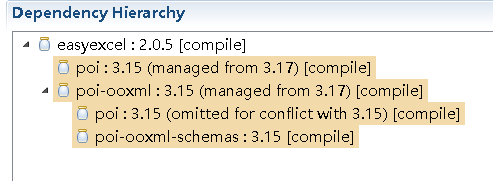
在继承方式使用io.spring.platform时,解决方法也比较简单,覆盖io.spring.platform对poi的版本号管理即可
<properties>

  <poi.version>3.17</poi.version>

</properties>
这个时候在来看依赖关系,发现poi的版本引入变成了3.17
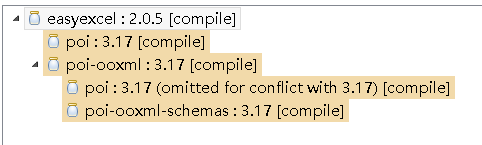
这样就解决了问题。
附上完整pom.xml
<project xmlns="http://maven.apache.org/POM/4.0.0" xmlns:xsi="http://www.w3.org/2001/XMLSchema-instance"

  xsi:schemaLocation="http://maven.apache.org/POM/4.0.0 http://maven.apache.org/xsd/maven-4.0.0.xsd">

  <modelVersion>4.0.0</modelVersion>

  <groupId>com</groupId>

  <artifactId>springboot-dependency7</artifactId>

  <version>0.0.1-SNAPSHOT</version>

  <packaging>jar</packaging>

  <name>springboot-dependency7</name>

  <url>http://maven.apache.org</url>

  <parent>

    <groupId>io.spring.platform</groupId>

    <artifactId>platform-bom</artifactId>

    <version>Brussels-SR7</version>

  </parent>

  <properties>

    <project.build.sourceEncoding>UTF-8</project.build.sourceEncoding>

    <poi.version>3.17</poi.version>

  </properties>

  <dependencies>

    <dependency>

      <groupId>junit</groupId>

      <artifactId>junit</artifactId>

      <scope>test</scope>

    </dependency>

    <dependency>

      <groupId>com.alibaba</groupId>

      <artifactId>easyexcel</artifactId>

      <version>2.0.5</version>

    </dependency>

  </dependencies>

  <build>

    <plugins>

      <plugin>

        <groupId>org.springframework.boot</groupId>

        <artifactId>spring-boot-maven-plugin</artifactId>

        <configuration>

          <mainClass>com.springboot_dependency7.main.Applicaiton</mainClass>

        </configuration>

      </plugin>

    </plugins>

  </build>

</project>
二、再来看import的方式
<dependencyManagement>

  <dependencies>

    <dependency>

      <groupId>io.spring.platform</groupId>

      <artifactId>platform-bom</artifactId>

      <version>Brussels-SR7</version>

      <type>pom</type>

      <scope>import</scope>

    </dependency>

  </dependencies>

</dependencyManagement>
同样引入easyexcel 2.0.5依赖
<dependency>

  <groupId>com.alibaba</groupId>

  <artifactId>easyexcel</artifactId>

  <version>2.0.5</version>

</dependency>
这个时候poi的版本被强制使用3.15
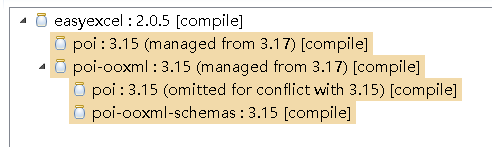
要覆盖io.spring.platform的版本号需要在pom.xml里dependencyManagement节点io.spring.platform引入的前面加上poi的引入
<dependencyManagement>

  <dependencies>

    <dependency>

      <groupId>org.apache.poi</groupId>

      <artifactId>poi</artifactId>

      <version>3.17</version>

    </dependency>

    <dependency>

      <groupId>org.apache.poi</groupId>

      <artifactId>poi-ooxml</artifactId>

      <version>3.17</version>

    </dependency>

    <dependency>

      <groupId>io.spring.platform</groupId>

      <artifactId>platform-bom</artifactId>

      <version>Brussels-SR7</version>

      <type>pom</type>

      <scope>import</scope>

    </dependency>

  </dependencies>

</dependencyManagement>
再来看poi的依赖
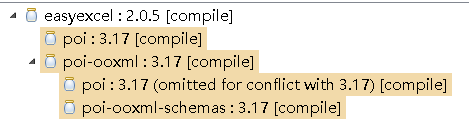
版本已经变成了3.17,解决问题。
附上完整pom.xml
<project xmlns="http://maven.apache.org/POM/4.0.0" xmlns:xsi="http://www.w3.org/2001/XMLSchema-instance"

  xsi:schemaLocation="http://maven.apache.org/POM/4.0.0 http://maven.apache.org/xsd/maven-4.0.0.xsd">

  <modelVersion>4.0.0</modelVersion>

  <groupId>com</groupId>

  <artifactId>springboot-dependency8</artifactId>

  <version>0.0.1-SNAPSHOT</version>

  <packaging>jar</packaging>

  <name>springboot-dependency8</name>

  <url>http://maven.apache.org</url>

  <properties>

    <project.build.sourceEncoding>UTF-8</project.build.sourceEncoding>

  </properties>

  <dependencyManagement>

    <dependencies>

      <dependency>

        <groupId>org.apache.poi</groupId>

        <artifactId>poi</artifactId>

        <version>3.17</version>

      </dependency>

      <dependency>

        <groupId>org.apache.poi</groupId>

        <artifactId>poi-ooxml</artifactId>

        <version>3.17</version>

      </dependency>

      <dependency>

        <groupId>io.spring.platform</groupId>

        <artifactId>platform-bom</artifactId>

        <version>Brussels-SR7</version>

        <type>pom</type>

        <scope>import</scope>

      </dependency>

    </dependencies>

  </dependencyManagement>

  <dependencies>

    <dependency>

      <groupId>junit</groupId>

      <artifactId>junit</artifactId>

      <scope>test</scope>

    </dependency>

    <dependency>

      <groupId>com.alibaba</groupId>

      <artifactId>easyexcel</artifactId>

      <version>2.0.5</version>

    </dependency>

  </dependencies>

  <build>

    <plugins>

      <plugin>

        <groupId>org.springframework.boot</groupId>

        <artifactId>spring-boot-maven-plugin</artifactId>

        <configuration>

          <mainClass>com.springboot_dependency8.main.Applicaiton</mainClass>

        </configuration>

      </plugin>

    </plugins>

  </build>

</project>
io.spring.platform继承方式和import方式更改依赖版本号的问题的更多相关文章
- spring-boot-dependencies、spring-boot-starter-parent、io.spring.platform详解
上一篇文章介绍了springboot依赖版本号管理的几种方式,现在来详细分析一下spring-boot-dependencies.spring-boot-starter-parent.io.sprin ...
- springboot依赖的一些配置:spring-boot-dependencies、spring-boot-starter-parent、io.spring.platform
springboot里会引入很多springboot starter依赖,这些依赖的版本号统一管理,springboot有几种方案可以选择. 一.spring-boot-dependencies 有两 ...
- 覆盖io.spring.platform管理的版本号
使用io.spring.platform时,它会管理各类经过集成测试的依赖版本号.想要覆盖其中某个依赖的版本号个: https://www.cnblogs.com/ld-mars/p/11818252 ...
- CSS的导入方式:link与import方式的区别
在前端开发中,加载CSS样式文件有两种方式:link方式与import方式,它们之间的区别主要有以下几点: 1.兼容性不一样 link是一个HTML标签,所以它不存在兼容性问题,而import方式则具 ...
- spring定时任务的几种实现方式
Spring定时任务的几种实现 近日项目开发中需要执行一些定时任务,比如需要在每天凌晨时候,分析一次前一天的日志信息,借此机会整理了一下定时任务的几种实现方式,由于项目采用spring框架,所以我都将 ...
- Spring Boot开启的 2 种方式
Spring Boot依赖 使用Spring Boot很简单,先添加基础依赖包,有以下两种方式 1. 继承spring-boot-starter-parent项目 <parent> < ...
- Elasticsearch学习(3) spring boot整合Elasticsearch的原生方式
前面我们已经介绍了spring boot整合Elasticsearch的jpa方式,这种方式虽然简便,但是依旧无法解决我们较为复杂的业务,所以原生的实现方式学习能够解决这些问题,而原生的学习方式也是E ...
- Spring创建JobDetail的两种方式
一.Spring创建JobDetail的两种方式 二.整合方式一示例步骤 1.将spring核心jar包.quartz.jar和Spring-context-support.jar导入类路径. 2.编 ...
- Spring Boot开启的2种方式
Spring Boot依赖 使用Spring Boot很简单,先添加基础依赖包,有以下两种方式 1. 继承spring-boot-starter-parent项目 <parent> < ...
随机推荐
- ST(RMQ)算法(在线)求LCA
在此之前,我写过另一篇博客,是倍增(在线)求LCA.有兴趣的同学可以去看一看.概念以及各种暴力就不在这里说了,那篇博客已经有介绍了. 不会ST算法的同学点这里 ST(RMQ)算法在线求LCA 这个算法 ...
- thinkphp 统计查询
在应用中我们经常会用到一些统计数据,例如当前所有(或者满足某些条件)的用户数.所有用户的最大积分.用户的平均成绩等等,ThinkPHP为这些统计操作提供了一系列的内置方法,包括: 大理石平台检定规程 ...
- codevs1222 信与信封的问题
二分图匹配. 先匹配一次,一定是完美匹配.然后枚举每条边,去掉它,若是不能完美匹配,这条边就必须. #include<cstdio> #include<cstring> #in ...
- laravel中如何使用Redis(Redis是什么)
laravel中如何使用Redis(Redis是什么) 一.总结 一句话总结: 基于内存亦可持久化键值数据库 Redis是完全开源免费的,遵守BSD协议,是一个高性能的键值数据库.是当前最热门的的的N ...
- Lintcode 翻转链表
翻转一个链表 样例 给出一个链表1->2->3->null,这个翻转后的链表为3->2->1->null 分析: /** * Definition of ListN ...
- work-shineyoo:杂项1906
ylbtech-work-shineyoo:杂项1906 1.返回顶部 1. 1.1 SMS (手机的)短信服务.Short Message Service. 1.2 VOD 视频点播.Video o ...
- CoreData手动创建托管对象子类时报错
1.具体问题 手动创建CoreData,在进行创建托管对象子类时出现报错如图: 2.解决方法 当使用CoreData时,Xcode自动管理实体类,文件都放在Derived Data文件夹中: 所以不需 ...
- 转:Linux 文件IO理解
源地址http://blog.csdn.net/lonelyrains/article/details/6604851 linux文件IO操作有两套大类的操作方式:不带缓存的文件IO操作,带缓存的文件 ...
- exiftool(-k)与gui的联合使用
首先下载一个exiftool下载后改名字https://sno.phy.queensu.ca/~phil/exiftool/ 根据自己的操作系统选择,我需要这个 然后下载guihttp://u88.n ...
- Python学习day08-python进阶(2)-内置方法
Python学习day08-python进阶(2)-内置方法 列表数据类型内置方法 作用 描述多个值,比如爱好 定义方法 xxxxxxxxxx 2 1 hobby_list ...