
如何利用aop的环绕消息处理log, 以及各种坑的记录
如何利用aop的环绕消息处理log, 以及各种坑的记录
本文链接: https://www.cnblogs.com/zizaiwuyou/p/11667423.html
因为项目里有很多地方要打log, 所以决定改为AOP统一处理, 好不容易整好了, 特此记录一下:
一, 新建项目, 添加注解类和切面类
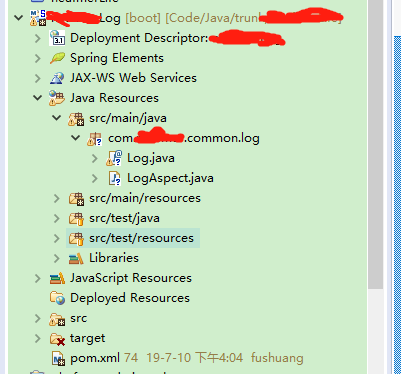
pom.xml文件如下:
<?xml version="1.0" encoding="UTF-8"?>

<project xmlns="http://maven.apache.org/POM/4.0.0" xmlns:xsi="http://www.w3.org/2001/XMLSchema-instance"

         xsi:schemaLocation="http://maven.apache.org/POM/4.0.0 http://maven.apache.org/xsd/maven-4.0.0.xsd">

    <modelVersion>4.0.0</modelVersion>

    <groupId>com.jhyx</groupId>

    <artifactId>demo</artifactId>

    <version>0.0.1-SNAPSHOT</version>

    <packaging>jar</packaging>

    <name>项目名</name>

    <description>Demo project for Spring Boot</description>

    <parent>

        <groupId>org.springframework.boot</groupId>

        <artifactId>spring-boot-starter-parent</artifactId>

        <version>1.5.6.RELEASE</version>

        <relativePath/> <!-- lookup parent from repository -->

    </parent>

    <properties>

        <project.build.sourceEncoding>UTF-8</project.build.sourceEncoding>

        <project.reporting.outputEncoding>UTF-8</project.reporting.outputEncoding>

        <java.version>1.8</java.version>

    </properties>

    <dependencies>

        <!-- aop dependency -->

        <dependency>

            <groupId>org.springframework.boot</groupId>

            <artifactId>spring-boot-starter-aop</artifactId>

        </dependency>

        <!-- web starter dependency -->

        <dependency>

            <groupId>org.springframework.boot</groupId>

            <artifactId>spring-boot-starter-web</artifactId>

        </dependency>

        <!-- spring boot start denpendency -->

        <dependency>

            <groupId>org.springframework.boot</groupId>

            <artifactId>spring-boot-starter-test</artifactId>

            <scope>test</scope>

        </dependency>

        <!-- slf4j log dependency -->

        <dependency>

            <groupId>org.slf4j</groupId>

            <artifactId>slf4j-api</artifactId>

        </dependency>

        <!-- json dependency -->

        <dependency>

            <groupId>com.alibaba</groupId>

            <artifactId>fastjson</artifactId>

            <version>LATEST</version>

        </dependency>

        <!-- test dependency -->

        <dependency>

            <groupId>org.mockito</groupId>

            <artifactId>mockito-all</artifactId>

            <version>LATEST</version>

            <scope>test</scope>

        </dependency>

        <dependency>

            <groupId>org.powermock</groupId>

            <artifactId>powermock-core</artifactId>

            <version>LATEST</version>

            <scope>test</scope>

        </dependency>

        <dependency>

            <groupId>org.powermock</groupId>

            <artifactId>powermock-api-mockito</artifactId>

            <version>LATEST</version>

            <scope>test</scope>

        </dependency>

        <dependency>

            <groupId>org.powermock</groupId>

            <artifactId>powermock-module-testng</artifactId>

            <version>1.7.0</version>

            <scope>test</scope>

        </dependency>

    </dependencies>

    <build>

        <plugins>

            <plugin>

                <groupId>org.springframework.boot</groupId>

                <artifactId>spring-boot-maven-plugin</artifactId>

            </plugin>

        </plugins>

    </build>

    <repositories>

        <repository>

            <id>spring-snapshots</id>

            <name>Spring Snapshots</name>

            <url>https://repo.spring.io/snapshot</url>

            <snapshots>

                <enabled>true</enabled>

            </snapshots>

        </repository>

        <repository>

            <id>spring-milestones</id>

            <name>Spring Milestones</name>

            <url>https://repo.spring.io/milestone</url>

            <snapshots>

                <enabled>false</enabled>

            </snapshots>

        </repository>

    </repositories>

    <pluginRepositories>

        <pluginRepository>

            <id>spring-snapshots</id>

            <name>Spring Snapshots</name>

            <url>https://repo.spring.io/snapshot</url>

            <snapshots>

                <enabled>true</enabled>

            </snapshots>

        </pluginRepository>

        <pluginRepository>

            <id>spring-milestones</id>

            <name>Spring Milestones</name>

            <url>https://repo.spring.io/milestone</url>

            <snapshots>

                <enabled>false</enabled>

            </snapshots>

        </pluginRepository>

    </pluginRepositories>

</project>
注解类内容如下:
package com.xxx.common.log;

import org.springframework.stereotype.Component;

import java.lang.annotation.ElementType;

import java.lang.annotation.Retention;

import java.lang.annotation.RetentionPolicy;

import java.lang.annotation.Target;

/**

 *  TYPE ->  Class, interface (including annotation type), or enum declaration

 *  METHOD ->  Method declaration

 */

@Target({ElementType.METHOD,ElementType.TYPE})

@Retention(RetentionPolicy.RUNTIME)

public @interface Log {

    String value() default "";

    boolean ignore() default false;

}
切面类如下:
package com.xxx.common.log;

import com.alibaba.fastjson.JSONObject;

import com.alibaba.fastjson.serializer.SerializerFeature;

import org.aspectj.lang.ProceedingJoinPoint;

import org.aspectj.lang.annotation.Around;

import org.aspectj.lang.annotation.Aspect;

import org.aspectj.lang.annotation.Pointcut;

import org.aspectj.lang.reflect.MethodSignature;

import org.slf4j.Logger;

import org.slf4j.LoggerFactory;

import org.springframework.core.annotation.Order;

import org.springframework.stereotype.Component;

import java.lang.reflect.Method;

/**

 * Log 注解类实现

 */

@Aspect

@Order(100)

@Component

public class LogAspect {

    public static final Logger log =  LoggerFactory.getLogger(LogAspect.class);

    public static final String dateformat = "yyyy:MM:dd HH:mm:ss";

    public static final String STIRNG_START = "\n<<<<<<<<<<<<<<<<<<<<<<<<<<<<<<<<<<<<<<<<<";

    public static final String STIRNG_END = "\n>>>>>>>>>>>>>>>>>>>>>>>>>>>>>>>>>>>>>>>>>>";

//    execution the scan of pakage 切点package

    @Pointcut("execution( * com.controller..*(..)) || execution( * com.service..*(..))")

    public void serviceLog(){

    }

    @Around("serviceLog()")

    public Object around(ProceedingJoinPoint joinPoint) { // ProceedingJoinPoint 为JoinPoint 的子类,在父类基础上多了proceed()方法,用于增强切面

        try {

            // 获取方法签名

            MethodSignature signature = (MethodSignature) joinPoint.getSignature();

            //java reflect相关类,通过反射得到注解

            Method method = signature.getMethod();

            Class<?> targetClass = method.getDeclaringClass();

            StringBuffer classAndMethod = new StringBuffer();

            //获取类注解Log

            Log classAnnotation = targetClass.getAnnotation(Log.class);

            //获取方法注解Log

            Log methodAnnotation = method.getAnnotation(Log.class);

            //如果类上Log注解不为空,则执行proceed()

            if (classAnnotation != null) {

                if (classAnnotation.ignore()) {

                    //proceed() 方法执行切面方法,并返回方法返回值

                    return joinPoint.proceed();

                }

                classAndMethod.append(classAnnotation.value()).append("-");

            }

            //如果方法上Log注解不为空,则执行proceed()

            if (methodAnnotation != null) {

                if (methodAnnotation.ignore()) {

                    return joinPoint.proceed();

                }

                classAndMethod.append(methodAnnotation.value());

            }

            //拼凑目标类名和参数名

            String target = targetClass.getName() + "#" + method.getName();

            String params = JSONObject.toJSONStringWithDateFormat(joinPoint.getArgs(), dateformat, SerializerFeature.WriteMapNullValue);

            log.info(STIRNG_START + "{} 开始调用--> {} 参数:{}", classAndMethod.toString(), target, params);

            long start = System.currentTimeMillis();

            //如果类名上和方法上都没有Log注解,则直接执行 proceed()

            Object result = joinPoint.proceed();

            long timeConsuming = System.currentTimeMillis() - start;

//            log.info("\n{} 调用结束<-- {} 返回值:{} 耗时:{}ms" + STIRNG_END, classAndMethod.toString(), target, JSONObject.toJSONStringWithDateFormat(result, dateformat, SerializerFeature.WriteMapNullValue), timeConsuming);

            log.info("\n{} 调用结束<-- {}  耗时:{}ms" + STIRNG_END, classAndMethod.toString(), target, timeConsuming);

            return result;

        } catch (Throwable throwable) {

            log.error("调用异常", throwable.getMessage(), throwable);

        }

        return null;

    }

}
踩坑:@Pointcut("execution( * com.controller..*(..)) || execution( * com.service..*(..))")
设置execution表达式的具体详情请参考https://blog.csdn.net/yangshangwei/article/details/77627825
@Around("serviceLog()")定义的是触发时机, 通过一个空的方法来转换, 这种方式可以写多个环绕消息, 示例中只写了一个
二,导出JAR包
在eclipse中, 右键项目, Export- > JAR File
踩坑:
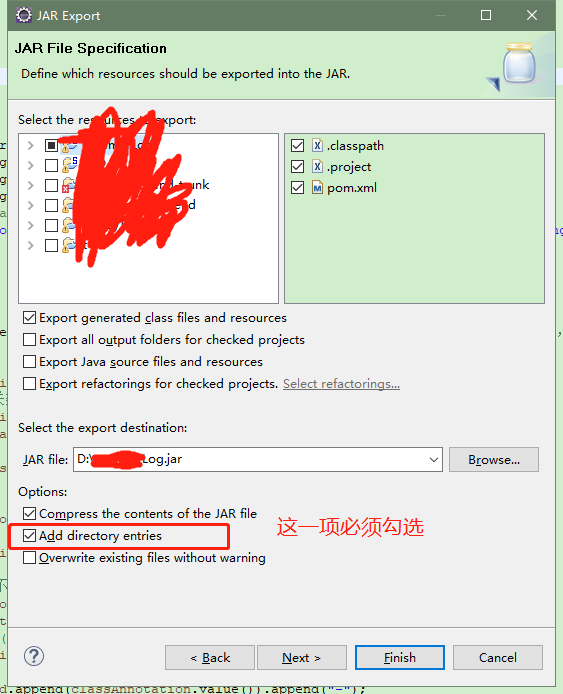
图中的这一项必须勾选, 不然无法被springBoot扫描
三, 在需要使用log的项目中导入jar包
我使用的是gradle, builde.gradle文件中加入下列配置
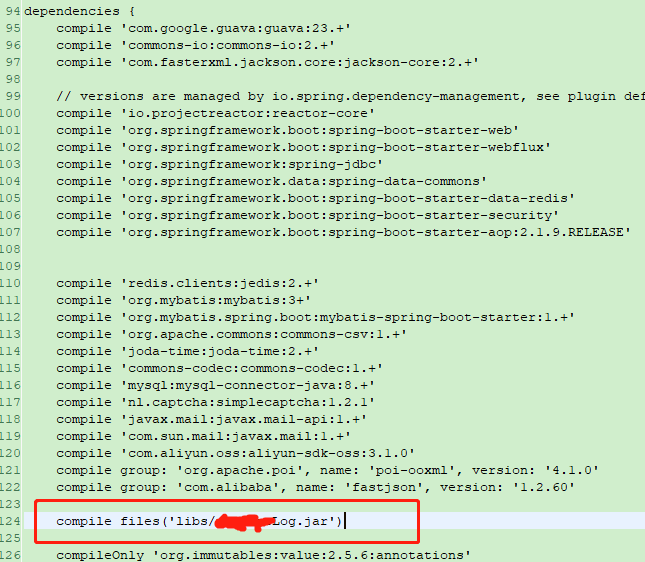
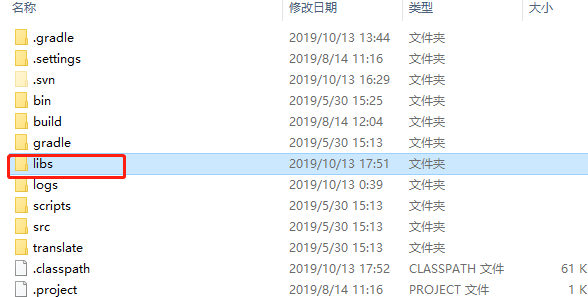
然后在项目根目录加一个libs文件夹, 把jar放进去
修改项目启动文件:
package com.qingniu.qfpay.rvwbackend;

import org.springframework.boot.SpringApplication;

import org.springframework.boot.autoconfigure.SpringBootApplication;

import org.springframework.boot.autoconfigure.security.servlet.SecurityAutoConfiguration;

import org.springframework.context.annotation.ComponentScan;

import org.springframework.context.annotation.Import;

@SpringBootApplication(exclude = SecurityAutoConfiguration.class)

@Import(AppConfig.class)

@ComponentScan(basePackages = {"com.xxx, com.xxx.common.log"})

public class App {

    public static void main(final String[] args) {

        SpringApplication.run(App.class, args);

    }

}
踩坑:这里的@ComponentScan配置,如果不声明, spring默认是扫描当前文件层级以及子孙级,但是如果声明的话, 就全按照声明的路径扫描, 所以要加上当前路径
四, 启动项目,
所有controller和service包下的类中的方法都会打印进出log, 如果要log入库, 在切面类中自定义操作就行了, 注解的作用在于定制化打印log, 可以按照自己的使用需求, 更改代码
参考资料:
https://my.oschina.net/xiaomingnevermind/blog/1619274
https://blog.csdn.net/d_ohko/article/details/78962458
https://blog.csdn.net/yangshangwei/article/details/77627825
https://www.cnblogs.com/cac2020/p/9216509.html
如何利用aop的环绕消息处理log, 以及各种坑的记录的更多相关文章
- AOP 切面编程------JoinPoint ---- log日志
AOP 在软件业,AOP为Aspect Oriented Programming的缩写,意为:面向切面编程,通过预编译方式和运行期动态代理实现程序功能的统一维护的一种技术.AOP是OOP的延续,是软件 ...
- 利用AOP切面打印项目中每个接口的运行情况
1.前言 AOP切面技术,大家应该都听知道,Spring框架的主要功能之一. AOP切面的用途很广,其中一个常见的用途就是打印接口方法的运行日志和运行时间. 日志对于一个项目很是重要,不仅有助于调错, ...
- SpringBoot31 整合SpringJDBC、整合MyBatis、利用AOP实现多数据源
一.整合SpringJDBC 1 JDBC JDBC(Java Data Base Connectivity,Java 数据库连接)是一种用于执行 SQL 语句的 Java API,可以为多种关系数 ...
- SpringAOP01 利用AOP实现权限验证、利用权限验证服务实现权限验证
1 编程范式 1.1 面向过程 1.2 面向对象 1.3 面向切面编程 1.4 函数式编程 1.5 事件驱动编程 2 什么是面向切面编程 2.1 是一种编程范式,而不是一种编程语言 2.2 解决一些特 ...
- SpringBoot2.x整合Email并利用AOP做一个项目异常通知功能
因为不知aop能干嘛,因此用aop做个小功能,再结合最近学的springboot-Email做了个系统异常自动邮件通知的功能, 感觉满满的成就感. AOP不懂的可以看上一篇:https://www.c ...
- 利用AOP与ToStringBuilder简化日志记录
刚学spring的时候书上就强调spring的核心就是ioc和aop blablabla...... IOC到处都能看到...AOP么刚开始接触的时候使用在声明式事务上面..当时书上还提到一个用到ao ...
- 工控随笔_07_西门子_WinCC利用命令行实现操作log日志
在WinCC中可以通过报警纪录来实现操作员纪录,这个需要WinCC的消息系统进行组态和配置. 利用消息系统进行实现上诉功能不但复杂而且时间久啦也不方便查询.那么有没有一种简单的方法来 实现操作员纪录呢 ...
- Spring Boot AOP 扫盲,实现接口访问的统一日志记录
AOP 是 Spring 体系中非常重要的两个概念之一(另外一个是 IoC),今天这篇文章就来带大家通过实战的方式,在编程猫 SpringBoot 项目中使用 AOP 技术为 controller 层 ...
- C# Asp.net中的AOP框架 Microsoft.CCI, Mono.Cecil, Typemock Open-AOP API, PostSharp -摘自网络 (可以利用反射 Attribute 进行面向切面编程 可以用在记录整个方法的Log方面)
Both Microsoft.CCI and Mono.Cecil are low-level, and don't validate produced assemblies. It takes lo ...
随机推荐
- 2016计蒜之道复赛A 百度地图的实时路况
百度地图的实时路况功能相当强大,能方便出行的人们避开拥堵路段.一个地区的交通便捷程度就决定了该地区的拥堵情况.假设一个地区有 nnn 个观测点,编号从 111 到 nnn.定义 d(u,v,w)d(u ...
- 百度DMLC分布式深度机器学习开源项目(简称“深盟”)上线了如xgboost(速度快效果好的Boosting模型)、CXXNET(极致的C++深度学习库)、Minerva(高效灵活的并行深度学习引擎)以及Parameter Server(一小时训练600T数据)等产品,在语音识别、OCR识别、人脸识别以及计算效率提升上发布了多个成熟产品。
百度为何开源深度机器学习平台? 有一系列领先优势的百度却选择开源其深度机器学习平台,为何交底自己的核心技术?深思之下,却是在面对业界无奈时的远见之举. 5月20日,百度在github上开源了其 ...
- 创建一个User类
1.用户模型—User类 用户模型或者叫账户模型,为什么这么说看下面代码 using System; using System.ComponentModel.DataAnnotations; name ...
- PHP学习(函数)
可变函数,即通过变量的值来调用函数,因为变量的值是可变的,所以可以通过改变一个变量的值来实现调用不同的函数. 经常会用在回调函数.函数列表,或者根据动态参数来调用不同的函数.可变函数的调用方法为变量名 ...
- 2019-9-2-dotnet-命名管道名字长度限制
title author date CreateTime categories dotnet 命名管道名字长度限制 lindexi 2019-09-02 11:54:50 +0800 2019-09- ...
- React-FlipOver-Counter(日历翻页)
跟窝一起学习鸭~~ //index.js import React from 'react'; import ReactDOM from 'react-dom'; import './index.cs ...
- 阿里云的重大战略调整,“被集成”成核心,发布SaaS加速器助力企业成长
摘要: 阿里云战略调整,“被集成”成为生态战略,讲讲即将“退居幕后”的阿里云. 阿里云近期调整动作巨大,阿里云新任总裁张剑锋(花名,行颠)上任后充分体现其创新和自我探索不断求“变”的阿里特性.期间,达 ...
- codevs1839 洞穴勘测
题目描述 Description 辉辉热衷于洞穴勘测.某天,他按照地图来到了一片被标记为JSZX的洞穴群地区.经过初步勘测,辉辉发现这片区域由n个洞穴(分别编号为1到n)以及若干通道组成,并且每条通道 ...
- WPF HTTP请求(GET,POST)
WPF HTTP请求(GET,POST) using System; using System.Collections.Generic; using System.IO; using System.L ...
- HTML之CSS标签
1.CSS选择器 1).id选择器 2).class选择器 3).标签选择器 4).层级选择器(空格) (1)id层级选择器 (2)class层级选择器 5).组合选择器(逗 ...