
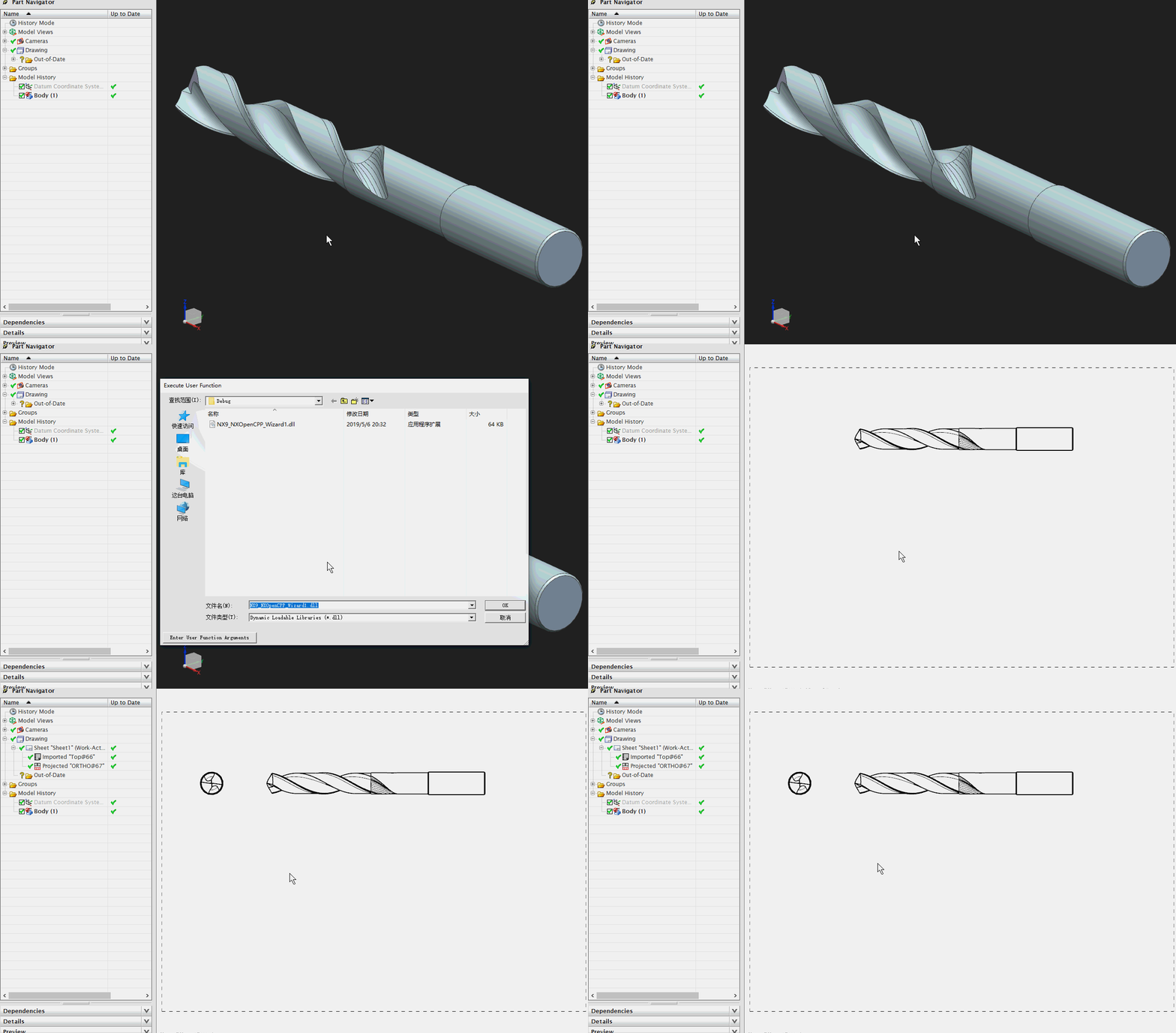
NX二次开发-UFUN添加工程图投影视图UF_DRAW_add_orthographic_view
 NX9+VS2012

 #include <uf.h>

 #include <uf_draw.h>

 #include <uf_obj.h>

 #include <uf_part.h>

 UF_initialize();

 //新建工程图(A4图纸)

 char* DrawingName = "Sheet1";//设置图纸名字

 UF_DRAW_info_t DrawingInfo;//设置图纸大小、投影视角、视图比例等

 DrawingInfo.size_state = UF_DRAW_METRIC_SIZE;//设置图纸类型

 DrawingInfo.size.metric_size_code = UF_DRAW_A4;//设置图纸大小

 DrawingInfo.drawing_scale = 1.0;//设置比例

 DrawingInfo.units = UF_PART_METRIC;//设置单位

 DrawingInfo.projection_angle = UF_DRAW_FIRST_ANGLE_PROJECTION;//设置投影视角

 tag_t DrawingTag = NULL_TAG;

 UF_DRAW_create_drawing(DrawingName, &DrawingInfo, &DrawingTag);

 //导入视图(创建Top视图)

 //找名字获取视图的Tag

 tag_t TopViewTag = NULL_TAG;

 UF_OBJ_cycle_by_name_and_type(UF_PART_ask_display_part(), "Top", UF_view_type, false, &TopViewTag);

 UF_DRAW_view_info_t TopViewInfo;

 UF_DRAW_initialize_view_info(&TopViewInfo);//初始化视图信息

 double TopDwgPoint[] = {150.0, 160.0};

 tag_t TopDrawViewTag = NULL_TAG;

 UF_DRAW_import_view(DrawingTag, TopViewTag, TopDwgPoint, &TopViewInfo, &TopDrawViewTag);

 //添加投影视图

 //UF_DRAW_project_infer = 0,自动判断

 //UF_DRAW_project_above,上

 //UF_DRAW_project_right,右

 //UF_DRAW_project_below,下

 //UF_DRAW_project_left左

 UF_DRAW_proj_dir_t RightProjection =  UF_DRAW_project_right;

 double RightDwgPoint[] = {35.0, 160.0};

 tag_t RightViewTag = NULL_TAG;

 UF_DRAW_add_orthographic_view(DrawingTag, TopDrawViewTag, RightProjection, RightDwgPoint, &RightViewTag);

 //更新视图

 UF_DRAW_update_one_view(DrawingTag, TopDrawViewTag);

 UF_DRAW_update_one_view(DrawingTag, RightViewTag);

 UF_terminate();
NX二次开发-UFUN添加工程图投影视图UF_DRAW_add_orthographic_view的更多相关文章
- NX二次开发-UFUN获取工程图所有视图tag UF_DRAW_ask_views
#include <uf.h> #include <uf_draw.h> #include <uf_drf.h> #include <uf_obj.h> ...
- NX二次开发-UFUN将工程图转成CGM和PDF文件UF_CGM_export_cgm
文章转载自唐康林NX二次开发论坛,原文出处: http://www.nxopen.cn/thread-126-1-1.html 刚才有同学问到这个问题,如果是用NXOpen来做,直接录制一下就可以了: ...
- NX二次开发-UFUN新建工程图UF_DRAW_create_drawing
NX9+VS2012 #include <uf.h> #include <uf_draw.h> #include <uf_part.h> UF_initialize ...
- NX二次开发-UFUN打开工程图UF_DRAW_open_drawing
NX9+VS2012 #include <uf.h> #include <uf_draw.h> #include <uf_part.h> UF_initialize ...
- NX二次开发-UFUN删除工程图UF_DRAW_delete_drawing
NX9+VS2012 #include <uf.h> #include <uf_draw.h> #include <uf_part.h> UF_initialize ...
- NX二次开发-UFUN获取工程图的数量和tag UF_DRAW_ask_drawings
NX9+VS2012 #include <uf.h> #include <uf_draw.h> #include <uf_part.h> #include < ...
- NX二次开发-UFUN获取工程图详细信息UF_DRAW_ask_drawing_info
NX9+VS2012 #include <uf.h> #include <uf_draw.h> #include <uf_part.h> UF_initialize ...
- NX二次开发-UFUN将工程图中的点坐标映射到建模绝对坐标UF_VIEW_map_drawing_to_model
#include <uf.h> #include <uf_ui.h> #include <uf_draw.h> #include <uf_view.h> ...
- NX二次开发-UFUN创建工程图注释UF_DRF_create_note
NX9+VS2012 #include <uf.h> #include <uf_drf.h> #include <NXOpen/Annotations_Note.hxx& ...
随机推荐
- python读取ini配置文件的示例代码(仅供参考)
这篇文章主要介绍了python读取ini配置文件过程示范,文中通过示例代码介绍的非常详细,对大家的学习或者工作具有一定的参考学习价值,需要的朋友可以参考下 安装 pip install configp ...
- Centos剔除在线用户
CentOS踢除已登录用户的方法: 1.>先按下w查看用户终端号 2.>执行pkill -kill -t pts/1 (pts/1为w指令看到的用户终端号)命令
- Vue2.0源码思维导图-------------Vue 初始化
上一节看完<Vue源码思维导图-------------Vue 构造函数.原型.静态属性和方法>,这节将会以new Vue()为入口,大体看下 this._init()要做的事情. fun ...
- RichView
TRichView中文文档 TRichView 是Delphi/C++Builder 控件,主要用于显示.编辑和打印超文本文档. 新版本解决多个兼容性问题,更新了字符串标签.剪贴板.RTF和DB组件 ...
- noip提高组 2010 关押罪犯 (洛谷1525)
题目描述 S 城现有两座监狱,一共关押着N 名罪犯,编号分别为1~N.他们之间的关系自然也极不和谐.很多罪犯之间甚至积怨已久,如果客观条件具备则随时可能爆发冲突.我们用"怨气值"( ...
- Python 内置模块:os模块
Python os模块包含普遍的操作系统功能.如果你希望你的程序能够与平台无关的话,这个模块是尤为重要的.(一语中的) 二.常用方法 1.os.name 输出字符串指示正在使用的平台.如果是windo ...
- Serializable读写类操作
import java.io.FileInputStream; import java.io.FileNotFoundException; import java.io.FileOutputStrea ...
- WIN7下怎么安装iis教程
点击开始→控制面板,然后再点击程序,勿点击卸载程序,否则到不了目标系统界面. 2 然后在程序和功能下面,点击打开和关闭windows功能. 3 进入Windows功能窗口,然后看到internet信息 ...
- C++——decltype
, &cj=ci; decltype(ci) x=;//x的类型是const int decltype(cj) y=x;//y的类型是const int & decltype(cj) ...
- 13、testng.xml对用例进行分组
目录如下: TestGroup.java 代码如下: package com.testng.cn; import org.testng.annotations.*; import static org ...